QueryWeaver: a Text2SQL service that keeps the schema in a graph
An open-source Text2SQL tool that transforms natural language into SQL using graph-powered schema understanding. Ask your database questions in plain English, QueryWeaver handles the weaving.
At a glance
- What is it?
- QueryWeaver turns plain-English questions into SQL by building a graph of tables, columns and foreign keys, and it comes with a REST API, an MCP surface and per-user memory in FalkorDB. It is a beta project under AGPL-3.0 that refuses to start without a graph database.
- Who is it for?
- QueryWeaver fits a team with a database that is too large to describe to a model in a prompt, that wants analysts to ask questions in plain English without waiting on a data team, and that already runs or is willing to run FalkorDB. It is the wrong choice for a report that is written once, because a question and its SQL is a query an analyst can run directly, and it is the wrong choice for a codebase that cannot take AGPL-3.0-or-later.
- Can I use it commercially?
- Yes, with strict conditions. AGPL-3.0 is a network copyleft licence: if people use a modified version over a network, for example as a hosted service, you must offer them its source code under the same licence.
- Is it still maintained?
- Yes. The repository last received commits 4 days ago.
- What is it written in?
- Mainly Python, according to GitHub's language statistics.
Answers come from the project's GitHub data, last synced on November 7, 2026, and from our analysis. They are not legal advice.
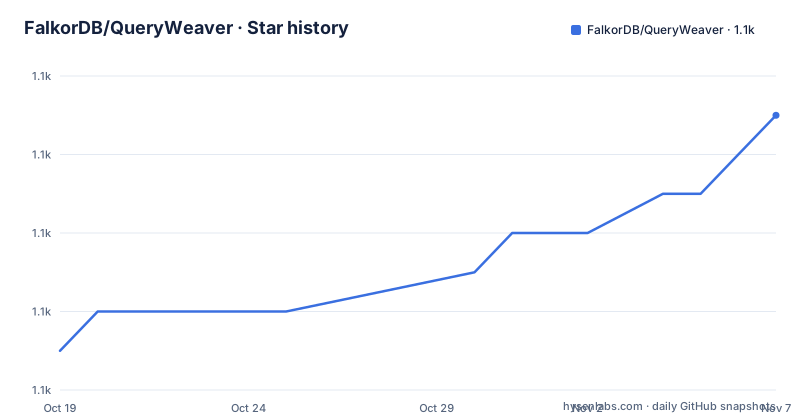
Star history
- FalkorDB/QueryWeaver1,091 ★ · +6
| Repository | 2026-10-19 | 2026-11-07 |
|---|---|---|
| FalkorDB/QueryWeaver | 1.1k | 1.1k |
6 Stars in the last 19 days, measured from the daily GitHub snapshot. Compare with other projects
Editorial analysis
The schema is a graph, not a prompt
QueryWeaver is an open-source Text2SQL tool that transforms natural language into SQL using graph-powered schema understanding. The name of the technique is the design decision, and it is worth being precise about what the graph holds.
A graph is created per database. Its nodes and links are the tables, the columns and the foreign keys, and the API exposes exactly that: `GET /graphs/{graph_id}/data` returns the nodes and links for a graph, which is a schema in graph form. `POST /graphs` uploads or creates a graph, from a JSON payload or a file upload.
The reason to model a schema as a graph rather than as a text description is structural. A text description of a database is a list of tables with their columns, and the relationships between them are the part that gets lost. Foreign keys are the edges, and they are what tells the model which joins are legal and which are not. Once the relationships are first-class, a question like which customers have orders containing a given product becomes a path through the graph rather than a guess.
The tool returns SQL and results, and the query endpoint is a chat query against a named graph with a streaming response. The homepage is `app.queryweaver.ai`, with Swagger UI at the `/docs` path and an OpenAPI JSON document alongside it, and the project is published on PyPI as `queryweaver` and on Docker Hub as `falkordb/queryweaver`.
The package metadata calls the project beta, with a development status of 4, and the licence is AGPL-3.0-or-later. It is maintained by FalkorDB, and the graph database it runs on, FalkorDB, is not an optional extra.
One Docker command, and a configuration file that is meant to be edited
The recommended way to evaluate QueryWeaver is a single container run, and the README says why: no local Python or Node is required.
docker run -p 5000:5000 -it falkordb/queryweaverThe application is then on `http://localhost:5000`.
For a real configuration, the documented approach is an env file, copied from the example that ships in the repository:
cp .env.example .env
# edit .env to set your values, then:
docker run -p 5000:5000 --env-file .env falkordb/queryweaver
The alternative is passing variables one by one on the command line, which the README marks as less convenient for many variables:
docker run -p 5000:5000 -it \
  -e APP_ENV=development \
  -e FASTAPI_SECRET_KEY=your_super_secret_key_here \
  -e GOOGLE_CLIENT_ID=your_google_client_id \
  -e GOOGLE_CLIENT_SECRET=your_google_client_secret \
  -e GITHUB_CLIENT_ID=your_github_client_id \
  -e GITHUB_CLIENT_SECRET=your_github_client_secret \
  -e AZURE_API_KEY=your_azure_api_key \
  falkordb/queryweaver
Two details in that example are traps for a first run. `APP_ENV=development` is what makes the login work on the plain-HTTP `http://localhost:5000` this command serves, and the README says to drop it, or set anything else, when the service is behind HTTPS, so that the session cookie is marked `Secure`. And the secret key is required, since it signs the browser session cookie, and changing it logs everyone out.
The model provider is not fixed. The README notes that QueryWeaver supports multiple AI providers, with `OPENAI_API_KEY`, `GEMINI_API_KEY`, `ANTHROPIC_API_KEY` or `AZURE_API_KEY`, and the core dependency list carries `litellm` at `1.83.0` or later, which is what makes that list possible.
Three credentials, three different failure modes
The most carefully argued part of the README is the credential model, and it is the part a reviewer should read before deploying this anywhere.
QueryWeaver keeps three kinds of login independent of one another, so that a failure in one never looks like a failure in another.
The browser login proves who is using the app. It is a signed session cookie, established once by OAuth or a password, and it does not depend on FalkorDB once the process is running. The API token proves that a script may act as a user, it lives as a `Token` node in the Organizations graph, it is sent as an `Authorization: Bearer` header, and it does depend on FalkorDB. The data-source connection proves access to your database, it is supplied per request and never stored, and it does not depend on FalkorDB either.
The consequences are spelled out. Because the browser login is a signed cookie, staying logged in costs no database round trip and survives a FalkorDB outage in an already-running process, so the session keeps working and only the operations that genuinely need the graph fail. Requests that supply an API token explicitly are always checked against the database, and are answered with `503` rather than `401` when it cannot be reached, so that clients retry instead of re-authenticating.
That `503` choice is the detail that shows the design has been used in anger. A `401` tells a client the credential is wrong, and a well written client will then go and get a new credential, which is the wrong response to a database that is briefly unreachable.
The scope is stated too. This is about staying logged in, not about booting. QueryWeaver connects to FalkorDB at startup and will not start without it, so a restart during an outage is still a downtime.
Four REST endpoints and a streaming answer
The REST surface is small, and the README describes it as a small API for managing graphs and running Text2SQL queries.
GET /graphs
GET /graphs/{graph_id}/data
POST /graphs
POST /graphs/{graph_id}
`GET /graphs` lists the graphs available for the authenticated user. `GET /graphs/{graph_id}/data` returns the nodes and links, which are the tables, columns and foreign keys. `POST /graphs` uploads or creates a graph, and it accepts either a JSON payload or a file upload. `POST /graphs/{graph_id}` runs a Text2SQL chat query against the named graph and answers with a streaming response.
All the endpoints that modify or access user-scoped data require authentication, and for scripts that is a bearer token:
Authorization: Bearer <API_TOKEN>In the browser the same application uses the signed session cookie, and the tokens routes, or the web UI, are where a token is created.
The streaming response is the part that matters for the user experience of a text-to-SQL tool. A query against a wide schema can take a while to plan and execute, and a chat interface that returns nothing until the end looks broken. The console and the API therefore share the same streaming model, and the SSE surface for the browser and the streaming response for the API are two views of one thing.
The repository also carries the artifacts that go with a project like this: a `Dockerfile` that is built in two stages, a `Makefile`, a `start.sh` with a wait loop for the graph database, a `docker-compose.test.yml` for the test environment, Playwright configuration with `@playwright/test` for end-to-end tests, a `setup_e2e_tests.sh`, an `examples/` directory with an ecommerce example in both Python and SQL, and a `wordlist.dic` for spell checking.
MCP works in both directions
QueryWeaver includes optional support for the Model Context Protocol, and the support runs both ways.
The first direction is exposing QueryWeaver as an MCP server. The app registers MCP operations focused on Text2SQL flows, and there are four of them: `list_databases`, `connect_database`, `database_schema` and `query_database`. The surface is exposed as HTTP endpoints, and a client configuration for a local instance looks like this:
{
   "servers": {
      "queryweaver": {
         "type": "http",
         "url": "http://127.0.0.1:5000/mcp",
         "headers": {
            "Authorization": "Bearer your_token_here"
         }
      }
   },
   "inputs": []
}
The built-in surface is enabled by default and can be turned off with `DISABLE_MCP=true`, which the README shows as an environment variable on the Docker run:
docker run -p 5000:5000 -it --env DISABLE_MCP=true falkordb/queryweaverThe second direction is the other way round: QueryWeaver can be configured to call an external MCP server for model and context services. That is the arrangement where the model itself comes from an MCP server rather than from a provider key.
The four operations are the right set, and they mirror the lifecycle of the tool: list the databases this user has access to, connect to one, read its schema, and then run a query. An assistant that has those four tools can do the whole job without knowing anything about the internal graph representation, which is a good sign for a surface designed to be used by someone else's agent.
Memory graphs that never expire unless you say so
QueryWeaver stores per-user conversation memory in FalkorDB, and the default behaviour of that storage is the thing to know about.
By default the memory graphs persist indefinitely. The `MEMORY_TTL_SECONDS` variable applies a Redis TTL in seconds so that idle memory graphs are cleaned up automatically, and the example in the README expires them after a week of inactivity:
# Expire memory graphs after 1 week of inactivity
MEMORY_TTL_SECONDS=604800
The TTL is refreshed on every user interaction, so an active user never loses their memory and an abandoned one is eventually collected. That is a sensible design, but only if the variable is actually set, and a deployment that does not set it accumulates a graph per user indefinitely.
The memory feature is an optional extra in the package metadata. The `memory` extra pulls in `openai` at `2.41.0` or later and `graphiti-core` at `0.29.1` or later, and the comment in the project file is precise that this is the graphiti-backed conversation memory used when queries are run with `use_memory=True`, and that it is imported lazily by the SDK.
The rest of the dependency list explains what else the tool needs. `falkordb[hiredis]` pinned to `>=1.8.0,<1.9.0`, with the hiredis C reply parser, is the graph database client, and the comment notes that redis comes in transitively through falkordb. `psycopg2-binary` and `pymysql` are the PostgreSQL and MySQL drivers for the data sources, `sqlglot` at `30.12.0` or later handles SQL parsing and transpilation, `jsonschema` validates the schema payloads, `pydantic` models the shapes, `tqdm` draws the progress bars during ingestion, and `python-dotenv` loads the environment file.
The `server` extra is what turns the SDK wheel into a running application, with FastAPI and the authentication stack, and the project file notes that the published SDK wheel does not include the server.
Where QueryWeaver is the wrong tool
The case for it is a database that is too big to describe in a prompt, and a group of people who want to ask questions instead of writing queries.
The case against has three parts.
The first is the dependency. QueryWeaver will not start without FalkorDB. That is fine if the organisation already runs a graph database, and it is a project to evaluate if it does not, since the graph is not a cache here, it holds the schema and the memory. The three-credential model also means a deployment has to run a login system with OAuth providers and API tokens, not just an API key, and a per-request data-source connection has to be supplied by every caller rather than configured once.
The second is the licence. AGPL-3.0-or-later is the right licence for a hosted service and the wrong one for many product teams, and that is a decision to make before the first deployment rather than after.
The third is the maturity. The package metadata says beta, the default branch is `staging`, and the release history moves in a way that suggests a project finding its shape: v0.3.2 on 2026-08-18, 0.3.1 on 2026-07-16 and 0.0.14 on 2026-01-08.
The alternative is the one a small team will actually choose, which is to describe the schema to a model and ask for SQL, either in a notebook or in a chat window, and to check the result by running it. The difference in approach is that QueryWeaver persists the schema as a graph, so the relationships are available on every question, and it gives the same SQL a user interface, an API, a token system and a memory of what was asked before. The alternative asks for a prompt and a careful reviewer on every question. Which is cheaper depends on how many people ask the same database questions and how often the schema changes.
Editorial conclusion
QueryWeaver fits a team with a database that is too large to describe to a model in a prompt, that wants analysts to ask questions in plain English without waiting on a data team, and that already runs or is willing to run FalkorDB. It is the wrong choice for a report that is written once, because a question and its SQL is a query an analyst can run directly, and it is the wrong choice for a codebase that cannot take AGPL-3.0-or-later. Before adopting it, read the three-credential model in the README, because the browser session, the API token and the data-source connection fail in different ways, and one of them returns 503 rather than 401 on purpose so that scripts retry instead of re-authenticating. Also plan for the fact that the conversation memory graphs persist indefinitely unless you set `MEMORY_TTL_SECONDS`.
Frequently asked questions
How do I run QueryWeaver locally?
With `docker run -p 5000:5000 -it falkordb/queryweaver`, which the README recommends for evaluation because no local Python or Node is required, then open http://localhost:5000. For a configured run, copy `.env.example` to `.env`, edit it and pass it with `--env-file .env`.
Which AI providers does QueryWeaver support?
Several. The README names OPENAI_API_KEY, GEMINI_API_KEY, ANTHROPIC_API_KEY and AZURE_API_KEY, and the core dependency list carries litellm at 1.83.0 or later, which is what allows a single configuration to switch between them.
How do I connect an MCP client to QueryWeaver?
QueryWeaver exposes an MCP-compatible HTTP surface at /mcp with the operations list_databases, connect_database, database_schema and query_database, and a client configuration uses type http with the URL and an Authorization bearer header. Set DISABLE_MCP=true to turn the built-in surface off.
Does QueryWeaver need FalkorDB to run?
Yes. QueryWeaver stores the schema graphs and the per-user conversation memory in FalkorDB, and it connects to it at startup and will not start without it. The published wheel is the SDK, and the server dependencies are an extra used when running the full application from a checkout.
Official sources
Add this badge to your README
If you maintain this project, the badge below links readers to this analysis and shows its maintenance status from the daily GitHub snapshot. Paste the markdown into your README; add ?metric=license or ?metric=stars to the image URL for a different field.

[](https://hysenlabs.com/projects/falkordb-queryweaver)Star history chart for your README
[](https://hysenlabs.com/projects/falkordb-queryweaver)Was this useful?