robot_lab, a home for reinforcement learning tasks outside Isaac Lab
RL Extension Library for Robots, Based on IsaacLab.
At a glance
- What is it?
- robot_lab is an Isaac Lab extension that provides ready-made locomotion environments for a long list of commercial robots, so you can train a policy for the Anymal D, the Unitree Go2 or the Booster T1 without writing the task yourself. Its value is isolation: the environments live in their own repository, not in the Isaac Lab core.
- Who is it for?
- robot_lab suits a reinforcement learning engineer who has a specific robot in mind and wants a working velocity locomotion task for it today, since writing the task, the domain randomization and the reward from scratch is the slow part.
- Can I use it commercially?
- Yes. Apache-2.0 is a permissive licence: you can use, modify and sell software built on it, as long as you keep its copyright and licence notices.
- Is it still maintained?
- Yes. The repository last received commits 3 days ago.
- What is it written in?
- Mainly Python, according to GitHub's language statistics.
Answers come from the project's GitHub data, last synced on October 23, 2026, and from our analysis. They are not legal advice.
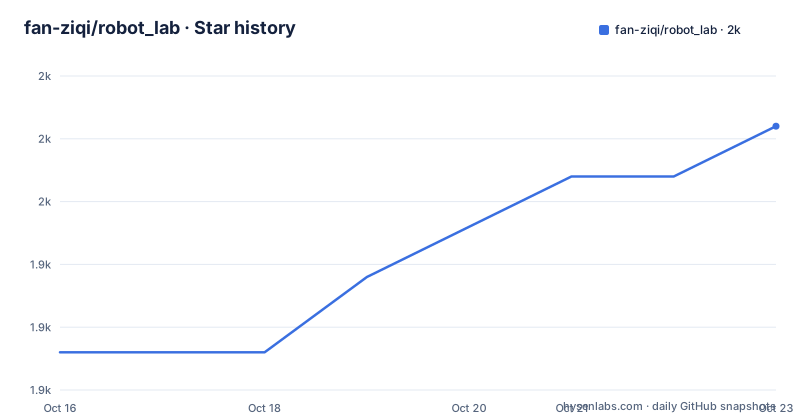
Star history
- fan-ziqi/robot_lab1,953 ★ · +9
| Repository | 2026-10-16 | 2026-10-23 |
|---|---|---|
| fan-ziqi/robot_lab | 1.9k | 2k |
9 Stars in the last 7 days, measured from the daily GitHub snapshot. Compare with other projects
Editorial analysis
Why the environments live outside the Isaac Lab repository
robot_lab is described as an RL extension library for robots, based on IsaacLab, and the reason it exists is stated in one line: it allows you to develop in an isolated environment, outside of the core Isaac Lab repository. That is an architectural choice, not a packaging detail, and it changes who the project is for.
Isaac Lab is the core framework, and it is a large one. A separate repository means a contributor can add a robot, an asset configuration or a task without opening a pull request against the framework itself, and the review burden stays local. It also means the environment catalogue can grow at the pace of commercially available robots rather than at the pace of a framework release cycle.
The dependency surface is what the badges spell out: IsaacSim 5.1.0, IsaacLab 2.3.2, Python 3.11, Linux 64 bit and Windows 64 bit platforms, pre-commit for the linting workflow, and an Apache 2.0 licence. The Isaac Lab version and the Isaac Sim version are the two things that will actually matter to you, and the project keeps a table for exactly that reason.
The repository layout follows the Isaac Lab extension conventions closely, which is a good sign for anyone who has written an Isaac Lab extension before. There is a source/ directory, a scripts/ directory, a docker/ directory, a docs/ directory, a pyproject.toml, a VERSION file, a CONTRIBUTORS.md and a pre-commit configuration. The pyproject.toml header even carries the Isaac Lab project developers' copyright line and an SPDX identifier, and its ruff configuration follows the same rules with a line length of 120, a py310 target and a mccabe complexity limit of 30.
Every environment is a velocity locomotion task
The catalogue is long, and the naming makes its uniformity obvious. Every environment follows the pattern RobotLab-Isaac-Velocity-Rough followed by the robot name and a version suffix of v0, and the category column groups them as Quadruped, Wheeled and Humanoid.
The quadrupeds are the Anymal D, the Unitree Go2, B2, A1, the Deeprobotics Lite3, the Zsibot ZSL1, the Magiclab MagicDog and the Agibot D1. The wheeled group takes the same idea to legged platforms with wheels: the Unitree Go2W and B2W, the Deeprobotics M20, the DDTRobot Tita, the Zsibot ZSL1W and the Magiclab MagicDog-W. The humanoids are the Unitree G1 and H1, the FFTAI GR1T1 and GR1T2, the Booster T1, the RobotEra Xbot, the Openloong Loong, the RoboParty ATOM01, and the Magiclab MagicBot-Gen1 and MagicBot-Z1.
The point of the grouping is that a policy is not portable between a wheeled and a legged robot, or trivially between a quadruped and a humanoid, so the category tells you which family a result belongs to. The Rough in every name refers to the rough terrain condition the task targets.
The list is also a map of what the robotics industry is actually shipping and funding right now, since a library that tracks the commercial robot catalogue is tracking the market. That is a legitimate reason to use it, and it is also a reason to expect the list to churn: the catalogue is a moving target by nature.
One gap is worth naming. Every entry is a locomotion task. There is no manipulation environment here, no grasping, no pick and place. If your problem is a robot arm, this catalogue does not cover it.
The version table is the part to read before anything else
Because robot_lab sits on top of two fast-moving things, the version compatibility table is the most practically important part of the README.
The table maps robot_lab versions to Isaac Lab versions and to Isaac Sim versions. The main branch tracks the main branch of Isaac Lab and supports Isaac Sim 4.5, 5.0 and 5.1. The v2.3.2 tag of robot_lab pairs with Isaac Lab v2.3.2 and the same three Isaac Sim versions. The v2.2.2 tag pairs with Isaac Lab v2.2.1 and Isaac Sim 4.5 or 5.0, and v2.1.1 pairs with Isaac Lab v2.1.1 and Isaac Sim 4.5. The oldest entry, v1.1, pairs with Isaac Lab v1.4.1 and Isaac Sim 4.2.
That table also shows the project is not version-locked to a single simulator, since most rows list two or three Isaac Sim releases. Isaac Sim 4.2 support was dropped along the way, which is a reasonable trade for keeping the code simple against a fast-moving simulator, but it does mean an old workstation or an older driver stack is a constraint.
The release tags are v2.3.2 from 2026-02-03, v2.3.0 from 2025-10-29 and v2.2.1 from 2025-08-28, and the last push was on 2026-10-10, so work is continuing on the main branch even between tagged releases. The project distinguishes that explicitly, with the main branch row being the one that tracks Isaac Lab's own main branch. If you want the newest environments, you are on main, and you are accepting the churn that comes with it.
Installation, and the boundary between training and deployment
The installation sequence starts outside this repository. You install Isaac Lab by following the Isaac Lab installation guide, and the README recommends the conda installation because it simplifies calling Python scripts from the terminal. Then you clone this repository. The remaining steps are whatever Isaac Lab's own extension instructions say.
The two platforms are Linux 64 bit and Windows 64 bit, and the docker/ directory in the repository suggests a containerised path is available for the Linux side.
The deployment boundary is stated more clearly than the installation steps, in a note directly under the environment table. If you want to run a policy in Gazebo or on a real robot, the README says to use the rl_sar project instead. That is a significant limitation for anyone whose goal is sim to real, because it means robot_lab covers the training half of the pipeline and rl_sar covers the deployment half.
The split makes sense in principle. A training library and a deployment library have different dependencies, different safety constraints and different maintenance rhythms, and merging them usually produces something that is good at neither. But it does mean a robot learning project that adopts robot_lab is adopting two projects.
For questions, the README points to GitHub Discussions for the project and to a Discord server. There is a CONTRIBUTORS.md file, which is the Isaac Lab convention, and the project uses pre-commit for its formatting and lint hooks, so a contribution is expected to arrive formatted and passing the same ruff rules the maintainers use.
What this is for, and where the limits are
The value proposition is narrow and real. If you have a Unitree Go2 and you want a policy that walks it over rough terrain, the value of robot_lab is that you are not writing the task configuration, the observation and action terms, the termination conditions and the domain randomization for that robot from scratch. Those are the parts that are tedious and that differ little between robots of the same family.
The cost is a dependency chain that reaches from your training script down through robot_lab, Isaac Lab, Isaac Sim, Omniverse and a NVIDIA GPU stack. That is a heavy install, and it is a heavy install to do twice, once for the version of Isaac Sim the table names and once for whichever other version you need for something else.
The realistic alternative to name is writing the environment in Isaac Lab yourself, which is what the project is a shortcut for. The difference in approach is the same either way: robot_lab packages a maintained configuration per robot against a pinned dependency matrix, while a hand-written environment gives you full control over observations, rewards and curriculum, at the cost of everything robot_lab automates.
Two things are worth checking before you commit. First, whether the robot you care about is in the catalogue, since a missing robot means the shortcut does not exist for you. Second, whether the version combination you have installed is in the table, because a mismatch between robot_lab, Isaac Lab and Isaac Sim is the most likely reason an environment refuses to register or produces a scene that does not load. The project is Apache 2.0 licensed, so the code and the configurations are yours to fork and adapt when you need a robot it does not cover.
Editorial conclusion
robot_lab suits a reinforcement learning engineer who has a specific robot in mind and wants a working velocity locomotion task for it today, since writing the task, the domain randomization and the reward from scratch is the slow part. It is the wrong tool if you need a manipulation task, because every environment in the catalogue is a velocity locomotion task, and it is the wrong tool if you plan to run policies on real hardware or in Gazebo through this project, since the README points to the separate rl_sar project for that. Before adopting it, check the version dependency table so your robot_lab release matches your Isaac Lab and Isaac Sim versions, since a mismatch across that table is the likely cause of an environment that fails to register.
Frequently asked questions
What is robot_lab and how does it relate to Isaac Lab?
robot_lab is an RL extension library for robots built on IsaacLab, and it exists so you can develop in an isolated environment outside the core Isaac Lab repository. It provides ready-made environments for a catalogue of commercial robots.
Which robots have environments in robot_lab?
The catalogue is grouped as Quadruped, Wheeled and Humanoid, and includes the Anymal D, the Unitree Go2, B2, A1, G1 and H1, the Deeprobotics Lite3 and M20, the Zsibot ZSL1 and ZSL1W, the Magiclab MagicDog, MagicDog-W, MagicBot-Gen1 and MagicBot-Z1, the Agibot D1, the FFTAI GR1T1 and GR1T2, the Booster T1, the RobotEra Xbot, the Openloong Loong, the RoboParty ATOM01 and the DDTRobot Tita.
How do I install robot_lab?
Install Isaac Lab first using its own installation guide, and the README recommends the conda installation because it makes calling Python scripts from the terminal simpler. Then clone the robot_lab repository. The project supports Linux 64 bit and Windows 64 bit, and the badges state IsaacSim 5.1.0, IsaacLab 2.3.2 and Python 3.11.
Which Isaac Lab and Isaac Sim versions match my robot_lab version?
The README has a version dependency table. The main branch tracks the Isaac Lab main branch with Isaac Sim 4.5, 5.0 and 5.1, while v2.3.2 pairs with Isaac Lab v2.3.2 and the same three Isaac Sim releases, and v2.2.2 pairs with Isaac Lab v2.2.1 and Isaac Sim 4.5 or 5.0.
Can I run a policy trained with robot_lab on a real robot?
Not from this project. The README says that if you want to run a policy in Gazebo or on a real robot, you should use the rl_sar project. robot_lab covers the training side, and deployment is handled separately.
Official sources
Add this badge to your README
If you maintain this project, the badge below links readers to this analysis and shows its maintenance status from the daily GitHub snapshot. Paste the markdown into your README; add ?metric=license or ?metric=stars to the image URL for a different field.

[](https://hysenlabs.com/projects/fan-ziqi-robot-lab)Star history chart for your README
[](https://hysenlabs.com/projects/fan-ziqi-robot-lab)Was this useful?