DashDoc: Dash and Zeal docsets inside Sublime Text
Dash integration for Sublime Text
At a glance
- What is it?
- DashDoc is a Sublime Text plugin that looks up the word under the cursor in Dash on macOS, Zeal on Linux, and Zeal or Velocity on Windows, and picks the docset from the syntax of the buffer, so a lookup of map in a Haskell file consults the Haskell docset rather than the Python one. It is a small, single-file plugin with no default hotkey and a long default syntax map.
- Who is it for?
- Adopt DashDoc if you write in Sublime Text, you already use Dash or Zeal docset collections, and your workflow is lookup-driven, since the syntax-aware docset selection is the part that makes it more than a browser shortcut. Do not adopt it if you have no docset library installed, since the plugin only drives an existing viewer, and do not expect it to work without a hotkey, since it deliberately ships none and you have to add the key binding yourself.
- Can I use it commercially?
- Yes. Apache-2.0 is a permissive licence: you can use, modify and sell software built on it, as long as you keep its copyright and licence notices.
- Is it still maintained?
- Yes. The repository last received commits 24 days ago.
- What is it written in?
- Mainly Python, according to GitHub's language statistics.
Answers come from the project's GitHub data, last synced on November 7, 2026, and from our analysis. They are not legal advice.
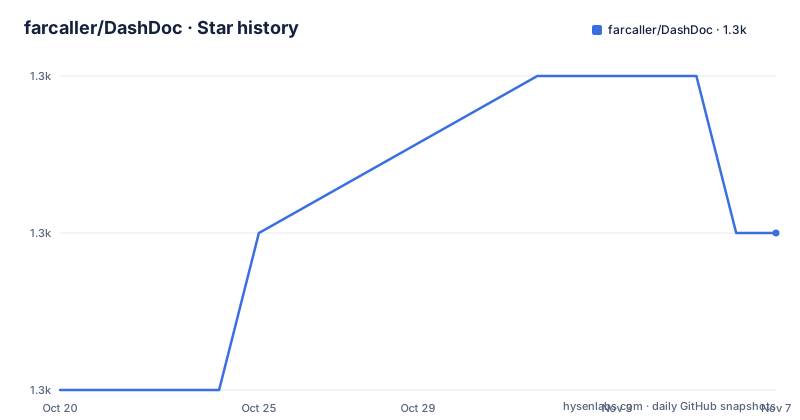
Star history
- farcaller/DashDoc1,319 ★ · +1
| Repository | 2026-10-20 | 2026-11-07 |
|---|---|---|
| farcaller/DashDoc | 1.3k | 1.3k |
1 Stars in the last 18 days, measured from the daily GitHub snapshot. Compare with other projects
Editorial analysis
The docset is chosen by the syntax of the buffer
DashDoc provides integration of Dash on OS X, Zeal on Linux, and Zeal or Velocity on Windows into Sublime Text. The usage is a single keystroke, ctrl+h, which looks up the word under the cursor or the selected text in Dash.
The interesting part is the default behaviour underneath that keystroke. By default DashDoc is sensitive to the syntax used in the current view, so Dash consults the docset that matches that syntax. The README's example is a good one: a lookup for map in a Haskell buffer instructs Dash to search in the haskell docset, while the same word in a Python buffer consults the python docset instead.
That single decision is what makes the plugin worth having. The alternative, a plain documentation search, returns whatever the index ranks highest, which for a common word in a multi-language project is frequently the wrong language. DashDoc's job is to make sure the answer comes from the ecosystem you are actually writing in, and it does that by looking at a property of the editor state that you already have.
The plugin also includes a command to search any topic from Sublime's command palette, for the case where you know what you want but not what it is called in the code.
Package Control installs it, and you add the hotkey yourself
Installation follows the standard Sublime Text route. Install the Sublime Package Control package, then use Package Control to install this package, DashDoc. The README also has a section for the case where the package does not appear in the install list, which points at the Package Control troubleshooting page and the Package Control issue tracker.
The part that catches new users is stated plainly: DashDoc no longer comes with a default hotkey. To set it up, open Preferences and Key Bindings from the menu and add an entry. For the default mode:
[{ "keys": ["YOUR HOTKEY"], "command": "dash_doc"}]and for the flipped case sensitive mode:
[{ "keys": ["YOUR HOTKEY"], "command": "dash_doc",
                           "args": { "flip_syntax_sensitive": true } }]
So both modes use the same command, and the second binding differs only by an argument. A user who has configured their own key bindings can wire the two to whatever they like, which is the usual reason a package stops shipping a default.
The settings live where Sublime Text users expect them, under Preferences, Package Settings, DashDoc, and personal overrides belong in Settings and User. The only external dependency is xdg-utils on Linux.
Two lookup modes, and a setting that decides which is default
The syntax sensitivity can be invoked on its own. A syntax-insensitive search is bound to ctrl+alt+h, and there is a configuration option called syntax_sensitive_as_default which defaults to true. Setting it to false flips the arrangement, so ctrl+h becomes the syntax-insensitive lookup and ctrl+alt+h becomes the sensitive one.
The reason to care about the default is that a lookup that ignores syntax is much more useful in some workflows than in others. If you are reading someone else's code and you just want the definition of a symbol, forcing the docset of the buffer can send you to a docset for a language you are not using. If you are writing in a language with several docset flavours, for example C with a C library, a C++ entry and man pages, the map decides which is consulted and in what order, and the syntax-aware lookup is faster than scrolling through a list of candidates.
The plugin also supports the case where a word exists in more than one docset of the same language. The mapping in the settings is a list rather than a single value, and Dash searches the docsets in the given order, so a project that wants a different priority can change it without touching the plugin.
The syntax map and the per-project override
The syntax-to-docset mapping is a first-class part of the plugin's configuration, and the default map is large. The README states it is derived from Dash's own suggestion, and the listing shows how opinionated it is. Python maps to python, django, twisted, sphinx, flask, tornado, sqlalchemy, numpy, scipy, salt and cvp. Ruby maps to ruby, rubygems and rails. Go maps to go and godoc. C maps to c, glib, gl2, gl3, gl4 and manpages, and C++ extends that with cpp, net, boost, qt, cvcpp and cocos2dx.
Some entries exist because the mapping follows Sublime's syntax names rather than language names, so GoSublime and GoSublime-Go both map to go and godoc, Haskell-SublimeHaskell and Literate Haskell both map to haskell, and Jade maps to jade. The map is long enough that it is clearly a maintained artefact rather than a one-off.
The override mechanism is per project. Individual syntax-to-docsets mappings can be overridden in the settings of the project's .sublime-project file:
"settings": {
  "syntax_docset_map": {
    "Objective-C": ["iphoneos", "cocos2d"]
  }
}
That example narrows Objective-C to two docsets for that project, which is the case that motivates the whole feature, a codebase that mixes a platform SDK with a game framework. Mappings that are not overridden fall back to DashDoc.sublime-settings, so the project file only has to carry the differences.
Where DashDoc is the wrong tool
The first wrong-tool case is not having a docset collection. DashDoc does not include documentation, it drives a viewer that you install separately, and on macOS that means Dash, on Linux Zeal, and on Windows Zeal or Velocity. Installing this package without one of those gives you a plugin that opens nothing, and the README's first troubleshooting note is about the package not appearing in the install list rather than about a missing viewer.
The second is a workflow that does not live in Sublime Text. The plugin is a keystroke in one editor, and a team that reads documentation in a browser, in a separate documentation tool or in an IDE has no reason to add it. The value is in being one keystroke away from a docset, and that only pays off in the editor you work in.
The third is a project where the syntax does not match the documentation you need. The mapping is keyed on Sublime syntax names, and a file in a language with no matching docset falls back to whatever the first entry resolves to. Teams working in a niche language, or in a framework with its own documentation set, will want to check that a docset exists before relying on the plugin for lookups.
There is also a mild platform asymmetry worth knowing, since the plugin is written in Python and depends on xdg-utils on Linux, while on macOS and Windows the dependency is the doc viewer itself.
Apache-2.0, one Python file and an October 2026 push
The plugin is licensed under the Apache License 2.0, with the LICENSE file at the repository root. The repository is not archived, and the last push was on 2026-10-14, only a few days before this review, so the project is still being touched despite the absence of GitHub releases.
The layout tells you what kind of thing this is. There is a single DashDoc.py, a .python-version file pinning the interpreter the plugin expects, the DashDoc.sublime-settings file holding the configuration, Default.sublime-commands and Main.sublime-menu for the command palette and menu entries, packages.json for the Package Control metadata, and a messages/ directory with a messages.json for the install and update notes that Sublime shows in the editor.
That structure is a good model for a Sublime Text plugin. There is no build step, no dependency tree and no framework, so a contributor reads one file, edits a settings default or a mapping, and opens a pull request. The cost of that simplicity is that features have to be written in whatever Sublime's plugin API offers, and the mapping and the messages are the parts most likely to need maintenance as new Sublime syntaxes appear.
Editorial conclusion
Adopt DashDoc if you write in Sublime Text, you already use Dash or Zeal docset collections, and your workflow is lookup-driven, since the syntax-aware docset selection is the part that makes it more than a browser shortcut. Do not adopt it if you have no docset library installed, since the plugin only drives an existing viewer, and do not expect it to work without a hotkey, since it deliberately ships none and you have to add the key binding yourself. Before you install, confirm your platform has Dash, Zeal or Velocity available, add the binding in Preferences and Key Bindings as the README shows, and set the syntax_sensitive_as_default option to false if you prefer every lookup to be syntax-insensitive.
Frequently asked questions
How do I install DashDoc for Sublime Text?
Install the Sublime Package Control package, then use Package Control to install DashDoc. The only external dependency listed is xdg-utils on Linux.
Why does DashDoc not have a default hotkey?
The README states it no longer comes with a default hotkey. You add one in Preferences and Key Bindings with an entry of the form { "keys": ["YOUR HOTKEY"], "command": "dash_doc"}, and a second variant with the flip_syntax_sensitive argument for the flipped case sensitive mode.
How does DashDoc choose which docset to search?
By default it is sensitive to the syntax of the current view, so a lookup of map in a Haskell buffer consults the haskell docset and the same word in a Python buffer consults the python docset. The syntax_sensitive_as_default option, which defaults to true, controls which mode the main key performs.
Can I override the docsets for one project in DashDoc?
Yes. Individual syntax-to-docsets mappings can be overridden in the settings of the project's .sublime-project file, under a syntax_docset_map key. Mappings that are not overridden fall back to the DashDoc.sublime-settings defaults.
Which documentation viewers does DashDoc support?
Dash on OS X, Zeal on Linux, and Zeal or Velocity on Windows. The plugin drives the viewer and the docset collections you have installed, and does not include documentation itself.
Official sources
Add this badge to your README
If you maintain this project, the badge below links readers to this analysis and shows its maintenance status from the daily GitHub snapshot. Paste the markdown into your README; add ?metric=license or ?metric=stars to the image URL for a different field.

[](https://hysenlabs.com/projects/farcaller-dashdoc)Star history chart for your README
[](https://hysenlabs.com/projects/farcaller-dashdoc)Was this useful?