App Ideas Collection: A Structured Project List for Developers Who Need a Starting Point
GitHub describes it as A Collection of application ideas which can be used to improve your coding skills.. The metadata lists the MIT license. This article stays within the project description and details documented in the GitHub repository README.
At a glance
- What is it?
- florinpop17/app-ideas is a tiered list of application ideas with user stories and resources. It helps developers practice coding, but it is not a tutorial or a codebase.
- Who is it for?
- Adopt this repository if you are a self-taught developer or a bootcamp student who needs a steady supply of small, well-scoped projects to build a portfolio or practice a new language. Avoid it if you expect runnable code or step-by-step tutorials, because this repo deliberately gives you only specifications and links.
- Can I use it commercially?
- Yes. MIT is a permissive licence: you can use, modify and sell software built on it, as long as you keep its copyright and licence notices.
- Is it still maintained?
- Probably not. The repository last received commits 13 months ago, on October 11, 2025.
- What is it written in?
- GitHub does not report a main language for this repository.
Answers come from the project's GitHub data, last synced on November 15, 2026, and from our analysis. They are not legal advice.
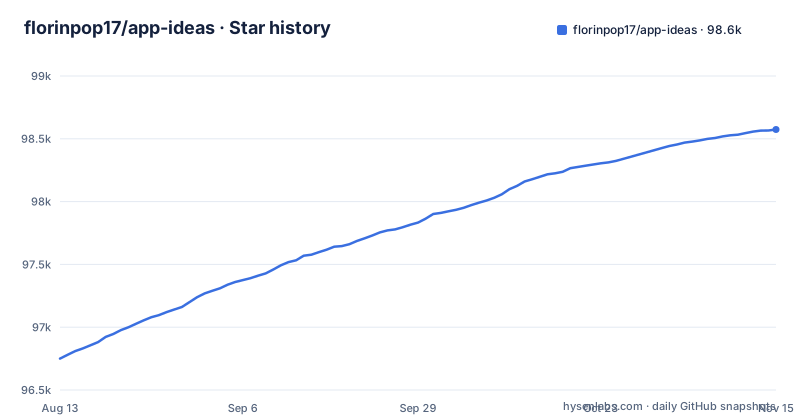
Star history
- florinpop17/app-ideas98,574 ★ · +1,824
| Repository | 2026-08-13 | 2026-11-15 |
|---|---|---|
| florinpop17/app-ideas | 96.8k | 98.6k |
1,824 Stars in the last 94 days, measured from the daily GitHub snapshot. Compare with other projects
Editorial analysis
What This Repository Actually Provides
The repository is a curated list of application ideas, each with a clear objective, a list of user stories, optional bonus features, and links to relevant resources. The README frames it as a cure for 'writer's block' in development: you want to build something but cannot think of what. The projects are meant to be built from scratch using your own code. There is no shared codebase, no framework, and no runtime. The value is in the specification format, not in any implementation. The intended audience is developers at three skill tiers: beginners focused on user-facing apps, intermediate developers comfortable with APIs and UI/UX, and advanced developers ready for backend and database work. This makes it a practical tool for self-directed learning, portfolio building, or tutorial material.
How the Tier System Structures Your Practice
The projects are divided into three tiers, each with a distinct developer profile. Tier 1 targets early-stage developers who typically build user-facing applications. Examples include Bin2Dec, a binary-to-decimal converter, and a Border Radius Previewer for CSS3. Tier 2 moves to intermediate developers who are comfortable with UI/UX, development tools, and API services. Tier 3 involves backend applications and database services. This tiering is a genuine constraint: it forces you to pick projects that match your current skill level, which is useful when you are overwhelmed by open-ended coding. The README also marks new projects with a star, which helps you find recently added ideas. However, the tier descriptions are broad. A project like 'First DB App' is listed as Tier 1, which might surprise someone who expects database work to be advanced. The tier assignment is a guideline, not a strict curriculum.
The User Story Format: A Specification, Not a Tutorial
Each project file includes a clear objective, a list of user stories, and bonus features. The README explicitly says these stories act as a guideline, not a forced to-do list. This is a deliberate design choice: you are free to add your own stories. The format is similar to a product specification you might get at a job, which makes it good practice for interpreting requirements. The bonus features are optional and meant to be attempted after the base stories are done. They push you to extend the project and learn more. The resources and links in each file point you to documentation or tools you need. The key limitation is that the repository does not provide any solution code. If you get stuck, you are on your own. That is fine for confident developers, but frustrating for beginners who need a reference implementation.
Getting Started: Commands and Configuration
Since this is a collection of markdown files, there is no installation or build step. You simply clone the repository or browse it on GitHub. The README links to a YouTube video that explains the repository, which is a helpful orientation. To start a project, you open the corresponding markdown file in the Projects directory, read the objective and user stories, and then build the application in your own environment. There are no package.json files, no dependencies, and no CLI commands to run. The only configuration you need is your own development setup. This is both a strength and a weakness: it keeps the repository language-agnostic, but it also means you cannot 'run' anything from the repo itself. The real work happens in your own editor, using whatever language or framework you choose.
A Real Limitation: No Code, No Support, and Stale Links
The most obvious limitation is the lack of any implementation. If you are a beginner who has never built a calculator, the user stories tell you what to do, but not how to do it. The linked resources may help, but they are external and can become outdated. The repository has no release cadence and no recent releases listed, so some project files may reference APIs or tools that have changed. For example, a project like 'GitHub Status' relies on an external status API that could change its response format. You have to verify each resource yourself. Another limitation is that the repository is not interactive. It does not check your code or give feedback. If you are the kind of learner who needs validation, this repo will not provide it. You are responsible for testing and evaluating your own work.
Comparing to Coding Challenge Platforms
The closest alternative is a platform like Exercism or Codewars, which provides coding challenges with automated tests and community solutions. Those platforms give you a problem statement, a test suite, and often a reference solution. App-ideas does none of that. The difference is fundamental: a challenge platform evaluates your code against hidden tests, while app-ideas only gives you a specification. The platform approach is better when you want immediate feedback and a structured progression. App-ideas is better when you want to practice building a complete application with a UI, user interactions, and possibly a backend, which challenge platforms rarely cover. The trade-off is that you lose the safety net of tests and solutions. If you are preparing for a job that requires building full features, app-ideas is closer to that reality. If you are grinding algorithmic logic, a challenge platform is more efficient.
Maintenance and License: What You Need to Know
The repository is licensed under MIT, which means you can freely use, copy, modify, and distribute the project ideas and their descriptions, even for commercial purposes, as long as you include the original copyright notice. This is a permissive license, so there are few restrictions. However, the repository appears to be a community-driven collection, and the last push was on 2025-10-11 and there are no GitHub releases. The README mentions a sponsor, CodeRabbit, which is an AI code review tool. This indicates some ongoing activity, but it does not guarantee that every project file is current. You should treat the repository as a living document that may have outdated references. Before using a project, check the file's last modified date on GitHub, if available, and verify any external links.
Who Should Use This, and Who Should Skip It
This repository is a good fit for a developer who has learned the basics of a language and wants to apply that knowledge to a concrete, small project. It is also useful for educators who need a list of assignment ideas with clear requirements. The tier system helps you choose a project that matches your skill level, and the user stories give you a starting point without dictating the implementation. You should skip it if you are a complete beginner who needs step-by-step instructions or if you prefer instant feedback from automated tests. You should also skip it if you want a polished, maintained codebase to contribute to, because this repo is not a software project in the traditional sense. It is a list of ideas, not a product. If you are looking for a way to practice building real applications without the pressure of a deadline, this is a useful resource.
Editorial conclusion
Adopt this repository if you are a self-taught developer or a bootcamp student who needs a steady supply of small, well-scoped projects to build a portfolio or practice a new language. Avoid it if you expect runnable code or step-by-step tutorials, because this repo deliberately gives you only specifications and links. Before starting, verify that the project file you pick is up to date, since the repo has no release cadence and some ideas may reference outdated APIs. Check the specific project's resources and confirm they still work. If you need a more guided path, consider a structured coding platform instead, but for a free, low-pressure way to practice, app-ideas is a solid starting point.
Frequently asked questions
What are the best app ideas?
The collection does not rank projects. It splits them into three tiers by the knowledge a developer already has, and the tier-1 table is not in alphabetical order: Cause Effect App is listed after Christmas Lights. Choosing by what you can already do is the only selection method the repository offers.
simple app ideas for students
Tier 1 is written for developers in the early stages of learning who are focused on user-facing applications, and its entries are small single-purpose tools such as Bin2Dec, a Calculator, a Pomodoro Clock and a Notes App. Each brief carries an objective, a list of user stories, optional bonus features and a resource list.
simple app ideas
Every project is described in enough detail to build from the ground up, with four elements: a clear objective, user stories that act as a guideline rather than a forced to-do list, optional bonus features, and links to resources.
useful app ideas
The tier 2 profile covers developers comfortable in UI/UX, using development tools, and building apps that use API services, which is where anything needing a backend call belongs. Tier 3 adds backend applications and database services on top. The dividing axis is API and database experience, not project size.
Official sources
Add this badge to your README
If you maintain this project, the badge below links readers to this analysis and shows its maintenance status from the daily GitHub snapshot. Paste the markdown into your README; add ?metric=license or ?metric=stars to the image URL for a different field.

[](https://hysenlabs.com/projects/florinpop17-app-ideas)Star history chart for your README
[](https://hysenlabs.com/projects/florinpop17-app-ideas)Was this useful?