Fossify Contacts is a GPL Android address book without the ad layer
Easy and quick contact management with no ads, handles groups and favorites too.
At a glance
- What is it?
- Fossify Contacts is a Kotlin Android contacts app published under GPL-3.0, distributed through Google Play, F-Droid and IzzyOnDroid. It does local storage or sync, groups, favorites and vCard import and export, but the README is thin on which sync backends exist and what the app does with contacts on your device.
- Who is it for?
- Fossify Contacts suits anyone who wants an address book they can build from source and distribute, or who wants their contact data held in files they control rather than in a proprietary account, and the vCard import and export path makes migration in and out practical.
- Can I use it commercially?
- Yes, with conditions. GPL-3.0 is a copyleft licence: if you distribute software that includes it, you must release that software's source code under the same licence. Running it internally without distributing it does not trigger that obligation.
- Is it still maintained?
- Yes. The repository last received commits 4 days ago.
- What is it written in?
- Mainly Kotlin, according to GitHub's language statistics.
Answers come from the project's GitHub data, last synced on November 7, 2026, and from our analysis. They are not legal advice.
Star history
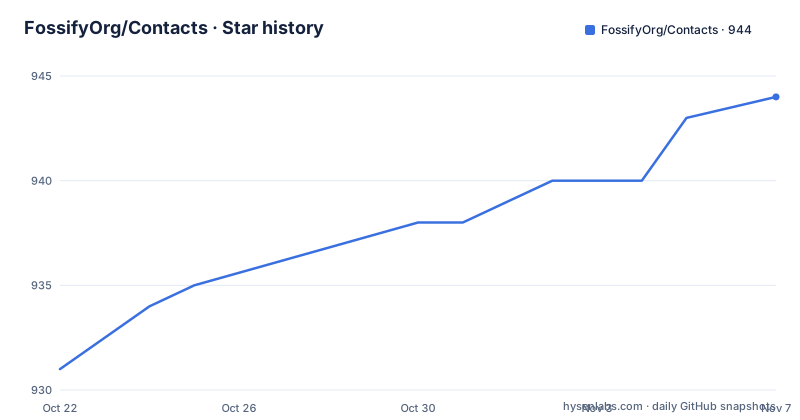
- FossifyOrg/Contacts944 ★ · +13
| Repository | 2026-10-22 | 2026-11-07 |
|---|---|---|
| FossifyOrg/Contacts | 931 | 944 |
13 Stars in the last 16 days, measured from the daily GitHub snapshot. Compare with other projects
Editorial analysis
A standalone address book for people who want their own copy
Fossify Contacts is an Android contacts application written in Kotlin, and its repository description is plain about the goal: contact management with no ads, handling groups and favorites as well.
The audience is users who want an address book they can inspect, build from source and redistribute. The README says the app is built on an open-source platform and invites readers to access the code on GitHub, and the homepage at fossify.org sits alongside a family of other Fossify applications. The topic tags on the repository list android, contacts, foss, kotlin and open-source, which is the same set of terms.
Two behaviours in the README matter more than the feature list. First, storage: the app lets you choose to keep contacts locally or to sync them across devices. Second, data handling: the README states that contact information remains confidential and that data is never shared with third-party apps.
That second claim is a promise from the project, not something the README substantiates with an audit, a policy link or a technical description of what the sync path does. For an address book, it is the claim most worth testing yourself rather than accepting, because contact graphs are among the most revealing datasets a phone holds.
Three ways to install: Play, F-Droid and IzzyOnDroid
The app is distributed through three channels, which is unusual enough to be a decision in itself.
The first is Google Play, with the listing linked from the README. The second is F-Droid, the free software repository. The third is IzzyOnDroid, an alternative repository for F-Droid compatible builds.
https://f-droid.org/packages/org.fossify.contacts/
https://apt.izzysoft.de/fdroid/index/apk/org.fossify.contacts
The package identifier is org.fossify.contacts in every channel, so switching between a Play install and a F-Droid build is not a change of app, only of provenance.
The README contains no installation command, no APK download link and no statement of the minimum Android version, so the app store listings are the source of truth for those details. There is also no mention of a privacy policy page or of which permission the app requests for contact access.
For a reviewer this matters in a specific way. The Play build and the F-Droid build are produced by different pipelines, and the repository does not explain how they are signed or whether they come from the same source commit. The README does not say.
vCard import and export is the most concrete feature in the README
Of everything the README describes, backup and export is the most checkable claim, because vCard is a standard file format and its behaviour is observable.
The app can export or import contacts in vCard format, which the README frames as data migration and backup. For anyone arriving from another address book, the import path is the practical entry point: the existing contacts arrive as a file, and the new app is populated without a service account in the middle.
The same property makes leaving easy, which is the argument for a GPL app that stores your data on your device. An address book that can only be exported at the cost of a subscription is not portable in a meaningful sense. Here, portability is a file you can read with other tools.
What the README does not describe is the fidelity of the round trip. Whether photos, notes, group membership, custom fields and multiple phone numbers survive an export and re-import is not stated anywhere in it, and that is exactly the kind of detail that decides whether a migration is painless. Test it on a copy of your own data before trusting it with the only copy.
Groups and favorites are the two features with a stated purpose
Contact grouping is described with a clear purpose rather than as a flat list of capabilities. The README says the app facilitates easy grouping for batch emails or SMS, and that you can create favorite lists and rename groups.
Grouping with a batch action attached is what makes a group worth having. A group you can only browse is a folder, but a group you can select and message is a list you actually use. Favorite lists are the lightweight version of the same idea, and the README calls them out separately.
Renaming groups is a small detail that shows attention to the fact that these groups are user data rather than a fixed set of categories. The repository description also says the app handles groups and favorites, which matches.
Search sits in the same feature cluster. The README describes an intelligent search feature, along with the ability to customize which fields are visible and a user-friendly interface. It does not say how search behaves on a large address book, whether it matches partial numbers or notes, or whether it is limited to the fields you chose to display, and the phrase intelligent search is not backed by any detail in the text.
Local storage or sync, with the backends left unnamed
The README's synchronisation paragraph is the shortest and vaguest part of the document. It says that whether you choose to store your contacts locally or prefer syncing them across devices using different means, the app gives a smooth and efficient management experience.
Different means is doing a lot of work there. The text does not name a sync protocol, a server, an account type or a conflict resolution rule. It does not say whether the sync is the Android system contacts provider, a proprietary backend operated by the project, a third-party service or a file the user supplies.
That ambiguity is the main limitation of this project as described. The choice between storing contacts locally and syncing them is a decision about where your address book lives and who can read it, and the README does not let you make that decision on information.
There is a workable alternative approach if the missing detail matters to you: treat the address book as a set of vCard files that you own, export and import them explicitly, and never enable an opaque sync path. That is less convenient than continuous sync and much easier to reason about, and it costs you nothing that the README's sync feature actually specifies.
Appearance options: system design themes and dynamic theming
The app covers theming as well. The README says the interface offers the system design themes and supports dynamic theming, along with adjustable settings and design options, and that you can sort contacts and choose themes.
Dynamic theming means the palette follows the system setting rather than being fixed in the app, which is a modest but visible feature on modern Android.
Sort controls are worth a mention too. Contact ordering is one of the few settings that people notice every day and one of the few that varies between address books, so having sort and display options in a private address book matters more than it might in a bundled system app.
The README also claims the app is light on device resources and contributes to longer battery life. No measurement accompanies that claim, and the repository contains no benchmark files, so treat it as an intention stated by the project rather than a fact you can check.
Building it yourself with Gradle, detekt and lint
The repository is an Android project with the standard Gradle layout, and it is complete enough to build from source.
The top level holds app/, build.gradle.kts, settings.gradle.kts, gradle.properties, a gradle/ directory and the gradlew and gradlew.bat wrapper scripts, so a clone comes with its own build toolchain rather than requiring a system Gradle install. There is also a .fossify/ directory and a graphics/ folder, which is where shared branding assets live in this project family.
Quality tooling is configured in the repository as well: detekt.yml for static analysis and lint.xml for Android lint. Formatting is handled by .editorconfig, and there is a Gemfile with a Gemfile.lock, which is the fastlane setup used for the store metadata. The fastlane/ directory holds the metadata and the screenshots referenced in the README.
The project also keeps the usual governance files, CODEOWNERS, CONTRIBUTING.md, CHANGELOG.md and LICENSE. That CHANGELOG.md is worth reading before you upgrade, since the README does not describe the changes between versions.
For maintenance, the recent releases are 1.4.0 on 2025-10-29, 1.5.0 on 2025-12-16 and 1.6.0 on 2026-01-30. The repository is not archived and the last push was on 2026-10-19, so work is continuing. The licence field on the repository says GPL-3.0, which means a derivative build distributed to others carries source obligations under that licence, something to check with your own counsel before you fork and ship it.
Editorial conclusion
Fossify Contacts suits anyone who wants an address book they can build from source and distribute, or who wants their contact data held in files they control rather than in a proprietary account, and the vCard import and export path makes migration in and out practical. It does not suit teams that need documented, supported sync with a specific provider, because the README names no sync backend, and it is a wrong fit for anything requiring enterprise contact management features. Before adopting it, install the F-Droid or IzzyOnDroid build and confirm that its sync behaviour matches what your workflow needs, since the README only says contacts can be stored locally or synced across devices using different means.
Frequently asked questions
How do I install Fossify Contacts?
The app is distributed through Google Play, F-Droid and IzzyOnDroid, with the package identifier org.fossify.contacts in each channel. The README gives no APK download link or minimum Android version, so the store listings hold those details.
Can I import and export my contacts with Fossify Contacts?
Yes. The README states that contacts can be exported or imported in vCard format for data migration and backup. It does not describe which fields survive a full export and re-import round trip.
Does Fossify Contacts support syncing contacts across devices?
The README says you can store contacts locally or sync them across devices using different means, but it does not name the sync backend, protocol or account type. It also states that contact data is never shared with third-party apps.
Official sources
Add this badge to your README
If you maintain this project, the badge below links readers to this analysis and shows its maintenance status from the daily GitHub snapshot. Paste the markdown into your README; add ?metric=license or ?metric=stars to the image URL for a different field.

[](https://hysenlabs.com/projects/fossifyorg-contacts)Star history chart for your README
[](https://hysenlabs.com/projects/fossifyorg-contacts)Was this useful?