Freeplane: a Java and Swing mind mapper that can run from a USB drive
Application for Mind Mapping, Knowledge Management, Project Management. Develop, organize and communicate your ideas and knowledge in the most effective way.
At a glance
- What is it?
- Freeplane is a Java and Swing mind mapper that runs on any operating system with a current version of Java. The trade is a portable file you can open anywhere, in exchange for a desktop app you install per machine.
- Who is it for?
- Adopt Freeplane if you want one map file per project that survives a reinstall and opens with no account, no server and no login. Do not adopt it if you need concurrent editing on a shared document, a phone companion, or a browser tab, because the architecture is a Swing desktop application with no service behind it.
- Can I use it commercially?
- Yes, with conditions. GPL-2.0 is a copyleft licence: if you distribute software that includes it, you must release that software's source code under the same licence. Running it internally without distributing it does not trigger that obligation.
- Is it still maintained?
- Yes. The repository last received commits 3 days ago.
- What is it written in?
- Mainly Java, according to GitHub's language statistics.
Answers come from the project's GitHub data, last synced on November 14, 2026, and from our analysis. They are not legal advice.
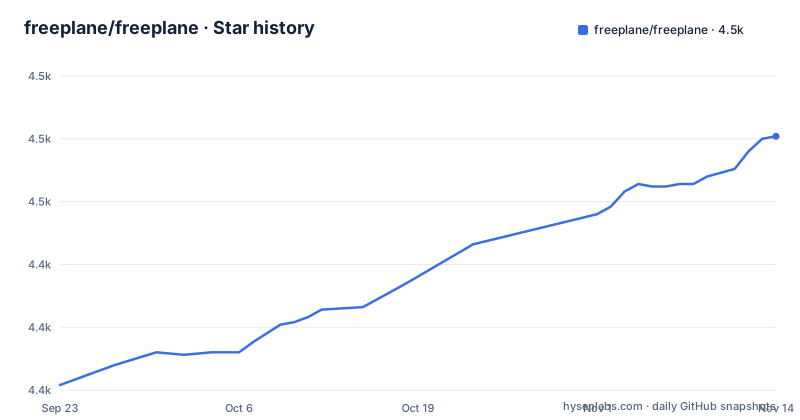
Star history
- freeplane/freeplane4,476 ★ · +99
| Repository | 2026-09-23 | 2026-11-14 |
|---|---|---|
| freeplane/freeplane | 4.4k | 4.5k |
99 Stars in the last 52 days, measured from the daily GitHub snapshot. Compare with other projects
Editorial analysis
A desktop app whose map is a file you can copy
Freeplane ships as a Java application built on OSGi and Java Swing, and the repository layout shows it split into a framework layer plus one Gradle module per feature area: freeplane_plugin_markdown, freeplane_plugin_formula, freeplane_plugin_latex, freeplane_plugin_svg, freeplane_plugin_script, freeplane_plugin_ai, freeplane_plugin_codeexplorer. That layout matters for adoption. It is not a hosted service with an API. It is an application you install, and what it produces is a map you keep locally. Because a map is a file on disk, it can be copied to another machine, dropped in a USB drive, or committed to a repository next to the code it describes. Everything else in the design follows from that one choice, including the weak points.
Why the tree shape, and not the canvas, is the design decision
A mind mapper invites you to draw. The README describes a set of tools for mind mapping, also known as concept mapping or information mapping, and for navigating the mapped information. If your workflow depends on spatial layout being the primary information, test that before committing a team to it.
Getting it onto a machine, and what the README does not tell you
There is no install command to copy. The README sends you to the SourceForge files page for the latest version, and that is the only download route it names. It also points bug reports at the GitHub issue tracker, documentation at docs.freeplane.org, and questions at the repository Discussions area. Because the application runs on any operating system that has a current version of Java installed, and because it can be installed or run from removable storage such as a USB drive, the first thing to settle is which of those two modes you want. The README does not document the Java version matrix, does not list package formats, and does not give an upgrade or rollback procedure. The repository root carries debian-meta-data, linux-packages.gradle, win.dist.gradle and mac.dist.gradle, so packaging work exists in the tree, but the README does not tell you which of those outputs end up on the download page.
Plugins as separate Gradle modules, and the extension route the README points at
The feature rundown section of the README is empty in the repository. Under the heading there are only separators, and the words Features Rundown sit above them with nothing beneath. So the plugin list is not documented where you would expect to find it. What the tree does give you is the module names: markdown, formula, latex, svg, openmaps, script, jsyntaxpane, ai, codeexplorer, bugreport, and a script_test module used for the scripting path. Reading module names tells you what the tree contains, not what a given build ships with, so treat it as a rough map of the surface rather than a promise. The contribution section is more concrete and says something useful about the project's shape: the team is looking for people to write step-by-step guides, translate existing text into English, and move old documentation into the new set. It also asks that feature ideas be raised as a discussion post first, while each contributor or team member freely decides what task to work on. For a user, add-ons and pre-configured maps are the contribution route named in the README.
No account, no server, and a Swing window to run
The licence question is settled by one file: license.txt at the repository root, which carries GPL-2.0. That is the only licensing fact worth repeating here. What the application does not come with is collaboration. The README positions Freeplane as an alternative to Xmind, Mindmeister and similar mind mapping software, and calls it a more robust and superior alternative without mentioning concurrent editing, comments, or a web client. There is no account, no server and no shared link in the model this README describes. The build is a Swing desktop application, so it needs a display. Anyone asking for a browser tab or a phone companion has to look elsewhere, and the absence is architectural rather than a missing feature flag. The README also does not document a headless mode, an export pipeline, or a command line interface for scripted map generation.
FreeMind compatibility, and why it is the first thing to test
Before moving real work in, open a map you care about, save a copy, and reopen it. The README does not describe a compatibility matrix between Freeplane versions, does not say what happens to a map written by a newer build when you open it in an older one, and does not document a backup or autosave interval. With a text format, an unwanted edit is recoverable through version control. With one file and no documented safety net, it is not.
One file per project beats a workspace account
Freeplane's structural advantage over a subscription mapper is easy to state: the artefact is a file on your disk, and nothing about opening it requires an account or a network call. That makes it a natural fit for engineers who already keep project material in a repository, and a poor fit for anyone whose maps are meant to be opened by a group in a shared browser session. The practical question is not feature coverage but custody. If a map can be versioned, diffed and restored, the desktop model costs you nothing. If it can only be edited through one person's machine, the same model is a single point of failure, and no amount of plugin work in the tree changes that. Decide which side of that line your use sits on before evaluating anything else in the application.
Editorial conclusion
Adopt Freeplane if you want one map file per project that survives a reinstall and opens with no account, no server and no login. Do not adopt it if you need concurrent editing on a shared document, a phone companion, or a browser tab, because the architecture is a Swing desktop application with no service behind it. Verify first that the build you downloaded starts on your Java installation and that a throwaway map reopens after a save, before you move real maps in, since the README documents no rollback path and no list of which builds can read which maps. If your maps must live inside a shared workspace with a history of its own, pick the tool your team already hosts instead.
Frequently asked questions
What is Freeplane used for?
The README describes it as an application for mind mapping, also known as concept mapping or information mapping, and for navigating the mapped information, for work, school and home use.
Where can I download Freeplane?
The README points to the SourceForge files page for the latest version, and to GitHub Issues for reporting a bug.
Is Freeplane free?
It is described as free and open source software that anyone can download from SourceForge.
How do I install Freeplane on Linux?
The README gives no package manager command. It says the application runs on any operating system with a current version of Java installed, can be installed or run from removable storage such as a USB drive, and should be downloaded from SourceForge.
What is the Freeplane app written in?
It is written in Java using OSGi and Java Swing, based on the repository layout.
Official sources
Add this badge to your README
If you maintain this project, the badge below links readers to this analysis and shows its maintenance status from the daily GitHub snapshot. Paste the markdown into your README; add ?metric=license or ?metric=stars to the image URL for a different field.

[](https://hysenlabs.com/projects/freeplane-freeplane)Star history chart for your README
[](https://hysenlabs.com/projects/freeplane-freeplane)Was this useful?