CRW-Extension: surfacing consumer rights while you browse
Browser extension that shows a popup and notifications when the site, product, or service you're viewing has an article on the Consumer Rights Wiki.
At a glance
- What is it?
- The CRW Extension is a small browser extension that watches which site you are on and, when that site has an article on the Consumer Rights Wiki, tells you so. The interesting engineering is not in the extension but in the matching, which is a data problem maintained by a community and checked by a daily report.
- Who is it for?
- CRW Extension suits a consumer lawyer, a journalist or a policy researcher who wants the relevant consumer rights material to appear at the moment it is useful, rather than in a wiki they have to remember to search. It is a poor fit if your use of it would be scraping the wiki at scale, since the data is community contributed and licensed separately from the code, and a poor fit if you need it to work on a site the matching data does not cover.
- Can I use it commercially?
- Yes. MIT is a permissive licence: you can use, modify and sell software built on it, as long as you keep its copyright and licence notices.
- Is it still maintained?
- Yes. The repository last received commits 1 day ago.
- What is it written in?
- Mainly TypeScript, according to GitHub's language statistics.
Answers come from the project's GitHub data, last synced on November 7, 2026, and from our analysis. They are not legal advice.
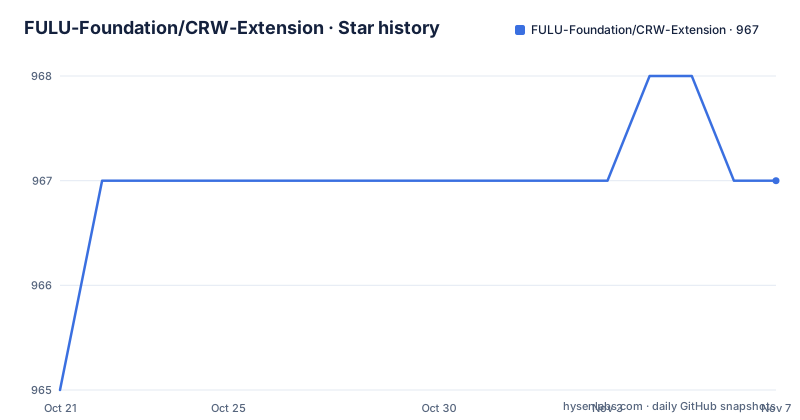
Star history
- FULU-Foundation/CRW-Extension967 ★ · +2
| Repository | 2026-10-21 | 2026-11-07 |
|---|---|---|
| FULU-Foundation/CRW-Extension | 965 | 967 |
2 Stars in the last 17 days, measured from the daily GitHub snapshot. Compare with other projects
Editorial analysis
A popup, a notification and a matching problem
The description is one sentence and it is easy to understand. The extension shows a popup and notifications when the site, product or service you are viewing has an article on the Consumer Rights Wiki.
That is a narrow and specific idea, and narrowness is what makes it work. The hard part of a consumer rights tool is not the content, the Consumer Rights Wiki already has it, and it is not the browser integration, which is a few lines of script. The hard part is knowing, at the moment a page loads, whether the site you are on is one of the sites the wiki covers.
So the extension is really a matching engine with a user interface attached, and the readme's structure reflects that. The first thing it explains is what the extension does, the next is how to install it, and then it spends most of its length on how the data works and how to contribute to it.
The consumer rights framing also explains the tone of the project. The extension is a distribution mechanism for legal information to the people who need it, which is a rare kind of open source project and one where the editorial quality of the data matters as much as the code.
The type is TypeScript, the licence is MIT, and the project is published in the Chrome, Edge and Brave web stores as well as on the Firefox add-ons site, which is the practical detail that matters for anybody who wants to use it.
Installing it, and the data behind the matching
Installation for users is a store listing, and the readme gives one for Chrome, Edge and Brave and one for Firefox.
The contribution section is the more interesting half, because it splits the work in two. The first is editorial, which means helping to improve or add articles directly on the Consumer Rights Wiki. The second is what the readme calls cargo data, which is structured metadata that powers the extension's matching, contributed at a wiki project page for completing the cargo.
So the matching is a wiki project in its own right, with its own contribution flow, and the readme links a daily Cargo report that tracks data quality and helps ensure the matching is as accurate as possible.
That daily report is the mechanism that makes the whole thing trustworthy. A browser extension that silently fails to match will look identical to one that has no article for the site you are on, and there is no way for a user to tell the difference. A published daily report on the completeness of the data is the way to make that visible, both to the maintainers who can fix gaps and to the users deciding whether to rely on it.
It also explains the project's shape. An extension that matched sites by a hardcoded list would be a one-file project that goes stale. A wiki project with a daily quality report is a project with a maintenance process, and that is the difference between something that works in a demo and something that works in a legal advice workflow.
Building it locally
The development section is short and conventional for a browser extension built with a modern bundler.
git clone https://github.com/FULU-Foundation/CRW-Extension.git
cd CRW-Extension
npm ci
npm run build
The compiled extension is written to a dist directory, and there is an alternative watch mode that uses a file watcher to rebuild on changes during development.
The formatting command is a single script call, and the file watcher is configured to ignore a generated source directory, which is a detail that only matters if you have generated code in the tree.
Loading the result into a browser is the part that differs between the two platforms, and the readme gives both.
For Chrome, and the same applies to Brave, you open the extension settings page, enable developer mode, click load unpacked, and navigate to the unzipped folder.
For Firefox, you open the debugging page for the runtime, expand the temporary extensions section, click load temporary add-on, and navigate to the unzipped folder and open the manifest file.
That Firefox flow is a little different from the Chrome one in a way that catches people out, because Firefox asks for the manifest file rather than the directory.
Two browsers, three bundles, and a set of matching tools
The package manifest is where the shape of the build becomes clear, and it is more interesting than a typical extension manifest.
The top level build script runs the Chrome build and then the Firefox build, and each of those in turn runs the bundler three times with three different configuration files, one for the background script, one for the content script and one for the rest of the extension. The browser is selected with an environment variable, so the two builds differ only in which configuration is used and which manifest is produced.
That is the standard shape for a modern extension, where the background worker, the injected content script and the user interface are separate bundles. The fact that the manifest supports both browsers from one source tree, rather than maintaining two projects, is what makes the store releases cheap to produce.
The matching tooling is the part that deserves attention. There are separate scripts to preview how a URL matches, to compare subdomain matching behaviour, to compare top level domain matching behaviour, to verify the matching against the data, to verify the quality of the cargo data itself, and to update the country code suffixes. They are written in TypeScript and run directly with the type stripping flag of the runtime, with no compilation step in between.
So the repository carries a small analysis laboratory around the matching problem: one script to look at a single URL, two to compare two strategies for matching hostnames, one to verify the whole matching table, and one to check the quality of the underlying data. A project that ships scripts to compare its own matching strategies is a project where the matching is known to be the hard part, and it is a good sign that the tools for it are first class.
The linting is a flat configuration over the source, the tests and the scripts, and the formatting covers source, styles, markup and JSON.
Licensing, and the split between code and content
The disclaimer at the end of the readme is short and it is the detail to get right before you redistribute anything.
The source code of the extension is licensed under the MIT licence, and that covers the code only. All references found by the software are not part of the extension and are provided to the end user under a Creative Commons Attribution-ShareAlike 4.0 licence by the originating site, the Consumer Rights Wiki.
So there are two licences in play and they apply to different things. The extension code, including the matching logic and the user interface, is MIT, so reuse must keep the copyright notice. The content, the actual articles about your consumer rights, is the wiki's, under a share-alike licence, and the extension is a delivery mechanism for it rather than a copy of it.
That split is the right way round for a project like this, and it is also the thing to check if you were planning to build something on top. If you take the matching approach and the code, you are in the clear. If you scrape the articles into your own product, you are taking on the wiki's licence and its terms about attribution and share-alike, and you should talk to them rather than assume.
The repository has a privacy policy file and a directory for licence texts, which suggests the two are tracked deliberately, and the extension is published in the stores with a privacy policy that a user can read before installing.
Editorial conclusion
CRW Extension suits a consumer lawyer, a journalist or a policy researcher who wants the relevant consumer rights material to appear at the moment it is useful, rather than in a wiki they have to remember to search. It is a poor fit if your use of it would be scraping the wiki at scale, since the data is community contributed and licensed separately from the code, and a poor fit if you need it to work on a site the matching data does not cover. Before you point it at a real workflow, look at the daily Cargo report to see how complete the matching data actually is, because the extension is only as good as that list.
Frequently asked questions
What does the CRW Extension actually do?
It shows a popup and a notification when the site, product or service you are currently viewing has an article on the Consumer Rights Wiki, so the relevant legal information appears at the point where it is useful rather than in a wiki you have to remember to search.
Where can I install the Consumer Rights Wiki extension?
It is published in the Chrome, Edge and Brave web stores, and separately on the Firefox add-ons site, under the name Consumer Rights Wiki. The source code is MIT licensed, while the articles themselves remain the wiki's content under a Creative Commons Attribution-ShareAlike 4.0 licence.
How does the extension know which sites to match?
Through structured metadata contributed at a Cargo completion project on the Consumer Rights Wiki, and there is a daily Cargo report tracking data quality so the matching stays accurate. The repository also ships scripts to preview a URL match, to compare subdomain and top level domain matching strategies, and to verify the matching and the cargo data.
How do I build the extension from source?
Clone the repository, run the install command and then the build command, and the compiled extension is written to a dist directory that you load as an unpacked extension. In Chrome you enable developer mode and load the unpacked folder, and in Firefox you use the temporary add-on loader and open the manifest file inside that folder.
Official sources
Add this badge to your README
If you maintain this project, the badge below links readers to this analysis and shows its maintenance status from the daily GitHub snapshot. Paste the markdown into your README; add ?metric=license or ?metric=stars to the image URL for a different field.

[](https://hysenlabs.com/projects/fulu-foundation-crw-extension)Star history chart for your README
[](https://hysenlabs.com/projects/fulu-foundation-crw-extension)Was this useful?