Lift: AWS CDK constructs declared inside serverless.yml
Expanding Serverless Framework beyond functions using the AWS CDK
At a glance
- What is it?
- Lift is a Serverless Framework plugin that uses the AWS CDK under the hood so a team can declare websites, queues, storage buckets and databases in serverless.yml instead of writing CDK code. The constructs are deliberately opinionated, and every one of them can be ejected to plain CloudFormation when the configuration stops fitting.
- Who is it for?
- Adopt Lift when your Serverless Framework project needs a website, bucket, queue, webhook or DynamoDB table and the team has no appetite for the CDK learning curve, since the constructs encode AWS practices without exposing them. Skip it when you need resources outside the construct catalogue, or when a project that must not depend on the Serverless Framework at all is a requirement, since Lift is a plugin and the eject path is a manual copy and paste.
- Can I use it commercially?
- Yes. MIT is a permissive licence: you can use, modify and sell software built on it, as long as you keep its copyright and licence notices.
- Is it still maintained?
- Yes. The repository last received commits 15 days ago.
- What is it written in?
- Mainly TypeScript, according to GitHub's language statistics.
Answers come from the project's GitHub data, last synced on November 7, 2026, and from our analysis. They are not legal advice.
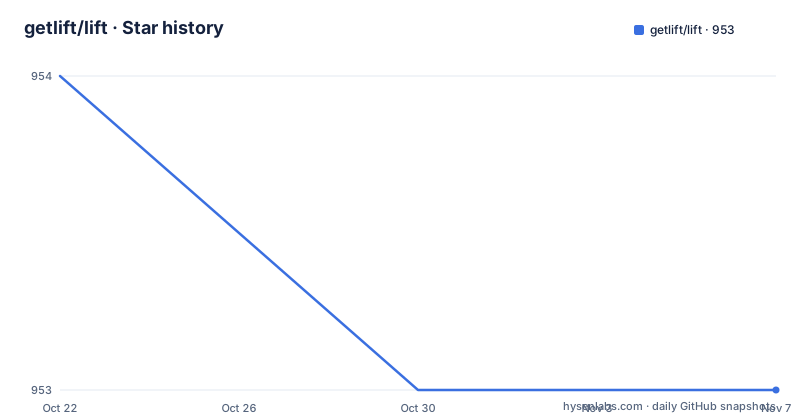
Star history
- getlift/lift953 ★ · -1
| Repository | 2026-10-22 | 2026-11-07 |
|---|---|---|
| getlift/lift | 954 | 953 |
-1 Stars in the last 16 days, measured from the daily GitHub snapshot. Compare with other projects
Editorial analysis
What Lift adds to a Serverless Framework project
Lift is a plugin that uses the AWS CDK to expand the Serverless Framework beyond functions. The stated goal is to deploy production-ready websites, queues, storage buckets and more with a few lines in serverless.yml.
The problem it solves is the gap between the two halves of the Serverless Framework story. The framework supports functions and can also deploy other AWS infrastructure, such as buckets and queues, through its resources section. Writing those resources by hand in the framework's resources section means writing CloudFormation, and writing CloudFormation means learning CloudFormation.
Lift's answer is to hide the CDK behind a small vocabulary. The README is blunt about why this is not a CDK wrapper you write yourself: the AWS CDK is extremely powerful, but it is very complex and cannot be used in serverless.yml. Lift changes that by exposing a set of components, called constructs, specifically selected for serverless applications, all built using the CDK and its best practices, with what the README calls unique features for the developer experience.
The four selling points in the README are aimed at different readers. For developers, no AWS knowledge required. For operators, production-ready, built by AWS experts and optimised for production. For existing projects, not invasive, because it integrates with what you already have. And for teams worried about commitment, no lock-in, because you can eject to CloudFormation at any time.
The audience is therefore a serverless team that has outgrown functions but does not want an infrastructure-as-code specialist on the team.
Installing the plugin and declaring it in serverless.yml
Installation follows the standard Serverless Framework plugin route:
serverless plugin install -n serverless-liftThe README also offers an npm route, stating that if you prefer you can install Lift via npm with npm install --save-dev serverless-lift, and then register the serverless-lift plugin in serverless.yml.
Either way, the plugin has to appear in the plugins list of the service file before any construct will work. The quick start shows the whole shape of a Lift-enabled service:
service: my-app

provider:
    name: aws

plugins:
    - serverless-lift

functions:
    # ...

constructs:

    # Include Lift constructs here

    landing-page:
        type: static-website
        path: 'landing/dist'

    avatars:
        type: storage
Two things are worth noting in that file. The constructs live in a top-level key named constructs, separate from functions, so existing function configuration is untouched. And each construct is an entry with a type and, depending on the type, a few properties of its own.
The package metadata sets the engines requirement at node 20.19.0 or newer, which is a real constraint for CI images and developer machines. The published package is named serverless-lift, and the file list shows that only the dist directory ships, with the build pipeline using esbuild for bundling and tsc-alias for path resolution.
TypeScript users are covered too. Lift provides type definitions so you can use serverless.ts instead of serverless.yml, with the definitions documented separately.
The construct catalogue and how much each one hides
The catalogue is small enough to read in one sitting, which is part of the appeal.
A single-page-app construct deploys single page applications, for example React, VueJS or Angular apps, and takes a path. A static-website construct does the same for static websites, also with a path. Both are declared with a type and a path pointing at the built output directory.
A storage construct deploys preconfigured S3 buckets to store files, and needs nothing beyond its type. A queue construct deploys SQS queues and workers for asynchronous processing, with a worker handler pointing at a source file. A webhook construct deploys webhooks to receive notifications from third party applications, taking a path and optionally an authorizer handler.
A database construct with the type database/dynamodb-single-table deploys databases following DynamoDB Single Table Design principles, and in the quick start it needs no properties at all. A server-side-website construct deploys server side rendered websites, for example Laravel or Symfony apps, and maps asset paths such as '/css/*' to public/css and '/js/*' to public/js.
The design intent is visible in the storage example. A bucket is one of the easiest resources to misconfigure, and the construct exists so that a developer gets a correctly configured bucket by writing two lines. The queue construct bundles the queue and its worker, which is a pairing you would otherwise have to reason about yourself.
The limitation follows directly from the size of the list. Anything not in the catalogue is not covered, and the README points to a discussions board where construct drafts are published and can be upvoted, which suggests the set is expected to grow rather than cover everything.
The lift configuration block and the extensions escape hatch
Every construct has defaults, and Lift's own configuration sits in a lift property at the root of serverless.yml. The property is optional, as are all the configurable options within it, and configurations specified at that level affect all constructs defined within the same service file.
That last sentence is the design pressure point. Lift packages production-ready features in the form of highly opinionated constructs with minimal configuration options, in order to avoid confusion for serverless early adopters. The opinion is deliberate and the reasoning is stated: fewer knobs means fewer confusing configurations for people who are new to this part of AWS.
For developers who need more, every construct ships with an extensions property that allows overrides on the underlying CloudFormation resources. The README's example extends the S3 bucket CloudFormation resource generated by the avatars storage construct with a new AccessControl property:
constructs:
    avatars:
        type: storage
        extensions:
            bucket:
                Properties:
                    AccessControl: PublicRead
Each construct's own documentation lists the available underlying CloudFormation resources that can be extended with the extensions key.
So the extension path is not a separate advanced API. It is the same YAML file, one level deeper, and it reaches all the way down to raw CloudFormation properties. That is the escape hatch that makes opinionated defaults tolerable, since a construct can be bent without forking it.
Note that the example also demonstrates why the escape hatch deserves care. Making a bucket publicly readable is a one-line change at the CloudFormation layer and a significant change to how the asset is secured.
Ejecting: the exit path is a manual copy and paste
The no lock-in claim is backed by an ejection procedure, and it is worth reading closely because the process is hands-on.
You can eject from Lift at any time, because Lift is based on CloudFormation. The stated rationale is that this allows anyone to kickstart a project with Lift and fall back to CloudFormation if they grow out of it.
The procedure has three steps. You export the CloudFormation template with serverless lift eject. Then you copy the parts you want to turn into CloudFormation and paste them into the resources section of serverless.yml. And you do not forget to remove from serverless.yml the Lift constructs you have turned into CloudFormation.
That last step is the one that matters operationally. Leaving a construct in place after pasting its resources into the resources section risks two definitions of the same infrastructure in one file, which is the kind of conflict that surfaces at deploy time rather than at review time.
There is also a scope limit to the claim. Ejecting gives you CloudFormation for what Lift generated. It does not give you the CDK source for the construct, so the outcome is a pile of generated CloudFormation rather than a CDK app. That is a genuine escape from the plugin, but it is not a migration to the CDK.
For most teams that is the right trade, since the CloudFormation is the artefact they would have had to write anyway.
Where Lift stops, and the shape of the dependency it adds
Two limits are visible in the documentation and the dependency list.
The first is the catalogue itself. Constructs exist for websites, single page apps, storage, queues, webhooks, a DynamoDB single table database and server side rendered sites. A project that needs anything else, a domain with specific routing, a CDN with a custom cache policy, an EventBridge rule, a Lambda wired to a queue with a specific batch size, falls back to the resources section and to writing CloudFormation by hand. Lift reduces the cost of the common cases; it does not remove the need to know CloudFormation for the uncommon ones.
The second is the exit procedure itself, which is a manual copy and paste rather than an automated migration. For a large service file that is real work, and the guidance to remove the construct afterwards implies the ejected state is not tracked automatically.
The dependency picture is also worth a look, because it is larger than a small plugin might suggest. The runtime dependencies include aws-cdk-lib at 2.262.0 or newer and constructs at 10.5.0 or newer, alongside AWS SDK clients for CloudFormation, CloudFront, S3 and SQS. Then there are the plugin dependencies: chalk, inquirer for prompts, js-yaml, lodash, mime-types, ora for terminal output, stripe, toml and traverse.
The stripe dependency is the one that tells you something about the webhook construct in particular, since webhooks are commonly used for payment providers. The presence of the AWS SDK clients for CloudFront and S3 explains why the static constructs are more than a bucket and a record set. None of this is unusual for a plugin that generates infrastructure, but it does mean the plugin's own dependency footprint is larger than its small configuration surface suggests.
Release cadence, licensing and how the project is maintained
The repository is not archived and the last push was on 2026-09-28, with three releases listed: 1.37.9 on 2026-09-28, 1.37.8 on 2026-09-04 and 1.37.7 on 2026-06-29.
The versioning is worth understanding. The major version stays at 1 while the minor version climbs into the thirties, which in practice means the project treats construct behaviour and configuration as evolving within a 1.x line rather than reserving major bumps for breaking changes. For a plugin that generates infrastructure, that is the kind of thing to check before an upgrade: a minor bump can change the resources a construct produces, and the diff will be in the generated CloudFormation rather than in your own code.
The engineering setup is the part that suggests careful maintenance. The project uses TypeScript with eslint, prettier and husky for commit hooks, jest with ts-jest and sinon for tests, nodemon for development, and a .nvmrc alongside the node engine requirement. There is a jest.config.js and a nodemon.json at the root, and the .github directory holds the workflow definitions.
The licence is MIT, declared in package.json and with the text in the LICENSE file at the repository root, so using Lift inside a commercial Serverless project carries no unusual obligation.
The project also states who maintains it, with Lift built and maintained by Theodo and the Serverless Framework, and the documentation set under docs/ covers each construct individually, plus a comparison page explaining why to choose Lift and a configuration page.
Editorial conclusion
Adopt Lift when your Serverless Framework project needs a website, bucket, queue, webhook or DynamoDB table and the team has no appetite for the CDK learning curve, since the constructs encode AWS practices without exposing them. Skip it when you need resources outside the construct catalogue, or when a project that must not depend on the Serverless Framework at all is a requirement, since Lift is a plugin and the eject path is a manual copy and paste. Before adopting, confirm the construct types you need exist, read the configuration documentation for the lift root property, and check the node engine requirement of 20.19.0 or newer against your build environment.
Frequently asked questions
How do I install the Lift plugin for the Serverless Framework?
Run serverless plugin install -n serverless-lift in your project. You can also install it with npm install --save-dev serverless-lift and then register the serverless-lift plugin in serverless.yml. The package requires Node.js 20.19.0 or newer.
Which infrastructure can Lift create in serverless.yml?
Lift provides constructs for single page applications, static websites, S3 storage buckets, SQS queues with workers, webhooks, DynamoDB databases following Single Table Design principles, and server side rendered websites. Each construct is declared under a top-level constructs key with a type and its own properties.
Can I change what a Lift construct generates?
Yes. Every construct ships with an extensions property that allows overrides on the underlying CloudFormation resources, and each construct's documentation lists which resources can be extended. The README's example adds an AccessControl property to the bucket resource created by the storage construct.
How do I get out of Lift and back to plain CloudFormation?
Export the template with serverless lift eject, copy the parts you want into the resources section of serverless.yml, and then remove the Lift constructs you have converted. Lift is based on CloudFormation, so the exported template is ordinary CloudFormation.
Does Lift work with serverless.ts instead of serverless.yml?
Yes. TypeScript users can use serverless.ts instead of serverless.yml, and Lift provides type definitions for that, documented in the serverless types page under the project docs.
Official sources
Add this badge to your README
If you maintain this project, the badge below links readers to this analysis and shows its maintenance status from the daily GitHub snapshot. Paste the markdown into your README; add ?metric=license or ?metric=stars to the image URL for a different field.

[](https://hysenlabs.com/projects/getlift-lift)Star history chart for your README
[](https://hysenlabs.com/projects/getlift-lift)Was this useful?