OdyTTY: A GPU-Rendered Rust Terminal That Puts Visual Identity First
Linux terminal emulator built around visual identity and in-app menu-driven configuration - theme builder, bloom/CRT/retro effects, GPU rendering.
At a glance
- What is it?
- OdyTTY is a from-scratch, GPU-rendered Linux terminal with a heavy focus on theming and retro effects, but its pre-1.0 status and platform caveats mean you should check your hardware before switching.
- Who is it for?
- Adopt OdyTTY if you are a Linux user who wants a terminal that treats visual customization as a first-class feature and you are comfortable with a pre-1.0 release that changes quickly. Do not adopt it if you need a stable, battle-tested terminal for production work, or if you rely on X11-only workflows, Intel macOS, or Windows without a willingness to handle SmartScreen prompts.
- Can I use it commercially?
- Yes, with conditions. GPL-3.0 is a copyleft licence: if you distribute software that includes it, you must release that software's source code under the same licence. Running it internally without distributing it does not trigger that obligation.
- Is it still maintained?
- Yes. The repository received new commits within the last day.
- What is it written in?
- Mainly Rust, according to GitHub's language statistics.
Answers come from the project's GitHub data, last synced on October 23, 2026, and from our analysis. They are not legal advice.
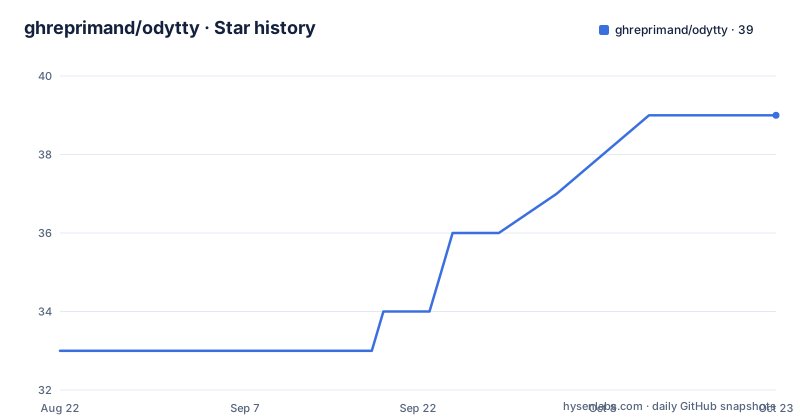
Star history
- ghreprimand/odytty39 ★ · +6
| Repository | 2026-08-22 | 2026-10-23 |
|---|---|---|
| ghreprimand/odytty | 33 | 39 |
6 Stars in the last 62 days, measured from the daily GitHub snapshot. Compare with other projects
Editorial analysis
What OdyTTY Solves and Who It Targets
The project is a from-scratch implementation, not a wrapper around an existing terminal library. It owns the PTY integration, escape parsing, terminal state, text layout, and shaders. That is a serious engineering commitment, and it shows in the feature list: Kitty graphics, Sixel, IME, bracketed paste, hyperlinks, and clickable paths. But that ownership also means the project carries the full burden of correctness. A terminal that parses escape sequences from scratch can have subtle bugs that mature projects have already fixed. The README acknowledges this by calling OdyTTY a broad pre-1.0 terminal, so early adopters should expect rough edges.
The Architecture: Owned Stack and GPU Rendering
The use of wgpu is a deliberate choice for cross-platform GPU access, but it also means that OdyTTY's performance depends on your GPU drivers. The README states that Wayland is the primary display target, with X11 supported through the current windowing and GPU stack. That phrasing suggests X11 support may be less polished. If you are on a Linux system with a problematic Vulkan driver, you might end up on the software rendering path, which the project itself calls slow. That is a real limitation for a terminal that prides itself on GPU efficiency.
Getting It Running: Install Commands and Configuration
Configuration is designed to be done inside the app. The settings panel opens with `Ctrl+Shift+,`, the command palette with `Ctrl+Shift+P`, and the theme picker with `Ctrl+Shift+H`. Hand-editing a config file is optional, but if you do, it lives at `$XDG_CONFIG_HOME/odytty/` or `~/.config/odytty/` on Unix, and `%APPDATA%\odytty\` on Windows. The config file is called `odytty.conf`, and it supports hot reload. That is a nice touch: you can edit a theme file and see changes without restarting. The theme builder can even capture a pane's live colors into a new theme, which is a feature I have not seen in other terminals. For launching, you can start OdyTTY with `odytty` or run a command directly with `odytty -e btop`. The README references a full CLI reference in docs/runtime-knobs.md, including command hold, application identity, layouts, and detached sessions.
The Theme and Effects System: Where It Shines
The theme builder's ability to capture a pane's live colors is a standout feature. You can be looking at a program with a specific color scheme and tell OdyTTY to extract those colors into a new theme. That is a practical workflow for people who want to match their terminal to a website or an editor. It is a feature that requires deep integration between the terminal state and the renderer, which is only possible because OdyTTY owns the entire stack. This is the clearest example of why the from-scratch approach pays off.
Limitations and Failure Modes
Platform support has caveats. On macOS, the app is ad-hoc signed, not notarized, which means Gatekeeper may block it, and the cask has to clear quarantine. Intel Macs require a source build, which is a significant barrier. On Windows, the release is unsigned, so SmartScreen will likely show a warning, and the platform scope is described as current, implying it may be less complete than Linux. On Linux, the primary target is Wayland, and X11 support is described as supported through the current stack, which is vague. If you are a heavy X11 user, you should test before committing. Also, the installer script pipes curl to bash, which is a security risk that some users will refuse to accept, even if the README mentions checksums.
Alternatives and How OdyTTY Differs
Another difference is that OdyTTY is from scratch, whereas some alternatives build on existing libraries. That means OdyTTY has a smaller ecosystem and fewer eyes on the code, which is a risk for a terminal that handles security-sensitive input. But it also means the project can innovate without being constrained by legacy code. The trade-off is clear: you get a unique feature set, but you accept a higher chance of bugs.
Maintenance, License, and Upgrade Costs
The project is licensed under GPL-3.0, which means any derivative work must also be open source under the same license. That is a consideration if you plan to embed or fork the code. The README does not mention a contribution guide or a roadmap, but the release cadence is active: v0.11.0 and v0.11.1 in August 2026, and v0.12.0 later that month. That suggests frequent updates, which is good for bug fixes but means you will need to keep up with releases to avoid falling behind. The update process varies by install method, and for direct .deb or .rpm packages, you must re-run the installer or download new packages manually, since there is no repository. That is a maintenance cost: you cannot rely on your system's package manager to keep OdyTTY up to date. For source builds, you need to rebuild with `cargo build --release --locked`, which is a standard Rust workflow. The README does not mention a migration guide between versions, so you may need to re-check your config after major updates. The project has no telemetry or update ping, which is a privacy win, but it also means you have to remember to check for updates yourself.
Editorial conclusion
Adopt OdyTTY if you are a Linux user who wants a terminal that treats visual customization as a first-class feature and you are comfortable with a pre-1.0 release that changes quickly. Do not adopt it if you need a stable, battle-tested terminal for production work, or if you rely on X11-only workflows, Intel macOS, or Windows without a willingness to handle SmartScreen prompts. Before switching, verify that your GPU and compositor work with Vulkan or accelerated OpenGL/GLES, test your IME and font fallback, and read docs/benchmark-results.md to understand the memory claims, since the W7 four-hour memory-growth workload is still deferred.
Frequently asked questions
What does the Oddity Company do, according to this repository?
The repository covers no company. The name overlap is with OdyTTY, a from-scratch GPU-rendered Rust terminal emulator that owns its own pseudoterminal integration, its escape parser, terminal state, text layout and shaders, and that runs independently of the operating system it takes its visual identity from.
What is the monster in Oddity?
There is no film content here and no monster. What the project documents instead is terminal behaviour: with bracketed paste disabled, multiline or control-bearing text is held behind a bounded escaped preview showing the original line and byte counts, with explicit paste, paste as a single line, or cancel offered as the outcomes.
Is Oddity a really scary movie?
The page says nothing about films. On maturity it is explicit instead: the published release is v0.15.7, and the v0.16.0 development tree adds read-only panes and scrollback export as text or sanitized HTML, both stated as not included in the published release.
What is the story of Oddity?
The closest thing is the project's own framing: a terminal emulator built from scratch with an Odyssey visual identity, meaning it ships its own rendering stack rather than wrapping an existing terminal, and it runs independently of OdysseyOS. Most customization happens inside the app through a settings shortcut, a command palette shortcut and a theme picker shortcut.
Official sources
Add this badge to your README
If you maintain this project, the badge below links readers to this analysis and shows its maintenance status from the daily GitHub snapshot. Paste the markdown into your README; add ?metric=license or ?metric=stars to the image URL for a different field.

[](https://hysenlabs.com/projects/ghreprimand-odytty)Star history chart for your README
[](https://hysenlabs.com/projects/ghreprimand-odytty)Was this useful?