Three skills, one pipeline, and a hardcoded Mac font name
Tell the AI one sentence and it automatically adds Chinese subtitles to foreign-language videos — download, transcribe, translate, polish and burn in, all in one pipeline, running fully locally with zero API cost for transcription.
At a glance
- What is it?
- xiaohu-video-translate is a set of installable skills rather than an app: three folders of scripts and instructions that turn a video URL into a Chinese-subtitled file plus a Markdown transcript, driving Whisper locally for word-level timestamps and reusing whatever AI the coding CLI already has for translation, with the caveat that the burn-in command defaults to a font that only exists on macOS.
- Who is it for?
- It fits someone who already works inside an AI coding CLI and wants subtitled video without a desktop app or a paid transcription API, and the three-skill split means you can use the downloader or the subtitle polisher on their own. Check three things first.
- Can I use it commercially?
- Yes. MIT is a permissive licence: you can use, modify and sell software built on it, as long as you keep its copyright and licence notices.
- Is it still maintained?
- Yes. The repository last received commits 170 days ago.
- What is it written in?
- Mainly Python, according to GitHub's language statistics.
Answers come from the project's GitHub data, last synced on November 25, 2026, and from our analysis. They are not legal advice.
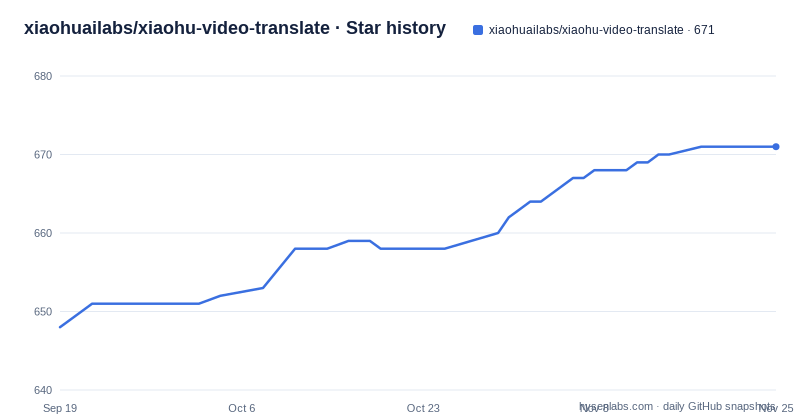
Star history
- xiaohuailabs/xiaohu-video-translate671 ★ · +23
| Repository | 2026-09-19 | 2026-11-25 |
|---|---|---|
| xiaohuailabs/xiaohu-video-translate | 648 | 671 |
23 Stars in the last 67 days, measured from the daily GitHub snapshot. Compare with other projects
Editorial analysis
Three skills with one orchestrator in the middle
The unit of installation is not a program but a skill: a folder of scripts plus a SKILL.md instruction file that tells a coding agent how to call them. The repository root is small, holding .gitignore, LICENSE, README.md, an assets directory, install.sh and a skills directory, and everything lives inside that skills directory.
There are three of them, and the division of labour is deliberate. xiaohu-video-md is the orchestrator, owning download, audio extraction, Whisper transcription, the call into polishing, the subtitle burn-in and the Markdown transcript. xiaohu-subtitle-polish does translation and subtitle cleanup: correcting errors, translating, breaking lines, removing punctuation, aligning timestamps and producing bilingual ASS. xiaohu-video-download is the plain downloader, handling video, audio, playlists and burning subtitles onto a local file.
The pipeline is that the orchestrator calls the polisher at the translation step, and each of the three works alone if you only want one. Translation costs nothing extra because it reuses the AI already configured in your coding tool.
Word-level timestamps cut by sentence and pause
The timing story is the part that separates usable subtitles from machine output. Transcription uses Whisper and takes word-level timestamps, then splits the transcript into subtitle lines by sentence and by pause. The stated effect is that subtitles do not run ahead of the speaker and half a sentence does not spill into the next line.
The failure mode is named rather than hidden. If a subtitle does appear early or two fragments get crowded together, the documented cause is background music loud enough that Whisper misjudged the segment, and the remedy is to ask for that part to be transcribed again. That is an honest limitation of any speech recogniser on mixed audio, and having it written down means you will not spend an hour hunting a bug that is not there.
There is also a correction layer on the text side. The polisher fixes proper nouns the recogniser mishears, with Claude commonly heard as cloud and MCP heard as NCP named as examples, breaks lines by meaning rather than by character count, and leaves technical terms in English instead of translating them. A fast mode swaps in a faster model at the cost of slightly lower accuracy, which is the only quality dial exposed.
Bilingual subtitles need ASS because SRT cannot size text
Two subtitle styles are offered. Pure Chinese keeps the frame clean. Bilingual puts Chinese large and English small beneath it, so the hierarchy is readable at a glance and the English is there for listening practice.
The reason that mode is not just a translated SRT is a format limitation. Font size contrast between two lines is done with a real ASS subtitle, using an override block to set the sizes, and plain SRT cannot express it. So the bilingual path produces ASS and the single-language path can stay in the simpler format.
The positioning is deliberate too: the burned-in bilingual subtitles sit at the bottom of the frame and are described as not covering the speaker, which is the constraint that decides everything else about their placement.
The demonstration case pushes this further. The same English interview is shown translated into Chinese, Japanese, Korean, Arabic and French, each as bilingual subtitles with the target language on top and the English underneath, and the right-to-left Arabic is reported as laying out correctly. Burn-in and watermark happen in a single encode, so there is one generation loss rather than two.
Windows is three caveats away from the Mac path
The documented happy path is macOS on Apple Silicon. Homebrew supplies yt-dlp and ffmpeg, mlx-whisper is installed for GPU-accelerated transcription, and the repository is cloned and installed with install.sh. faster-whisper is the fallback engine on a non-Apple-Silicon Mac. The MLX model, roughly 1.5 GB, downloads from HuggingFace on first run, and after installation you change output_dir to an absolute path in the config file at ~/.claude/skills/xiaohu-video-md/config.json.
The recommended Windows route is WSL2 with Ubuntu, which is effectively the Linux path:
sudo apt update && sudo apt install -y ffmpeg
pip3 install yt-dlp faster-whisper
git clone https://github.com/xiaohuailabs/xiaohu-video-translate.git
cd xiaohu-video-translate && bash install.sh
Running natively on Windows instead has three specific differences. Use faster-whisper and never mlx-whisper, since MLX only supports Apple chips, and the scripts detect the absence of MLX and fall back on their own. Run install.sh through Git Bash, or copy the three folders under skills/ into your tool's skills directory by hand and copy each config.example.json to config.json. And change the font, which is the third section's problem.
The burn-in command hardcodes PingFang SC
The most concrete portability problem is a font name. The subtitle rendering command defaults to FontName=PingFang SC, which is a macOS system font. On Windows that font does not exist and Chinese characters render as boxes, and on Linux the same applies.
The fix is a manual edit in each case. On Windows, replace PingFang SC with Microsoft YaHei, the font that ships with the system, and point the watermark font path at a Windows font file such as C:/Windows/Fonts/msyh.ttc. On Linux, install and use a CJK font such as Noto Sans CJK. The same applies to a native Windows install, where ffmpeg comes from winget with Gyan.FFmpeg or from scoop or choco.
What is missing is automatic font selection. The project says so itself, pointing to an open issue for cross-platform adaptation so the renderer picks the right font without editing. Until that lands, this is a first-run edit on any machine that is not a Mac, and it is also a second-run edit for anyone who moves their skills directory to another computer.
A backup transcription engine is also optional rather than required: whisper-cpp is installed with brew if you want the whisper-cli path, with ggml models placed under ~/.cache/whisper-cpp/.
YouTube cookies first, a proxy flag second
Download failures have a documented order of escalation, which is useful because the causes move over time. A 403, SABR or PO Token error is the first case, and the response is to let the scripts read cookies from your browser and retry, Chrome by default. If that still fails, the next step is a proxy, passed as --proxy http://127.0.0.1:7890.
Neither step is about this project. Reading cookies from a browser is a workaround for YouTube's own access changes, and the proxy flag is a generic escape hatch for networks that block the request outright. So treat download reliability as a moving dependency rather than a property of the pipeline: what is stable is the transcribe, translate and burn path afterwards.
One more platform note sits alongside. Videos already in Chinese skip the translation step and produce only the transcript, which is the expected behaviour rather than a bug when the tool seems to ignore the request.
Douyin needs one browser login, kept on your machine
Chinese-platform support has an onboarding step. The first time you use a Douyin link, run the login script by path:
python3 ~/.claude/skills/xiaohu-video-md/scripts/douyin_login.pyA browser opens, you scan the code, and the session is written to your machine only. If the tool later reports that it is not logged in, rerunning that same script is the fix, which suggests the session has a lifetime shorter than a permanent login.
The privacy story is stated twice, once in the skill description and once in the licence section: do not commit your own config.json or your Douyin login state to any public repository. The .gitignore already excludes them, so the risk is only for someone who overrides that or copies a file elsewhere by hand.
The licence is MIT, and the note about it is permissive about the parts you are expected to change: subtitle styling and the default watermark values are yours to modify, which is a reasonable thing to say in a project whose hardest-coded value is a font path.
Editorial conclusion
It fits someone who already works inside an AI coding CLI and wants subtitled video without a desktop app or a paid transcription API, and the three-skill split means you can use the downloader or the subtitle polisher on their own. Check three things first. The default burn-in font is PingFang SC, so on Windows or Linux you must edit the render command and the watermark font path before the first run or you get boxes. YouTube may need browser cookies or a proxy flag, which is a moving target outside this project. And never commit your config.json or your Douyin login state, which the project warns about twice.
Frequently asked questions
What is xiaohu-video-translate?
It is a set of skills for AI coding tools, not a standalone app. Three skills, xiaohu-video-md, xiaohu-subtitle-polish and xiaohu-video-download, turn a video URL or local file into a Chinese-subtitled video plus a Markdown transcript through download, transcription, translation, polishing and burn-in.
Which AI coding tools can run xiaohu-video-translate?
Claude Code loads the skills natively, with install.sh placing the three folders under ~/.claude/skills/. OpenClaw installs them through its own skills mechanism, Gemini CLI loads the repository as an extension through gemini-extension.json, and for Codex or anything else you feed the SKILL.md file in as rules or run the scripts in scripts/ by hand.
Why do xiaohu-video-translate subtitles sometimes run ahead of the speaker?
Transcription uses Whisper with word-level timestamps and splits lines by sentence and pause, so this is not the normal case. The documented cause is background music loud enough that Whisper misjudged the segment, and the fix is to ask for that part to be transcribed again.
What do I have to change to use xiaohu-video-translate on Windows or Linux?
Three things. Use faster-whisper rather than mlx-whisper, which only supports Apple chips. Expect install.sh to need Git Bash, or copy the three skill folders and rename each config.example.json to config.json. And change the burn-in font, since the default is PingFang SC: use Microsoft YaHei on Windows or a CJK font such as Noto Sans CJK on Linux, or the Chinese text renders as boxes.
Does xiaohu-video-translate cost anything to transcribe?
No transcription API is used. Transcription runs locally with Whisper, mlx-whisper with MLX and Metal on Apple Silicon, with the model of roughly 1.5 GB downloading from HuggingFace on first run. Translation reuses the AI already configured in your coding tool rather than a separate paid API.
Official sources
Add this badge to your README
If you maintain this project, the badge below links readers to this analysis and shows its maintenance status from the daily GitHub snapshot. Paste the markdown into your README; add ?metric=license or ?metric=stars to the image URL for a different field.

[](https://hysenlabs.com/projects/xiaohuailabs-xiaohu-video-translate)Star history chart for your README
[](https://hysenlabs.com/projects/xiaohuailabs-xiaohu-video-translate)Was this useful?