Splat Analyzer: Turning 3D Gaussian Splats into Bounding Boxes Without Training
find 3d boundboxes in your splat
At a glance
- What is it?
- Splat Analyzer takes a .ply or .spz splat file and a plain-English prompt, then returns 3D bounding boxes for each detected object. It uses OWLv2 and a synthetic camera renderer, with no annotation or training required.
- Who is it for?
- Adopt Splat Analyzer if you need interaction zones for WebXR, games, or robotics from existing splats and want to avoid manual annotation. Skip it if your splats are not right-side up, if you lack an Apple Silicon Mac or an NVIDIA GPU with at least 8 GB VRAM, or if you need precise per-object segmentation rather than coarse boxes.
- Can I use it commercially?
- Yes. MIT is a permissive licence: you can use, modify and sell software built on it, as long as you keep its copyright and licence notices.
- Is it still maintained?
- Yes. The repository last received commits 94 days ago.
- What is it written in?
- Mainly HTML, according to GitHub's language statistics.
Answers come from the project's GitHub data, last synced on October 4, 2026, and from our analysis. They are not legal advice.
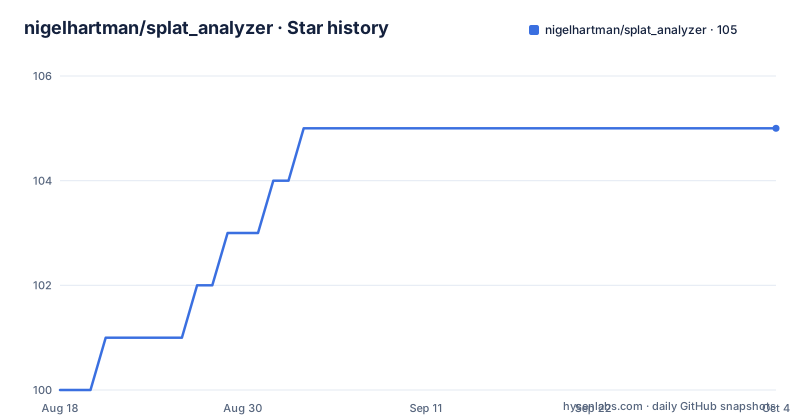
Star history
- nigelhartman/splat_analyzer105 ★ · +5
| Repository | 2026-08-18 | 2026-10-04 |
|---|---|---|
| nigelhartman/splat_analyzer | 100 | 105 |
5 Stars in the last 47 days, measured from the daily GitHub snapshot. Compare with other projects
Editorial analysis
What Splat Analyzer Solves and Who It Is For
The target user is someone who already has a splat and needs quick spatial hints, not a researcher building a detection model. The README's examples suggest event demos, where a server hosts the tool for multiple users. If you are a solo developer on a Mac, the local CLI is the entry point. If you have a GPU server, the web app and REST API let others submit splats and get boxes back. The core promise is speed and convenience: no training, no annotation, just a prompt and a file.
The Five-Step Pipeline: Render, Detect, Lift, Cluster, Output
The density-aware sampler is key: it decides where to place cameras based on where the splat has content, which avoids wasting views on empty space. The depth map from the renderer is what makes the 2D-to-3D lift possible. The clustering step is what turns multiple noisy detections into one stable box. This design means the quality of the output depends on both the renderer's fidelity and OWLv2's detection accuracy. The README notes that OWLv2 dominates VRAM usage, which is a hint that the detection stage is the heaviest part.
Running Locally on Apple Silicon or NVIDIA GPU
On an NVIDIA GPU, the steps are more manual. You create a venv, install torch matching your CUDA version, set TORCH_CUDA_ARCH_LIST to your GPU's compute capability (for example, 8.9 for RTX 40xx), then pip install -r requirements.txt. The gsplat library compiles CUDA extensions during install, so torch must be present first. Then you run the same run_local.py command, but with --quality high if you want. The README gives a table mapping GPUs to arch values, like 8.6 for RTX 30xx. Getting this wrong will likely cause a build failure, so it is a real setup hurdle.
Running as a Server: Deployment and API
The API is straightforward. You submit a job with a POST to /api/v1/detect, sending the file and prompt as multipart form data with an X-API-Key header. Then you poll /api/v1/jobs/<job_id>/status and fetch the result from /api/v1/jobs/<job_id>/result. The admin panel is where you change the initial password from .env and create API keys. The README states that admin password and API keys are stored on a persistent data volume, so they survive redeploys. This is a sensible design for a multi-user setup, but it also means you must secure the server yourself, as there is no mention of authentication for the upload form beyond the API key.
Quality Parameters and Their Trade-offs
These parameters give you control, but they also mean that tuning is part of the workflow. If you set min_votes too high, you might miss small objects that only appear in a few views. If you set it too low, you get noise. The README does not provide guidance on how to tune these beyond the defaults, so you will need to experiment. The quality setting has a direct impact on runtime: the README says a high-quality job takes 3 to 5 minutes on an L40S, so on a smaller GPU it will be slower. This is a trade-off between coverage and latency that you must manage per use case.
A Real Limitation: Orientation and the Wrong Tool for Precision
Another limitation is that the output is a bounding box, not a segmentation mask or a precise mesh. For robotics or games, a box might be enough for interaction zones, but if you need to know the exact contour of an object, this tool is the wrong choice. Also, the detection is limited to OWLv2's vocabulary. While it is open-vocabulary, it may not recognize niche objects. The README does not list failure cases for detection, but it is safe to assume that unusual or heavily occluded objects will be missed. Finally, the tool requires a GPU with at least 8 GB VRAM for reasonable performance; on a Mac it is slower, so it is not a lightweight utility.
Alternatives: Nerfstudio's Tools and Manual Annotation
A more direct alternative is using a 2D detector on rendered views and then projecting to 3D yourself. You could render your own views with gsplat, run a detector like Detic or Grounding DINO, and then do the back-projection. That would give you flexibility in choosing the detector and the camera placement, but it requires writing a pipeline. Splat Analyzer packages this entire flow, which saves time if the defaults work for you. The trade-off is that you inherit OWLv2 and the density-aware sampler without the ability to swap them out easily.
Maintenance, Upgrade Cost, and License
The deploy.sh script handles server setup, but it does not mention an update path. If you deploy a new version, you will likely need to rerun deploy.sh, which rebuilds the Docker image and recompiles gsplat. The persistent data volume for admin credentials and API keys survives redeploys, which is good. However, there is no mention of database migrations or versioned API endpoints, so a major update could break existing clients. Given the lack of release tags, you should pin the commit you deploy and test before upgrading.
Editorial conclusion
Adopt Splat Analyzer if you need interaction zones for WebXR, games, or robotics from existing splats and want to avoid manual annotation. Skip it if your splats are not right-side up, if you lack an Apple Silicon Mac or an NVIDIA GPU with at least 8 GB VRAM, or if you need precise per-object segmentation rather than coarse boxes. Before committing, verify that your splat's orientation is correct and that your GPU arch is set in TORCH_CUDA_ARCH_LIST or CUDA_ARCH_LIST. Also check that OWLv2's vocabulary covers your objects; if it fails, you will need a different detector.
Frequently asked questions
What file formats can splat_analyzer read?
A .ply file in the standard 3DGS format, from Nerfstudio, Gaussian Splatting or gsplat, and a .spz file in the Niantic and World Labs compressed format, versions 1 through 3. Splats from World Labs and XGRIDS are named as tested.
Does splat_analyzer need training or manual annotation?
Neither. You give it a splat file and a plain-English prompt such as "chair, table, monitor", and it returns a 3D bounding box for each object it finds, with a label, a position and a size, written to interactions.json.
Can splat_analyzer run on a Mac without an NVIDIA GPU?
Yes, on Apple Silicon, using the Metal renderer. Run ./install_mac.sh, which creates a virtual environment, installs dependencies and builds the Metal renderer, then run python run_local.py. Xcode command-line tools are required and the first build compiles a shader.
How much VRAM does a splat_analyzer job need?
The development and testing machine was an NVIDIA L40S with 48 GB, where a high-quality job takes around 3 to 5 minutes, and measured peak VRAM is about 7 GB with OWLv2 as the dominant cost. For a local NVIDIA box the guidance is 8 GB minimum, 12 GB comfortable, 16 GB RAM minimum with 32 GB recommended, and roughly 20 GB of free disk.
What does the quality setting change in splat_analyzer?
It sets how many camera views are rendered: low is 24, medium is 90 and high is 192, with medium as the default. More views means more rendering and more detection work, since the detection model runs on every frame.
Why are my splat_analyzer detections in the wrong place?
The most common cause is an upside-down splat. Some exporters flip the vertical axis, and if the scene loads inverted the camera placement and the detections are both off. Re-orient the splat before running, and check the /debug page or the frames directory to confirm.
Official sources
Add this badge to your README
If you maintain this project, the badge below links readers to this analysis and shows its maintenance status from the daily GitHub snapshot. Paste the markdown into your README; add ?metric=license or ?metric=stars to the image URL for a different field.

[](https://hysenlabs.com/projects/nigelhartman-splat-analyzer)Star history chart for your README
[](https://hysenlabs.com/projects/nigelhartman-splat-analyzer)