glowing-bear: a browser front end that talks to WeeChat directly
A web client for WeeChat
At a glance
- What is it?
- glowing-bear is a web client for the WeeChat IRC client that has no backend of its own. The browser opens a WebSocket straight to the WeeChat relay, which means the whole thing is client-side JavaScript and you can run it as a hosted page, install it as a Chrome app or build it as a desktop app with Tauri.
- Who is it for?
- glowing-bear suits an IRC user who already runs WeeChat and wants a usable interface on a phone or a tablet without a native build for each platform, and who can reach the WeeChat host over the network. It is a poor fit if your WeeChat instance is behind a firewall you cannot open, since the relay has to be reachable.
- Can I use it commercially?
- Yes, with conditions. GPL-3.0 is a copyleft licence: if you distribute software that includes it, you must release that software's source code under the same licence. Running it internally without distributing it does not trigger that obligation.
- Is it still maintained?
- Yes. The repository last received commits 93 days ago.
- What is it written in?
- Mainly JavaScript, according to GitHub's language statistics.
Answers come from the project's GitHub data, last synced on November 7, 2026, and from our analysis. They are not legal advice.
Star history
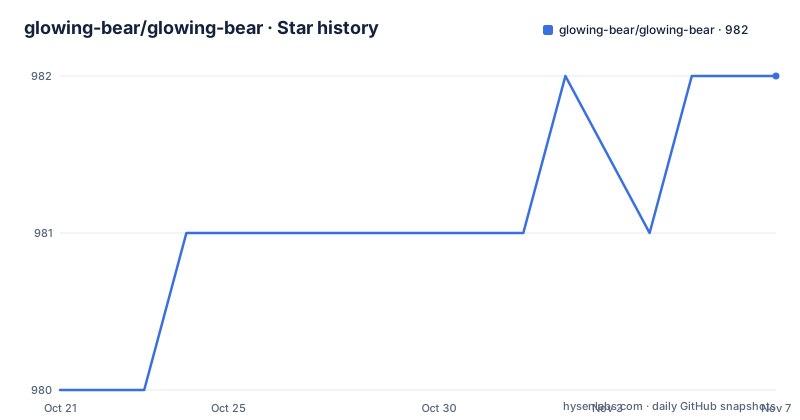
- glowing-bear/glowing-bear982 ★ · +2
| Repository | 2026-10-21 | 2026-11-07 |
|---|---|---|
| glowing-bear/glowing-bear | 980 | 982 |
2 Stars in the last 17 days, measured from the daily GitHub snapshot. Compare with other projects
Editorial analysis
No backend, which is the whole design
The architecture section is the part that makes glowing-bear interesting, and it is short.
Glowing Bear uses WeeChat directly as its backend through the relay plugin. The consequence is that the client can connect to WeeChat directly from the browser using WebSockets, so the client does not need a special backend service and you do not have to install anything. A connection is made from the browser to the WeeChat instance, with no services in between, and the project is therefore written purely in client-side JavaScript with a bit of HTML and CSS.
That is an unusual and appealing shape for a web application. Most web clients are a server-side application with a browser front end, and the server holds the session, the credentials and the protocol implementation. Here, the browser is the client of WeeChat, and the only server involved is the WeeChat host you already run.
The stated benefit follows from that. It relies on WeeChat to do all the heavy lifting, and then provides some nice features on top of that, like embedding images, videos and other content. The best part, the readme says, is that you can use it from any modern internet device, whether it is a computer, a tablet or a smart phone, and all your stuff is there wherever you are.
The readme is also honest that the technical explanation is optional, that you do not need to understand it to use it. That is a good sign for a user interface project, where the person setting it up is often the person using it.
The relay is the integration point, and it must be reachable
Glowing Bear connects to the WeeChat instance you are already running, and version 2.9 or later of WeeChat is required. The mechanism is the relay plugin, so you need to set up a relay.
For a local WeeChat instance the documentation gives the two commands, and it is explicit that they create an unencrypted relay:
/relay add weechat 9001
/set relay.network.password YOURPASSWORD
The first command adds a relay named weechat on port 9001, and the second sets the network password for it. Then you point the browser at the Glowing Bear site and enter the host and port of the WeeChat host.
If you are having trouble connecting, the readme gives two checks: that the host and port of the WeeChat host are entered correctly, and that the server firewall permits incoming connections on the relay port, 9001 in the example.
That firewall line is the crux of the whole deployment. Because there is no proxy service in between, the WebSocket has to reach the WeeChat host directly from wherever the browser is running. On a home network that is a matter of opening a port on the local firewall. Over the internet it means the machine running WeeChat has to be reachable, which is precisely what the encryption guidance is about.
The password set by the second command matters for the same reason. A relay that accepts connections without authentication on a reachable port is an open path into your IRC client, and the readme does not soften that.
The unencrypted relay warning, and what to do about it
The security advice in the readme is short and it deserves to be quoted rather than paraphrased.
The instructions above set up an unencrypted relay, and all your data will be transmitted in clear. You should not use this over the internet. The project strongly recommends setting up encryption if you want to keep using Glowing Bear, and points at a guide for setting it up with Let's Encrypt on the landing page of the next version of Glowing Bear, under Getting Started. It also suggests asking in the channel on the libera network if something is unclear.
The FAQ explains the mechanism of the encryption, and it is the browser doing the work. TLS is used for securing the connection if you enable it, and that is handled by your browser, with the project stating it has no influence over certificate handling. More detailed instructions are in the Getting Started tab of the development version's landing page.
That last point is worth understanding as a security decision. TLS is terminated where it can be inspected, which means the certificate validation, the cipher suite and the trust store are the browser's, not the project's. The project's job is to make sure you actually turn it on, and to tell you where to find the certificate for the domain the relay is published on.
There is a second FAQ entry about requests to third-party servers. The answer is that it is possible, pointing at an issue in the repository, with details to follow once it is merged. If you care about what the page loads, that issue is the place to watch.
Four ways to run it, and only one of them needs a server
The readme lists several ways to run Glowing Bear, and the first is the important one.
It can run like any other webpage, which means the hosted version on GitHub Pages, and the readme is clear that you do not need to host it yourself to use it, and that the hosted version is maintained for you. The reason hosting does not matter is stated plainly: the browser connects to WeeChat directly, so where the page itself is served from is irrelevant to the connection.
The other options are the platform integrations. It can be installed as a Chrome app, by going to the Tools menu and creating an application shortcut, and the screenshot in the readme shows it running as a separate window on Windows and on Android. On Android Chrome, adding it to the home screen gives a full-screen experience.
Self-hosting is the fourth option, and it is the one that needs a web server. If you host it yourself, the readme says to use a proper webserver like Caddy, nginx or Apache, and to run the build command to bundle the resources and then point the webserver at the build folder. The readme describes that as the explicit way of doing what the start command does transparently in the background for development.
The development setup is the other side of the same coin. You need Node.js, you clone the repository, you install the dependencies with the install command, and you start the development webserver:
npm install
npm start
Then the browser goes to localhost on port 8000, and once a change is made the development server instructs the browser to reload the page for you.
For developers there is more, with branches published per branch name and pull requests per number, both with a trailing slash, which is an unusual detail that only matters if you have contributed a change.
AngularJS 1.8 with a Tauri shell
The manifest is where the state of the project shows through most clearly.
The runtime dependencies are Angular and its satellite modules at version 1.8.3, including routing, sanitization and touch, plus Bootstrap at 3.4.1, an emoji library, a favicon library, and a zlib implementation in JavaScript. AngularJS 1.8 is a framework that reached end of life years ago, and Bootstrap 3 is likewise well past its current major. The application was clearly written against that generation and has not been migrated.
The build tooling is current, though. Babel 7 with the environment preset, Webpack 5 with the development server, and the Tauri command line interface are all recent, and there is a src-tauri directory in the repository, which is the Rust shell Tauri uses. That combination, an AngularJS application wrapped in a Tauri desktop shell, is the shape of a project part way through a migration rather than one that has finished it.
The test stack is a mixture of eras too. Karma 6 with Jasmine 5 runs the unit tests, and Protractor 7 runs the end to end tests, with a script that updates the webdriver before they run. Protractor was the standard end to end tool for AngularJS and has itself been deprecated, so the end to end suite is the part most likely to be the first casualty of any further modernisation.
The version in the manifest is 0.10.0, and the repository listing shows no tagged releases beyond 0.9.0 in 2020, with the last push on 2026-08-06. The development version is served from a separate domain, and the project points at it as the latest and greatest development version.
The proxy question, and the test suite
The FAQ contains the question that will decide the project for you, and the answer is a no.
Can Glowing Bear be used to access a machine or port not exposed to the internet by passing the connection through your server? No, that is not what Glowing Bear does. The suggested alternative is to use a websocket proxy module for your own webserver to forward the weechat path to the WeeChat instance, with instructions on the project wiki.
That answer is worth sitting with, because it defines the security boundary. There is no service in the middle, which is what makes the client pure and the deployment simple, and it also means there is nothing to hide a credential behind. If your WeeChat is on a home network behind a router, the project will not relay for you; you forward the port yourself, or you put your own proxy in front of it, and in that case the TLS termination, the certificate and the password handling all become your problem rather than the browser's.
The testing story is spelled out in the development section. The unit tests are run with the test command, and the end to end tests with the protractor command. The end to end tests assume that a web server is hosting Glowing Bear on port 8000 and that a WeeChat relay is configured on port 9001, which is the same relay setup described at the start, so a contributor needs a working WeeChat instance to run the full suite. There is also a run_tests.sh script at the root, and the project uses the wonderful nvm tool for Node version management, with the readme recommending it strongly.
The project is GPL-3.0 licensed, the code of conduct is in a separate file, and the community is on the libera network, where the readme asks for contributions of code, design or plain user feedback, and specifically asks which devices and platforms it works on, since the team is small and cannot test everywhere.
Editorial conclusion
glowing-bear suits an IRC user who already runs WeeChat and wants a usable interface on a phone or a tablet without a native build for each platform, and who can reach the WeeChat host over the network. It is a poor fit if your WeeChat instance is behind a firewall you cannot open, since the relay has to be reachable. Before you set it up, read the encryption section, because the quick start commands in the documentation create an unencrypted relay that sends your traffic in the clear, and put TLS in front of it before you connect over anything but a local network.
Frequently asked questions
How do I set up a WeeChat relay for glowing-bear?
In WeeChat, add a relay with /relay add weechat 9001 and set a network password with /set relay.network.password YOURPASSWORD. The documentation notes that these commands create an unencrypted relay, so you should set up TLS before using it over the internet, and that your server firewall must permit incoming connections on the relay port.
Does glowing-bear need a server of its own?
No. It uses WeeChat directly as its backend through the relay plugin, and the browser connects over WebSockets with no service in between, so the client is pure client-side JavaScript. You can use the hosted version, install it as a Chrome application shortcut, or self-host the built files behind Caddy, nginx or Apache.
Can glowing-bear reach a WeeChat instance that is not exposed to the internet?
Not through any service of its own, and the readme says so directly. The suggested approach is to use a websocket proxy module on your own webserver to forward the weechat path to the WeeChat instance, with instructions on the project wiki.
How do I run the glowing-bear tests?
Unit tests are run with npm test, using Karma and Jasmine, and the end to end tests with npm run protractor. The end to end tests assume a web server hosting Glowing Bear on port 8000 and a WeeChat relay configured on port 9001, so they need a working WeeChat instance.
Official sources
Add this badge to your README
If you maintain this project, the badge below links readers to this analysis and shows its maintenance status from the daily GitHub snapshot. Paste the markdown into your README; add ?metric=license or ?metric=stars to the image URL for a different field.

[](https://hysenlabs.com/projects/glowing-bear-glowing-bear)Star history chart for your README
[](https://hysenlabs.com/projects/glowing-bear-glowing-bear)Was this useful?