eksctl turns CloudFormation templates into the cluster lifecycle you forgot
The official CLI for Amazon EKS
At a glance
- What is it?
- The official CLI for Amazon EKS is written in Go, uses CloudFormation, and ships as release binaries or a public ECR image.
- Who is it for?
- eksctl earns its place by turning cluster creation into one command, with config files like those in examples/ that are reviewable in a pull request rather than buried in console clicks. Read the minimal IAM policy page before your first run so the first attempt is not a permissions error, keep the version pinned rather than tracking latest, and treat config changes the way you would treat infrastructure code.
- Can I use it commercially?
- Check first. The repository uses a licence we do not classify automatically, so read its LICENSE file before any commercial use.
- Is it still maintained?
- Yes. The repository last received commits 3 days ago.
- What is it written in?
- Mainly Go, according to GitHub's language statistics.
Answers come from the project's GitHub data, last synced on November 22, 2026, and from our analysis. They are not legal advice.
Star history
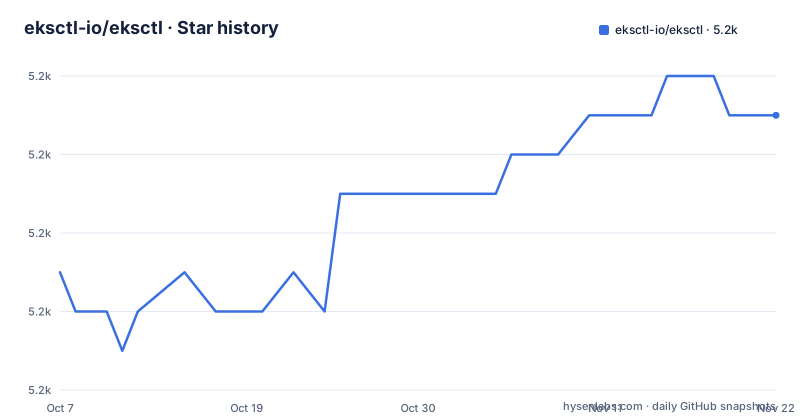
- eksctl-io/eksctl5,219 ★ · +4
| Repository | 2026-10-07 | 2026-11-22 |
|---|---|---|
| eksctl-io/eksctl | 5.2k | 5.2k |
4 Stars in the last 46 days, measured from the daily GitHub snapshot. Compare with other projects
Editorial analysis
One command, and what it quietly decides for you
The pitch is a single command. `eksctl create cluster` creates a cluster on EKS, Amazon's managed Kubernetes service for EC2, and the README leads with the fact that you can do it in minutes.
What that command chooses is spelled out immediately after, as a list of defaults: an exciting auto-generated name such as "fabulous-mushroom-1527688624", two `m5.large` nodes with the README noting that this instance type suits most common use cases and is good value, and defaults for the rest. The auto-generated name is a small touch that tells you the tool is optimised for the first run rather than for reproducibility. For anything you intend to keep, you will replace it with a name of your own.
The important architectural fact is in the second line of the README: eksctl is written in Go and uses CloudFormation. That single word explains most of this project's behaviour.
Install paths, and which one the project wants you to use
The README is direct about installation: eksctl is available from official releases, and it recommends installing only from the official GitHub releases. Third-party installers exist and are documented, with a clear advisory that AWS does not maintain nor support those methods, at your own discretion.
The Unix path builds a platform string from `uname` and then downloads the tarball, and it includes an optional checksum verification step against `eksctl_checksums.txt` that is worth taking rather than skipping:
# for ARM systems, set ARCH to: `arm64`, `armv6` or `armv7`
ARCH=$(uname -m | sed 's/x86_64/amd64/' | sed 's/aarch64/arm64/')
PLATFORM=$(uname -s)_$ARCH

curl -sLO "https://github.com/eksctl-io/eksctl/releases/latest/download/eksctl_$PLATFORM.tar.gz"

# (Optional) Verify checksum
curl -sL "https://github.com/eksctl-io/eksctl/releases/latest/download/eksctl_checksums.txt" | grep $PLATFORM | sha256sum --check

tar -xzf eksctl_$PLATFORM.tar.gz -C /tmp && rm eksctl_$PLATFORM.tar.gz

sudo install -m 0755 /tmp/eksctl /usr/local/bin && rm /tmp/eksctl
The mapping from `uname -m` output to release artefact names is the fiddly part, and it is why that first line exists at all: the release artefacts are named `eksctl_Darwin_arm64` and the like, while the machine reports `arm64` or `aarch64`.
Windows gets four direct download links, AMD64 through ARMv7, plus a documented checksum route using `CertUtil -hashfile` in Command Prompt or `Get-FileHash` in PowerShell, and a Git Bash variant that unzips into `$HOME/bin`. Docker is one line, since every release and release candidate pushes an image to `public.ecr.aws/eksctl/eksctl`:
docker run --rm -it public.ecr.aws/eksctl/eksctl versionThe third-party routes are Homebrew and MacPorts on macOS and chocolatey and scoop on Windows. The README marks them not recommended and advises that AWS does not maintain nor support these methods of installation.
The prerequisites table is the real documentation
Before any of that you need AWS API credentials configured, and the README says what works for the AWS CLI or any other tool such as kops or Terraform should be sufficient, using either the `~/.aws/credentials` file or environment variables.
The less obvious prerequisite is a second tool. You also need AWS IAM Authenticator for Kubernetes available as `aws-iam-authenticator`, or `aws eks get-token` from AWS CLI version 1.16.156 or greater, in your `PATH`. eksctl creates the cluster but does not replace your kubeconfig authentication, so this is a hard dependency rather than a convenience.
Then there is the table of minimal access levels for the IAM account used for cluster creation. CloudFormation needs Full Access. EC2 needs Full for Tagging and Limited List, Read, Write. EC2 Auto Scaling needs Limited List and Write. EKS needs Full Access. IAM needs Limited including Permissions Management. Systems Manager needs Limited List and Read. The inline policy JSON is linked from a Minimal IAM Policies page on the site.
Permissions Management on IAM and Full Access on CloudFormation are the two entries that make people pause. This is the reason to read the policy page before the first run: the first attempt failing on an IAM error is an expensive way to learn that.
A Go module still named after the company it outgrew
The repository lives under `eksctl-io` on GitHub and is described as the official CLI for Amazon EKS, but the Go module path is a reminder of where it started:
module github.com/weaveworks/eksctl

go 1.26.5
The Homebrew tap in the README is `weaveworks/tap` for the same reason. eksctl began at Weaveworks and moved into an `eksctl-io` organisation, and the import path stayed put. Changing a Go module path is a breaking change for anything that imports it.
The dependency list in `go.mod` is the clearest statement of what this tool actually talks to. It uses the v2 AWS SDK with individual service clients: `service/cloudformation`, `service/ec2`, `service/eks`, `service/iam`, `service/autoscaling`, `service/kms`, `service/outposts`, `service/ssm`, `service/sts` and `service/cloudwatchlogs`. Two entries are more revealing than the rest. `github.com/awslabs/amazon-eks-ami/nodeadm` is the node bootstrap path, and `github.com/cloudflare/cfssl` is a certificate authority library.
There is also a comment at the top of `go.mod` that reads like a maintainer note: run `make generate-all`, `make lint` and `make check-all-generated-files-up-to-date` after changes to the file. A project that tells you how to verify generated code is up to date is a project where generated code is load-bearing.
The tree is organised around generated code and tests
Thirty-three top level entries, and the ones that matter for understanding the project are `pkg/`, `cmd/`, `userdocs/`, `integration/`, `examples/` and the four Makefiles.
`cmd/` holds command entry points, which is the standard Go layout, and `pkg/` holds the bulk of the implementation. The Makefile names the pieces worth knowing about. It defines a variable pointing at `pkg/apis/eksctl.io/v1alpha5/zz_generated.deepcopy.go`, which is the generated deep-copy code for the cluster config API. The `v1alpha5` in that path is the config schema version, and the `zz_` prefix is the convention that marks a file as generated and not to be edited.
The Makefile also declares the generated AWS SDK mocks with a wildcard over `pkg/eks/mocks/*API.go`, and groups both under a variable called `conditionally_generated_files`. The word conditionally is doing work: not everything is regenerated on every run, and the Makefile has a target that regenerates unconditionally before a build. There is a `.mockery.yaml` at the top level, which is the configuration for the mock generator, so the mocks are produced rather than written by hand.
The `Makefile` help target is self-documenting, with an awk one-liner that formats target names and descriptions into a usage block, including a separate Windows branch because the shell differs. `Makefile.docker`, `Makefile.common` and `Makefile.docs` are included from the top, and `netlify.toml` with a `CNAME` at the root is how the documentation site at eksctl.io is built and hosted. `userdocs/src/usage/auto-mode.md` and `userdocs/src/usage/hybrid-nodes.md` are the two documentation files the README links for the newest features, which tells you the docs live in the repository rather than in a separate system.
What changed in 0.229.0 and 0.230.0
Two releases and one release candidate are recorded. Version 0.230.0 shipped on 2026-08-14, and version 0.231.0 shipped on 2026-10-02, with a release candidate earlier the same day.
The version numbering is the other thing to understand. eksctl is at 0.231.0 while the README says EKS Auto Mode and EKS Hybrid Nodes each require version 0.195.0 or greater. The three most recent releases here span 2026-08-14 to 2026-10-02.
Editorial conclusion
eksctl earns its place by turning cluster creation into one command, with config files like those in examples/ that are reviewable in a pull request rather than buried in console clicks. Read the minimal IAM policy page before your first run so the first attempt is not a permissions error, keep the version pinned rather than tracking latest, and treat config changes the way you would treat infrastructure code.
Frequently asked questions
What is the difference between eksctl and kubectl?
They operate at different layers. eksctl creates and manages the cluster infrastructure itself, and the README says it uses CloudFormation. kubectl talks to a running cluster's API server to deploy and inspect workloads. The README also notes you need AWS IAM Authenticator for Kubernetes, or `aws eks get-token` from AWS CLI 1.16.156 or greater, in your PATH for authentication after cluster creation.
How do I install eksctl?
The README recommends installing only from the official GitHub releases. On Unix you derive a platform string from `uname`, download the matching tarball, optionally verify it against `eksctl_checksums.txt`, and install the binary into `/usr/local/bin`. For every release and release candidate there is also a container image at `public.ecr.aws/eksctl/eksctl`, run with `docker run --rm -it public.ecr.aws/eksctl/eksctl version`. Third-party installers exist for Homebrew, MacPorts, chocolatey and scoop, but the README advises that AWS does not maintain or support them.
What permissions does my AWS account need to create a cluster with eksctl?
The README publishes a minimal access table. CloudFormation and EKS need Full Access. EC2 needs Full for Tagging and Limited List, Read and Write. EC2 Auto Scaling needs Limited List and Write. IAM needs Limited List, Read, Write and Permissions Management. Systems Manager needs Limited List and Read. The inline policy JSON is published on the eksctl site under Minimal IAM Policies.
Official sources
Add this badge to your README
If you maintain this project, the badge below links readers to this analysis and shows its maintenance status from the daily GitHub snapshot. Paste the markdown into your README; add ?metric=license or ?metric=stars to the image URL for a different field.

[](https://hysenlabs.com/projects/eksctl-io-eksctl)Star history chart for your README
[](https://hysenlabs.com/projects/eksctl-io-eksctl)Was this useful?