adk web: the developer UI that ships with Google's Agent Development Kit
Agent Development Kit Web (adk web) is the built-in developer UI that is integrated with Agent Development Kit for easier agent development and debugging.
At a glance
- What is it?
- adk web is an Angular developer interface for inspecting and debugging agents built with the Agent Development Kit, covering events, tracing, artifacts, evaluations and an agent builder. It is a separate front end that proxies to a running adk web backend, so it needs both npm and a Python or Java ADK install to be useful.
- Who is it for?
- adk web suits a developer working on agents with the ADK who needs to see the event stream, the trace and the artifacts of a run rather than reading logs, and who is happy with a two process development loop.
- Can I use it commercially?
- Yes. Apache-2.0 is a permissive licence: you can use, modify and sell software built on it, as long as you keep its copyright and licence notices.
- Is it still maintained?
- Yes. The repository last received commits 1 day ago.
- What is it written in?
- Mainly TypeScript, according to GitHub's language statistics.
Answers come from the project's GitHub data, last synced on November 7, 2026, and from our analysis. They are not legal advice.
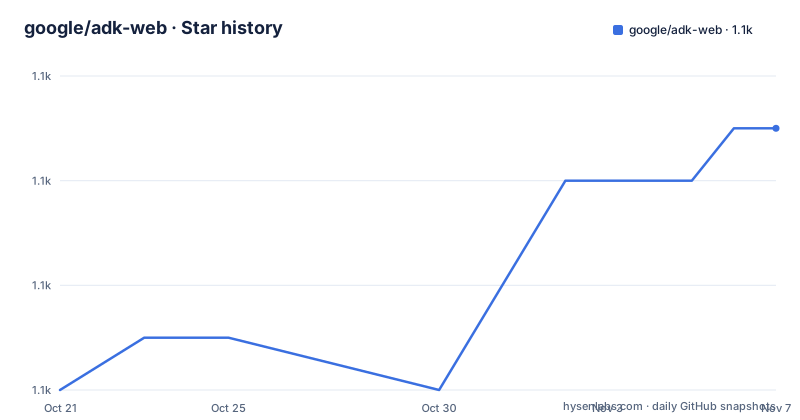
Star history
- google/adk-web1,063 ★ · +5
| Repository | 2026-10-21 | 2026-11-07 |
|---|---|---|
| google/adk-web | 1.1k | 1.1k |
5 Stars in the last 17 days, measured from the daily GitHub snapshot. Compare with other projects
Editorial analysis
What adk web is: the developer UI for ADK, not the framework itself
Agent Development Kit Web is described as the built-in developer UI that is integrated with the Agent Development Kit for easier agent development and debugging. The ADK itself is described as a flexible and modular framework for developing and deploying AI agents, which is optimised for Gemini and the Google ecosystem while being model-agnostic and deployment-agnostic and built for compatibility with other frameworks. The stated design goal of ADK is to make agent development feel more like software development. adk web is the piece that delivers that promise in practice, because it turns an agent run into something you can inspect rather than something you read about in a log file. This repository is only the front end. The framework lives in the separate google-adk Python and Java repositories, and the samples are in google/adk-samples, with the documentation at google.github.io/adk-docs.
What the UI actually shows: events, tracing, artifacts and evaluations
The Screenshots section names the views, and the list is the feature list. Events is the first, which is the event stream an agent produced during a run, the equivalent of watching a conversation happen. Tracing is the second, which is the call graph behind the run, so you can see which tool was called in which order and how long each step took. Artifacts is the third, covering the files and binary outputs the agent generated. Evaluations is the fourth, and it is a distinctly different kind of view from the others, because an evaluation is a judgement about output quality rather than a record of what happened. Then there is an agent builder and assistant screen, and the README says and more. The distinction between the first three and the fourth matters in practice, because inspecting a run tells you the agent did the wrong thing, while evaluations tell you it did the right thing badly.
Two processes, one browser origin, and why the proxy exists
Running adk web takes two terminals and two commands. In the first you install the dependencies with npm install and start the front end with npm run serve. In the second you run adk web, which starts the API server. The reason for the split is stated directly: the dev server proxies API calls through to the backend, so from the browser's point of view everything is same-origin. That is not a detail, it is the design. A same-origin setup means no CORS configuration, no allow_origins flag, and the browser sees one origin, so the front end does not need to know or care where the backend actually lives. The README notes that the --allow_origins and --host=0.0.0.0 flags are no longer needed, which tells you that earlier versions of this setup required them and that the proxy approach removed the need. Once both are running you go to localhost:4200 and start developing.
npm install
npm run serveadk webPorts and the ADK_BACKEND variable, including the restart rule
Each side picks its own port, and the two are configured independently. You tell the dev server where the backend is with ADK_BACKEND, and you pass a port through to ng serve for the front end, so a backend on port 9000 and a front end on port 5555 is a matter of adk web --port 9000 in one terminal and ADK_BACKEND pointing at that address with npm run serve -- --port 5555 in the other. The asymmetry is deliberate: the backend never needs to know the front end's port, and ADK_BACKEND accepts any URL including a remote host, so a backend on another machine works, although a backend reachable from another machine still needs --host 0.0.0.0. There is one operational trap, and the README states it plainly: the proxy configuration is read once at startup, so you must restart npm run serve after changing ADK_BACKEND. There is also a prohibition, do not pass --url_prefix in this two process setup, because the prefix would not match the dev server's proxy routes, and the reverse proxy prefix behaviour is exercised by the backend's own tests instead.
adk web --port 9000                                              # backend
ADK_BACKEND=http://127.0.0.1:9000 npm run serve -- --port 5555   # frontend
The prerequisites are wide: Node, Angular CLI and an ADK in Python or Java
The prerequisites list names five things, and it is worth noticing that the list spans three toolchains. You need npm, you need Node.js, you need the Angular CLI, you need google-adk for either Python or Java, and you need the repository itself cloned. So a developer working in the Python ADK has a Node and Angular install purely to run the UI, and the same is true of the Java ADK user. That is a real cost for a debugging tool, though it is mitigated by the fact that the front end is a normal Angular application that a front end developer would already have. There is one troubleshooting note for the case where the backend command is not found, and it is the obvious one: be sure to install google-adk, or remember to activate your virtual environment if you are using one.
The Angular dependency list reveals what the UI is made of
The package.json is a good map of the implementation. It is Angular 21, with the standard packages plus Angular Material and the CDK for the component layer, and the build is driven by angular.json. The interesting dependencies are the ones that reveal the shape of the features. mermaid for diagram rendering and ngx-vflow for graph rendering are what the tracing view and the agent builder are built on, and @viz-js/viz is a Graphviz renderer, so a workflow drawn as a graph in the agent builder can be laid out properly rather than by hand. prismjs with ngx-markdown for the markdown rendering, so agent output and documentation read as formatted text. For the data side, there is vanilla-jsoneditor for editing JSON, yaml and zod for parsing and validation, safevalues for XSS-safe DOM value handling, string-to-color for stable colours per item, uuidv7 for identifiers, and rxjs for the reactive streams that the live event view runs on.
The testing quirk that comes from running inside Google
The Contributing section has a Testing quirks subsection, and it is short but consequential. The tests in this repository also run in Google's internal test environment, so testing code must follow a few rules, and the first rule is specific: initTestBed() from ./src/app/testing/utils.ts must be called before TestBed.configureTestingModule(). That constraint is not about the framework, it is about the fact that the test code now has to work in an environment the project does not control, and the fix is a helper that is always called first. The test stack is Karma with Jasmine, karma-chrome-launcher, karma-coverage and the HTML reporter, with a karma.conf.js at the repository root, and the scripts are ng test, ng build, ng build with the development configuration, and a serve script that uses ng serve with a poll interval of 1000 so the dev server picks up file changes promptly.
Licence, preview status and release cadence
The project is licensed under the Apache 2.0 License with the text in the LICENSE file, and the badge at the top of the README confirms it. The repository is not archived and the last push was on 2026-10-08, with releases v1.0.5 on 2026-08-26, v1.0.6 on 2026-09-24 and v1.0.7 on 2026-10-01, so this is a component shipping regularly. There is one caveat that deserves attention, and it sits in a Preview section near the end of the README. The feature is subject to the Pre-GA Offerings Terms in the General Service Terms section of the Service Specific Terms, pre-GA features are available as is and might have limited support, and the launch stage descriptions are linked. In other words, the developer UI is offered as a preview with a reduced support commitment, which is a reasonable position for an internal tooling surface but worth knowing before you make it the front door of a team's agent development.
Editorial conclusion
adk web suits a developer working on agents with the ADK who needs to see the event stream, the trace and the artifacts of a run rather than reading logs, and who is happy with a two process development loop. It is the wrong choice for anyone who wants a single command that starts everything, since the front end and the backend run separately and the front end needs the backend's address, and a poor fit if you are not already inside the ADK ecosystem, because the UI has no value without an ADK agent to point it at. Before adopting it, install the Angular CLI, Node.js, npm and either the Python or the Java google-adk package, start the backend and then the front end, and read the port configuration section, because the proxy configuration is read once at startup and a change to ADK_BACKEND needs a restart of npm run serve.
Frequently asked questions
What is adk web and what does it show?
It is the built-in developer UI for the Google Agent Development Kit, and the documented views cover events, tracing, artifacts, evaluations and an agent builder with an assistant. It is a separate Angular front end that talks to a running ADK backend.
How do I run adk web locally?
You need npm, Node.js, the Angular CLI and either the Python or the Java google-adk package. Then run npm install and npm run serve in one terminal, run adk web in another, and open localhost:4200. The dev server proxies API calls to the backend so everything is same-origin.
How do I change the ports for adk web?
Each side picks its own port. Run adk web --port 9000 for the backend and set ADK_BACKEND=http://127.0.0.1:9000 with npm run serve -- --port 5555 for the front end. The backend never needs to know the front end's port, and the proxy configuration is read once at startup, so you must restart npm run serve after changing ADK_BACKEND.
Can I point adk web at a remote backend?
Yes, ADK_BACKEND accepts any URL including a remote host. A backend reachable from another machine still needs --host 0.0.0.0. You should not pass --url_prefix in this two process setup, because the prefix would not match the dev server's proxy routes.
What are the testing requirements for adk-web contributors?
The tests also run in Google's internal test environment, so test code must follow a few rules. In particular, initTestBed() from ./src/app/testing/utils.ts must be called before TestBed.configureTestingModule(). The stack is Karma with Jasmine and the ng test script.
Official sources
Add this badge to your README
If you maintain this project, the badge below links readers to this analysis and shows its maintenance status from the daily GitHub snapshot. Paste the markdown into your README; add ?metric=license or ?metric=stars to the image URL for a different field.

[](https://hysenlabs.com/projects/google-adk-web)Star history chart for your README
[](https://hysenlabs.com/projects/google-adk-web)Was this useful?