wz_mini_hacks for Ingenic T20 and T31 Cameras
wz camera mods... make your camera better.
At a glance
- What is it?
- wz_mini_hacks is a firmware modification package for selected Ingenic T20 and T31 based cameras. It adds networking, streaming, USB, and file-server features, but the README warns that it is not in active development and can permanently damage or brick a device.
- Who is it for?
- wz_mini_hacks may suit an owner of a supported T20 or T31 camera who understands firmware recovery, accepts the lack of support, and needs features such as RTSP, WireGuard, USB networking, or webcam mode. It is a poor choice for users seeking a documented release history, a confirmed compatibility guarantee, or a reversible low-risk configuration.
- Can I use it commercially?
- Not without permission. GitHub finds no licence file in the repository, and without a licence all rights are reserved by default: you may read the code but not reuse it. Check the README, or ask the authors, before using it.
- Is it still maintained?
- Yes. The repository last received commits 151 days ago.
- What is it written in?
- Mainly Shell, according to GitHub's language statistics.
Answers come from the project's GitHub data, last synced on November 7, 2026, and from our analysis. They are not legal advice.
Star history
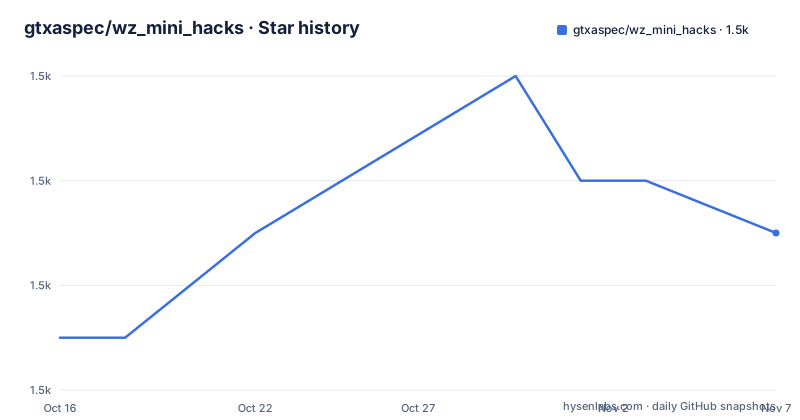
- gtxaspec/wz_mini_hacks1,535 ★ · +2
| Repository | 2026-10-16 | 2026-11-07 |
|---|---|---|
| gtxaspec/wz_mini_hacks | 1.5k | 1.5k |
2 Stars in the last 22 days, measured from the daily GitHub snapshot. Compare with other projects
Editorial analysis
Why wz_mini_hacks Exists Beyond Camera Firmware
wz_mini_hacks addresses a practical limitation of the firmware shipped with some Ingenic based T20 and T31 cameras. The README presents the project as a way to run additional firmware features while retaining root access, without requiring hardware modifications. The intended users are camera owners who want more control over local networking, video access, storage, and USB behavior than the original firmware exposes.
The feature set is broad. The README lists RTSP support through go2rtc, RTMP streaming through go2rtc, WireGuard, IPv6, CIFS or Samba access, iptables support, remote SD-card file access, USB tethering through RNDIS, and USB gadget networking through USB CDC-NCM. It also describes USB mass storage for SSDs, HDDs, and flash drives, audio playback through the camera speaker, webcam mode over UVC, and a custom boot script.
This is not a general camera-management application. It changes the environment around the camera and exposes services that may be useful on a private network. The README says the project was created to track local feral cats, which explains the original need for dependable local video access. It does not claim compatibility with every Wyze-branded or Ingenic device, and it explicitly limits the project to Ingenic T20 and T31 based devices.
The security warning matters because the package can expose the device to the open internet depending on network configuration. That statement does not identify a particular service or guarantee a particular exposure. It does mean the operator must understand how camera services, ports, routing, and firewall rules interact before connecting the device to an untrusted network.
Repository Structure and Modification Mechanism
The repository layout suggests a firmware package assembled from several parts rather than a single conventional application. The top-level entries include `SD_ROOT/`, `src/`, `v2_install/`, `documentation/`, `generate_checksum.sh`, and `file.chk`. That structure indicates that boot-time files, source material, installation resources, and documentation are separate concerns.
The README gives the operational model. A microSD card of at least 256MB is required, and the installation instructions are delegated to the project's Setup & Installation wiki. The documented uninstall path is removal of the added files from the microSD card, or not using the card at all. This is a meaningful design difference from Thingino, which the README describes as alternate firmware that must be flashed. Removing the card-based changes may be easier, but the documentation does not explain how to recover from a change that prevents normal startup.
The package is designed to work across different firmware versions, but compatibility is not guaranteed for older firmware. The README recommends updating to the latest stable or beta firmware and says most features should still work, referring readers to the Firmware-Support wiki for details. That is a qualified compatibility claim, not a matrix of tested versions. The repository's scripts and source directories may contain the implementation details needed to judge a particular camera, but the README does not specify the boot chain, startup sequence, binary components, or checksum verification procedure.
The lack of a documented rollback procedure is a concrete limitation. The project explicitly says that permanent damage is possible, and the warning says a failed state may require restoring the device. Any prospective user would therefore need more than the feature list before inserting a card.
Camera Compatibility and Network Exposure
The clearest boundary for adoption is hardware and firmware compatibility. wz_mini_hacks applies to Ingenic based T20 and T31 devices only. The README does not provide a complete list of camera models, board revisions, storage configurations, or firmware build numbers. It also warns that very old firmware may not work.
Several listed features move the camera beyond a simple local camera. RTSP and RTMP streaming depend on media and network configuration. WireGuard, IPv6, Samba, iptables, USB networking, and USB gadget support can alter how the camera communicates with other devices. The README specifically mentions exposing the device to the open internet as a possible result of network configuration, while placing responsibility for network security on the user.
This makes the project most appropriate for someone who already understands camera firmware and can inspect the resulting network configuration. It is less suitable for a household installation where a cloud account and the vendor application are the only expected interfaces. There is no support offered with the release, and the README says not to contact the manufacturer because the manufacturer cannot support the modification.
The project also does not promise that every feature works on every supported camera. The feature list includes `v4l2rtspserver` but marks it deprecated, while go2rtc is presented as the current RTSP path in the README. That distinction matters when planning a streaming setup because a deprecated component may have a different maintenance and compatibility outlook.
Installation Tutorial and First Use
The README does not include installation commands, configuration snippets, or a complete first-use procedure. It directs users to the Setup & Installation section of the repository wiki. The README also points to the Changelog for update information and the Firmware-Support wiki for compatibility details. The wiki is the documented source for the actual installation steps.
The repository exposes `SD_ROOT/`, `v2_install/`, `generate_checksum.sh`, and `file.chk` as installation-related paths. The README does not document their command-line usage, so these paths should not be treated as executable instructions without consulting the wiki.
SD_ROOT/
v2_install/
generate_checksum.sh
file.chk
The documented preparation is limited but concrete. First, confirm that the device is based on an Ingenic T20 or T31 processor. Next, prepare a microSD card with a capacity of at least 256MB. The README says that a higher class card should provide better performance, but it does not define a speed class or a tested card model. The operator must then follow the wiki's installation procedure and firmware-support page before placing the package on the card.
For a first real use, the relevant first choice is the feature to expose. RTSP, RTMP, Samba, USB networking, and webcam mode have different dependencies and security consequences. The README does not document a universal verification command or a post-install test page. It also does not say how to confirm that the boot script completed successfully. Therefore, the first-use procedure cannot be completed from the README alone. Device-specific recovery instructions should be located before writing to the card.
Maintenance, Licensing, and Support Costs
The repository is not archived, and its last push was on 2026-06-09. The README separately states that the project is not in active development and recommends Thingino instead. The repository has no GitHub releases, so there is no release history available to define an upgrade track. The absence of releases does not prove that no updates exist, but it does mean that this repository's release history is not available as a maintenance signal.
Maintenance cost is therefore more than copying a new file onto a card. Camera firmware compatibility may change as the base firmware changes, and the README does not promise compatibility with really old firmware. A failed boot or damaged configuration may require recovery work. The project's custom boot script and firmware integration also make it important to preserve the exact files and checksum information relevant to the installed version.
The repository listing does not identify a license, and the README contains no licensing terms. No permission to modify, redistribute, or commercially use the code can be inferred from the README or repository entry list. The `generate_checksum.sh` filename indicates that the repository includes checksum-related tooling, but the README does not explain its usage or whether it is required for installation.
Thingino is the clearest alternative named by the project. It is an alternate firmware that must be flashed, which makes uninstall less straightforward than removing wz_mini_hacks files. In exchange, the README says it is more feature-complete. Users choosing between the two must weigh reversible file removal against a broader firmware base, not merely compare their feature lists.
wz_mini_hacks Versus Thingino for Camera Owners
Thingino is an actual alternative named in the README, and the difference is primarily the installation model. wz_mini_hacks adds changes through the camera's microSD-card environment, which the project presents as easy to uninstall by removing files or omitting the card. Thingino replaces the camera firmware through flashing, so removing it is less convenient according to the README.
The trade-off is not simply flexibility against completeness. wz_mini_hacks lists streaming, networking, storage, USB, and webcam functions, but it warns of permanent damage, offers no support, and lacks a documented release history. Thingino is described by the project as more feature-complete, although the README does not enumerate its features or provide compatibility guidance. A direct capability comparison cannot therefore be established from the README alone.
For an expert who needs the card-based modification path and can accept device-specific risk, wz_mini_hacks may be the more reversible choice. For an owner who wants the alternative firmware recommended by the project, Thingino may be more appropriate despite the flashing requirement. The decision should start with the exact camera model and the recovery procedure available for each path.
Editorial conclusion
wz_mini_hacks may suit an owner of a supported T20 or T31 camera who understands firmware recovery, accepts the lack of support, and needs features such as RTSP, WireGuard, USB networking, or webcam mode. It is a poor choice for users seeking a documented release history, a confirmed compatibility guarantee, or a reversible low-risk configuration. Before adoption, verify the exact camera model, inspect the wiki's installation and firmware-support instructions, confirm that recovery is possible, and review the network changes required by the intended configuration.
Frequently asked questions
What devices does wz_mini_hacks support?
The README limits the project to Ingenic based T20 and T31 devices. It does not claim support for every camera using those processors, and compatibility with older firmware is not guaranteed.
How do I install wz_mini_hacks?
The README directs users to the Setup & Installation section of the project wiki. It requires a microSD card of at least 256MB, but the README does not provide the actual installation commands or configuration steps.
Can wz_mini_hacks be removed without reflashing the camera?
The README says uninstalling can be done by removing the added files from the microSD card, or by not using the card. It does not document a recovery procedure for a camera that fails to start after installation.
Official sources
Add this badge to your README
If you maintain this project, the badge below links readers to this analysis and shows its maintenance status from the daily GitHub snapshot. Paste the markdown into your README; add ?metric=license or ?metric=stars to the image URL for a different field.

[](https://hysenlabs.com/projects/gtxaspec-wz-mini-hacks)Star history chart for your README
[](https://hysenlabs.com/projects/gtxaspec-wz-mini-hacks)Was this useful?