hwdsl2/docker-ipsec-vpn-server: An IPsec Server in One Docker Command
Docker image to run an IPsec VPN server, with IPsec/L2TP, Cisco IPsec and IKEv2. Auto-generates server config and supports VPN client setup on Linux, Windows, macOS, iOS and Android.
At a glance
- What is it?
- This image bundles Libreswan and xl2tpd into a container that generates its own credentials on first boot, so a self-hosted IPsec endpoint becomes a single docker run. It is a good fit for small teams and home labs that need native-client IPsec, and the wrong tool for anyone who wants a modern, kernel-level tunnel or a Windows-hosted container.
- Who is it for?
- Adopt this image if you want IPsec/L2TP, Cisco IPsec or IKEv2 termination on a Linux host and would rather not manage Libreswan and xl2tpd by hand. Do not adopt it if your container host is Docker for Windows, if you want to run it on Synology NAS, or if you need WireGuard-class throughput and a much smaller attack surface.
- Can I use it commercially?
- Check first. The repository uses a licence we do not classify automatically, so read its LICENSE file before any commercial use.
- Is it still maintained?
- Yes. The repository last received commits 6 days ago.
- What is it written in?
- Mainly Shell, according to GitHub's language statistics.
Answers come from the project's GitHub data, last synced on November 14, 2026, and from our analysis. They are not legal advice.
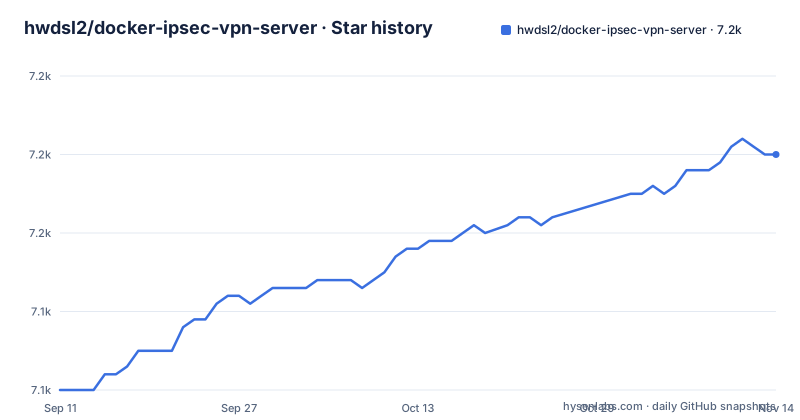
Star history
- hwdsl2/docker-ipsec-vpn-server7,160 ★ · +30
| Repository | 2026-09-11 | 2026-11-14 |
|---|---|---|
| hwdsl2/docker-ipsec-vpn-server | 7.1k | 7.2k |
30 Stars in the last 64 days, measured from the daily GitHub snapshot. Compare with other projects
Editorial analysis
The problem it removes: hand-building Libreswan and xl2tpd
Standing up an IPsec server by hand means installing Libreswan, configuring xl2tpd for L2TP, generating certificates for IKEv2, writing ipsec.conf and ipsec.secrets, and keeping all of that in sync across upgrades. The README frames this image as the shortcut: it is based on Alpine 3.23 or Debian 12 and packages Libreswan with the xl2tpd daemon inside a single container. The stated audience is anyone who wants encrypted traffic on untrusted networks, with the README naming coffee shops, airports and hotel rooms as the motivating cases. The practical target is narrower than that phrasing suggests: you need a Linux server with a public IP address or DNS name, Docker installed, and UDP 500 and 4500 open in the firewall. If you have a spare VPS and want native IPsec clients rather than an app install, this is the shape of project you are looking for.
What actually runs inside the container
The image supports three connection modes from the same server: IPsec/L2TP, Cisco IPsec, and IKEv2. Libreswan handles the IPsec negotiation; xl2tpd provides the L2TP daemon that the L2TP mode depends on. The README states that IKEv2 is offered with ciphers it describes as strong and fast, naming AES-GCM as an example. The image is multi-arch, built for linux/amd64, linux/arm64 and linux/arm/v7. Two variants ship: the default Alpine build, which the README puts at roughly 19 MB compressed, and a Debian variant tagged :debian at roughly 62 MB compressed. Both carry Libreswan 5.4 and both list IPsec/L2TP, Cisco IPsec and IKEv2 as supported. The README notes the images are not currently compatible with Synology NAS systems, which is a constraint on where this can run, not a bug report.
First boot generates the credentials, and the volume keeps them
The mechanism the README leads with is automatic generation: on first start the container creates VPN credentials and IKEv2 configuration, and it can emit profiles that auto-configure iOS, macOS and Android devices. A helper script ships in the image for managing IKEv2 users and certificates, so adding or removing a certificate-based client does not require editing files by hand. State lives in a Docker volume mounted at /etc/ipsec.d, which is why the quick-start command names the volume ikev2-vpn-data. That volume is the thing to back up. If you delete it, the credentials and the IKEv2 material go with it, and every client you configured has to be re-enrolled. The README also lists an env-file path for supplying your own values instead of accepting the generated ones, which matters for reproducibility: a random pre-shared key is fine for one person, less so for a team that needs to distribute the same credentials deliberately.
Running it: the command, the mounts, and the env keys
The README gives this as the quick-start invocation, reproduced here as written:
docker run \ --name ipsec-vpn-server \ --restart=always \ -v ikev2-vpn-data:/etc/ipsec.d \ -v /lib/modules:/lib/modules:ro \ -p 500:500/udp \ -p 4500:4500/udp \ -d --privileged \ hwdsl2/ipsec-vpn-server
Two details in that block deserve attention. The /lib/modules mount is read-only and maps the host kernel modules into the container, which is how the IPsec stack reaches the host kernel. The --privileged flag is not optional in the documented command; it grants the container broad access to the host, so this image should run on a host you control and not alongside untrusted workloads. For configuration, the README states all variables are optional and that an empty env file is enough for a working server. The three it documents are VPN_IPSEC_PSK, VPN_USER and VPN_PASSWORD, declared in an env file such as the provided vpn.env.example. Download paths are docker pull hwdsl2/ipsec-vpn-server, or quay.io/hwdsl2/ipsec-vpn-server followed by docker image tag to rename it locally. Building from source is documented separately in docs/advanced-usage.md, and the README shows a sed command against Dockerfile and Dockerfile.debian to pin SWAN_VER if you want the older Libreswan 4.15.
Where it breaks: privileged mode, Windows hosts, and NAS installs
The limitations are stated plainly in the README rather than buried. Docker for Windows is not supported at all. Docker for Mac is described as an advanced-user option, and even then the README warns that IPsec/L2TP mode may require restarting the container once with docker restart ipsec-vpn-server before it works. Synology NAS systems are called out as incompatible with both image variants. The --privileged requirement means the container is not sandboxed in any meaningful sense, which is the opposite of what you want if your threat model includes the container itself. There is also a version ceiling to consider: the default is Libreswan 5, and dropping to 4.x means cloning the repository and rebuilding, which puts you on a self-maintained image.
The honest alternative: WireGuard, from the same maintainer
The README itself points to hwdsl2/docker-wireguard and hwdsl2/docker-openvpn as sibling projects, and to setup-ipsec-vpn for the same IPsec server without Docker. The WireGuard comparison is the useful one. WireGuard is a kernel-level tunnel with a much smaller codebase and a fixed set of modern primitives; it does not carry the L2TP daemon, the IPsec policy database, or the legacy compatibility surface that lets this image serve Cisco IPsec clients. The trade-off runs the other way too, and it is the reason this image still exists: IPsec and IKEv2 are natively supported by Windows, macOS, iOS and Android without installing anything, while WireGuard generally requires a client app. If your users are on managed devices where you cannot install software, the native-client argument outweighs the leaner protocol. If you control the endpoints and want fewer moving parts, the WireGuard image is the smaller thing to operate.
Maintenance, the licence field, and what to check before you deploy
The repository is active, not archived, with a last push on 2026-11-02, and the README states images are automatically built and published through GitHub Actions. The README also lists persistent data via a Docker volume, and the quick-start command mounts the named volume ikev2-vpn-data at /etc/ipsec.d. The licence field on the repository is reported as NOASSERTION, which means GitHub could not map the project to a recognised licence identifier. This article is not legal advice; if you are deploying commercially, read the LICENSE file in the repository and the upstream Libreswan and xl2tpd licences yourself before you ship. The README also links a companion book and a newsletter, which is worth knowing when you weigh how much of the surrounding material is documentation versus promotion. Before deploying, confirm three things on your own hardware: that the host kernel exposes the modules your IPsec stack needs, that your firewall actually forwards UDP 500 and 4500, and that you are comfortable running a privileged container on that machine.
Editorial conclusion
Adopt this image if you want IPsec/L2TP, Cisco IPsec or IKEv2 termination on a Linux host and would rather not manage Libreswan and xl2tpd by hand. Do not adopt it if your container host is Docker for Windows, if you want to run it on Synology NAS, or if you need WireGuard-class throughput and a much smaller attack surface. Before committing, verify on your own host that the kernel modules under /lib/modules load correctly, that UDP 500 and 4500 are reachable from outside, and that you have a plan for the VPN_IPSEC_PSK, VPN_USER and VPN_PASSWORD values, since a weak pre-shared key weakens every client that uses it.
Frequently asked questions
Does Docker work with a VPN server like hwdsl2/ipsec-vpn-server?
Yes, with the container standing in for a host install: the daemon runs privileged inside it, UDP 500 and 4500 are published from the host, and /lib/modules is mounted read only. The host still needs a public IP address or DNS name, plus both UDP ports open.
How do I create an IPsec VPN with hwdsl2/ipsec-vpn-server?
Run the published image with docker run and it generates VPN credentials and the IKEv2 configuration on first start. If you would rather fix the values, set VPN_IPSEC_PSK, VPN_USER and VPN_PASSWORD in an env file first; every variable is optional.
How do I add more VPN users to hwdsl2/ipsec-vpn-server?
Additional VPN users are supported and can be optionally declared in your env file. A helper script for managing IKEv2 users and certificates is included in the image as well.
Which systems can hwdsl2/ipsec-vpn-server not run on?
The images are not compatible with Synology NAS systems, and the image does not support Docker for Windows. On macOS with Docker for Mac, IPsec/L2TP mode may need one docker restart ipsec-vpn-server first.
Can hwdsl2/ipsec-vpn-server run Libreswan 4 instead of 5.4?
Not from the published image. You build it yourself after changing SWAN_VER in both Dockerfile and Dockerfile.debian, and the older version offered in the example is 4.15.
Official sources
Add this badge to your README
If you maintain this project, the badge below links readers to this analysis and shows its maintenance status from the daily GitHub snapshot. Paste the markdown into your README; add ?metric=license or ?metric=stars to the image URL for a different field.

[](https://hysenlabs.com/projects/hwdsl2-docker-ipsec-vpn-server)Star history chart for your README
[](https://hysenlabs.com/projects/hwdsl2-docker-ipsec-vpn-server)Was this useful?