gwen001/pentest-tools: a script collection for quick recon and probing
A collection of custom security tools for quick needs.
At a glance
- What is it?
- A loose set of Bash, Python and PHP scripts for DNS enumeration, CORS and CRLF checks, XSS and RCE probing, and quick port work. Useful as a grab bag for a single manual test, not as a maintained framework.
- Who is it for?
- Adopt gwen001/pentest-tools if you want a set of small, single-purpose scripts you can read in a few minutes and run against hosts you are authorised to test, and if you are comfortable that each script has its own interface and its own external dependencies such as netcat, nmap, parallel, phantomjs, xvfb or smtp-user-enum.
- Can I use it commercially?
- Not without permission. GitHub finds no licence file in the repository, and without a licence all rights are reserved by default: you may read the code but not reuse it. Check the README, or ask the authors, before using it.
- Is it still maintained?
- Yes. The repository last received commits 37 days ago.
- What is it written in?
- Mainly Python, according to GitHub's language statistics.
Answers come from the project's GitHub data, last synced on November 24, 2026, and from our analysis. They are not legal advice.
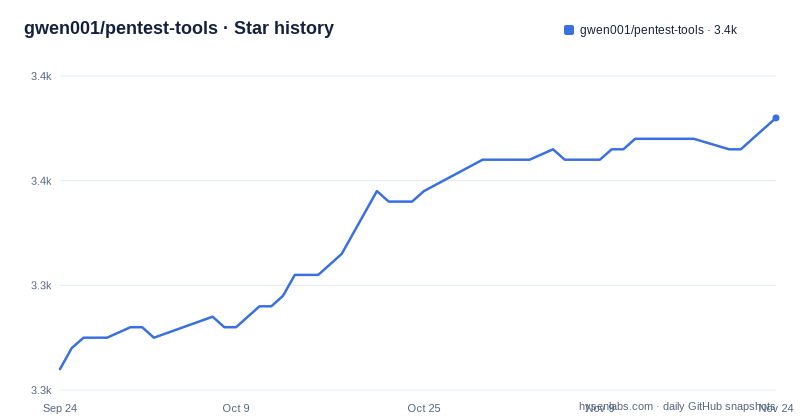
Star history
- gwen001/pentest-tools3,356 ★ · +24
| Repository | 2026-09-24 | 2026-11-24 |
|---|---|---|
| gwen001/pentest-tools | 3.3k | 3.4k |
24 Stars in the last 61 days, measured from the daily GitHub snapshot. Compare with other projects
Editorial analysis
What gwen001/pentest-tools is for, and who it is for
The project describes itself as "a collection of custom security tools for quick needs." That wording matters. There is no framework, no plugin API and no orchestrator. The repository is a flat directory of roughly fifty executables written in Bash, Python and PHP, each aimed at one narrow task: converting an IP into arpa format, testing CORS on a list of hosts, brute forcing subdomains from a wordlist, testing zone transfers, generating Google dorks, hashing a string with about forty algorithms.
The intended user is a penetration tester or bug bounty hunter who already knows which check they want to run and wants a short script for it. The listing makes that explicit: cors.py, crlf.py, rce.py, openredirect.py, smuggler.py and xss.py each test one class of issue against a list of hosts. If you are looking for a single tool that takes a target and produces a report, this is not it. The README gives one line per script and no usage examples, so reading the source before running it is the normal workflow rather than an edge case.
How the scripts are organised and what they actually do
The architecture is the filesystem. Top-level entries include the shell scripts (arpa.sh, bbhost.sh, dnsenum-brute.sh, mass_axfr.sh, ping-sweep-nc.sh, portscan-nc.sh, screensite.sh), the Python scripts (cors.py, crlf.py, extract-domains.py, filterurls.py, lfi.py, openredirect.py, quickhits.py, rce.py, resolve.py, smuggler.py, subalt.py, xss.py) and the PHP scripts (codeshare.php, crtsh.php, gdorks.php, hashall.php, ip-converter.php, ip-listing.php, pass-permut.php, pastebin.php, quick-hits.php, shodan.php, ssrf-generate-ip.php, testhttp.php).
The data flow is deliberately simple. Most scripts read a list of hosts or URLs from input, loop over it, and print results to standard output. Several delegate the heavy lifting to an external binary: bbhost.sh runs the host command through parallel, detect-vnc-rdp.sh checks ports 3389 and 5900 with netcat, ping-sweep-nmap.sh uses nmap, screensite.sh takes screenshots through xvfb, nrpe.sh drives Metasploit, and mass-smtp-user-enum-check.sh wraps smtp-user-enum. That delegation is the design: the repository supplies the loop and the parsing, and expects the underlying tool to be installed separately.
The Python side depends on a shared requirements.txt listing argparse, mmh3, requests, shodan, tldextract, termcolor, netaddr, colored, goop, lockfile, pythonwhois and queuelib. Some of those are old packages; the README does not pin versions, so installs resolve to whatever pip selects at the time. There are also two shared helper files, Utils.php and myutils.sh, plus static data files such as resolvers.txt, cloudflare-ip.txt and cloudflare-range.txt, which suggests a few scripts are meant to be pointed at those lists rather than at arbitrary input.
Installing gwen001/pentest-tools and running a first script
The README gives a three-command install. It clones the repository, changes into the directory and installs the Python dependencies. There is no package on PyPI, no container image and no install script mentioned.
git clone https://github.com/gwen001/pentest-tools
cd pentest-tools
pip3 install -r requirements.txt
After that, the Python scripts can be run directly. The README does not document the arguments for any of them, so the reliable way to start is to ask the script itself. Running a script with the standard help flag is the pattern to try first, since argparse appears in requirements.txt and is the usual argument parser for scripts of this shape.
python3 cors.py -hFor a first real use, pick a script whose purpose is unambiguous and whose input is a file. extract-domains.py is described as extracting the domain from a given URL or a list of URLs, which makes it a safe way to confirm the install works before you point anything at a live host.
python3 extract-domains.py -hThe shell scripts need their own dependencies. Before running bbhost.sh you need parallel and the host command; before ping-sweep-nmap.sh you need nmap; before screensite.sh you need xvfb; before the smtp-user-enum wrappers you need smtp-user-enum from pentestmonkey. The README lists those relationships in the one-line descriptions but does not give install commands for them, so treat each script as having its own prerequisites checklist.
Where the collection breaks down
The most visible limitation is documentation. Each tool gets a single sentence. There is no man page, no usage block, no example invocation and no description of output format. For a script like filterurls.py, described as classifying and displaying URLs by vulnerability types, the README does not say what the classes are or what the input looks like. You have to read the source.
The second limitation is that the collection is not uniform. Three languages, three dependency models, and a long list of external binaries mean that a working install of one script tells you nothing about the next. A machine that runs cors.py successfully may still fail on screensite.sh because xvfb is missing, or on nrpe.sh because Metasploit is not present.
The third is maintenance shape. The README carries a note that a big cleanup occurred in 2022-11, with some scripts archived and others moved to their own repositories, including apk-analyzer, cloudflare-origin-ip, csp-analyzer, detectify-cves, extract-endpoints, favicon-hashtrick, google-search, graphql-introspection-analyzer, keyhacks.sh and related-domains. The repository itself is not archived and its last push was on 2026-09-13, but the only listed release, v2.0.0, dates from 2022-12-02. There is no changelog and no documented upgrade path, so tracking what changed between the version you cloned and the current master means reading commit history.
Finally, the licence is a real gap. The README shows an MIT licence badge, but the repository has no licence file at the top level, and the metadata supplied for the project lists the licence as unknown. That badge is not a substitute for a LICENSE file if you need to redistribute the code inside a company.
How it differs from a scanner like Nuclei
The obvious alternative for template-driven checking is Nuclei, which takes a target and runs a library of YAML templates with a defined output format. The difference in approach is structural rather than cosmetic. Nuclei separates the check definition from the engine, so adding a check means writing a template. gwen001/pentest-tools has no engine and no template layer: each check is its own script with its own argument handling, and adding a check means writing another script in Bash, Python or PHP.
That has two consequences. On the Nuclei side you get consistency across checks and a single command for a whole run. On the pentest-tools side you get scripts short enough to read end to end in a few minutes and modify on the spot, which is the point of a collection described as being for quick needs. If your work is a single manual test where you want to change one line of logic, the script collection is easier to bend. If your work is a repeatable sweep across many targets with comparable results, the template engine wins on every axis except the effort of writing the first template.
A second alternative is to skip the collection entirely and use the underlying tools directly. Several scripts are thin wrappers: mass-smtp-user-enum-check.sh around smtp-user-enum, webdav-bruteforce.sh around Davtest, nrpe.sh around Metasploit. If you already script those tools yourself, the wrapper adds a loop and a parsing convention and little else.
Licence, upgrade cost and what to check before depending on it
The README displays an MIT badge, which normally means you can use, modify and redistribute the code with the licence text preserved. The repository does not include a licence file at the top level, and the project metadata records the licence as unknown. I am not giving legal advice, but the practical reading is that the badge alone is weak evidence for a compliance review. If the code is going into a commercial product or a client deliverable, that gap is worth resolving with the maintainer before you build on it.
The upgrade cost is the part that surprises people. There are no versioned tags beyond v2.0.0 from 2022-12-02 and no changelog. Pulling the latest master can change a script's behaviour or remove it, as the 2022-11 cleanup did for a set of tools that moved to separate repositories. If you depend on one script, pin the commit you cloned and diff before updating. The requirements.txt file is also unpinned, so a fresh pip3 install can pull newer versions of requests, netaddr or tldextract than the script was written against.
One more thing to verify first: which scripts still exist. The top-level listing and the README descriptions do not match exactly. is-cloudflare.py, is-cloudflare.sh, isbuyable.py and lfi.py appear in the repository but are not described in the README's tool list, while the README describes tools such as extract_links.php and testnc.sh that are named differently from the files present. Check the directory, not the README, for the current inventory.
Editorial conclusion
Adopt gwen001/pentest-tools if you want a set of small, single-purpose scripts you can read in a few minutes and run against hosts you are authorised to test, and if you are comfortable that each script has its own interface and its own external dependencies such as netcat, nmap, parallel, phantomjs, xvfb or smtp-user-enum. Do not adopt it as a scanning platform: there is no unified CLI, no scheduler, no report format and no documented rollback or update path, and the README states that a large cleanup in 2022-11 archived scripts and moved others to separate repositories. Before relying on any single script, open it and confirm which binaries and environment variables it expects, because the README gives one line per tool and nothing more.
Frequently asked questions
How do I install gwen001/pentest-tools on Ubuntu?
The README gives three commands: git clone the repository, cd into the directory, then pip3 install -r requirements.txt. Several shell scripts additionally need external binaries such as nmap, netcat, parallel, xvfb or smtp-user-enum, which the README names in each script's one-line description but does not install for you.
How do I use gwen001/pentest-tools?
Each script is run on its own; there is no single entry point. The README gives one sentence per tool, so the practical approach is to run a script with its help flag, for example python3 cors.py -h, and read the source when the arguments are unclear.
What is gwen001/pentest-tools?
It is a collection of custom security tools for quick needs, written in Bash, Python and PHP. The scripts cover tasks such as DNS enumeration, subdomain brute forcing, CORS and CRLF testing, XSS and RCE probing, port scanning and screenshot capture.
Is there an alternative to gwen001/pentest-tools for template-driven scanning?
Nuclei is the natural comparison. It separates check definitions from the scanning engine so checks are written as YAML templates and run under one command, whereas this repository has no engine or template layer and each check is a standalone script with its own arguments.
Official sources
Add this badge to your README
If you maintain this project, the badge below links readers to this analysis and shows its maintenance status from the daily GitHub snapshot. Paste the markdown into your README; add ?metric=license or ?metric=stars to the image URL for a different field.

[](https://hysenlabs.com/projects/gwen001-pentest-tools)Star history chart for your README
[](https://hysenlabs.com/projects/gwen001-pentest-tools)Was this useful?