CTF Wiki: a self-hosted wiki for learning capture-the-flag
Come and join us, we need you!
At a glance
- What is it?
- CTF Wiki is an open, community-written knowledge base for capture-the-flag competitions, built with mkdocs and shipped as a Docker image. It is a reference to read and a repository to contribute to, not a tool that runs challenges for you.
- Who is it for?
- CTF Wiki suits newcomers who want one place to read about CTF skills, and contributors willing to follow the CONTRIBUTING page before opening a pull request. It is the wrong choice if you want a tool that runs challenges, automated grading or a course with deadlines, because it is a wiki built with mkdocs that the README says will never publish books.
- Can I use it commercially?
- Check first. The repository uses a licence we do not classify automatically, so read its LICENSE file before any commercial use.
- Is it still maintained?
- Yes. The repository last received commits 1 day ago.
- What is it written in?
- Mainly Python, according to GitHub's language statistics.
Answers come from the project's GitHub data, last synced on November 14, 2026, and from our analysis. They are not legal advice.
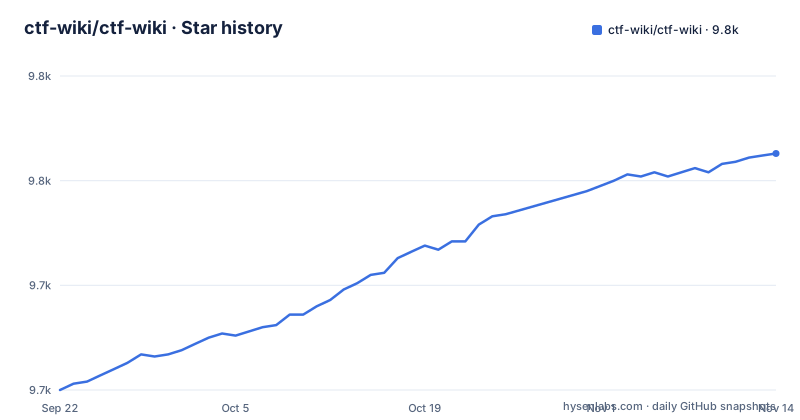
Star history
- ctf-wiki/ctf-wiki9,763 ★ · +113
| Repository | 2026-09-22 | 2026-11-14 |
|---|---|---|
| ctf-wiki/ctf-wiki | 9.7k | 9.8k |
113 Stars in the last 53 days, measured from the daily GitHub snapshot. Compare with other projects
Editorial analysis
The gap CTF Wiki was created to fill
Capture the flag started at DEFCON CTF in 1996, according to the README, and the difficulty of challenges has risen since. The README describes the problem plainly: most online information about CTF is scattered and trivial, and beginners do not know how to study it systematically. CTF Wiki was started on GitHub in October 2016 to give those people a single path into the subject.
The audience is narrow and clearly stated. It is written for people who are interested in CTF and want to start without assembling a curriculum from forum posts. The README also says the wiki is not strictly limited to CTF and plans to cover tools used in security research and wider discussion of security. That plan is stated as future work, not as a description of what is there now.
One editorial position is worth noting because it shapes how the project grows. The README gives two reasons for never publishing books: information about technology should be openly shared, and old techniques fade and should be replaced. That is a maintenance policy, not marketing. It means the wiki is expected to be edited rather than frozen, and it explains why the project asks for contributors in its own subtitle.
How the wiki is built: mkdocs, a build script and a category tree
CTF Wiki is a content repository first. The README states that it uses mkdocs to display its contents and that the rendered site is deployed at ctf-wiki.org. The top-level layout matches that description: a docs directory holds the pages, a scripts directory holds the build and serve entry points, requirements.txt lists the Python dependencies, and a Dockerfile turns the whole thing into a static site served by nginx.
The dependency list is short: Markdown, mkdocs, mkdocs-material, pymdown-extensions, typer and mkdocs-minify-plugin. Material supplies the theme, pymdown-extensions supplies Markdown extensions, and typer is what the scripts use to expose commands. The build is a static site generation step, so there is no database, no server-side rendering and no runtime API to reason about.
The Dockerfile shows the two-stage shape. A python:3.8-alpine stage copies the repository to /opt/ctf-wiki, installs requirements.txt and runs python scripts/docs.py build-all. The second stage copies the generated site directory into nginx:mainline-alpine under /usr/share/nginx/html and exposes port 80. That means the image you pull contains finished HTML, and the build toolchain is not present at runtime.
Install CTF Wiki locally and open the first page
The README gives a four-step local build. Clone the repository, install the Python requirements, generate the static files into site/, then serve them. Run these in order from the repository root.
git clone https://github.com/ctf-wiki/ctf-wiki.git
pip install -r requirements.txt
python3 scripts/docs.py build-all
python3 scripts/docs.py serve
The README says the serve step publishes the site at http://127.0.0.1:8008. It also states that a local mkdocs instance is dynamically updated: when you modify a markdown file, the corresponding page changes too. That is the reason to prefer this route over the Docker image if you intend to write or edit content, because you see the result without rebuilding.
If you only want to read the wiki and not edit it, the README offers a Docker one-liner. It maps container port 80 to host port 4100 and names the container ctf-wiki.
docker run -d --name=ctf-wiki -p 4100:80 ctfwiki/ctf-wikiAfter that, the README says to open http://localhost:4100/. Because the image is built from a static site, edits to markdown files in a clone have no effect on it. Choose the Python route for writing and the Docker route for reading.
Where the wiki stops and the sister repositories start
The README is explicit that practice is separate from reading. It names two sister projects. The ctf-challenges repository holds all of the challenges mentioned in the wiki, arranged by category, so you can locate the challenge a page is discussing. The ctf-tools repository collects the tools the wiki mentions.
This split is the most important thing to understand before adopting CTF Wiki. The wiki explains techniques and points at challenges; it does not host or run them. If you arrive expecting a lab environment with a scoreboard, you will not find one here. The README frames the reading order as learning basic security knowledge online first, then working through the challenges.
There is a practical consequence for anyone planning to use the wiki in a course or study group. Because challenge files live in a different repository, keeping a lesson in sync means tracking two sources. The README does not describe a versioning scheme that ties a page to a specific challenge revision.
Contribution rules and the state of the content
The README welcomes content contributions and points to a CONTRIBUTING page before you start. It also links a Projects board that details what is planned. The README is candid that the wiki mainly contains basic CTF skills at present, with advanced skills and special topics listed as work still to be done.
That candour is useful when you evaluate coverage. A wiki whose maintainers describe their own scope as basic is telling you to check the specific page you need rather than assume completeness. Pages about advanced exploitation, unusual challenge formats or niche tooling may be thin or absent, and the Projects board is where the project says the gaps are tracked.
The README also states that CTF Wiki advocates freedom of knowledge, will never be commercialised, and will maintain independence. That is a governance statement from the project itself. Treat it as the project's stated position rather than as an enforceable commitment, and read the licence file for the terms that actually apply.
Maintenance, upgrades and the licence question
The repository is not archived, and the last push was on 2026-08-23. The repository has no published GitHub releases, which fits a documentation repository: there is no versioned artifact to upgrade to, so the unit of change is a commit rather than a release.
Upgrading a local copy is a pull and a rebuild. Because the dependency set is small and unpinned by exact version in requirements.txt, a rebuild can pick up newer mkdocs, mkdocs-material or pymdown-extensions. When a build breaks after a pull, the first thing to inspect is that file. The Dockerfile pins the build stage to python:3.8-alpine, so the image build path is more predictable than a local build on a newer Python.
The licence is the loose end. The repository metadata reports NOASSERTION, meaning no standard licence identifier was detected, and the README does not discuss reuse terms. If you plan to mirror the content, translate it or reuse pages in training material, open the LICENSE file in the repository and read it yourself. The README's statement that the project will never be commercialised is a statement of intent about the project, not a licence grant.
CTF Wiki compared with a general documentation site
A general documentation generator, mkdocs itself for example, gives you a theme and a build pipeline and nothing else. You supply every page. CTF Wiki is the opposite arrangement: the pipeline is ordinary and the value is the corpus of pages written by contributors since 2016..
That difference decides which one you want. If you are writing your own team handbook, start from mkdocs and skip CTF Wiki entirely, because you would be forking a large body of content you did not write and then maintaining it. If you want to learn the techniques, or you want to contribute a writeup of a technique that others can build on, the existing corpus is the point and the build system is incidental.
The two sister repositories reinforce the split. A general docs site has no opinion about where your examples live. CTF Wiki expects its examples to live in ctf-challenges and its tool references in ctf-tools, which keeps the wiki itself free of binaries but adds a dependency on two other repositories staying available.
Editorial conclusion
CTF Wiki suits newcomers who want one place to read about CTF skills, and contributors willing to follow the CONTRIBUTING page before opening a pull request. It is the wrong choice if you want a tool that runs challenges, automated grading or a course with deadlines, because it is a wiki built with mkdocs that the README says will never publish books. Before relying on it, check that the category pages you need are written, confirm whether the challenge you are stuck on exists in the ctf-challenges repository, and read the licence file, since the repository reports NOASSERTION rather than a named licence.
Frequently asked questions
How do I install CTF Wiki and run it locally?
Clone the repository, run pip install -r requirements.txt, then python3 scripts/docs.py build-all and python3 scripts/docs.py serve, which the README says serves the site at http://127.0.0.1:8008. A local mkdocs instance updates pages as you edit markdown files. If you only want to read it, the README gives a Docker command that maps port 80 in the container to port 4100 on the host.
Does CTF Wiki include the challenges it describes?
No. The README says all of the challenges mentioned are in the separate ctf-challenges repository, where you can locate them by category, and that the tools mentioned are added to the ctf-tools repository. The wiki itself is the written explanation.
Which topics does CTF Wiki cover?
The README states that the wiki currently focuses on basic CTF skills, with advanced skills and special topics listed as content still being improved.
Official sources
Add this badge to your README
If you maintain this project, the badge below links readers to this analysis and shows its maintenance status from the daily GitHub snapshot. Paste the markdown into your README; add ?metric=license or ?metric=stars to the image URL for a different field.

[](https://hysenlabs.com/projects/ctf-wiki-ctf-wiki)Star history chart for your README
[](https://hysenlabs.com/projects/ctf-wiki-ctf-wiki)Was this useful?