hossainemruz/dotfiles: chezmoi-managed configs with a 15-minute self-sync loop
Configs for different tools I use
At a glance
- What is it?
- A personal dotfiles repository that uses chezmoi for machine setup and Dagu to auto-commit and push local changes. The sync design is opinionated, and the README is thin on details, but the core workflow is clear and reproducible.
- Who is it for?
- Adopt this repository if you already use chezmoi and want a concrete pattern for unattended sync across Linux and macOS, especially if you prefer a single-command bootstrap. Do not adopt it if you need a tool-agnostic dotfiles framework, want GPG-signed commits, or expect prebuilt support for non-Arch Linux distributions.
- Can I use it commercially?
- Not without permission. GitHub finds no licence file in the repository, and without a licence all rights are reserved by default: you may read the code but not reuse it. Check the README, or ask the authors, before using it.
- Is it still maintained?
- Yes. The repository last received commits 18 days ago.
- What is it written in?
- Mainly Lua, according to GitHub's language statistics.
Answers come from the project's GitHub data, last synced on October 4, 2026, and from our analysis. They are not legal advice.
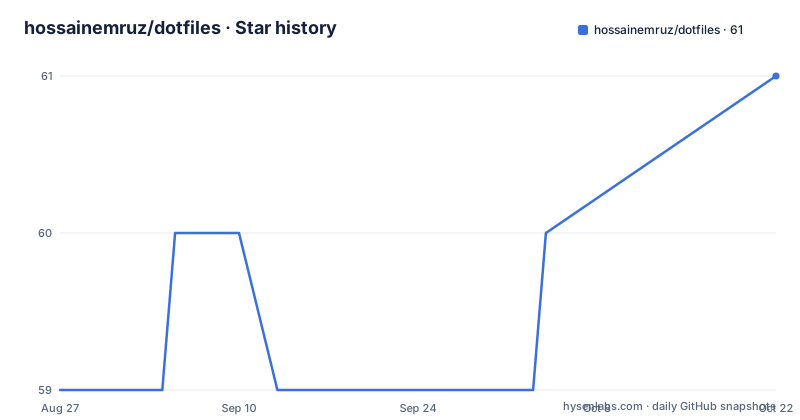
Star history
- hossainemruz/dotfiles60 ★ · +1
| Repository | 2026-08-27 | 2026-10-04 |
|---|---|---|
| hossainemruz/dotfiles | 59 | 60 |
1 Stars in the last 38 days, measured from the daily GitHub snapshot. Compare with other projects
Editorial analysis
What this repository actually is
This is not a framework or a library. It is a personal collection of configuration files managed by chezmoi, a dotfile manager that tracks files in a Git repository and applies them to a home directory. The README describes the repository as "configuration I use across different machines," which sets expectations: it is a working example of one person's setup, not a turnkey product. The primary language listed is Lua, likely because some of the tracked configs (for tools like Neovim or AwesomeWM, though the README does not name them) are Lua files. The license is unknown, so reusing any part of it carries uncertainty about legal terms. If you want to copy a pattern, treat it as a reference, not as a package to install.
The core mechanism: chezmoi as the single entry point
The repository's central mechanism is chezmoi's source-and-target model. The README shows the setup command: `chezmoi init [email protected]:hossainemruz/dotfiles.git`. This clones the repository into chezmoi's private source directory, where files are stored with a specific naming convention (for example, dotfiles that should land in the home directory are prefixed with `dot_`). The `chezmoi apply` command then renders those source files and writes them to the target machine. The key workflow commands are `chezmoi add $FILE` to track a new file, `chezmoi diff` to compare source state with machine state, and `chezmoi merge` to reconcile differences when both sides have changed. This is a standard chezmoi pattern, but the README does not show any template logic or per-machine variables, so the configuration may be simpler than a typical multi-host setup. The benefit is that a new machine can be bootstrapped with a one-liner: `sh -c "$(curl -fsLS get.chezmoi.io)" -- init --apply $GITHUB_USERNAME`. This works because chezmoi's installer script fetches and runs the init command directly.
How the automatic sync works and where it can break
The most distinctive feature is the automatic repository sync via Dagu, a workflow scheduler. The README states that Dagu runs two independent workflows every 15 minutes: one for `$HOME/agent-vault` and one for the chezmoi source repository. Each workflow commits local changes without GPG signing, fetches and rebases onto the branch's upstream, and pushes only when the local branch is ahead. This is a deliberate design choice: it avoids signing overhead and keeps the sync unattended. The failure mode is explicit: a failed rebase is left in place and triggers a desktop notification. You must then inspect the Dagu run, resolve the conflict, run `git rebase --continue` or `git rebase --abort`, and restart the failed workflow from the UI. This is not a set-and-forget system. If you are not comfortable with manual rebase conflict resolution, this sync design will cause friction. Also, the README notes that both repositories must have a checked-out branch with a remote upstream; without that, the fetch and push steps will fail silently or with errors.
Linux and macOS setup differences
The setup path diverges by operating system. On macOS, the README instructs you to run `xcode-select --install` first, then the same one-liner. During `chezmoi apply`, on macOS, chezmoi installs Homebrew if needed and runs `brew bundle` from a `Brewfile`. It also skips Hyprland, Waybar, and the Linux webapp installer, and installs native macOS apps via Homebrew casks where available. On Linux, the setup is the same one-liner, but the dependencies differ: `notify-send` (from Arch's `libnotify` package) is required for desktop notifications. The README does not specify which Linux distributions are supported, but the mention of Arch packages and systemd user services suggests Arch Linux is the primary target. If you are on Debian or Fedora, you may need to adjust package names and service commands. The macOS LaunchAgent path is shown as `launchctl print "gui/$(id -u)/com.hossainemruz.dagu"`, while the Linux systemd user service is `systemctl --user status dagu`.
The Dagu scheduler and the SSH agent dependency
Dagu is not started automatically as a web UI; the README says the web UI is only started when needed via `dagu server`, which opens `http://localhost:8080`. The scheduler itself runs as a systemd user service on Arch Linux or a LaunchAgent on macOS. One notable constraint is the SSH agent interaction. On Linux, Dagu and interactive shells share a per-user systemd SSH agent. An encrypted key must be unlocked once per login or session with `ssh-add` before unattended sync can authenticate, unless another non-interactive credential mechanism is configured. This is a real operational detail that can trip you up: if you reboot and do not unlock the key, the sync will fail to push, and you will only get a notification. The README does not explain how to configure an alternative credential mechanism, so you are left to figure that out yourself. This is a limitation worth acknowledging before adopting the pattern.
Getting it running: commands you will actually use
The README provides a clear set of commands. To set up a new machine, you run `chezmoi init [email protected]:hossainemruz/dotfiles.git`. To add a file to tracking, you run `chezmoi add $FILE`. To see what would change, run `chezmoi diff`. To apply changes, run `chezmoi apply`. To pull the latest from the remote and see the diff, the README suggests `chezmoi git pull -- --autostash --rebase && chezmoi diff`. To pull and apply in one step, use `chezmoi update`. For a fresh machine, the one-liner with `GITHUB_USERNAME` is the fastest path. The Dagu workflows require that you install Dagu via mise: `mise install dagu` before applying the dotfiles. The README also lists service commands: `systemctl --user status dagu` and `journalctl --user -u dagu` on Arch, and `tail -f ~/.local/share/dagu/launchd.stderr.log` on macOS. These are the concrete actions you need to verify the sync is running.
Maintenance cost and license implications
The maintenance cost is moderate. The sync workflow is designed to reduce manual pushes, but it introduces a new failure mode: rebase conflicts that require manual resolution. The README says a failed rebase is deliberately left in place, which means you must intervene. This is a conscious trade-off: the author prefers to see the conflict rather than have the sync silently drop changes. The cost is that you must monitor Dagu notifications and be ready to resolve conflicts. The license is listed as unknown, which is a significant issue if you plan to copy any part of this configuration. Without a license, you have no legal permission to reuse the files beyond personal reference. This is not legal advice, but it is a practical reason to treat the repository as a learning resource rather than a source to fork directly. Also, the sync commits are not GPG-signed, which may be unacceptable in environments that require signed commits.
Alternatives and when this is the wrong tool
The main alternative is to manage dotfiles with a plain Git repository and a symlink script, or to use a tool like GNU Stow. The difference is that chezmoi provides templating, per-machine variables, and a diff/apply workflow, while Stow simply creates symlinks from a directory to the home directory. If you do not need templates or cross-machine differences, Stow is simpler and has no extra runtime dependency. Another alternative is to use chezmoi without Dagu, relying on a cron job or a manual `chezmoi update`. The Dagu integration adds a scheduler with a web UI and notifications, but you could achieve the same with a simple cron entry. This repository is the wrong tool if you want a zero-dependency setup, if you need signed commits, or if you are not prepared to handle rebase conflicts manually. It is also not a good fit if you do not use Arch Linux or macOS, because the service commands and package names are specific to those platforms.
Editorial conclusion
Adopt this repository if you already use chezmoi and want a concrete pattern for unattended sync across Linux and macOS, especially if you prefer a single-command bootstrap. Do not adopt it if you need a tool-agnostic dotfiles framework, want GPG-signed commits, or expect prebuilt support for non-Arch Linux distributions. Before using, verify your branch has a configured upstream, test the Dagu workflow on a throwaway repository, and confirm your SSH agent is unlocked at login, since a failed rebase is left in place and requires manual intervention.
Frequently asked questions
How do I install these dotfiles on a new machine?
Export GITHUB_USERNAME and run sh -c "$(curl -fsLS get.chezmoi.io)" -- init --apply $GITHUB_USERNAME. The only requirement is chezmoi; if you also want the automatic sync, install Dagu first with mise install dagu.
What is a dotfile in this repository?
It is configuration for a machine, kept in one repository and applied rather than copied by hand. chezmoi manages it, home directory files carry a dot_ prefix such as dot_bashrc and dot_zshrc.tmpl, directories appear as dot_config/ and dot_local/, and scripts named run_once_ or run_onchange_ decide when setup steps execute.
How do I use these dotfiles on Arch Linux?
Apply them with chezmoi, then let the systemd user service carry the sync. On Arch, desktop notifications come from notify-send in the libnotify package, and you can inspect the service with systemctl --user status dagu, systemctl --user status ssh-agent and journalctl --user -u dagu.
How do I put my dotfile changes on GitHub?
Pull the upstream changes and inspect them first with chezmoi git pull -- --autostash --rebase && chezmoi diff, or use chezmoi update to pull and apply. The background Dagu workflows also do this on a schedule, committing without GPG signing, rebasing onto the configured upstream and pushing only when the local branch is ahead.
What happens if the automatic dotfiles sync hits a conflict?
The failed rebase is left in place on purpose and a desktop notification is raised. You inspect the Dagu run, resolve the conflict, run git rebase --continue or git rebase --abort, and then restart the failed workflow from the Dagu interface at localhost:8080.
Official sources
Add this badge to your README
If you maintain this project, the badge below links readers to this analysis and shows its maintenance status from the daily GitHub snapshot. Paste the markdown into your README; add ?metric=license or ?metric=stars to the image URL for a different field.

[](https://hysenlabs.com/projects/hossainemruz-dotfiles)Star history chart for your README
[](https://hysenlabs.com/projects/hossainemruz-dotfiles)