huggingface/evaluate: A Metric Loader, Not an Evaluation Harness
🤗 Evaluate: A library for easily evaluating machine learning models and datasets.
At a glance
- What is it?
- Hugging Face's evaluate library gives you dozens of metric implementations behind a single load() call and a Hub-backed module format. It provides evaluation modules, evaluators and multi-task evaluation suites, and the repository's own README now points LLM evaluation elsewhere.
- Who is it for?
- Adopt evaluate if you need a named metric such as accuracy or a dataset-specific score wired into a NumPy, PyTorch, TensorFlow, or JAX workflow and you want the implementation to come from the Hub rather than your own file. Do not adopt it as your LLM benchmark harness: the README itself redirects that use case to LightEval.
- Can I use it commercially?
- Yes. Apache-2.0 is a permissive licence: you can use, modify and sell software built on it, as long as you keep its copyright and licence notices.
- Is it still maintained?
- Yes. The repository last received commits 6 days ago.
- What is it written in?
- Mainly Python, according to GitHub's language statistics.
Answers come from the project's GitHub data, last synced on November 15, 2026, and from our analysis. They are not legal advice.
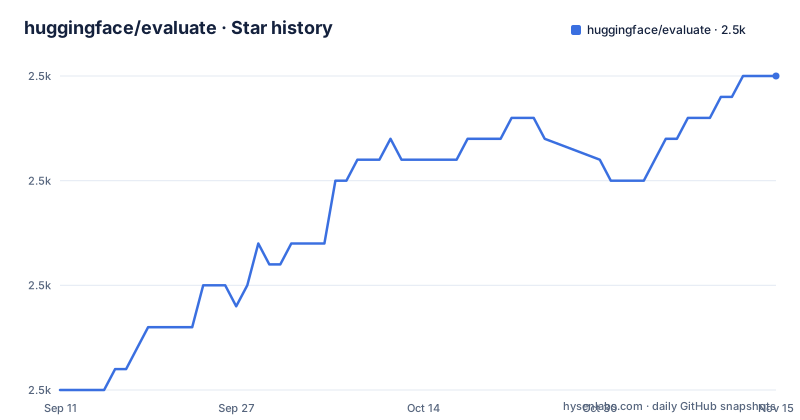
Star history
- huggingface/evaluate2,495 ★ · +15
| Repository | 2026-09-11 | 2026-11-15 |
|---|---|---|
| huggingface/evaluate | 2.5k | 2.5k |
15 Stars in the last 65 days, measured from the daily GitHub snapshot. Compare with other projects
Editorial analysis
The problem evaluate targets: metric code that gets rewritten per project
Every team that scores model output ends up with a folder of metric functions. Someone writes token-level accuracy, someone else writes a BLEU wrapper, a third person copies a F1 implementation from a notebook. The implementations drift, the input conventions differ, and comparing two models across two repositories becomes guesswork. The README frames the library's purpose as making evaluation and comparison of models easier and more standardized. The concrete unit of standardization is the metric itself: instead of a local function, you get a named module loaded from the Hugging Face Hub. That matters most for people who move between projects and want the same score to mean the same thing in each one. The audience is Python users already inside the Hugging Face orbit, since metrics are addressed by Hub identifiers and the module lifecycle assumes you can publish to a Space. If you never touch the Hub, you are still able to install from PyPI and load built-in metrics, but you lose the part of the design that makes custom metrics shareable.
load(), compute(), and where the metric code actually lives
The API surface is deliberately small. The README lists three main methods: evaluate.list_evaluation_modules() to enumerate available metrics, comparisons, and measurements; evaluate.load(module_name, **kwargs) to instantiate one; and module.compute(**kwargs) to produce a result. The README's own example is accuracy = load("accuracy"), after which the metric is described as ready to use for evaluating a model in any framework, listing Numpy, Pandas, PyTorch, TensorFlow, and JAX. That framework-agnostic claim is the architectural point: the metric object is a thin wrapper that accepts predictions and references in whatever array-like form your stack produces. Two features in the README shape how that wrapper behaves in practice. Type checking is applied to inputs, so a metric rejects an input format it does not expect rather than silently coercing it. Each metric also ships with a card describing its values, limitations, and ranges, plus usage examples. The card is not decoration. It is the only place in the repository's material where a metric's semantics are written down, which means the card is what you read before trusting a number. Note also the third category alongside metrics: comparisons, which measure the difference between models, and measurements, which are described as tools to evaluate datasets. Those are separate module types with their own Hub namespaces.
Installing it and creating your own metric module
Installation is a single PyPI package, and the README states it has to be installed in a virtual environment such as venv or conda: pip install evaluate. If you intend to author a metric rather than only consume one, the README gives a second install with the template extra: pip install evaluate[template]. From there the authoring entry point is the CLI, which the README shows as evaluate-cli create "Awesome Metric". According to the README, that command creates a new folder for your metric and displays the necessary steps, and the documentation links a step-by-step guide for creating and sharing modules. The sharing path runs through a dedicated Space on the Hub, which is what allows the README to describe comparing different metrics and their outputs against the same sets of references and predictions. Two constraints follow from this. First, custom evaluation modules can be loaded from a local script or directory; publishing to the Hub is optional for sharing. Second, the CLI scaffolds rather than finishes: it prints the steps you still have to complete. If you only need a private scoring function for one script, this is more ceremony than the task requires, and a plain Python function is the better fit.
The README redirects LLM evaluation to LightEval
The most important line in the repository is the tip near the top. For more recent evaluation approaches, for example for evaluating LLMs, the README recommends the newer and more actively maintained library LightEval. That is an explicit scope boundary written by the maintainers, and it should govern your decision more than any feature list. Evaluate provides metrics and other modules as well as evaluators that run models on datasets. EvaluationSuite can compose multiple evaluator, dataset and metric tasks. For more recent LLM evaluation approaches, the README recommends LightEval. The release cadence reinforces the same reading. The most recent releases listed are v0.4.4, v0.4.5, and v0.4.6, dated June, July, and September 2025, with the repository's last push recorded in July 2026. Nothing in the README shows the library being positioned as the primary surface for new evaluation work. Treat evaluate as a maintained metric library, not as the place where Hugging Face is investing in evaluation methodology.
What a Hub-backed metric costs you in reproducibility
Loading metrics from the Hub is the design's main convenience and its main risk. A metric is addressed by name, so evaluate.load("accuracy") resolves to whatever module currently carries that name in the evaluate-metric namespace. The README describes community metrics as living on the Hub with easy addition of your own, which is exactly the property that makes the namespace mutable over time. The loading API documents `revision` and `cache_dir` parameters and accepts local modules. For reproducible results, verify how the specific module resolves its revision and dependencies before building a reporting pipeline on top of it. A metric authored with evaluate-cli create can be used locally or published to a Space for sharing. The metric card is your only in-repo documentation of that artifact's semantics, and the README does not state what happens when a card and an implementation disagree. Type checking narrows the failure surface but does not tell you whether the score you computed is the score you meant.
Where scikit-learn or torchmetrics is the better choice
The obvious alternative for classical metrics is scikit-learn, and the difference is not quality but distribution. scikit-learn ships its metrics inside the installed package: you import them from a pinned dependency, and the version of the library in your environment is the version of the metric. Nothing resolves at call time, and CI does not need network access to score a validation set. That is a meaningfully different trade-off from evaluate.load(), where the module identity lives outside your dependency tree. torchmetrics makes a parallel choice for PyTorch users, keeping metrics in-process and tied to tensor types. Evaluate's counter-argument is breadth and sharing: dozens of metrics spanning NLP and computer vision, including dataset-specific metrics, plus the ability to publish a metric once and have others load it by name with its card attached. If your team already standardizes on the Hub for models and datasets, that consistency is worth something. If your only requirement is a stable F1 or accuracy number in a training loop, importing it from an installed package removes a moving part rather than adding one.
Licence, maintenance, and what to check before adopting
The repository is Apache-2.0, which permits commercial use and modification and includes an explicit patent grant, subject to the notice and attribution conditions in the licence text. That is a permissive choice consistent with the surrounding Hugging Face ecosystem, and it is not legal advice: read the LICENSE file and your own counsel's guidance if you are redistributing modified metric code. Maintenance cost is dominated by the Hub dependency rather than by the Python package. Upgrading evaluate is a pip install, but the metrics you load are separate artifacts with their own authors and their own update timelines, so a package upgrade does not pin what your scores mean. The README's recommendation of LightEval is also a signal about where future evaluation work is aimed, and you should read it as a statement about the library's role rather than as an announcement of removal. The practical check before adopting is a single call: evaluate.list_evaluation_modules() tells you whether the metric you need is in the namespace at all, and the metric card tells you its range and stated limitations. If the metric is not listed, a custom local module is another option; publish it only if you want to share it through the Hub.
Editorial conclusion
Adopt evaluate if you need a named metric such as accuracy or a dataset-specific score wired into a NumPy, PyTorch, TensorFlow, or JAX workflow and you want the implementation to come from the Hub rather than your own file. Do not adopt it as your LLM benchmark harness: the README itself redirects that use case to LightEval. Before committing, check available Hub modules or load a suitable local module, and check the metric card for the stated value range and limitations, since the card is where the library documents what a score does and does not mean.
Frequently asked questions
What is Hugging Face evaluate?
A library for evaluating and comparing machine learning models and datasets. It ships implementations of dozens of metrics across tasks from natural language processing to computer vision, plus comparisons that measure the difference between models and measurements that evaluate datasets.
How do I install evaluate?
With pip install evaluate, inside a virtual environment such as venv or conda. To create a new metric you add the template extra with pip install evaluate[template], then run evaluate-cli create with the name you want.
What is the API of the evaluate library?
Three functions. evaluate.list_evaluation_modules() lists the available metrics, comparisons and measurements, evaluate.load(module_name, **kwargs) instantiates one, and module.compute(*kwargs) produces the results.
Are Hugging Face evaluate metrics documented anywhere?
Each metric ships with a card describing its values, its limitations and their ranges, plus examples of usage. The library also type checks inputs, so passing the wrong input format for a metric fails early instead of producing a wrong number.
Is evaluate still the recommended evaluation library?
The README carries a tip recommending a newer library, LightEval, for more recent evaluation approaches such as evaluating language models. The last release in this repository is v0.4.6 from 2025-09-18 while the last push was on 2026-09-23.
Official sources
Add this badge to your README
If you maintain this project, the badge below links readers to this analysis and shows its maintenance status from the daily GitHub snapshot. Paste the markdown into your README; add ?metric=license or ?metric=stars to the image URL for a different field.

[](https://hysenlabs.com/projects/huggingface-evaluate)Star history chart for your README
[](https://hysenlabs.com/projects/huggingface-evaluate)Was this useful?