Hunyuan-PromptEnhancer: a 7B prompt rewriter for text-to-image and image editing
[CVPR 2026] PromptEnhancer is a prompt-rewriting tool, refining prompts into clearer, structured versions for better image generation.
At a glance
- What is it?
- PromptEnhancer rewrites short prompts into structured ones before they reach an image model, and it also refines editing instructions with an image as context. Here is what the repository documents, what it leaves out, and where it fits.
- Who is it for?
- Adopt PromptEnhancer if you already run a text-to-image or image-editing pipeline and want prompts restructured before generation, and if you have at least the 8GB of memory the 7B model's row in the comparison table lists. Do not adopt it if you need a hosted API, a browser extension, or a tool with documented rollback and versioning: the repository has no published GitHub releases.
- Can I use it commercially?
- Check first. The repository uses a licence we do not classify automatically, so read its LICENSE file before any commercial use.
- Is it still maintained?
- Yes. The repository last received commits 99 days ago.
- What is it written in?
- Mainly Python, according to GitHub's language statistics.
Answers come from the project's GitHub data, last synced on November 24, 2026, and from our analysis. They are not legal advice.
Star history
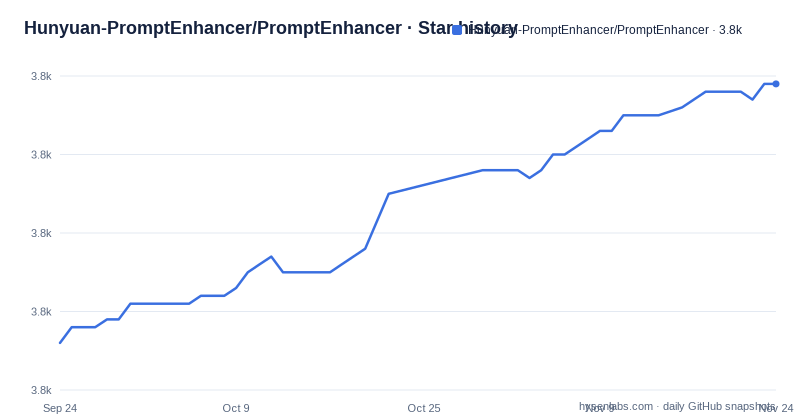
- Hunyuan-PromptEnhancer/PromptEnhancer3,809 ★ · +33
| Repository | 2026-09-24 | 2026-11-24 |
|---|---|---|
| Hunyuan-PromptEnhancer/PromptEnhancer | 3.8k | 3.8k |
33 Stars in the last 61 days, measured from the daily GitHub snapshot. Compare with other projects
Editorial analysis
The gap PromptEnhancer fills between a short prompt and an image model
Most text-to-image workflows fail at the prompt, not at the sampler. A user types a sentence, the model picks up some of it, and the result misses the layout, the style, or an attribute that was implied rather than stated. PromptEnhancer is a rewriting utility that sits in front of generation and restructures the input prompt while, per the README, preserving the original intent: subject, action, style, layout and attributes. The intended audience is people building image pipelines rather than people clicking a button. The repository is Python, the top level holds inference/, models/, script/ and t2i_keypoints_eval.py, and the project is presented by Tencent Hunyuan alongside a technical report at arXiv:2509.04545. It is not a general-purpose chatbot prompt tool, and it does not generate images itself. It produces the text that an image model then consumes.
Two modes: text-to-image rewriting and image-to-image instruction refinement
The README describes dual-mode support. In text-to-image mode the input is a prompt string and the output is a rewritten prompt string. In image-to-image mode the model also receives visual context, so the rewriting step can resolve an editing instruction against the image it will be applied to. That second mode is the more interesting one, because editing instructions are usually elliptical: a user writes something like a short directive and expects the system to know which object is meant. The repository points to a separate checkpoint for this, PromptEnhancer-Img2img-Edit, hosted under the PromptEnhancer organisation on Hugging Face. The mode is a property of which weights you load, not a flag documented in the README, so the choice happens at download time. The README also lists a multi-level fallback mechanism for parsing, which is an admission that model output does not always arrive in the expected shape; the README does not describe what the fallback levels are.
Installing PromptEnhancer and running a first rewrite
The README gives two installation paths. The standard one installs the Python dependencies from requirements.txt, which pins transformers>=4.56.0 and pulls in huggingface-hub, qwen-vl-utils, datasets>=2.14.0, google-genai>=0.3.0, requests>=2.28.0 and tqdm>=4.64.0. The GGUF path runs a shell script in the script/ directory and is described as the option for quantized models with CUDA support.
pip install -r requirements.txtAfter that, download weights. The README recommends the 7B model for most users and gives this command, which places the files under ./models/promptenhancer-7b.
huggingface-cli download tencent/HunyuanImage-2.1/reprompt --local-dir ./models/promptenhancer-7bIf you want the 32B model instead, the README uses a different repository for it, and for image editing a third one. The comparison table in the README lists PromptEnhancer-7B at 13GB with 8GB+ memory, PromptEnhancer-32B at 64GB with 32GB+, and three GGUF quantisations of the 32B model: Q8_0 at 35GB, Q6_K at 27GB, and Q4_K_M at 20GB. The README names RTX 4090 and RTX 5090 for Q6_K and RTX 3090 or RTX 4080 for Q4_K_M. The README documents a GGUF command-line entry point in inference/prompt_enhancer_gguf.py, including an optional GGUF_MODEL_PATH. Check the current instructions and dependencies for the backend you select.
Memory, checkpoints and the parts the README does not answer
The honest constraint here is hardware. The project lists the 7B checkpoint as a 13GB download and recommends 8GB+ GPU memory. Treat that as a project estimate rather than a guaranteed fit: actual memory use depends on precision, context, backend and offloading. The 32B path in full precision wants 64GB of weights and 32GB+ of memory, and the quantised versions trade quality for footprint without changing the order of magnitude. For GGUF models the README describes llama.cpp CPU and GPU acceleration and a configurable number of GPU layers; check the selected backend and benchmark CPU-only performance. It does not establish a hosted endpoint or server mode. Two other gaps matter if you plan to put this behind a product. First, the README does not document rollback or versioning of the rewriting behaviour, so a checkpoint swap is a silent change in output. Second, the license field on the repository is NOASSERTION, which means no standard license identifier was detected; there is a LICENSE file in the repository root, and that file, not this article, is what you need to read. The README also does not state latency or throughput for any model, so capacity planning has to come from your own measurement.
Where a general-purpose LLM prompt rewriter differs
The obvious alternative is to send the prompt to a hosted large language model with an instruction to improve it. The difference is in what the two systems are tuned for. A hosted LLM is trained on general text and has no image-conditioned mode, so it cannot see the picture in an image-to-image task; PromptEnhancer's Img2img-Edit checkpoint is built for exactly that input. The hosted route also needs no local GPU, which is the opposite trade: you give up control of the weights and pay per call, and you accept that the rewriting prompt is something you maintain. PromptEnhancer moves that work into a local checkpoint you download once. The counter-argument is real: a local 13GB model is a heavier dependency than an API key, and the README does not publish a quality comparison against a general LLM, so the claim that specialised rewriting is better is asserted by the project rather than demonstrated in the documentation available here. The T2I-Keypoints-Eval dataset and the t2i_keypoints_eval.py script in the repository root are the project's own evaluation path, and that is where you would look to check the claim rather than take it on faith.
Who should adopt PromptEnhancer, and what to check before you commit
This fits teams that already operate a text-to-image or image-editing model locally and want a separate rewriting stage they control. It does not fit anyone who wants a browser extension, a free online tool, or a ChatGPT-style assistant: those are different products that happen to share the phrase prompt enhancer, and the search results for that phrase are dominated by them. The listed GPU memory figures are estimates; CPU or mixed-offload GGUF inference may be an option, but requires testing memory use and acceptable speed on the target machine. Before committing, confirm three things in order. Read the LICENSE file at the repository root, because the license field is NOASSERTION and nothing else settles the terms. Check that the checkpoint you want is reachable, since the 7B weights live under tencent/HunyuanImage-2.1/reprompt while the 32B and Img2img-Edit weights live under the PromptEnhancer organisation. Then run the rewriting stage against your own prompts and inspect the output shape, because the README mentions a multi-level fallback parser without describing its levels, and that parser is what stands between the model and your generation call.
Editorial conclusion
Adopt PromptEnhancer if you already run a text-to-image or image-editing pipeline and want prompts restructured before generation, and if you have at least the 8GB of memory the 7B model's row in the comparison table lists. Do not adopt it if you need a hosted API, a browser extension, or a tool with documented rollback and versioning: the repository has no published GitHub releases. Verify first that your GPU fits the model row you pick, that you can download from the tencent/HunyuanImage-2.1 and PromptEnhancer Hugging Face repositories, and that the LICENSE file in the repository root matches how you intend to use the weights.
Frequently asked questions
What does Hunyuan-PromptEnhancer do?
It rewrites prompts into clearer, structured versions while preserving the original intent, covering subject, action, style, layout and attributes. It supports both text-to-image prompt enhancement and image-to-image editing instruction refinement with visual context.
How do I install Hunyuan-PromptEnhancer?
The README gives two paths: pip install -r requirements.txt for the standard installation, or running script/install_gguf.sh for quantized models with CUDA support. Weights are then downloaded separately with huggingface-cli.
Which Hunyuan-PromptEnhancer model should I download first?
The README recommends starting with PromptEnhancer-7B, a 13GB download listed at 8GB+ memory, as the balance of quality and efficiency. The 32B model and its GGUF quantisations are for higher memory budgets, and PromptEnhancer-Img2img-Edit is the separate checkpoint for image editing tasks.
Does Hunyuan-PromptEnhancer generate images itself?
No. It is a prompt rewriting utility that produces the text a downstream image model consumes. The README links to HunyuanImage-2.1 as the associated image model rather than describing generation inside this repository.
What license does Hunyuan-PromptEnhancer use?
The repository's license field is NOASSERTION, meaning no standard license identifier was detected. A LICENSE file exists in the repository root, and the README does not restate its terms.
Official sources
Add this badge to your README
If you maintain this project, the badge below links readers to this analysis and shows its maintenance status from the daily GitHub snapshot. Paste the markdown into your README; add ?metric=license or ?metric=stars to the image URL for a different field.

[](https://hysenlabs.com/projects/hunyuan-promptenhancer-promptenhancer)Star history chart for your README
[](https://hysenlabs.com/projects/hunyuan-promptenhancer-promptenhancer)Was this useful?