Hyperlight-Wasm: Running Untrusted Wasm in a Lightweight VM Sandbox
hyperlight-wasm is a rust library crate that enables Wasm Modules and components to be run inside lightweight Virtual Machine backed Sandbox. It is built on top of Hyperlight.
At a glance
- What is it?
- Hyperlight-Wasm is a Rust crate that executes WebAssembly modules and components inside a lightweight virtual machine, built on Hyperlight. It targets low-latency isolation for untrusted code, but it is experimental and not production-ready.
- Who is it for?
- Adopt Hyperlight-Wasm if you need hardware-level isolation for untrusted Wasm code with low overhead and are willing to accept experimental status and a specific toolchain. Do not use it for production workloads or if you require mature support.
- Can I use it commercially?
- Yes. Apache-2.0 is a permissive licence: you can use, modify and sell software built on it, as long as you keep its copyright and licence notices.
- Is it still maintained?
- Yes. The repository last received commits 2 days ago.
- What is it written in?
- Mainly Rust, according to GitHub's language statistics.
Answers come from the project's GitHub data, last synced on November 22, 2026, and from our analysis. They are not legal advice.
Star history
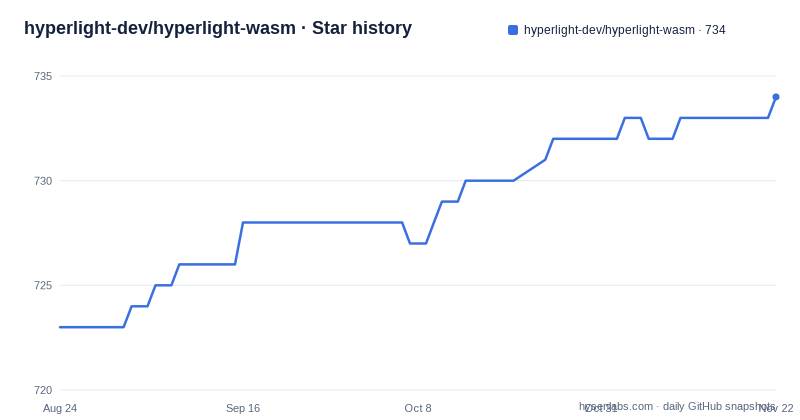
- hyperlight-dev/hyperlight-wasm734 ★ · +11
| Repository | 2026-08-24 | 2026-11-22 |
|---|---|---|
| hyperlight-dev/hyperlight-wasm | 723 | 734 |
11 Stars in the last 90 days, measured from the daily GitHub snapshot. Compare with other projects
Editorial analysis
The Problem: Isolating Untrusted Wasm Beyond Process Sandboxes
The core mechanism is straightforward: instead of running Wasm directly on the host, Hyperlight-Wasm executes it inside a lightweight virtual machine. The VM is backed by Hyperlight, which provides a minimal hypervisor interface on Windows via the Windows Hypervisor Platform, on Linux via KVM, or on systems exposing /dev/mshv. The Wasm module or component runs as a guest inside that VM, and the host application communicates with it through generated bindings. For core Wasm modules, the library handles the execution directly. For Component Model components, the process is more involved: you define a WIT world, compile it to a binary encoding using wasm-tools, set the WIT_WORLD environment variable, and then use the host_bindgen! macro to generate host-side bindings. The result is a guest binary specialized to load components of that type. This architecture means that the isolation boundary is the VM, not the Wasm runtime. The cost is that you must manage a VM lifecycle, which the library abstracts, but the underlying hypervisor requirements are real and platform-specific.
Getting Started: Prerequisites and Build Steps
The README is explicit about the toolchain. You need Rust, just (version 1.5.0 or newer, installed via cargo install just, not from package managers), pwsh on Windows, git, GitHub CLI, wasm-tools, and cargo component. On Windows, you must enable the Windows Hypervisor Platform with a specific PowerShell command. On Ubuntu with KVM, you need build-essential, and you should verify KVM availability with kvm-ok after installing cpu-checker. The README also says to add your user to the kvm group. The build process pins Rust to version 1.94: rustup install 1.94 and rustup default 1.94. Then you run just build to compile the library, just build-wasm-examples and just build-rust-wasm-examples to build the sample modules, and just test to run tests. A quick example is cargo run --example helloworld. These are concrete commands from the README, and they show that this is not a cargo add and go situation. The dependency on just as a command runner and the specific Rust version add friction, which the maintainers acknowledge by warning about incompatible versions. If you are not comfortable with a pinned toolchain and a command runner, this project will feel heavy.
Component Model Support: A Two-Stage Build with WIT Worlds
The most interesting part of Hyperlight-Wasm is its experimental support for WebAssembly Component Model components. Unlike core Wasm modules, components require a type definition in WIT. The flow is: write a WIT file, compile it to a binary component type using wasm-tools component wit -w -o output.wasm input.wit, then set the WIT_WORLD environment variable to that output. This causes the library to include a guest binary specialized to load components with that type. On the host side, you use hyperlight_component_macro::host_bindgen!() to generate bindings from the same component type. The README gives a small example of multiple worlds in one WIT file, where you can select a specific world by setting WIT_WORLD_NAME; otherwise the last world in the file is used. This two-stage approach means that the guest and host are tightly coupled to a specific component type. Changing the WIT world requires regenerating both sides. That is a design trade-off: it gives type safety and efficient communication, but it reduces flexibility. If you need to run components with dynamic types, this model will not fit.
Debugging the Macro: A Concrete Workflow
The README includes a short section on debugging the host_bindgen! macro, which is useful because macro-generated code can be opaque. You can expand the macro locally by cleaning the hyperlight-wasm package and rebuilding with environment variables. Specifically, cargo clean -p hyperlight-wasm, then WIT_WORLD=</path/to/output.wasm> HYPERLIGHT_COMPONENT_MACRO_DEBUG=/tmp/guest.rs cargo build -p hyperlight-wasm, and then HYPERLIGHT_COMPONENT_MACRO_DEBUG=/tmp/host.rs cargo build. This writes the generated guest and host code to files you can inspect. This is a practical feature for anyone who hits a type mismatch or a binding error. It shows that the project anticipates debugging pain and provides a way out. However, it also indicates that the macro is complex enough to fail in ways that require this level of inspection. If you are not prepared to read generated Rust code, you may struggle with component support.
Limitations and Failure Modes
The README is unusually honest: it states that this is experimental code, not considered production-grade, and not supported software. That is the first limitation. The second is platform dependence. You must have a working hypervisor backend: Windows Hypervisor Platform on Windows, KVM on Linux, or /dev/mshv. If you are on a cloud VM without nested virtualization, KVM will not be available, and the project will not run. The README specifically mentions Azure VM sizes that support nested virtualization, which is a hint that not all environments qualify. Third, the Rust toolchain is pinned to 1.94. That is a specific version, and using a different one may break the build. The README warns about just versions too, so the dependency chain is fragile. Fourth, the Component Model support is experimental, and the WIT world binding approach means that any change to your component interface requires a rebuild of both guest and host. This is not a runtime dynamic loading system. If you need to load arbitrary Wasm components at runtime, this is the wrong tool. Finally, the project has a dev-latest release alongside versioned releases, indicating active development with potential breaking changes between versions.
Alternatives: Comparing with Pure Wasm Runtimes and Hyperlight
The most direct alternative is a pure WebAssembly runtime like Wasmtime or Wasmer, which run Wasm in a process sandbox without a VM. The difference is fundamental: those runtimes rely on the Wasm sandbox model and the host OS for isolation, whereas Hyperlight-Wasm adds a hardware-enforced VM boundary. The trade-off is latency and complexity. A pure runtime has lower overhead and is easier to deploy, but it does not protect against vulnerabilities in the runtime itself or in host functions. Hyperlight-Wasm sits above Hyperlight, which is a separate project providing the VM abstraction. If you do not need the VM layer, you could use Hyperlight directly to run arbitrary code, but that would require you to implement the Wasm guest yourself. Hyperlight-Wasm packages that integration for you. Another alternative is a microVM approach like Firecracker, but that is a heavier-weight solution with higher startup latency. The README does not mention these alternatives, but the architectural difference is clear: Hyperlight-Wasm trades deployment simplicity for a stronger isolation boundary.
Maintenance and Upgrade Cost
The repository shows recent releases: v0.14.0 in April 2026, v0.12.0 in December 2025, and a dev-latest build updated on the same day as the latest release. This indicates a fast release cadence, which means you will need to track changes frequently. The README warns about toolchain versions, so upgrading the project may require updating your Rust toolchain and just version. The license is Apache-2.0, which is permissive and does not impose copyleft obligations, but you should verify the licenses of dependencies, as the README includes a FOSSA badge for license and security scanning. The project follows the Microsoft Open Source Code of Conduct, which is a governance detail. There is no mention of long-term support or a stability guarantee. The experimental status suggests that APIs may change between versions. If you adopt this, plan for ongoing maintenance: re-testing with each release, updating your WIT bindings if the macro changes, and monitoring the hypervisor backend requirements. The dev-latest release is explicitly a development build, so you should rely on tagged releases for any stability.
Editorial conclusion
Adopt Hyperlight-Wasm if you need hardware-level isolation for untrusted Wasm code with low overhead and are willing to accept experimental status and a specific toolchain. Do not use it for production workloads or if you require mature support. Before adopting, verify that your platform (Windows Hypervisor Platform, KVM, or /dev/mshv) is available and that you can pin Rust 1.94, as the README explicitly warns. Check the latest release notes for breaking changes, since the project is under active development with frequent releases.
Frequently asked questions
What is hyperlight-wasm used for?
It runs Wasm modules and Component Model components inside a lightweight VM backed sandbox, so an application can safely execute untrusted or third party Wasm code with very low latency and overhead. It is built on top of the Hyperlight runtime.
Is hyperlight-wasm production ready?
The README says plainly that this is experimental code, that it is not considered production-grade by its developers, and that it is not supported software. Treat the repository as research code you own end to end.
Which hypervisors can hyperlight-wasm run on?
The Windows Hypervisor Platform on Windows, KVM on Linux, and /dev/mshv. On Linux the README also asks you to check KVM with `sudo apt install cpu-checker && kvm-ok` and to add your user to the kvm group.
How do I choose a WIT world when building hyperlight-wasm?
Set WIT_WORLD to the binary component type and WIT_WORLD_NAME to the world you want, as in `WIT_WORLD=/path/to/output.wasm WIT_WORLD_NAME=http-world cargo build -p hyperlight-wasm`. If WIT_WORLD_NAME is not set, the last world in the WIT file is used.
What Rust version does hyperlight-wasm require?
1.94. The build notes say to run `rustup install 1.94` and `rustup default 1.94`, and the workspace manifest declares rust-version 1.94 with edition 2024. The root also ships a rust-toolchain.toml.
How do I install just for the hyperlight-wasm build?
Use `cargo install just`. The README warns against installing it through a package manager on Linux and against installing it with what it calls Chocolately on Windows, because those paths give an older incompatible version, and it asks for at least version 1.5.0 if cargo did not install it.
Official sources
Add this badge to your README
If you maintain this project, the badge below links readers to this analysis and shows its maintenance status from the daily GitHub snapshot. Paste the markdown into your README; add ?metric=license or ?metric=stars to the image URL for a different field.

[](https://hysenlabs.com/projects/hyperlight-dev-hyperlight-wasm)Star history chart for your README
[](https://hysenlabs.com/projects/hyperlight-dev-hyperlight-wasm)Was this useful?