Apktool: decoding and rebuilding closed Android APKs
A tool for reverse engineering Android apk files
At a glance
- What is it?
- Apktool turns a compiled APK back into readable resources and smali, then rebuilds it. It is aimed at engineers doing localization, compatibility work or smali-level debugging, not at anyone looking for a one-click repackager.
- Who is it for?
- Apktool fits engineers who need to read or modify the resources and smali of a closed APK they are entitled to work on, and who are willing to keep a Java runtime in order. It is the wrong tool if you want a graphical one-click repackager, if you are targeting an app whose resources fail to decode cleanly, or if the licence of the app forbids the modification in the first place.
- Can I use it commercially?
- Yes. Apache-2.0 is a permissive licence: you can use, modify and sell software built on it, as long as you keep its copyright and licence notices.
- Is it still maintained?
- Yes. The repository last received commits 5 days ago.
- What is it written in?
- Mainly Java, according to GitHub's language statistics.
Answers come from the project's GitHub data, last synced on November 13, 2026, and from our analysis. They are not legal advice.
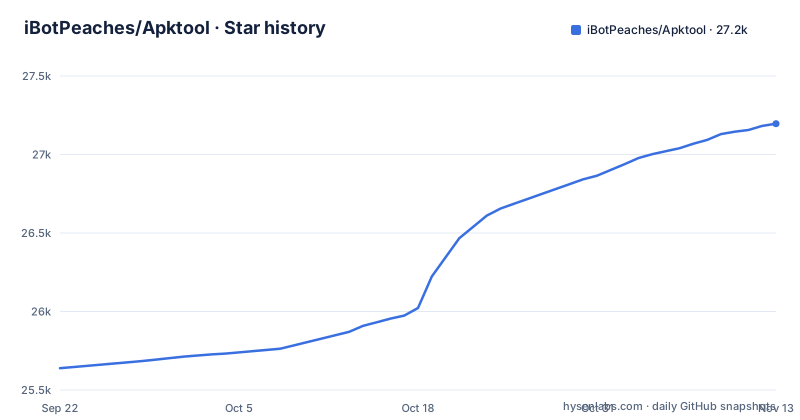
Star history
- iBotPeaches/Apktool27,196 ★ · +1,557
| Repository | 2026-09-22 | 2026-11-13 |
|---|---|---|
| iBotPeaches/Apktool | 25.6k | 27.2k |
1,557 Stars in the last 52 days, measured from the daily GitHub snapshot. Compare with other projects
Editorial analysis
What Apktool is for, and who actually needs it
An APK that has been through aapt is not a source tree. The manifest is binary XML, resources live in a compiled resource table, and the code is dex bytecode. Apktool's stated purpose is to reverse engineer third-party, closed, binary Android apps: it decodes resources to nearly original form and rebuilds them after modification, and it makes it possible to debug smali code step by step. The README frames the workflow as a project-like file structure with automation of repetitive tasks such as building the APK.
The audience is narrow. If you are localizing an app, adding support for a custom platform, or tracing a crash down into smali, Apktool is the right shape of tool. If you want to inspect a single string, unzipping the APK or reading it with a hex viewer is faster. The README is explicit that the project is not intended for piracy and other non-legal uses, and that the authors of the app you are working on should be treated fairly. That is a positioning statement, not a technical control: nothing in the tool stops you from rebuilding an APK you have no right to touch.
How the decode and rebuild cycle works
The repository is a multi-module Gradle build. The top level contains brut.apktool, brut.j.common, brut.j.util, brut.j.xml, brut.j.yaml and brut.j.zip, alongside build.gradle.kts, settings.gradle.kts and the gradlew wrapper. Those module names map onto the work: a zip-handling layer, shared utilities, XML and YAML handling, and the apktool module that ties them together.
Decoding is a translation in both directions. Binary XML is expanded back into text XML, the compiled resource table (arsc) is turned into a directory of resource files, and the dex files are disassembled into smali. Rebuilding reverses it: smali is assembled, resources are compiled, and the result is packaged back into an APK. Because the round trip goes through intermediate formats, anything the decoder could not represent faithfully is a place where the rebuild can diverge from the original. That is the structural reason a decode can succeed and a rebuild can still produce an APK that behaves differently.
The branch layout matters for anyone pinning a version. The main branch is the Apktool 3.x line, and there is a separate 2.x branch described as a maintenance branch for Apktool 2.x releases. If you have scripts written against 2.x behaviour, the 2.x branch is where that behaviour is kept, and the release history shows 3.x moving forward on its own cadence.
Installing Apktool and decoding your first APK
The README points to the project page at apktool.org for documentation and to a downloads page and a downloads mirror for binaries, with a How to Build link for building from source. It does not print an install command in the repository README, so the exact invocation depends on which of those distribution routes you take. The repository does ship a Gradle wrapper, so a source build goes through that wrapper rather than a system Gradle install.
On Windows the wrapper is gradlew.bat, which the repository also provides. The README directs anyone who wants the build instructions to apktool.org/docs/build rather than documenting them here.
Once you have the tool, the first real use is a decode against a target APK. The documentation site is the authority on the exact flag set, and the README does not reproduce it, so check the wiki page linked as Documentation before scripting anything. What you should see afterwards is a directory laid out like an Android project: decoded resources, a readable manifest, and smali sources. The rebuild step takes that directory back to an APK. Treat the first decode as a compatibility test, not a formality. Open the manifest and a couple of resource files and confirm they are legible; if the decoder emitted warnings, read them before you edit anything, because a resource that decoded badly will not survive the rebuild.
Where Apktool breaks down
The honest limitation is that Apktool is a best-effort round trip over formats that were never designed to be reversed. The README's own wording is that it decodes resources to nearly original form, and nearly is doing real work in that sentence. Resource obfuscation, unusual resource table layouts, and vendor-specific packaging all sit outside what the decoder can guarantee. When that happens you get warnings during decode and a rebuild that either fails or produces an APK that installs and then misbehaves.
A second limit is that smali is not source. Debugging smali step by step is possible, but you are reading assembled bytecode in a textual form, with no structure beyond what the compiler left behind. For anything larger than a targeted patch, that is a slow place to work.
The third case where Apktool is simply the wrong tool is signature-sensitive work. Rebuilding an APK invalidates the original signature, so anything that verifies the signer, including most production apps and their update mechanisms, will reject a rebuilt artifact. Apktool is for analysis and for modified builds you install yourself, not for producing a drop-in replacement for a signed release. The README does not document rollback behaviour or a supported downgrade path, so if a rebuild goes wrong, your recovery is the original APK file, which you should keep.
Apktool compared with baksmali and smali
The obvious alternative for the code half of the job is the baksmali and smali pair, which work on dex files directly. The difference in approach is scope. Baksmali disassembles dex to smali and smali reassembles it; neither one touches the binary manifest or the compiled resource table. Apktool covers the whole APK, which is why its module list includes XML and YAML handling and a zip layer rather than just a dex reader.
That scope is the reason to choose Apktool when your change spans resources and code at once, for example swapping strings and then adjusting the smali that references them. It is also the reason to choose the narrower tools when you only care about dex: fewer moving parts, and no resource round trip to go wrong. If your task is purely a resource edit, an APK-level resource editor will be more direct than either. The trade-off is not quality, it is how much of the APK you want the tool to take responsibility for.
Maintenance, releases and the Apache-2.0 licence
The repository is not archived and the last push was on 2026-11-02, so this is a project with current activity on main. The release cadence visible in the history is roughly quarterly: v3.0.1 on 2026-02-22, v3.0.2 on 2026-04-19, and v3.0.3 on 2026-07-20. Anyone pinning a version should expect that cadence, and should also note the 2.x maintenance branch, which exists precisely because the 3.x line moves.
Upgrade cost is dominated by the smali and resource formats rather than by the CLI. When a new Android platform version changes how resources are compiled, the decoder has to follow, and a rebuild that worked on one Apktool release can produce different output on the next. Pinning the version in your build scripts and re-testing the decode on your target APK after each bump is the practical mitigation.
The licence is Apache-2.0, which is permissive and includes an explicit patent grant. That covers the tool. It says nothing about the APK you feed it, which carries its own licence and its own terms. Distributing a rebuilt APK is a separate question from distributing Apktool, and the README's note about being fair to app authors is the project's own acknowledgement of that gap. This is not legal advice; the licence of your target app is the thing to read.
Editorial conclusion
Apktool fits engineers who need to read or modify the resources and smali of a closed APK they are entitled to work on, and who are willing to keep a Java runtime in order. It is the wrong tool if you want a graphical one-click repackager, if you are targeting an app whose resources fail to decode cleanly, or if the licence of the app forbids the modification in the first place. Before committing, verify three things on your own target APK: that the decode completes without resource errors, that the rebuilt APK installs and launches, and that apktool.org still lists the version you intend to pin.
Frequently asked questions
Is Apktool safe to use?
Apktool is distributed as a Java tool from the project page and the linked downloads pages, and the repository is public with a documented security contact for vulnerability reports. The safety question that actually matters is the APK you feed it, since a rebuilt APK is unsigned relative to the original and should not be installed as a replacement for a signed release.
Is using Apktool legal?
The README states that Apktool is not intended for piracy and other non-legal uses, and that users should be fair to the authors of the app they are working on. The tool itself is Apache-2.0 licensed; what you do with a decoded third-party APK is governed by that app's own terms, which the README does not address.
how to use apktool to decompile apk
The decode step takes an APK and produces a project-like directory containing decoded resources, a readable manifest and smali sources. The README points to the documentation site for the exact invocation rather than listing flags itself, so check apktool.org/wiki before scripting the command.
how to install apktool
The README links a Downloads page, a Downloads Mirror, and a How to Build page at apktool.org/docs/build, and the repository ships a Gradle wrapper for building from source. It does not print a single install command, so the route depends on whether you take a prebuilt download or build the brut.apktool module yourself.
Official sources
Add this badge to your README
If you maintain this project, the badge below links readers to this analysis and shows its maintenance status from the daily GitHub snapshot. Paste the markdown into your README; add ?metric=license or ?metric=stars to the image URL for a different field.

[](https://hysenlabs.com/projects/ibotpeaches-apktool)Star history chart for your README
[](https://hysenlabs.com/projects/ibotpeaches-apktool)Was this useful?