DotRecast: Recast and Detour for C# and Unity
DotRecast - a C# port of Recast & Detour, Industry-standard navigation mesh toolset for .NET, Unity3D, games, servers
At a glance
- What is it?
- DotRecast is a C# port of the Recast and Detour navigation mesh toolset, packaged as a set of NuGet friendly modules covering navmesh generation, pathfinding, tile streaming, crowd simulation and dynamic geometry. It fits server side game AI and Unity projects that want the industry standard navmesh behaviour without a C++ dependency, and it does not replace the rest of your engine.
- Who is it for?
- Adopt DotRecast when you are writing game AI or a game server in C# and want navmesh generation, pathfinding and crowd behaviour with no native dependency and no engine lock in. Skip it when your engine already ships a mature navigation stack, since you would be replacing a tuned system with a port, or when you need a full editor experience for navmesh authoring, which this repository does not provide.
- Can I use it commercially?
- Yes. Zlib is a permissive licence: you can use, modify and sell software built on it, as long as you keep its copyright and licence notices.
- Is it still maintained?
- Yes. The repository last received commits 36 days ago.
- What is it written in?
- Mainly C#, according to GitHub's language statistics.
Answers come from the project's GitHub data, last synced on November 7, 2026, and from our analysis. They are not legal advice.
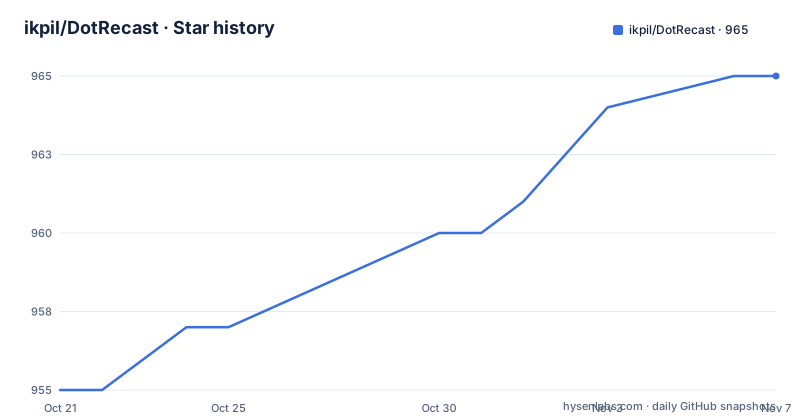
Star history
- ikpil/DotRecast965 ★ · +10
| Repository | 2026-10-21 | 2026-11-07 |
|---|---|---|
| ikpil/DotRecast | 955 | 965 |
10 Stars in the last 17 days, measured from the daily GitHub snapshot. Compare with other projects
Editorial analysis
A C# port of Recast and Detour, not a reimplementation
DotRecast is described as C# Recast and Detour, a port of recastnavigation and recast4j to the C# language. That distinction matters for anyone adopting it. This is not a new navigation algorithm with its own behaviour; it is the same toolset that powers navigation in Unity, Unreal, Godot and O3DE, expressed in a language where it can be embedded in a managed application.
The README attributes the underlying design to Recast itself, describing it as an industry standard navigation mesh toolset, and lists several reasons to use it. It generates a navmesh automatically from any level geometry you give it. It offers fast turnaround for level designers, so a mesh can be rebuilt while someone is still moving things around. It offers detailed customisation and a modular design so you can tailor the functionality. And it is dependency free: building Recast and Detour only requires a .NET compiler, which is why there is no native library to ship or a C++ toolchain to maintain.
That last point is the practical reason to prefer the port over the original C++ code for a managed stack. A server written in C# can load and query navmeshes without crossing into unmanaged code, and a Unity project does not need a platform specific binary for each target.
The licence is ZLib, which the README points to a LICENSE.txt file for the details. ZLib is permissive and allows use in closed source products without copyleft obligations.
The audience is game server developers and Unity engineers who need pathfinding and crowd behaviour and do not want to deal with a native dependency.
Nine modules that split the toolset by job
The repository is organised into modules, each in its own folder under src/, and the split is a usable map of the library's surface.
DotRecast.Core holds the core utilities. DotRecast.Recast is the navmesh generation half, the part that turns geometry into a mesh. DotRecast.Detour is the runtime half: loading navmesh data, pathfinding and navmesh queries. Those two are the minimum for a static world.
DotRecast.Detour.TileCache adds navmesh streaming, which the README calls useful for large levels and open world games. DotRecast.Detour.Crowd covers agent movement, collision avoidance and crowd simulation. DotRecast.Detour.Dynamic handles dynamic navmeshes, combining pre-built voxels with dynamic objects that can be added and removed freely. DotRecast.Detour.Extras is a small utility for importing navmeshes created with the A* Pathfinding Project, which is the practical bridge for teams arriving from Unity.
Two more exist for convenience rather than for production use. DotRecast.Recast.Toolset bundles all the modules, and DotRecast.Recast.Demo is a standalone, comprehensive demo application that shows off the functionality.
Unit tests live in the test/ directory, and the README points at two specific files as starting points: RecastSoloMeshTest.cs for creating a navmesh and FindPathTest.cs for testing pathfinding.
The design consequence is that you take only what you need. A server with static levels needs Recast and Detour, and adding the crowd module costs more memory and more per frame work whether or not you call it.
How Recast turns triangles into a navmesh
The README describes the construction process as a multi-step mesh rasterisation, in four stages.
First, Recast rasterises the input triangle meshes into voxels, turning surface geometry into a volumetric grid. Second, voxels in areas where agents would not be able to move are filtered and removed, which is how walls, gaps and obstacles stop being navigable. Third, the walkable areas described by that voxel grid are divided into sets of polygonal regions, which is the partitioning step that makes the later queries cheap. Fourth, the navigation polygons are generated by re-triangulating those polygonal regions into the navmesh itself.
The voxel grid is the conceptual heart of the system. Because navigation is computed on a grid, the same machinery handles slopes, step heights and clearances, and because the result is polygonal regions, the runtime can answer questions like what is reachable from here without walking the triangles at runtime.
None of this is unique to the port. The value of DotRecast is that this well understood pipeline exists as a managed library with the module split described above, and that the port is maintained alongside the upstream projects the README links to.
Single mesh or tiled mesh, and what tiling unlocks
The choice between one mesh and a tiled mesh is the first architectural decision, and the README states the trade-off plainly.
A single navmesh is suitable for many simple, static cases and is easy to work with. You build it once from the level geometry and the runtime queries it. For a small level with a fixed layout, that is the entire story.
A tiled navmesh is more complex to work with but better supports larger, more dynamic environments. The specific advantages the README names are re-baking, hierarchical path planning and navmesh data streaming. Each of those is a capability you simply do not have with one monolithic mesh: re-baking is replacing part of the navigation data after the world changes, hierarchical planning is a two level query that searches a coarse graph of regions first and refines inside the region, and streaming is loading tiles only when they are needed.
The module that delivers streaming is DotRecast.Detour.TileCache, and the module that handles geometry appearing and disappearing at runtime is DotRecast.Detour.Dynamic. Those two modules exist because the single mesh model cannot express those cases.
For a team on a large open world, the tiled path is the only one that scales. For a team on a small arena or a top down level, the simpler single mesh removes a category of bugs around tile borders and partially loaded navigation data.
Getting started means reading the integration guide, not a package install
There is no quick install command in the README, and that reflects how the library is meant to be consumed. The getting started section points you at BuildingAndIntegrating.md for building the source or integrating it into your own project, and at two test files for the two things you will want to see working first.
The library is distributed on NuGet, with the README badge pointing at the DotRecast.Core package, and the module structure means you add the packages matching the features you need rather than one assembly with everything in it.
The repository layout backs this up. DotRecast.sln is the solution, src/ holds the modules, test/ holds the unit tests, tool/ and resources/ sit alongside, and BuildingAndIntegrating.md is at the top level where you would expect it. The project also carries a CHANGELOG.md and an.editorconfig, and the CI configuration publishes NuGet packages under the DotRecast.Core name.
The demo is worth knowing about even if you never run it. DotRecast.Recast.Demo is described as a standalone, comprehensive demo application showcasing all aspects of the functionality, and the README links three demo videos. For a library whose behaviour is largely visual, a demo that you can watch is a faster way to decide whether the output is what your game needs than any amount of reading.
So the sequence for a new user is: build from source or take the NuGet package, open the two test files to see a mesh built and a path found, then port the shape of that into your own level data.
Where DotRecast is the wrong tool
The first case is an engine that already does this well. Unity, Unreal, Godot and O3DE all ship navigation mesh tooling, and the README says as much when it notes that Recast powers AI navigation features in those engines. If you are inside one of them and its navigation is meeting your needs, replacing it with a port means owning a system that the engine designer already tuned against the game's specific movement model.
The second case is authoring workflows. This is a library, not an editor. It generates a navmesh from geometry you hand it, which is the runtime and pipeline half of the problem, but there is no scene tool, no bake UI and no navigation visualisation in the repository. The demo application exists to show behaviour, not to be an authoring environment. Teams whose designers need to bake and debug navigation inside an editor will find that gap elsewhere.
The third case is anything beyond navigation. The module list ends at navmesh generation, pathfinding, queries, streaming, crowd behaviour and dynamic geometry. It is not an animation system, not a steering planner for vehicles, and not a task assignment layer, and DotRecast.Detour.Crowd is a crowd local avoidance module rather than a replacement for a behaviour tree or a utility based AI layer.
The alternative approach is to stay inside the engine, or to use the original recastnavigation C++ library through a binding of your own. The difference in approach is that the C++ library is the upstream design that Unity and Unreal already use, so you get exactly the behaviour those engines have, at the cost of a native dependency, a build for every target platform and a marshalling boundary on every query. DotRecast removes that boundary, at the cost of being a port that tracks two upstream projects rather than one.
Editorial conclusion
Adopt DotRecast when you are writing game AI or a game server in C# and want navmesh generation, pathfinding and crowd behaviour with no native dependency and no engine lock in. Skip it when your engine already ships a mature navigation stack, since you would be replacing a tuned system with a port, or when you need a full editor experience for navmesh authoring, which this repository does not provide. Verify three things first: that the module you need is in the package you take, because the feature list is split across DotRecast.Core, Recast, Detour, TileCache, Crowd, Dynamic and Extras, that the Zlib licence suits your distribution, and that the single or tiled navmesh decision matches your world, since tiled meshes are what unlock re-baking, hierarchical path planning and streaming. The last push to main was on 2026-10-03 and version 2026.3.1 was published on 2026-08-02.
Frequently asked questions
What is DotRecast?
DotRecast is a C# port of Recast and Detour, itself the industry standard navigation mesh toolset used by Unity, Unreal, Godot and O3DE. It is described as a port of recastnavigation and recast4j to C#.
Which modules does DotRecast provide?
DotRecast.Core for core utilities, DotRecast.Recast for navmesh generation, DotRecast.Detour for runtime loading, pathfinding and queries, plus Detour.TileCache for streaming, Detour.Crowd for agent movement and collision avoidance, Detour.Dynamic for dynamic navmeshes and Detour.Extras for importing A* Pathfinding Project meshes.
What is the difference between a single navmesh and a tiled navmesh in DotRecast?
Single meshes suit simple static cases and are easy to work with. Tiled navmeshes are more complex but enable re-baking, hierarchical path planning and navmesh data streaming, and the TileCache module handles the streaming case.
Does DotRecast need native dependencies?
No. The README states that building Recast and Detour only requires a .NET compiler, and the library is published on NuGet as DotRecast.Core.
What licence is DotRecast released under?
DotRecast is licensed under the ZLib licence, with the terms in the LICENSE.txt file in the repository.
Official sources
Add this badge to your README
If you maintain this project, the badge below links readers to this analysis and shows its maintenance status from the daily GitHub snapshot. Paste the markdown into your README; add ?metric=license or ?metric=stars to the image URL for a different field.

[](https://hysenlabs.com/projects/ikpil-dotrecast)Star history chart for your README
[](https://hysenlabs.com/projects/ikpil-dotrecast)Was this useful?