ILLA Builder: A Self-Hosted Low-Code Platform for Internal Tools
Low-code platform allows you to build business apps, enables you to quickly create internal tools such as dashboard, crud app, admin panel, crm, cms, etc. Supports PostgreSQL, MySQL, Supabase, GraphQL, MongoDB, MSSQL, Rest API, Hugging Face, Redis, etc. Automate workflows with schedule or webhook. Open source Retool.
At a glance
- What is it?
- ILLA Builder is an open-source, Apache-2.0 licensed low-code platform for building internal tools like dashboards, CRUD apps, and admin panels. It offers real-time collaboration, self-hosting via Docker or k8s, and a broad set of data connectors, but its beta branch and limited documentation warrant careful evaluation.
- Who is it for?
- Adopt ILLA Builder if you need a self-hosted, open-source low-code platform for building internal tools and value real-time collaboration and a wide range of data connectors. Avoid it if you require a stable production-ready release, as the default branch is beta and the README lacks detailed configuration guidance.
- Can I use it commercially?
- Yes. Apache-2.0 is a permissive licence: you can use, modify and sell software built on it, as long as you keep its copyright and licence notices.
- Is it still maintained?
- Yes. The repository last received commits 2 days ago.
- What is it written in?
- Mainly TypeScript, according to GitHub's language statistics.
Answers come from the project's GitHub data, last synced on November 14, 2026, and from our analysis. They are not legal advice.
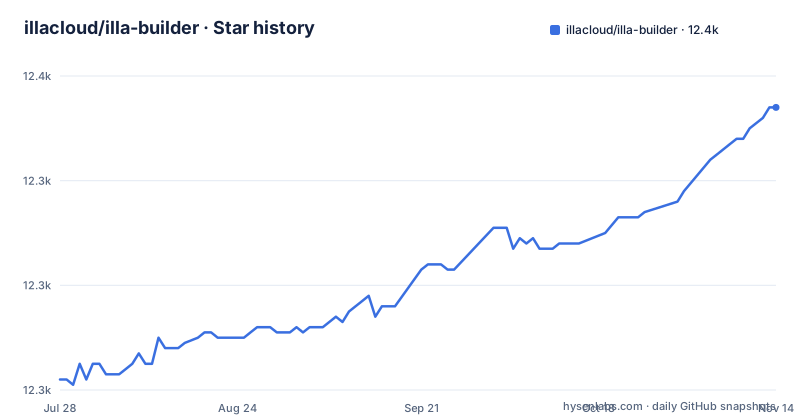
Star history
- illacloud/illa-builder12,354 ★ · +52
| Repository | 2026-07-28 | 2026-11-14 |
|---|---|---|
| illacloud/illa-builder | 12.3k | 12.4k |
52 Stars in the last 109 days, measured from the daily GitHub snapshot. Compare with other projects
Editorial analysis
What ILLA Builder Solves and Who It Is For
ILLA Builder addresses the repetitive work of building internal tools: dashboards, CRUD apps, admin panels, CRMs, and CMSs. It targets developers who need to spin up such tools quickly without writing boilerplate frontend code. The repository description calls it an "Open source Retool", and the README emphasizes a library of Components and Actions. The intended user is a developer, not a business analyst, given the emphasis on data connectors and self-hosting.
How It Works: Components, Actions, and Real-Time Collaboration
The core mechanism is a visual builder where you drag components onto a canvas. Components include charts, tables, and forms, provided by ILLA Design, a separate library. When components overlap, their positions are automatically adjusted, which simplifies layout. Data flows through Actions: you connect to a data source, build UI, then bind components to data. Real-time collaboration allows multiple users to edit the same app simultaneously.
Getting It Running: Cloud, Docker, and CLI
The quickest start is ILLA Cloud, where you sign up and log in. For self-hosting, the README points to a self-hosted deployment guide and mentions a CLI that accelerates deployment. Supported methods include Docker, docker-compose, and Kubernetes. After deployment, you can register with an email or use the default credentials: username root, password password. The README does not give exact commands, so you must consult the documentation at docs.illacloud.com. The default branch is beta, which suggests the code is not yet stable for production.
Data Connectors and Automation: The Breadth and the Gaps
ILLA Builder claims support for PostgreSQL, MySQL, Supabase, GraphQL, MongoDB, MSSQL, REST API, Hugging Face, and Redis. That is a wide net, covering relational, NoSQL, and API-based sources. The README says 'We will add more than 10 databases and APIs soon,' which indicates the list is evolving. Automation is another feature: you can trigger workflows via schedule or webhook. However, the README does not explain how these connectors are configured or how automation is set up. That lack of detail is a real gap for evaluation.
Self-Hosting: Docker, k8s, and the Default Credentials
Self-hosting is a key selling point. The README says the ILLA CLI enables faster deployment than 'your imagination,' but that is marketing. The actual deployment uses Docker, docker-compose, or Kubernetes. After deployment, you log in with root/password, which is a security concern if you forget to change it. The docs link is the only source for steps, but the README does not mention environment variables, image names, or compose file locations.
Limitations and Wrong-Tool Scenarios
The most obvious limitation is that the default branch is beta. Version 4.8.5, released on 2024-08-05, is the latest, but beta implies breaking changes. The README is thin on configuration details, so troubleshooting may require reading source code. The platform is likely overkill for a simple one-page dashboard if you just need a quick script. It is also not ideal if you need a fully offline or air-gapped environment, since the cloud offering is a separate path. The real-time collaboration feature may introduce complexity in concurrency control, but the README does not discuss how conflicts are resolved.
Alternative: Retool and the Difference in Approach
Retool is the named alternative. ILLA Builder is Apache-2.0 licensed, so you can modify and redistribute it. The trade-off is that you get more control and lower cost, but you accept less polish and documentation.
Maintenance, Upgrade Cost, and License Implications
The latest listed releases are 4.8.3 (2024-07-15), 4.8.4 (2024-07-29) and 4.8.5 (2024-08-05); none is listed after August 2024. Upgrading between minor versions may require migration steps, but the README does not mention any. The license is Apache-2.0, which permits commercial use, modification, and distribution, provided you retain copyright notices. That is permissive, but you should still review the full license text. The project is not archived and the last push was on 2026-05-27, though the latest listed release dates from August 2024.
Editorial conclusion
Adopt ILLA Builder if you need a self-hosted, open-source low-code platform for building internal tools and value real-time collaboration and a wide range of data connectors. Avoid it if you require a stable production-ready release, as the default branch is beta and the README lacks detailed configuration guidance. Before adopting, verify the self-hosting documentation for Docker, docker-compose, and k8s, and test the beta branch with your specific data sources, especially GraphQL, Hugging Face, or Redis, to ensure they work as expected. Also, check the Apache-2.0 license implications for your use case, particularly if you plan to modify and redistribute the platform.
Frequently asked questions
What is the best low-code app builder?
The repository does not rank itself against other builders, but it positions ILLA Builder as an open source low-code platform for internal tools and as an open source Retool. You can sign up for ILLA Cloud or self-host with Docker, docker-compose, and k8s, and the platform is licensed Apache 2.0.
Is there a no-code mobile app builder available?
Nothing in this repository documents a mobile target. The described workflow is dragging components such as charts, tables, and forms onto a canvas, connecting data, then deploying and self-hosting the result as an internal tool, and the README says nothing about producing mobile applications.
How to build apps without code?
The README lays out four steps: connect to your database, build the UI by dragging components onto the canvas, where overlapping components are repositioned automatically, connect your data through the GUI data connectors, and deploy the app for self-hosting. Dozens of components are offered, including charts, tables, and forms.
What is an open source app builder?
ILLA Builder is one: a TypeScript project under the Apache 2.0 license, with its default branch named beta and self-hosting available through the ILLA CLI using Docker, docker-compose, or k8s. A hosted option exists as well, since the README points to signing up for ILLA Cloud as the quickest route.
Official sources
Add this badge to your README
If you maintain this project, the badge below links readers to this analysis and shows its maintenance status from the daily GitHub snapshot. Paste the markdown into your README; add ?metric=license or ?metric=stars to the image URL for a different field.

[](https://hysenlabs.com/projects/illacloud-illa-builder)Star history chart for your README
[](https://hysenlabs.com/projects/illacloud-illa-builder)Was this useful?