InkChain Docs: A Nextra-Based Documentation Site That Runs on Pages Router
Ink Documentation
At a glance
- What is it?
- InkChain's documentation app is a Next.js and Nextra project that still uses the Pages Router, ships via Docker and AWS Amplify, and adds spell-checking and linting for MDX content. It is a content delivery tool, not a documentation framework or a knowledge base.
- Who is it for?
- Adopt this repository if you maintain InkChain's public docs and need a simple, linted MDX site that deploys automatically on merge. Do not adopt it if you need App Router features, a headless CMS, or a reusable general-purpose documentation framework.
- Can I use it commercially?
- Not without permission. GitHub finds no licence file in the repository, and without a licence all rights are reserved by default: you may read the code but not reuse it. Check the README, or ask the authors, before using it.
- Is it still maintained?
- Yes. The repository last received commits 2 days ago.
- What is it written in?
- Mainly MDX, according to GitHub's language statistics.
Answers come from the project's GitHub data, last synced on November 15, 2026, and from our analysis. They are not legal advice.
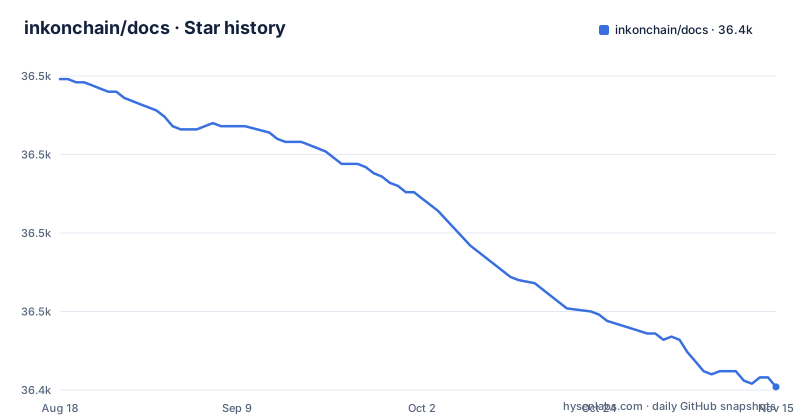
Star history
- inkonchain/docs36,426 ★ · -98
| Repository | 2026-08-18 | 2026-11-15 |
|---|---|---|
| inkonchain/docs | 36.5k | 36.4k |
-98 Stars in the last 89 days, measured from the daily GitHub snapshot. Compare with other projects
Editorial analysis
What This Repository Actually Is
The repository is the source for the documentation site at docs.inkonchain.com. It is not a documentation framework, not a static site generator, and not a content management system. It is a Next.js application that uses Nextra, a documentation-focused layer on top of Next.js, to turn MDX files into a navigable site. The README describes it as an advanced, streamlined documentation platform, but the repository shows a fairly conventional setup: a Pages Router app, a set of linting tools, and two deployment paths. The primary language is MDX, which means the content lives in Markdown files with embedded JSX components. For an engineer evaluating this as a template, the key fact is that the project is built to serve one specific product's documentation, not to be a general-purpose docs engine.
The Pages Router Constraint Is a Real Trade-Off
The README states plainly that the project has not upgraded to the App Router due to compatibility limitations. That is a significant detail for anyone considering this as a starting point. Next.js has been pushing the App Router as the default for new projects, and many plugins and examples assume it. Staying on the Pages Router means the project avoids a migration but also misses out on features like server components and nested layouts that the App Router provides. The README gives no further explanation of what compatibility limitation blocks the upgrade. If you fork this repository, you inherit that constraint. You will need to decide whether the Pages Router is acceptable for your own documentation needs, or whether you would rather start from a newer Nextra template that already uses the App Router.
How the Build and Run Process Works
The README gives two clear paths for running the site. For local development, clone the repository, run pnpm install, then pnpm run dev. For a containerized setup, build a Docker image with docker build -t docs . and run it with docker run -p 3000:3000 docs. The only stated requirement is Node.js v20.11.0 or higher. There is no mention of environment variables, database connections, or external services for local development, which suggests the site is a static or server-rendered app that does not need a backend. The Docker command maps port 3000, so the site listens on that port. The absence of a docker-compose file or a production build command in the README means you will need to check the repository's scripts yourself if you want to customize the build.
CI/CD and Preview Deployments via AWS Amplify
The repository uses GitHub Actions for automated checks on every pull request. The README lists four jobs: js-lint for ESLint, md-lint for Remark-based Markdown formatting, format for Prettier, and spell-check using CSpell. For unique terms like InkChain, the README says to add them to ./cspell/project-words.txt. That is a concrete file path you will need to edit if you fork the project and introduce new product names. The CI also deploys a temporary environment via AWS Amplify for each PR, and the deployment URL appears in the PR checks. The main branch is set for continuous deployment to AWS Amplify as well. This means the project depends on AWS Amplify for both preview and production hosting. If your team does not use AWS, you would need to replace that part of the pipeline.
Tooling and Content Quality Controls
The development setup includes CSpell, Remark, ESLint, Prettier, and Tailwind CSS. The README positions these as tools to maintain high-quality code and documentation. The spell-check job is particularly relevant for a docs repository, because documentation often contains product-specific terms that standard dictionaries reject. The project-words.txt file is the whitelist mechanism, and the README explicitly instructs contributors to add unique terms there. The README describes Remark as processing and rendering Markdown content with added plugins, and the remarkConfig in package.json lists them, including remark-frontmatter, remark-gfm, remark-mdx and several remark-lint presets; the lint:mdx script runs remark with --frail. Tailwind CSS is listed as a utility-first CSS framework, which the README lists for fast, responsive UI development.
Limitations and Cases Where This Is the Wrong Tool
The most obvious limitation is the Pages Router constraint, which the README itself acknowledges. Another limitation is the lack of a stated license. The repository metadata says License: unknown. For a company evaluating whether to reuse this code, that is a serious issue. Without a license, you technically have no permission to copy, modify, or distribute the code, even if it is public on GitHub. The README also gives no information about versioning or releases. The repository publishes no releases, which means you cannot rely on a stable release tag for dependency management. Finally, this is a product-specific documentation site. Check the current configuration for search, analytics, versioning and API reference features before assuming which components need additional work.
A Real Alternative: Nextra with App Router or a Static Site Generator
The most direct alternative is to start with a current Nextra template that uses the App Router. Nextra is the same documentation layer, but the official templates have moved to the App Router, and they include features like built-in search and i18n support. The difference in approach is that the App Router version uses file-based routing with server components, while this repository sticks to the Pages Router. Another alternative is a static site generator like Docusaurus or Astro. Docusaurus is built specifically for documentation and includes versioning, search, and a sidebar layout out of the box. Astro is more flexible but requires more setup for documentation-specific features. The deployment model also matters: Next.js can render on a server or produce static output when the application supports it, so inspect this project's build configuration rather than assuming either mode. If you need a docs site that is purely static and can be hosted on any CDN, a static generator might be simpler.
Maintenance and Upgrade Costs
The README gives no explicit maintenance instructions beyond the CI checks. The dependency on Nextra and Next.js means you will need to watch for breaking changes in both libraries. The Pages Router is still supported in Next.js, but the ecosystem is moving toward the App Router, so future Nextra releases may drop Pages Router support. That would force a migration. The Docker setup is straightforward, but the AWS Amplify dependency means your deployment pipeline is tied to that service. If Amplify changes its pricing or features, you would need to adjust. The spell-check whitelist is a small but ongoing maintenance task, as new product terms will need to be added. The lack of a license is the biggest maintenance risk: you cannot legally modify or redistribute the code without permission, so the project is not a safe template for other teams unless the license is clarified.
Editorial conclusion
Adopt this repository if you maintain InkChain's public docs and need a simple, linted MDX site that deploys automatically on merge. Do not adopt it if you need App Router features, a headless CMS, or a reusable general-purpose documentation framework. Verify search behavior and deployment requirements in the selected revision. Before using it as a template, verify the Nextra version, confirm your Node.js is v20.11.0 or higher, and check whether AWS Amplify is available in your team, because the CI/CD and preview deployments depend on that service. The project is a straightforward documentation app with a clear build path, and its value is tied to InkChain's own content, not to any generic documentation solution.
Frequently asked questions
What do I need to run the InkChain docs site locally?
Node.js v20.11.0 or higher, then pnpm install followed by pnpm run dev, which maps to next dev. The package manifest pins the toolchain further with volta at Node 22.23.4 and pnpm 9.12.3, and declares [email protected] as the packageManager.
How do I build a Docker image for the InkChain documentation?
The entry point documents docker build -t docs . followed by docker run -p 3000:3000 docs, using the current directory as the build context. The repository root as listed does not include a Dockerfile, so the image definition has to be supplied before that command can succeed.
Why did the InkChain docs project not move to the App Router?
The project states that due to compatibility limitations it has not yet upgraded to the App Router, and relies on the Pages Router for navigation and routing.
What does the InkChain docs CI pipeline check on a pull request?
Four checks: js-lint using ESLint for JavaScript code formatting, md-lint using Remark for Markdown code formatting, format using Prettier for consistent code style, and spell-check using CSpell on the documentation. Unique terms are whitelisted through the ./cspell/project-words.txt file.
How do I add a new word to the InkChain docs spell checker?
Add it to the ./cspell/project-words.txt file, which the pipeline documentation names as the whitelist for unique terms such as InkChain. The checking command is cspell lint "**/*.mdx", and the fixing command only prints the unknown words for you to commit yourself.
Official sources
Add this badge to your README
If you maintain this project, the badge below links readers to this analysis and shows its maintenance status from the daily GitHub snapshot. Paste the markdown into your README; add ?metric=license or ?metric=stars to the image URL for a different field.

[](https://hysenlabs.com/projects/inkonchain-docs)Star history chart for your README
[](https://hysenlabs.com/projects/inkonchain-docs)Was this useful?