gitin: a terminal explorer for Git history and working changes
commit/branch/workdir explorer for git
At a glance
- What is it?
- gitin gives Go developers and terminal-focused contributors an interactive way to inspect commits, search history, manage staged changes, and explore branches. It requires Git 2.18 or newer and is most useful for repositories that are comfortable being driven through a terminal UI.
- Who is it for?
- Adopt gitin if your work is centered on reviewing Git history and changing a working tree from the terminal. Do not choose it if Windows support, noninteractive automation, or a documented rollback workflow is mandatory.
- Can I use it commercially?
- Yes. BSD-3-Clause is a permissive licence: you can use, modify and sell software built on it, as long as you keep its copyright and licence notices.
- Is it still maintained?
- Yes. The repository last received commits 5 days ago.
- What is it written in?
- Mainly Go, according to GitHub's language statistics.
Answers come from the project's GitHub data, last synced on October 23, 2026, and from our analysis. They are not legal advice.
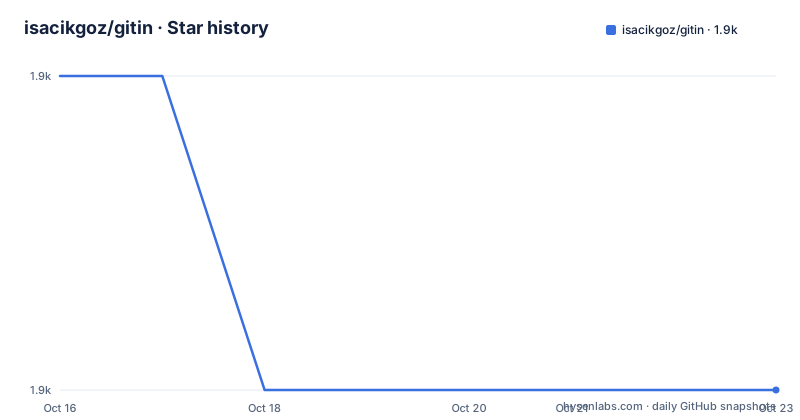
Star history
- isacikgoz/gitin1,865 ★ · -1
| Repository | 2026-10-16 | 2026-10-23 |
|---|---|---|
| isacikgoz/gitin | 1.9k | 1.9k |
-1 Stars in the last 7 days, measured from the daily GitHub snapshot. Compare with other projects
Editorial analysis
Why gitin fits terminal-based Git work
gitin solves a narrow problem: it turns several common Git operations into an interactive terminal workflow for inspecting a repository and its working tree. The README describes it as a commit, branch, status, and workdir explorer. That makes it relevant to developers who spend much of their time answering questions such as which commit changed a file, what is currently staged, or which branch should be checked out. It is not intended to replace every Git command. Its scope is exploration and interactive change management through a command-line interface.
The supported commands are `log`, `status`, `branch`, and `push`. Within the interface, `/` starts fuzzy search, `enter` can inspect a selected log entry or checkout a branch, and `space` stages a selected file from status. The status view also offers `c` for committing, `m` for amending, and `p` for hunk staging. These are concrete workflow choices rather than a general-purpose Git automation API.
The project is written in Go and has packages for CLI handling, configuration, Git access, prompting, and terminal behavior. Based on the repository layout, it is organized as a command-line application rather than a library intended for embedding into another Go program. The README lists Linux and macOS support. It does not document Windows support, so a Windows-only team should not assume that the terminal interface is available there.
How gitin loads and presents repository information
gitin invokes `git` to read repositories, with the README explicitly requiring Git 2.18 or newer. The application presents commit history through `gitin log`, working-tree changes through `gitin status`, and branches through `gitin branch`. The README says history is loaded and searched in the background, which explains why the tool is designed for interactive exploration rather than a one-shot report.
The `log` view supports fuzzy search after the user presses `/`. A selected commit can be opened to inspect the files and changes associated with it. The `branch` view supplies filter options, and pressing `enter` checks out the selected branch. The `status` view is more than a display. It can show a file diff, stage a file, stage individual hunks, create a commit, or amend an existing commit. That sequence keeps file inspection and staging in the same terminal interaction instead of requiring a separate diff tool for every decision.
The interface also supports environment-driven preferences. `GITIN_LINESIZE` controls the line size, `GITIN_STARTINSEARCH` can make the application start in search mode, `GITIN_DISABLECOLOR` can disable colors, and `GITIN_VIMKEYS` controls the `h`, `j`, `k`, and `l` navigation keys. The repository includes terminal-oriented dependencies, including terminal emulation and screen-related packages. The documentation does not describe a web interface, remote service, or persistent server component.
Installing gitin and launching the first repository view
The README gives two installation routes for Linux and macOS. One is a release binary for the relevant platform. The other installs the command with Go. The Go installation command installs the `gitin` executable into the user's Go command directory, so that directory must be available on `PATH` for normal command execution.
For a Go installation, run:
go install github.com/isacikgoz/gitin/cmd/gitin@latestThe README also documents Homebrew installation through the project's tap:
brew tap isacikgoz/taps
brew install gitin
After installation, use the repository's help output to confirm that the executable is available. The documented command is:
gitin --helpThe first useful operation is to enter a Git working tree and open the status view:
cd /path/to/your/repository
gitin status
The README does not document a noninteractive command that prints a complete status report or exports a commit history. The interaction is keyboard-driven. In `gitin status`, press `enter` on a file to view its diff and `space` to stage it. Press `c` to commit, `m` to amend, or `p` for interactive hunk staging. Those keys are documented, but the exact commit message entry flow is not described further in the README.
Commit and push checks have repository-specific behavior
gitin can run checks before a commit or push. The repository-specific checks live in `.git/gitin/config.yml`, which is local to the clone and is not committed. A project can also share checks through `.gitin.yml` at the repository root. Shared checks run before the user's own checks.
The configuration format names each check and gives it a shell command. For example:
commit:
  checks:
    - name: Format
      run: test -z "$(gofmt -l .)"
push:
  checks:
    - name: Tests
      run: go test ./...
Checks run one after another from the root of the working tree, and their output is displayed as it is produced. Commit checks temporarily set aside unstaged changes to tracked files in `.git/gitin/unstaged.patch`, then restore them after the checks. Untracked files remain in place. The README states that if a check changes a file that the user changed without staging, the check's change is undone so the user's change is restored.
A failed check does not automatically stop the operation. gitin asks whether to continue anyway, while `Ctrl-C` cancels the running check. The `run` value is executed as a shell command, so commands containing `: ` must be quoted, with a `|` block suggested by the README. Git's own `pre-commit` and `pre-push` hooks still run. This behavior gives teams a place for repeated checks, but it also means that check configuration is executable project input and should be reviewed before use.
Push routing and upgrade considerations
The `gitin push` command shows what will be pushed and asks whether to run the push checks. The README documents a precise fallback for branches without an obvious upstream. It considers `branch.<name>.pushRemote`, `remote.pushDefault`, the upstream's remote, then `origin` or the only remote. If Git cannot determine a destination, gitin uses a same-named branch on the push remote. A branch without an upstream tracks the same-named remote branch.
That routing behavior is useful in repositories where branch names are the primary interface, but it creates a dependency on Git configuration outside gitin. A user should inspect the upstream and push remote before using the command. The README does not document a dry-run option, a rollback command, or a way to undo a push from within gitin.
The project is not archived, and its last push was on 2026-10-13. The recent release history includes `v0.4.0-rc.2` on 2026-10-12 and `v0.4.0-rc.1` on 2026-10-06. The repository also lists `v0.3.0` from 2023-01-20. These release markers show a recent prerelease line, but the presence of a release candidate does not establish stability for every terminal environment. The Go module declares Go 1.26.0, so source builds require a compatible Go toolchain. The BSD-3-Clause license permits use and modification under its terms, but organizations should review the actual `LICENSE` file for their compliance requirements.
The practical boundary of gitin
The main alternative is to use Git's standard command-line commands together with a pager and, when needed, a separate diff or staging utility. That approach is scriptable and works in more environments because it depends directly on `git`, whereas gitin adds an interactive terminal layer and requires a supported terminal experience. Git's native commands also make it easier to express exact automation, such as filtering history by paths or producing machine-readable output. The README does not claim that gitin supports such scripting.
gitin is a poorer fit when the workflow must be fully unattended, when output must be parsed by another program, or when a team needs a documented recovery path after a mistaken commit or push. It is also a questionable choice on Windows because the README states only Linux and macOS support. Another limitation is that history loading and searching happen in the background, so the interface is still an application rather than a static repository index that another service can query.
The UI itself is the tradeoff. Fuzzy search, key-driven file staging, hunk staging, branch checkout, and checks embedded into commit and push flows can reduce command switching for a person at a terminal. In exchange, users need to learn the documented keys, inspect the screen state carefully, and review check output before confirming an action. The repository includes end-to-end tests that drive the binary in a pseudo terminal and compare terminal screens, including colors. That is evidence of deliberate interface testing, not a claim about behavior on every terminal emulator.
Editorial conclusion
Adopt gitin if your work is centered on reviewing Git history and changing a working tree from the terminal. Do not choose it if Windows support, noninteractive automation, or a documented rollback workflow is mandatory. Verify Git 2.18 or newer, your terminal's key handling, and the repository-specific checks in `.git/gitin/config.yml` or `.gitin.yml` before adopting it.
Frequently asked questions
How do I install gitin on Linux or macOS?
The README documents downloading a release binary, installing with Go using `go install github.com/isacikgoz/gitin/cmd/gitin@latest`, or installing through the Homebrew tap. Git 2.18 or newer is required.
How do I search Git history with gitin?
Run `gitin log` and press `/` to enter fuzzy search mode. The README also says that history is loaded and searched in the background.
Where should gitin commit and push checks be configured?
Local checks can be placed in `.git/gitin/config.yml`, while shared project checks can be committed as `.gitin.yml` at the repository root. Shared checks run first, followed by the local checks.
Official sources
Add this badge to your README
If you maintain this project, the badge below links readers to this analysis and shows its maintenance status from the daily GitHub snapshot. Paste the markdown into your README; add ?metric=license or ?metric=stars to the image URL for a different field.

[](https://hysenlabs.com/projects/isacikgoz-gitin)Star history chart for your README
[](https://hysenlabs.com/projects/isacikgoz-gitin)Was this useful?