DBQuill: A Local-First AI Database Agent That Treats SQL as a Reviewable Artifact
Open-source, local-first AI database agent for natural-language SQL, safe writes, charts, SQLite, MySQL, and PostgreSQL.
At a glance
- What is it?
- DBQuill is a Windows desktop agent that turns natural language into typed, gated database operations for SQLite, MySQL, and PostgreSQL. Its core claim is that the model plans but never directly executes, and every write stops at a preview.
- Who is it for?
- Adopt DBQuill if you are a developer or data analyst on Windows 10/11 who wants a local-first, source-verifiable way to query SQLite, MySQL, or PostgreSQL in natural language without granting a remote service direct database access. Do not adopt it if you need a signed native installer, macOS or Linux support, or immediate production-grade writes to MySQL or PostgreSQL, because the write path for those vendors is still marked pending.
- Can I use it commercially?
- Yes. MIT is a permissive licence: you can use, modify and sell software built on it, as long as you keep its copyright and licence notices.
- Is it still maintained?
- Yes. The repository last received commits 8 days ago.
- What is it written in?
- Mainly Python, according to GitHub's language statistics.
Answers come from the project's GitHub data, last synced on October 22, 2026, and from our analysis. They are not legal advice.
Star history
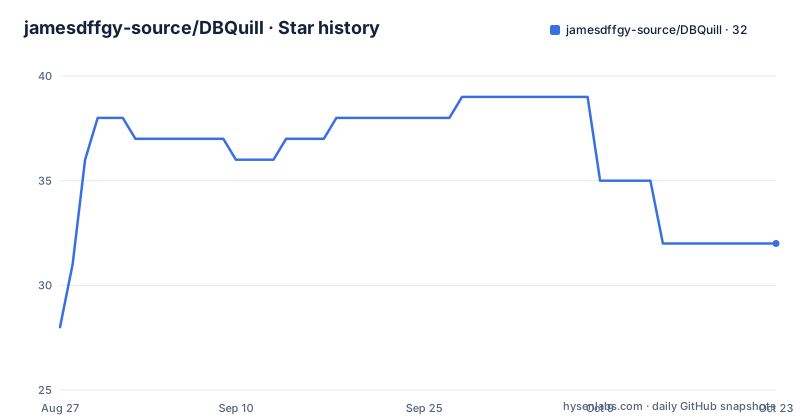
- jamesdffgy-source/DBQuill32 ★ · +4
| Repository | 2026-08-27 | 2026-10-22 |
|---|---|---|
| jamesdffgy-source/DBQuill | 28 | 32 |
4 Stars in the last 56 days, measured from the daily GitHub snapshot. Compare with other projects
Editorial analysis
The Problem DBQuill Targets: Unreviewed AI SQL
The core workflow is simple: attach a database, ask a question like "Which products grew fastest this quarter?", review the interpreted operation and relationship path, then see a result table and charts. Writes are different. For an insert, you choose a table, complete a generated form, or merge an Excel workbook whose sheets and headers match existing tables. The change preview appears before anything is committed. The README emphasizes that write confirmation is bound to one database, one reviewed plan, and one use. That means you cannot approve a write and then have the agent reuse that approval for a different operation, which is a sensible guard against accidental bulk changes.
Architecture: The Typed Relational Contract
The write path is deliberately conservative. Remote writes require an explicit controlled-write connection, and only DML is enabled; remote DDL remains blocked. Scheduled natural-language work cannot approve writes automatically. This is a strong limitation for automation use cases, but it is consistent with the project's safety-first stance. The README does not detail how the change preview is generated for arbitrary SQL, but it does say that write validation and preview happen before explicit confirmation and that the write runs in a transaction. For a v0.2.0 release, that level of caution is reasonable.
Getting It Running: Windows, Python 3.12, and a Script
The dependency set is hash-locked, which is a good supply-chain practice, but it also means you cannot casually change versions without regenerating the lock. The environment diagnostics script likely checks for WebView2 and Python version, but the README does not specify what it checks. The source-first model means you are responsible for building and running the app, not just downloading a binary. The README explicitly says a release badge or source archive is not a claim of a signed native installer.
What Is Verified vs. What Is Pending
The README includes a verification table that is refreshingly honest. SQLite has a complete MVP path: schema, retrieval, metrics, charts, semantics, scheduling, and confirmed writes. CSV and .xlsx import into a local SQLite database is verified, with a note that legacy .xls is not supported. MySQL 8.4 and PostgreSQL 17 have verified schema, PK/FK discovery, bounded queries, grouped metrics, timeout, and physical read-only enforcement. But the controlled INSERT/UPDATE/DELETE path for both remote vendors is marked "opt-in" and the live vendor write matrix is "pending." That is a significant caveat. If you need to write to MySQL or PostgreSQL in production, this project is not there yet. The write path is only fully proven for SQLite. The README also says scheduled natural-language work cannot approve writes automatically, which is a deliberate limitation that prevents unattended automation.
Security and Privacy: What the README Actually Claims
The security section lists several concrete properties. Queries are read-only by default, single-statement, and row-bounded. Writes require validation, a change preview, and explicit confirmation. Audit records retain controlled metadata and hashes, not raw prompts, SQL, credentials, or result rows. Layered memory stores redacted question previews and typed route metadata only, isolated by database, access scope, and schema fingerprint. Model credentials are stored in ignored local configuration. These are strong claims, but they are claims from the README, not independent verification. The README also says the source setup is continuously checked on a clean GitHub-hosted Windows environment, which is a CI claim you can verify by looking at the workflow file. The project gate includes a source fingerprint check, which means the repository has a way to detect if the code has been tampered with after release. That is an unusual and useful feature, though the README does not explain how the fingerprint is generated or verified.
Limitations and Wrong-Tool Cases
The most obvious limitation is platform: Windows only. The README does not mention macOS or Linux support, so if your team is cross-platform, this is not a fit. The write path for remote databases is not fully verified, so if you need to update MySQL or PostgreSQL rows with confidence, you should wait for a later release or use a different tool. The dependency on Python 3.12 specifically could be a problem if you have other Python versions installed, though the .venv approach isolates it. The README does not describe how the agent handles ambiguous natural language or multi-step queries beyond follow-up questions, so the quality of the SQL generation depends on the model endpoint you configure. The benchmark report separates model behavior from infrastructure failures, which suggests the authors know that model quality varies, but the README does not give specific accuracy numbers. You would need to read the benchmark report for that. Also, the README says scheduled work cannot approve writes, so if you want automated reporting that also writes, you cannot do that.
Alternatives and How They Differ
The most direct alternative is a general-purpose AI SQL tool like Text-to-SQL in a cloud service, such as OpenAI's Code Interpreter or a hosted service like Databricks SQL Assistant. Those tools typically run in the cloud, send your schema and queries to a remote server, and often execute SQL directly with less gating. DBQuill differs by being local-first, with a typed contract and a deterministic native plan that can bypass the model entirely. Another alternative is a local tool like sqlite-utils with a CLI, which gives you full control but no natural language interface. The difference is that sqlite-utils is a scriptable tool, not an agent, so you write SQL or Python yourself. A third alternative is a BI tool like Metabase, which has a natural language query builder but is designed for analytics, not safe writes. Metabase runs as a server and typically connects to a central database, not a local SQLite file. The core difference is that DBQuill is a desktop agent with a review-and-confirm write path, whereas those alternatives either execute without review or do not handle writes at all.
Maintenance and Upgrade Cost
The project is young, with v0.2.0 released on 2026-08-26, just a few hours after v0.1.0. That rapid release cadence suggests active development, but it also means the API and behavior may change. The README does not provide a migration guide or a changelog beyond release titles. The hash-locked dependency set means upgrading dependencies is a deliberate process, not a simple pip install -U. The license is MIT, which is permissive and allows commercial use, but you should read the LICENSE file yourself. The README does not mention any known issues or deprecation policies. The maintenance cost is primarily the time to keep up with releases and to re-run the verification gate after changes. The source-first distribution means you are responsible for building the app, which adds a step compared to a binary installer. If you want a stable, long-term tool, you might wait for a 1.0 release. But if you are comfortable with a source-first project and the pending remote write path does not matter to you, the local-first architecture and the explicit gating are worth a look.
Editorial conclusion
Adopt DBQuill if you are a developer or data analyst on Windows 10/11 who wants a local-first, source-verifiable way to query SQLite, MySQL, or PostgreSQL in natural language without granting a remote service direct database access. Do not adopt it if you need a signed native installer, macOS or Linux support, or immediate production-grade writes to MySQL or PostgreSQL, because the write path for those vendors is still marked pending. Before relying on it for sensitive data, verify the hash-locked dependency set, run the included check_project.cmd gate, and confirm that your model endpoint is OpenAI-compatible and that you accept storing model credentials in local ignored configuration. The project is source-first and requires Python 3.12, so budget time for a manual environment setup.
Frequently asked questions
Is DBQuill, the quill-style database agent, free to use?
The licence is MIT and the source is public. What is not offered is a signed native installer: the distribution is source-first, and running install_and_start.cmd on Windows creates an isolated .venv and installs a hash-locked dependency set, so you supply the Windows 10 or 11 machine, CPython 3.12 and the Edge WebView2 Runtime.
What does the quill in DBQuill's name refer to?
The repository does not explain the name. What it defines is the project itself: a local-first Windows agent for querying, understanding, visualizing and safely updating SQLite, MySQL and PostgreSQL from natural-language requests.
Does DBQuill let the model write SQL and run it unchecked?
No. The model is a planner input rather than the authority. Deterministic schema operations and proven relational plans bypass model-generated SQL when possible, and every candidate crosses the same authorization, single-statement, row-limit, semantic and execution gates before it runs.
What does DBQuill need installed on a Windows machine?
Windows 10 or 11 on x64, CPython 3.12, the Microsoft Edge WebView2 Runtime, and Git for cloning and release verification. After cloning, .\scripts\install_and_start.cmd creates the virtual environment, installs dependencies, runs diagnostics and opens the app.
Official sources
Add this badge to your README
If you maintain this project, the badge below links readers to this analysis and shows its maintenance status from the daily GitHub snapshot. Paste the markdown into your README; add ?metric=license or ?metric=stars to the image URL for a different field.

[](https://hysenlabs.com/projects/jamesdffgy-source-dbquill)Star history chart for your README
[](https://hysenlabs.com/projects/jamesdffgy-source-dbquill)