BiliPai: A Native, Plugin-Friendly Third-Party Bilibili Client for Android
Native, clean and extensible - redefining your Bilibili experience.
At a glance
- What is it?
- BiliPai is a Kotlin and Jetpack Compose based third-party Bilibili client for Android 8.0 and up. It focuses on daily-use flows, large-screen layouts, and a plugin system that ranges from built-in filters to source-level native extensions.
- Who is it for?
- Adopt BiliPai if you want a native-feeling Bilibili client with Material You styling, large-screen support, and a plugin system that lets you filter feeds or add playback tweaks without recompiling. Do not adopt it if you need a stable, production-grade app for daily critical use, because it is in active beta with frequent releases, some features like external Dex execution are still preview, and the project depends on a Telegram channel for official builds.
- Can I use it commercially?
- Yes, with conditions. GPL-3.0 is a copyleft licence: if you distribute software that includes it, you must release that software's source code under the same licence. Running it internally without distributing it does not trigger that obligation.
- Is it still maintained?
- Yes. The repository received new commits within the last day.
- What is it written in?
- Mainly Kotlin, according to GitHub's language statistics.
Answers come from the project's GitHub data, last synced on October 22, 2026, and from our analysis. They are not legal advice.
Star history
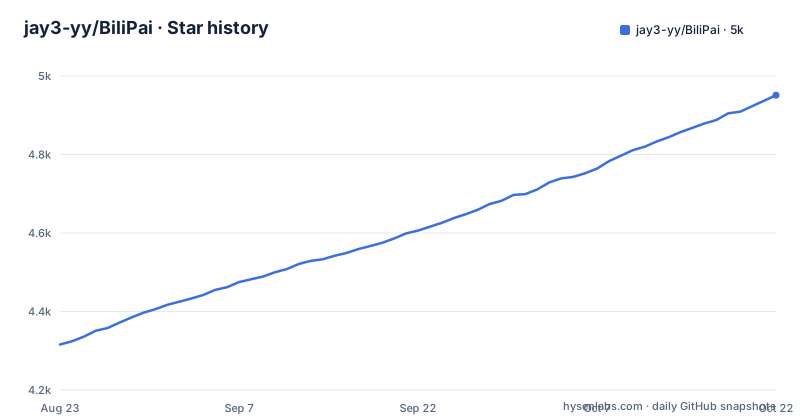
- jay3-yy/BiliPai4,951 ★ · +635
| Repository | 2026-08-23 | 2026-10-22 |
|---|---|---|
| jay3-yy/BiliPai | 4.3k | 5k |
635 Stars in the last 60 days, measured from the daily GitHub snapshot. Compare with other projects
Editorial analysis
What BiliPai Solves and Who It Is For
BiliPai targets Android users who want a Bilibili client that feels native to the platform rather than a web wrapper. The README lists coverage for video, anime, live streaming, dynamics, messages, and offline caching, which are the daily flows most people use. It also emphasizes large-screen adaptation: tablets, foldables, desktop, and TV layouts are mentioned as completed baselines. This makes it a candidate for users who find the official app awkward on a tablet or foldable. The project is also aimed at tinkerers. The plugin system, which ranges from JSON rules to source-level native plugins, is a clear signal that the author expects an audience willing to inspect and modify behavior. The target user is someone comfortable with installing APKs from a Telegram channel and reading a changelog, not a casual app store consumer.
Architecture: Kotlin, Compose, and a Three-Style Design System
The repository layout shows a modular structure. The app module contains most runtime code, split into core, data, domain, feature, and navigation packages. There is a separate design-system module that hosts shared themes, components, animations, and blur strategies for three visual styles: Material You, Miuix, and Compose Cupertino. The README says the UI uses Jetpack Compose with Material 3, Miuix, and Compose Cupertino, and the navigation is built on Navigation3 runtime/UI 1.2.0-alpha07. That is an alpha dependency, which tells you the project is willing to ride the bleeding edge. The data layer uses Room and DataStore for local storage, Retrofit and OkHttp for network, and AndroidX Media3 for playback. The use of MVVM with UseCases in a domain layer is standard but not remarkable. What stands out is the deliberate separation of a design-system module, which suggests the author wants to keep the three visual styles consistent across features. The project also mentions a danmaku render engine and custom overlay strategies, indicating that the player UI is not a simple ExoPlayer wrapper.
Getting It Running: Build Commands and System Requirements
The README provides concrete build steps. You clone the repository, then run `./gradlew :app:compileDebugKotlin` to compile. For a testable APK, you run `./gradlew :app:assembleDev`, and the output lands at `app/build/outputs/bilipai/dev/BiliPai-0.2.3-beta.15-dev.apk`. The release build goes to `app/build/outputs/bilipai/release/BiliPai-0.2.3-beta.15.apk`. The build requires JDK 21, AGP 9.3.1, Gradle 9.5, and compileSdk 37. That is a very recent toolchain, so your local environment must match it. Android Studio and the Android SDK need to be compatible with AGP 9.3.1. The README notes that `google-services.json` is optional; if you place it in the `app/` directory, Firebase Crashlytics and Analytics are enabled, otherwise the build skips those features. The system requirement is Android 8.0 or API 26, with Android 12 recommended for full Material You dynamic color support. For installation, you must allow unknown sources, and the README advises getting APKs from the official Telegram channel and checking version and checksum information in the release notes.
The Plugin System: Three Tiers with Different Trade-offs
The plugin ecosystem is the most distinctive part of BiliPai. There are three tiers. First, built-in plugins ship with the app; the README lists ten, including ad removal, Anime4K, danmaku enhancement, night eye protection, and CDN region selection. These are distributed with the main application. Second, JSON rule plugins, with a `.bp` extension, can be imported via URL. They are suited for feed filtering, danmaku filtering, and highlighting. This is a low-barrier entry: you write rules, not code. Third, external `.bpplugin` packages have an SDK, package format, manifest, and signature verification ready, but external Dex execution is still in preview. That means you can package a plugin, but the app may not fully trust and execute arbitrary code yet. The fourth tier is source-level native plugins, which require recompiling the APK. That is for complex player or recommendation changes. The README includes a caution about reviewing plugin capabilities like `NETWORK`, `LOCAL_HISTORY_READ`, and `PLAYER_CONTROL`. The trade-off is clear: JSON plugins are safe and easy but limited, native plugins are powerful but require a build environment, and external Dex is not production-ready.
Privacy and Data Handling: Local Login and Anonymous Stats
The README states that login information is stored locally and permissions are kept minimal. Usage statistics are limited to anonymous daily active users and basic usage. That is a deliberate contrast to the official app, which is known for aggressive data collection. The project also supports multiple account sessions, which is a practical feature for users who switch between accounts. WebDAV backup and restore for settings is included, which is a nice touch for keeping configuration across devices. However, the README does not detail what exactly is collected in the anonymous stats, nor how the local storage is encrypted. If you are privacy-sensitive, you should inspect the source code for the analytics implementation, especially since the build only enables Crashlytics when you add `google-services.json`. The default build without that file should have no Firebase dependency, which is a positive sign.
Limitations and Failure Modes
The project is in active beta, with releases like `v0.2.3-beta.16` pushed daily. That means frequent changes and potential instability. The README itself says the current build is `0.2.3-beta.15 / versionCode 324`, but the latest release is beta.16, so the README is slightly out of date. The dependency on Navigation3 1.2.0-alpha07 is a risk: alpha API can change without notice, and the roadmap lists 'Navigation3 1.2 real-device regression' as a current P0, indicating known issues. The external Dex plugin execution is preview, so you cannot rely on third-party native plugins yet. Also, the app is not on Google Play; distribution is via Telegram, which means you must trust the channel and verify checksums. The README mentions a CAUTION about third-party plugins, but the app itself may not sandbox them fully. If you import a malicious JSON plugin that declares `NETWORK` and `LOCAL_HISTORY_READ`, it could read your history or send data. The permission system for plugins is not described in detail, so you should review the plugin SDK documentation before importing anything.
Alternative: TabulaBili and the Custom Client Landscape
The README credits wangdaodao's TabulaBili and tjsky's TabulaBili-Plus as the origin of the 'initial recommendation' plugin. TabulaBili is an older third-party Bilibili client that also focuses on a clean experience, but it does not have the same plugin architecture or large-screen adaptation. BiliPai implements the initial recommendation as a built-in plugin, which shows it is borrowing ideas from the community. Another alternative is the official Bilibili app, which has more stable APIs and features but lacks the plugin system and local privacy stance. If you want a client that you can extend with custom filters, BiliPai's JSON plugin system is a different approach from TabulaBili's fixed feature set. However, if you need a stable daily driver without beta churn, the official app or a more mature open-source client like NewPipe (for YouTube, not Bilibili) might be safer. The key difference is BiliPai's willingness to embrace alpha dependencies and frequent releases, which is both a strength for innovation and a weakness for reliability.
Maintenance and Upgrade Cost
The project has a detailed wiki with versioning, release workflow, and QA docs. The CHANGELOG.md is the authoritative source for version changes, and the README points to it. The release cadence is high, with three beta releases in two days. That means you will need to update frequently to get bug fixes and new features. The build process is straightforward if you have the right toolchain, but AGP 9.3.1 and JDK 21 are not common in every Android developer's setup. The license is GPL-3.0, which means any derivative work must also be open source under the same license. If you plan to fork or use code in a proprietary project, that is a constraint. The plugin SDK is also under the same license, so plugins that link against it may need to be GPL-compatible. The README does not state a contributor license agreement, so contributions are presumably under the same license. For users, the maintenance cost is checking the Telegram channel for new APKs and verifying checksums. For developers, the cost is keeping up with alpha API changes and the project's own conventions, which are documented in STRUCTURE_GUIDELINES.adoc and the wiki.
Editorial conclusion
Adopt BiliPai if you want a native-feeling Bilibili client with Material You styling, large-screen support, and a plugin system that lets you filter feeds or add playback tweaks without recompiling. Do not adopt it if you need a stable, production-grade app for daily critical use, because it is in active beta with frequent releases, some features like external Dex execution are still preview, and the project depends on a Telegram channel for official builds. Before using it, verify the APK checksum against the release notes, review any third-party plugin's declared capabilities, and check the CHANGELOG for known issues in the current beta. The project's direction is clear: it prioritizes extensibility and native UI polish over API stability, so expect breaking changes as Navigation3 and AGP 9 evolve.
Frequently asked questions
What platforms does BiliPai support?
Android 8.0 / API 26 and above is the stated minimum, with Android 12 or later recommended for the fuller Material You and dynamic colour experience. CPU architecture follows the actual release artifacts and targets 64-bit devices first, and the repository holds both an `app` module and an `app-tv` module.
How do I build BiliPai from source?
Clone the repository, then run `./gradlew :app:compileDebugKotlin`. Local development uses JDK 21 with Android Studio, the Android SDK and a Gradle environment compatible with AGP 9.3.1 and compileSdk 37. Run `./gradlew :app:assembleDev` for an installable local test APK.
What kinds of plugins does BiliPai support?
Four forms: built-in plugins distributed with the app, ten of them currently registered; JSON or `.bp` rule plugins imported by URL; external `.bpplugin` packages where the SDK, manifest and signature verification are ready but Dex execution is still in preview; and source-level native plugins that require recompiling the APK. Review capability declarations such as `NETWORK` and `PLAYER_CONTROL` before importing any of them.
How do I log in to BiliPai?
Four login methods are listed: TV QR code scanning, phone number with password, SMS verification code, and Cookie import. Login information is stored locally, permissions are kept narrow, and usage statistics record only anonymous daily activity and basic usage.
Where do I get BiliPai APKs?
From the Telegram channel for announcements and releases, with a Telegram group for discussion. Installing an APK may require allowing installs from unknown sources, and the README asks you to check the version and verification information in the release notes. Released versions are recorded in CHANGELOG.md.
Official sources
Add this badge to your README
If you maintain this project, the badge below links readers to this analysis and shows its maintenance status from the daily GitHub snapshot. Paste the markdown into your README; add ?metric=license or ?metric=stars to the image URL for a different field.

[](https://hysenlabs.com/projects/jay3-yy-bilipai)Star history chart for your README
[](https://hysenlabs.com/projects/jay3-yy-bilipai)