hk, git hooks and project checks that run in parallel
git hooks and project lints
At a glance
- What is it?
- hk runs linters and fixers concurrently, with read and write file locks so that steps touching the same files do not collide, and the whole setup is described in a Pkl configuration that works the same in a git hook, in a terminal and in CI. The tool ships its own Pkl evaluator, so the configuration language is not another thing to install.
- Who is it for?
- hk fits a team whose hooks have grown into a slow serial script and whose CI runs the same checks, because the same step definitions serve both, and it fits a project that wants linter configurations described once and shared rather than copied into every repository.
- Can I use it commercially?
- Yes. MIT is a permissive licence: you can use, modify and sell software built on it, as long as you keep its copyright and licence notices.
- Is it still maintained?
- Yes. The repository last received commits 1 day ago.
- What is it written in?
- Mainly Rust, according to GitHub's language statistics.
Answers come from the project's GitHub data, last synced on October 25, 2026, and from our analysis. They are not legal advice.
Star history
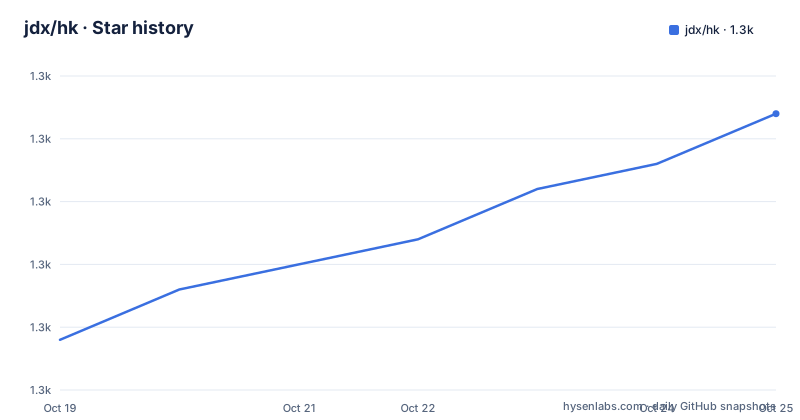
- jdx/hk1,281 ★ · +9
| Repository | 2026-10-19 | 2026-10-25 |
|---|---|---|
| jdx/hk | 1.3k | 1.3k |
9 Stars in the last 6 days, measured from the daily GitHub snapshot. Compare with other projects
Editorial analysis
Concurrency with locks, not concurrency by accident
hk is described in one line as git hooks and project checks, in parallel, and the parallelism is the interesting part of the design. It runs linters and fixers at the same time, and the problem that creates is obvious once you think about it, since two fixers that both rewrite the same file will overwrite each other's work. hk's answer is read and write file locks, so a step that is going to modify a file takes a write lock on it and a step that reads it takes a read lock, and the two do not collide. The claim in the README is that concurrency within a run does not cost correctness. Two escape hatches are named. Steps configured with stomp skip the locks entirely, which is the option for a tool that owns the whole file, and separate hk processes do not share the locks, so a manual run in a terminal while a hook runs can still collide. The other half of the design is that the same steps are used in three places, a git hook, a terminal command and CI, so the configuration is not duplicated per context.
Install, detect, and run
The quick start assumes mise, and the four commands are the whole path.
mise use hk
hk init
hk install
hk check --all
The middle command is the interesting one. hk init detects the tools your project uses and generates an hk.pkl configuration from them, and you then review the linters it selected and make sure their executables are on your PATH. The documentation is explicit that hk configures how to run the tools but does not install them, which is a deliberate separation between the runner and the toolchain, and it leaves the tool versions to mise or to whatever you already use. If the detection guesses wrong, hk init --interactive lets you choose the tools yourself. Installation of the hooks is the third command, and on Git 2.54 and later you can run hk install --global once to enable hk across repositories, with the installed hooks exiting silently in projects that have no hk configuration, so a global install does not break unrelated repositories. Other install routes are brew install hk and cargo install hk --locked, and the default Pkl evaluator is built into the binary, with a separate Pkl installation optional.
The configuration is a Pkl program
The configuration format is Pkl, a configuration language with types and imports, and the example the README gives is short enough to read in one go.
amends "package://github.com/jdx/hk/releases/download/v2.6.0/[email protected]#/Config.pkl"
import "package://github.com/jdx/hk/releases/download/v2.6.0/[email protected]#/Builtins.pkl"

steps {
  ["trailing-whitespace"] = Builtins.trailing_whitespace
  ["newlines"] = Builtins.newlines
}
The amends line pulls in the base configuration schema for the version you are targeting, and the import line brings in the builtins, which are the reusable descriptions of each linter: file patterns, the check command, the fix command and the tool specific optimisations. The steps block is the recommended starting point, and hk supplies the check, fix and pre-commit hooks from the steps it finds there. It is optional, since you can also define steps only inside explicit hooks. The two steps in the example need no linter at all, because they are hk's own whitespace utilities. For a real project you would add entries such as Builtins.prettier, Builtins.eslint or Builtins.ruff, or define steps of your own.
Checks do not edit, fix does not stage
The command table in the README is short and the conventions around it matter more than the commands. hk check examines the modified files, hk fix applies the available fixes to the modified files, hk check --all checks the whole repository and is the command for CI, hk check --plan previews the selected files and steps without running them, and hk check --why prettier explains why a step will run or be skipped, which is the tool you want when a linter you expected is not firing. Two conventions sit underneath. By convention checks do not modify files, so a check can never surprise you by rewriting your working tree. And hk fix leaves the fixes unstaged unless you pass --stage. The default pre-commit hook is the most interesting part, because it stashes unstaged work, fixes and stages the changes, and then restores the unstaged work, which is what makes a partial commit possible. The documentation points you at git diff and git diff --cached to review what the hook did on your behalf.
Why the project argues it exists
The README has a section with four reasons, and they are the design rationale in the author's own words. The first is coordinating concurrent tools, with file locks protecting overlapping steps and diff and file list checks reducing the amount of work that needs exclusive access. The second is reusing linter configurations, since the builtins describe file patterns, check commands, fixes and tool specific optimisations in one place instead of in a script. The third is keeping the configuration maintainable, and this is where Pkl earns its place, since a typed language with imports and reusable objects is what makes a step shareable across hooks and across projects. The fourth is using your existing toolchain, running commands from PATH or letting mise manage the tools and the environments. The documentation also points at project examples and at the benchmark methodology, so the claims about speed come with a stated method rather than a number in isolation.
Skills for coding agents, and a repository that keeps its own house in order
The release archives carry two skills for coding agents. hk-configure covers adding linters and custom checks, preserving the project's Pkl schema version and verifying which files each step selects, and hk-debug covers diagnosing hook failures, skipped steps, configuration overrides and partially staged files. Both ship in the skills/ directory of every release archive, and hk's packslip manifest points at those directories so a compatible installer can use the bundled instructions without a separate repository download, although making them available to an agent is opt-in through mise's skills documentation. The repository itself is a good advertisement for the tool, since it has its own hk.pkl, a hk-example.pkl, a deny.toml for dependency checks, a flake.nix and a default.nix, a mise.toml with a mise-tasks directory, and a settings.toml with a settings-schema.json beside it. There are also editor and agent specific directories, .vscode, .claude, .codex and .agents, along with AGENTS.md, CLAUDE.md and CRUSH.md, and a tapes/ directory for terminal recordings, an e2e-win/ directory for Windows end to end tests and a Cross.toml for cross compilation.
Rust internals and a fast release cadence
The Cargo.toml describes a Rust 2024 edition binary with a rust-version of 1.94.0 and the resolver set to 3, and the dependency list explains the design. The git access goes through git2 with the vendored libgit2 feature, so the binary carries its own libgit2. The Pkl evaluator is the pklr crate with the reqwest, package-zip and miette-diagnostics features, which is how the configuration is evaluated without a separate Pkl installation. rmcp brings the Model Context Protocol transport, matching the agent skills, and expr-lang provides the expression evaluation, while globset and ignore handle file selection, diffy handles diffing and schemars generates the JSON schema behind settings-schema.json. The release history shows a project shipping often, with v2.4.0 on 2026-09-28, v2.5.0 on 2026-10-04 and v2.6.0 on 2026-10-12, and the tag messages say what changed: more builtins applying their fixes as patches through new format-diff and sarif-diff utilities, safer stashing with faster configuration loading, and the Typst and jactionlint builtins with more shebang file types. The last push was on 2026-10-19. The licence is MIT according to the Cargo manifest and the README, while the JavaScript package manifest in the same tree declares ISC, so a distributor should read the LICENSE file rather than the metadata.
Editorial conclusion
hk fits a team whose hooks have grown into a slow serial script and whose CI runs the same checks, because the same step definitions serve both, and it fits a project that wants linter configurations described once and shared rather than copied into every repository. It does not fit a team that wants to run a single formatter on one file without installing a configuration system, and it does not fit a workflow that relies on two tools rewriting the same file at the same time, since the answer there is the stomp option, which gives up the locking that makes the concurrency safe. Verify three things first: that the linters hk selects during hk init are actually the ones you want, because it detects them and configures them but does not install them, that your Git version supports the global hook installation, which the README ties to Git 2.54 and later, and which files each step selects, which the hk-configure skill exists to help you confirm.
Frequently asked questions
What is hk?
It is a tool for running git hooks and project checks in parallel. Linters and fixers run concurrently, and read and write file locks keep steps that touch the same files from colliding, with steps marked stomp skipping the locks.
How do I get started with hk?
Run mise use hk, then hk init to detect your project tools and generate hk.pkl, hk install to install the git hooks and hk check --all to check the repository. hk init detects and configures the linters but does not install them, so their executables have to be on your PATH.
What configuration format does hk use?
Pkl, a typed configuration language with imports. The example in the documentation amends the base Config.pkl for the release you target and imports Builtins.pkl, then maps step names such as trailing-whitespace and newlines to the builtins, with entries like Builtins.prettier, Builtins.eslint and Builtins.ruff available for real linters.
Does hk modify files when I run a check?
No. By convention checks do not modify files, and hk fix leaves its fixes unstaged unless you pass --stage. The default pre-commit hook stashes unstaged work, fixes and stages the changes, then restores the unstaged work, so review git diff and git diff --cached afterwards.
Official sources
Add this badge to your README
If you maintain this project, the badge below links readers to this analysis and shows its maintenance status from the daily GitHub snapshot. Paste the markdown into your README; add ?metric=license or ?metric=stars to the image URL for a different field.

[](https://hysenlabs.com/projects/jdx-hk)Star history chart for your README
[](https://hysenlabs.com/projects/jdx-hk)Was this useful?