hl Reads Your JSON Logs So You Do Not Have To
A fast and powerful log viewer and processor that converts JSON logs or logfmt logs into a clear human-readable format.
At a glance
- What is it?
- A Rust log viewer built around indexed filtering, an unusual flag surface and a pager integration that has moved around between releases.
- Who is it for?
- The strongest argument for hl is not the rendering, it is the index. Passing -s builds a timestamp index once at roughly 2 GiB/s, after which filtering by time or level reads the index instead of re-parsing hundreds of gigabytes, and follow mode keeps several growing files sorted together.
- Can I use it commercially?
- Yes. MIT is a permissive licence: you can use, modify and sell software built on it, as long as you keep its copyright and licence notices.
- Is it still maintained?
- Yes. The repository received new commits within the last day.
- What is it written in?
- Mainly Rust, according to GitHub's language statistics.
Answers come from the project's GitHub data, last synced on October 23, 2026, and from our analysis. They are not legal advice.
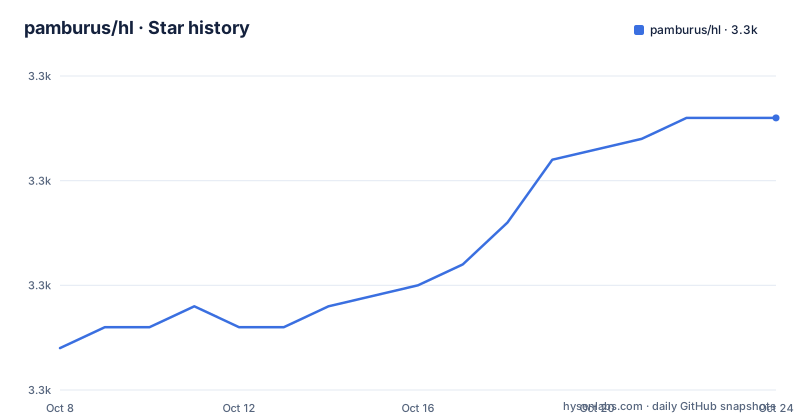
Star history
- pamburus/hl3,313 ★ · +11
| Repository | 2026-10-08 | 2026-10-23 |
|---|---|---|
| pamburus/hl | 3.3k | 3.3k |
11 Stars in the last 15 days, measured from the daily GitHub snapshot. Compare with other projects
Editorial analysis
The problem it takes on: structured logs nobody can read
Machine readable logging is a solved problem until a human has to read the output. A service that emits JSON or logfmt lines gives you grep and jq, and that is genuinely enough for scripted extraction, but it is a poor way to scan an incident. The fields that matter get buried between keys, timestamps carry timezone offsets that differ per line, and multi line error bodies arrive escaped into one enormous line.
The project is a Rust command line tool named hl, licensed MIT, with 3,292 stars and 66 forks at the time of this writing, 13 open issues, a master default branch and a last recorded push on 21 September 2026. Its topic list is unusually specific for a log tool: cli, command line tool, json, json log, json logging, json logs, log, log viewer, logfmt, logging, logs, structured logging, translates json logs and viewer. The description on the repository calls it a fast and powerful log viewer and processor that converts JSON logs or logfmt logs into a clear human readable format, and the crate metadata in Cargo.toml puts it more plainly as a JSON and logfmt log converter to human readable representation.
So the scope is narrow by design. It reads files, it understands two structured formats, it prints aligned output, and it does not attempt to be a collector, an agent or a search backend. Everything else in the feature list is about making that read interactive.
A flag surface that reads like a query language
The single letter flags are where most of the design shows. Streaming runs with -P, and that flag explicitly disables the pager so output flows to the terminal instead of a scrollback buffer. Filtering by field value is -f, and it supports hierarchical keys, so a dotted path reaches into nested objects rather than only top level keys. Level filtering is its own flag, -l, separate from field filtering on purpose, because level is the one field that is cheap to index and expensive to scan.
Time filtering uses --since and --until, and the accepted formats are broader than a strict parser would accept. RFC 3339 works, the current timestamp output format works, and so do words such as today and yesterday, weekday names such as friday, and relative offsets like -3h or -14d. Relative offsets are the feature that changes daily use: being able to ask for the last three hours without knowing the clock time removes the most common reason people fall back to piping through tail.
Display control is separate from selection control, which is the right split. -h hides or reveals named fields, -e drops fields that are empty rather than printing them as blanks, and -x chooses among four strategies for multi line content: never for compact single line output with escaped newlines, inline to preserve newlines as they are, auto to expand only fields that actually contain multi line content, and always to expand everything into a structured multi line format. Timestamps print in UTC by default, -Z switches to a chosen zone and -L moves to the local zone. Live following is -F, with --tail providing a preview of recent messages, and queries beyond the flags cover logical AND and OR conditions. There is also --allow-prefix, which exists for logs where each line is prefixed with something before the JSON object actually starts, a real situation when a collector stamps its own header onto forwarded lines.
The index is the feature that changes the cost model
The performance claims in the README are specific enough to be useful and specific enough to be arguable. Sorting with -s performs the initial scan at approximately 2 GiB/s, and reindexing large growing files runs at up to roughly 10 GiB/s by skipping blocks that have not been modified. The README frames the goal as handling hundreds of local files totaling hundreds of gigabytes, and the comparison chart in the repository puts hl against humanlog, hlogf and fblog on a 2.3 GiB log file.
The architectural point is more durable than the throughput number. Because the index is built once, subsequent filtering by timestamp and level reads the index rather than re-parsing every record, so the cost of asking a second question about the same file is far below the cost of the first. That is what makes repeated narrowing during an investigation cheap: start broad, then cut by time, then by level, then by field, and only the first pass pays full parse cost. The reindex figure matters for the follow case, where a file that is being written to constantly must be re-scanned; skipping unmodified blocks is what keeps that loop from degrading as the file grows.
Two caveats belong next to those numbers. The scan rate is a sequential read rate, so on spinning disks or network storage the figure will not hold, and the index itself consumes memory proportional to record count rather than file size. Neither caveat is addressed in the README. The measurable way to decide is to take a file from your own environment, run it once with -s and once without, and time both on your own storage.
Installing it, and the pager question
There are five documented install routes. On macOS, homebrew is first, and a curl and tar download is the fallback:
brew install hlcurl -sSfL https://github.com/pamburus/hl/releases/latest/download/hl-macos.tar.gz | tar xzCargo works everywhere Rust does:
cargo install --locked --git https://github.com/pamburus/hl.gitOn Linux the Arch package is a one-liner, and on Windows Scoop is the supported path:
pacman -S hlscoop bucket add pamburus https://github.com/pamburus/scoop-bucket.git
scoop install hlThe Windows section carries the most caution of any install guide in this repository. The README states plainly that hl does not provide a built in pager and relies on external pagers such as less, and it says so because the less build referenced on the original download page and distributed through WinGet does not work as expected. The authors say they have not tested that build and suggest installing less from Scoop or Chocolatey instead. Scoop installs less automatically as a dependency when you run scoop install hl, so the practical advice is to check what where less or Get-Command less reports and make sure a working binary wins. Two smaller tips come with it: Windows Terminal is recommended for the experience, and setting LESS to -R --mouse is how you get mouse scrolling in less.
There is an interesting tension between that warning and the code. The workspace in Cargo.toml lists crates/pager as a member, so pager integration is a first party crate in this repository, while the README says there is no built in pager. Read both as they stand: the crate handles integration, terminal behavior and argument construction, and what the project cannot supply on Windows is a pager binary that respects ANSI escape sequences. That distinction explains the v0.36.2 release note removing --mouse from the default less arguments, and it also explains why the Windows fix is an install instruction rather than a code change.
Where the README and the repository do not line up
Three discrepancies are worth stating as paired facts rather than resolved in the author's favor.
First, the README's feature list is written as a table of contents for a document that does not continue. Each feature links to an anchor such as automatic usage of pager, filtering by field values, filtering by log level, filtering by time range, sorting messages chronologically, performing complex queries, configuration files and selecting current theme, and the list also promises a performance section and a performance comparison chart. The README body in this repository ends after the Windows installation block, so none of those anchors resolve inside the file. Both facts are visible at once: the anchor targets are named precisely, and the sections they name are absent from the captured document. The repository does contain a docs directory and a diagram directory, which is the likely home for that material. What to do with this: run hl --help as your actual reference and treat the feature list as a menu rather than as documentation you can click through.
Second, the two build entry points disagree about the word build. The Makefile sets .DEFAULT_GOAL to build, and that build target depends on contrib-build and then runs cargo build --benches. The justfile, which describes itself as a convenient command runner, defaults to printing its recipe list, and its build recipe is a plain cargo build. So make with no arguments compiles benchmarks while just build compiles the program. Both are correct for their own tool, and the Makefile also carries a ci target that chains check-fmt, check-schema, test and build. The actionable check is simple: if you are a Rust developer dropping into this repository, use just, because make will not leave you with a binary.
Third, the declared toolchain and the working toolchain differ. Cargo.toml sets rust-version to 1.86.0, which is the minimum a consumer of the published crate must satisfy, while the v0.36.2 release notes record a bump of the rust toolchain to 1.95, and the repository carries a rust-toolchain.toml that pins whatever the maintainer actually builds with. Those are not the same claim: one is a compatibility floor for downstream builds, the other is the development environment. If you are packaging hl into a constrained environment, test against 1.86.0 rather than assuming the pinned toolchain is what your users need.
What lives in the repository beyond the binary
The tree shows how much of this project is tooling rather than application code. There are ten workspace members, and the ones worth naming are the ones that explain hl's behavior: crates/pager for the pager integration described earlier, crates/serde-logfmt for logfmt parsing, crates/styled-help for help rendering, plus enumset extensions, a heap optimization crate, a lifecycle crate, a wildcard matcher, an encrypted string helper and a base32 helper. The workspace dependency list is where the design decisions become legible: chrono with the clock feature and chrono-english for natural language timestamps such as friday, clap 4 with derive, env and wrap help for the flag surface, and config 0.15 with json, toml and yaml features for the configuration files. capnp and ciborium sit in the list too, which suggests binary and compact binary input formats beyond JSON.
Configuration is treated as a tested artifact. The Makefile has a check-schema target that lints with tombi, checks formatting with taplo, validates a test theme against schema/json/theme.schema.json, and runs build/ci/validate_yaml.py over config.schema.json against three shipped defaults named config, config-ecs and config-k8s. The existence of separate ECS and Kubernetes defaults tells you the configuration model supports structured field names and container orchestration conventions, which is more than most log viewers bother with.
The Python requirements file is the other surprise: jsonschema, pyyaml, rich and ruamel.yaml. A four package Python environment in a Rust project exists to validate and lint JSON and YAML files, and rich suggests human readable validation output in CI. Alongside that sit codecov.yml, .markdownlint.json, .yamllint, a .taplo.toml, a rustfmt.toml, cliff.toml for changelog generation, a justfile, a Makefile that includes build/make/common.mk, flake.nix with a nix directory for Nix packaging, and a .claude directory next to CLAUDE.md. Spec oriented directories are present as well, with specs and .specify alongside a schema directory and a benches directory, which tells you the project is developed against written specifications rather than only against tests. Release cadence supports that reading: v0.36.1 in April 2026, v0.36.2 in May, and v0.36.3 in June, each a small fix set, with macOS file replacement and in place truncation detection landing in the June release.
Editorial conclusion
The strongest argument for hl is not the rendering, it is the index. Passing -s builds a timestamp index once at roughly 2 GiB/s, after which filtering by time or level reads the index instead of re-parsing hundreds of gigabytes, and follow mode keeps several growing files sorted together. The flag surface is wide enough that you should learn it from hl --help rather than from the README, since the README body captured in this repository stops after the installation section while its feature list links to filtering, query and configuration anchors that live elsewhere. Two build paths disagree about what build means, make builds benches while just builds the binary, and rust-version still declares 1.86.0 even though the project bumped its toolchain to 1.95. Install from the release tarball or a package manager, run hl --help on your own machine, and check what less resolves to on Windows before you rely on scrolling a live file.
Frequently asked questions
What is the best log file viewer?
For structured input specifically, hl is the tool in this set that treats JSON and logfmt as the primary format rather than as an afterthought. It parses both, indexes timestamps and levels so repeat filtering does not re-scan the file, offers field and level filtering, relative time ranges, query conditions and live follow, and renders the result through an external pager such as less. For unstructured or mixed format files, a general purpose pager based viewer fits a different need, since hl expects records it can parse as objects.
How do I install hl on Linux?
Arch users can install the hl package from the extra repository with pacman -S hl. Elsewhere, the release tarball is downloaded and extracted with curl and tar, and the Linux builds exist for x86_64 and arm64. A cargo install --locked --git https://github.com/pamburus/hl.git works on any platform with a Rust toolchain.
Does hl include a pager on its own?
No. The README states that hl relies on external pagers such as less and integrates with one automatically when available, defaulting to less but accepting any compatible pager. Pager integration is implemented in a first party crate inside the workspace, but the pager binary itself is a separate dependency, which is why Windows users are told to install less from Scoop or Chocolatey instead of relying on the WinGet build.
What formats can hl read?
JSON and logfmt are the two documented formats, with serde-logfmt in the workspace handling logfmt parsing. Timestamps may be RFC 3339, the configured output format, natural language words such as today or friday, or relative offsets such as -3h and -14d. The --allow-prefix flag covers lines where something precedes the JSON object, and the workspace also lists capnp and ciborium dependencies for binary formats.
How fast is hl on large log files?
The README reports an initial indexed scan at approximately 2 GiB/s and reindexing of growing files at up to roughly 10 GiB/s by skipping unmodified blocks, and it presents a comparison against humanlog, hlogf and fblog on a 2.3 GiB file. These are sequential read figures, so storage type matters, and the index grows with record count. Timing a file from your own environment with and without the -s flag is the only reliable way to know what your hardware does.
Official sources
Add this badge to your README
If you maintain this project, the badge below links readers to this analysis and shows its maintenance status from the daily GitHub snapshot. Paste the markdown into your README; add ?metric=license or ?metric=stars to the image URL for a different field.

[](https://hysenlabs.com/projects/pamburus-hl)Star history chart for your README
[](https://hysenlabs.com/projects/pamburus-hl)Was this useful?