lazydocker: A Terminal UI That Puts Docker and Compose State in One Place
The lazier way to manage everything docker
At a glance
- What is it?
- lazydocker is a Go-based terminal UI that wraps docker and docker-compose into a single key-driven interface. It targets developers tired of juggling terminal windows for logs, restarts, and container status.
- Who is it for?
- Adopt lazydocker if you spend your day in a terminal and want container status, logs, and restart actions within one screen, without memorizing compose flags. Skip it if you prefer a GUI, need advanced orchestration features, or work in environments where installing a third-party binary is restricted.
- Can I use it commercially?
- Yes. MIT is a permissive licence: you can use, modify and sell software built on it, as long as you keep its copyright and licence notices.
- Is it still maintained?
- Yes. The repository last received commits 1 day ago.
- What is it written in?
- Mainly Go, according to GitHub's language statistics.
Answers come from the project's GitHub data, last synced on November 15, 2026, and from our analysis. They are not legal advice.
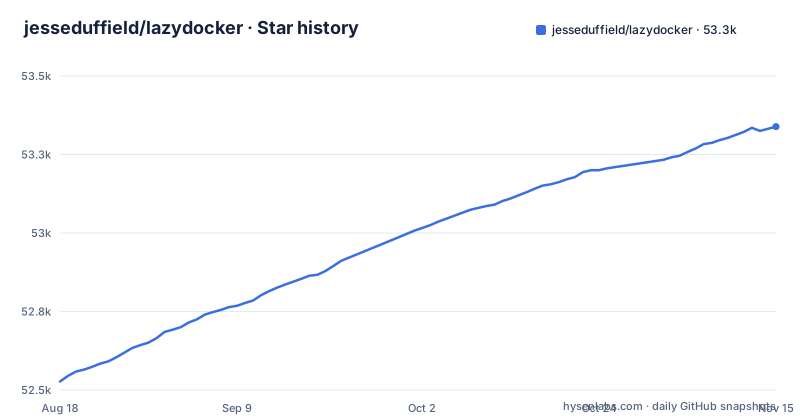
Star history
- jesseduffield/lazydocker53,339 ★ · +812
| Repository | 2026-08-18 | 2026-11-15 |
|---|---|---|
| jesseduffield/lazydocker | 52.5k | 53.3k |
812 Stars in the last 89 days, measured from the daily GitHub snapshot. Compare with other projects
Editorial analysis
The Problem: Docker Command Fatigue Across Windows
The README opens with a rant that many developers will recognize. A service fails, you run docker-compose ps, restart it, watch it fail again, and then you are hunting for logs in a terminal that either dies with the service or hogs a window. The author's complaint is that memorizing docker commands is hard, aliases help only slightly, and tracking containers across multiple terminals is near impossible. lazydocker exists to compress that loop: one terminal window, every common command one keypress away, plus room for custom commands. The intended user is a developer who lives in a shell and manages a handful of services, not an operator running a large cluster.
How It Works: gocui and a Single-Screen Layout
lazydocker is written in Go and built on the gocui library,. The README describes it as a simple terminal UI for both docker and docker-compose. Its go.mod requires github.com/docker/docker and github.com/docker/cli. The README links to a demo video.
Getting It Running: Install and First Launch
The README has an Installation section and badges linking to the Homebrew core formula and the GitHub releases page; the Homebrew formula suggests brew install lazydocker on macOS. For other platforms, the releases page provides binaries. The project requires Docker to be installed and the daemon running. Once launched, you get a full-screen UI. The README references a docs/keybindings file, which is the place to look for the default keys. The custom commands feature is mentioned as a way to extend beyond the built-in actions. The repository's docker-compose.yml mounts ./config at /.config/jesseduffield/lazydocker inside the container, and the repository has a docs directory.
Keybindings and Custom Commands: The Real Productivity Lever
The elevator pitch stresses that every common command is one keypress away. The README's own examples are checking service status, restarting a service and reading its logs. The ability to add custom commands is a differentiator: it means you can add your own commands beyond the built-in ones. This turns lazydocker from a fixed menu into a personal control panel. The trade-off is that you must learn the keybindings. If you are used to typing docker commands, the transition is not free. But for frequent actions, the keypress model removes the need to remember flags like --follow.
Limitations: Not a Replacement for Docker Knowledge
lazydocker is a terminal UI for docker and docker-compose, not a replacement for knowing them. For a developer managing a single project, that is fine. For a team that needs shared dashboards or remote access, this tool is the wrong choice. Also, because it is a TUI, it is not suitable for automation or scripting; it is an interactive tool.
Alternatives: Comparing to Plain Docker Commands and Other TUIs
The most direct alternative is not another tool but the raw docker and docker-compose commands. The difference is approach: raw commands are composable and scriptable, but they scatter state across windows. lazydocker consolidates that state into one screen. Another alternative is a GUI tool like Portainer, which provides a web-based dashboard. Portainer offers a visual overview and can manage remote hosts, but it runs as a separate service and requires a browser. lazydocker stays in the terminal. If you already use tmux, you could script your own layout with docker logs and docker ps panes, but that lacks the integrated keybindings and custom command support. The choice depends on whether you prefer a dedicated UI or general-purpose terminal multiplexing.
Maintenance and License: What You Are Signing Up For
The repository is licensed under MIT, which means you can use, modify, and redistribute it freely, with attribution. The last push was in April 2026, with releases v0.24.4, v0.25.0, and v0.25.2 appearing over a few months. That suggests active maintenance, but you should verify the commit history for gaps. The project relies on sponsors and contributors, which is common for open source tools. The upgrade cost is low: binaries are self-contained, and Homebrew manages updates.
Editorial conclusion
Adopt lazydocker if you spend your day in a terminal and want container status, logs, and restart actions within one screen, without memorizing compose flags. Skip it if you prefer a GUI, need advanced orchestration features, or work in environments where installing a third-party binary is restricted. Before adopting, verify that the keybindings cover your workflow, check the custom commands syntax in the docs, and confirm the project's maintenance cadence by looking at recent releases and commits. The tool is a convenience layer, not a replacement for understanding Docker internals.
Frequently asked questions
What is lazydocker?
It is a simple terminal UI for both docker and docker-compose, written in Go with the gocui library, released under the MIT licence. Its stated goal is to put container information in one terminal window with common commands a keypress away, plus room for custom commands.
how to install lazydocker
The README links to the GitHub releases and to the Homebrew core formula, and the repository ships a docker-compose.yml that builds the image lazyteam/lazydocker from the git context. That compose file mounts the Docker socket and the local config directory, so it is a way to run the tool rather than a package install.
how to use lazydocker
The interface is keyboard driven, and the page's table of contents points to a Keybindings document for the bindings themselves. The described workflow is to see all container state in one window instead of spreading commands across terminal windows, with common commands one keypress away.
lazydocker vs docker
lazydocker is not a container runtime, it is a terminal front end over docker and docker-compose. In the project's Docker image it reaches the engine through the mounted Docker socket, and the image includes a docker CLI built at v27.0.3.
How do I install Lazydocker on Windows?
The README links to GitHub releases and to a Homebrew core formula, so check the releases page for a Windows build; the go.mod dependency list includes Microsoft/go-winio, a Windows library.
Official sources
Add this badge to your README
If you maintain this project, the badge below links readers to this analysis and shows its maintenance status from the daily GitHub snapshot. Paste the markdown into your README; add ?metric=license or ?metric=stars to the image URL for a different field.

[](https://hysenlabs.com/projects/jesseduffield-lazydocker)Star history chart for your README
[](https://hysenlabs.com/projects/jesseduffield-lazydocker)Was this useful?