Meshenger: a peer-to-peer phone for the local network
P2P Voice/Video phone App for local networks.
At a glance
- What is it?
- Meshenger is an Android application for voice and video calls that never leaves your local network. There is no account, no registration and no server: you exchange a QR code containing a contact's name, public key and addresses, and the call is a WebRTC session between the two devices.
- Who is it for?
- Meshenger suits a team, a family or a community network that wants voice and video calls without a service provider in the middle, particularly where the network is community operated or the internet is unreliable. It is a poor fit for calls that leave the local network, because no call crosses a firewall or NAT border, and a poor fit for people whose address changes often, because every contact record has to be updated by hand.
- Can I use it commercially?
- Yes, with conditions. GPL-3.0 is a copyleft licence: if you distribute software that includes it, you must release that software's source code under the same licence. Running it internally without distributing it does not trigger that obligation.
- Is it still maintained?
- Yes. The repository last received commits 47 days ago.
- What is it written in?
- Mainly Kotlin, according to GitHub's language statistics.
Answers come from the project's GitHub data, last synced on November 7, 2026, and from our analysis. They are not legal advice.
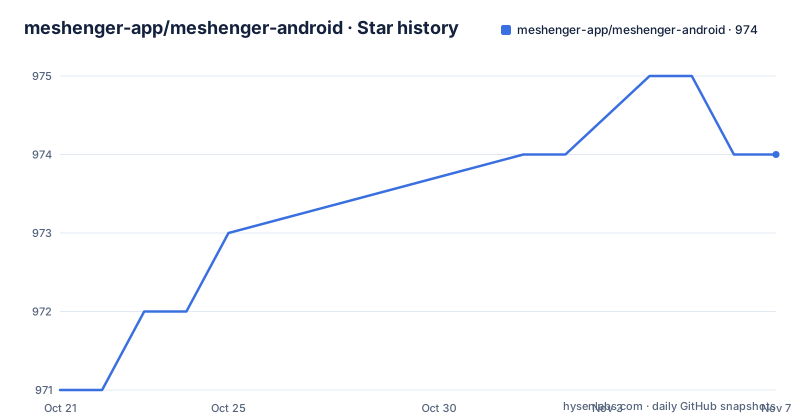
Star history
- meshenger-app/meshenger-android974 ★ · +3
| Repository | 2026-10-21 | 2026-11-07 |
|---|---|---|
| meshenger-app/meshenger-android | 971 | 974 |
3 Stars in the last 17 days, measured from the daily GitHub snapshot. Compare with other projects
Editorial analysis
The whole model in one sentence
The description is the design, and it is worth taking slowly.
Direct voice and video phone calls, with no need for accounts or access to the internet. You scan each other's QR code, which contains the contact's IP address. And it works at home or company networks, and also in many off-the-grid networks such as community mesh networks.
The consequence of removing the server is that the two devices have to be able to reach each other directly. That is a real constraint rather than a slogan, and the project states it as a limitation: no calls through firewalls or NAT borders. There is no relay, no TURN server and no fallback path, because a relay would be a server.
The second limitation follows from the same place. An IP address change requires a manual contact update, since there is no directory service to tell your contacts that you moved.
Against that, the feature list is short and honest. Voice and video calls, encrypted communication, no accounts, no registration and no servers, and the ability to add custom addresses to reach contacts. That last one is the escape hatch for the NAT problem: if you know a routable address for someone, you can enter it by hand.
The topic list on the repository says the same thing in different words: peer to peer, local area network, walkie talkie, decentralised, and WebRTC. The walkie talkie comparison is the right mental model, because a walkie talkie only works when the other party is in range, and this is the same constraint with better audio.
What a contact actually is
The documentation section explains the contact format, and it is more interesting than a phone number.
Meshenger connects to IP addresses in a true peer to peer fashion. Contacts are encoded in a text blob that can be exchanged by QR code, by picture, or by copy and paste. The blob contains a name, a public key, and a list of IP addresses or domain names.
So the contact is a key plus a set of addresses, and it is the key that makes the scheme work. The exchanged public key is used to authenticate and encrypt the signalling data that establishes the WebRTC session, which is the step that can transmit voice and video.
That is the detail to be careful about. The encryption described here applies to the signalling, the exchange that sets up the session, and the session itself then runs over WebRTC's own transport. The documentation and the FAQ are the places to read for the details of what is protected and how, and for anyone who intends to use this for sensitive conversations, that reading is not optional.
The three exchange methods are practical rather than technical. A QR code is the fast path, a picture of the code works when the other party is not physically in front of you, and copy and paste covers the case where you would rather not open a camera. The text blob format is what makes all three possible, since one encoded blob can be rendered as a code, sent as an image or pasted as text.
IPv6 link local addresses are supported as well, and the readme notes that this would not even need a DHCP server, which is a genuinely useful property for the mesh network case.
Where to get it, and where to read more
The distribution options are broad, and the spread tells you something about the audience.
There is a listing on F-Droid, one on Obtainium, which is a tool that tracks releases from a source repository, a link to the GitHub releases page, and a Google Play listing. The F-Droid and Obtainium presence matters because both are aimed at people who want an application without the tracking and the store account that come with the commercial distribution channel, and for a project whose whole premise is not needing a server, that audience is the same audience.
The Obtainium link in the readme is a long encoded URL with the package identifier, the source repository, the author and a set of update preferences, which is the standard way that tool describes an application. It is worth noting that the preferences embedded in it include a fallback to older releases and a prerelease switch that is turned off, which is what you want from a project that publishes tagged builds.
The screenshots in the readme cover the logo, the contact list, a ringing call, an active call, the QR code screen, the settings, address management and the call history, which is a decent map of the application without a single line of code.
For documentation, the readme points at two files in the repository, the documentation and the FAQ, and the readme itself summarises the signalling model. Translations are handled through a hosted Weblate instance, and the alternative is to translate the values in the strings resource file directly and open a pull request or send it by email, which is the standard way to contribute to an Android string catalogue.
The related projects, and what each one changes
The readme lists similar open source projects, and the list is a useful map of the design space rather than a set of competitors.
Linphone is described as a VoIP, SIP and video telephone application, so it keeps the SIP signalling model and the telephony vocabulary.
Jami is a multiplatform chat and video messenger that uses a distributed hash table, so it brings a directory into the picture without a central server, at the cost of the directory protocol.
Briar is a censorship resistant peer to peer messenger that connects over Bluetooth, Wi-Fi or Tor, and is described as privacy oriented. That is the closest comparison in spirit, with a different approach to the hard part: Briar solves reachability by having several ways to find and talk to a peer, where Meshenger solves it by requiring a reachable address in advance.
Qaul is an internet independent wireless mesh text messenger that uses Bluetooth, Wi-Fi and an internet overlay. It is text only, which makes it a different tool rather than a different implementation of the same one.
And there is an offline WebRTC demo, which is the smallest item on the list and the one that shows the underlying assumption most plainly: the interesting part of this design is the WebRTC session between two peers that already have each other's keys.
For somebody choosing between them, the axes are reachability, privacy properties and whether you need a directory. Meshenger is the simplest of the set on all three counts, and that simplicity is the point.
Project state and the shape of the repository
The administrative details are conventional, with a couple of observations.
The licence is the GNU General Public License version 3 or later, and the readme links the licence text and the SPDX identifier. The primary language is Kotlin, the default branch is master, and the repository is not archived.
The release history shows a 4.4 line with regular patch releases: version 4.4.6 in June 2025, 4.4.7 in July and 4.4.8 in August. The last push was on 2026-09-21, so the tree is being worked on a year after the last tagged build. For an application that people install from a store, the release channel and the branch are two different things, and the Play listing is the one most users will actually be on.
The repository layout is a conventional Android application. There is an app directory with the sources, a build script and a settings script, the Gradle wrapper with its properties, a metadata directory, a graphical assets directory holding the screenshots the readme shows, and a docs directory with the documentation and the FAQ.
The metadata directory is worth a note. It is a small reminder that a peer to peer application also has to be a well behaved Android package, with the update channel, the signing story and the permissions model that comes with the platform.
Editorial conclusion
Meshenger suits a team, a family or a community network that wants voice and video calls without a service provider in the middle, particularly where the network is community operated or the internet is unreliable. It is a poor fit for calls that leave the local network, because no call crosses a firewall or NAT border, and a poor fit for people whose address changes often, because every contact record has to be updated by hand. Before you rely on it, check that both devices can reach each other directly, and read the documentation and FAQ for the signalling and encryption details before treating it as a confidential channel.
Frequently asked questions
How do you add a contact in Meshenger?
You exchange a contact blob, which contains a name, a public key and a list of IP addresses or domain names. The blob can be shared as a QR code, as a picture of that code, or by copy and paste, and you can also add custom addresses by hand for contacts that need a routable address.
Can Meshenger calls cross a NAT or a firewall?
No. The readme lists no calls through firewalls or NAT borders as a limitation, which follows directly from there being no server to relay the call. The workaround the project offers is adding custom addresses to reach contacts.
How is a Meshenger call encrypted?
The public key exchanged with the contact is used to authenticate and encrypt the signalling data that establishes the WebRTC session carrying the voice and video. The project documentation and FAQ are the place to read the details of what is protected.
Where can I get Meshenger?
There are listings on F-Droid and Obtainium, the GitHub releases page, and the Google Play store. Translations are contributed through a hosted Weblate instance, or by editing the strings resource file and opening a pull request.
Official sources
Add this badge to your README
If you maintain this project, the badge below links readers to this analysis and shows its maintenance status from the daily GitHub snapshot. Paste the markdown into your README; add ?metric=license or ?metric=stars to the image URL for a different field.

[](https://hysenlabs.com/projects/meshenger-app-meshenger-android)Star history chart for your README
[](https://hysenlabs.com/projects/meshenger-app-meshenger-android)Was this useful?