FlatLaf: a flat Swing look and feel with Darcula and IntelliJ themes
FlatLaf - Swing Look and Feel (with Darcula/IntelliJ themes support)
At a glance
- What is it?
- FlatLaf swaps Swing's default Metal rendering for a flat, HiDPI-aware look with Light, Dark, IntelliJ and Darcula themes. This covers what it changes, how to add it as a Maven or Gradle dependency, and where the approach stops.
- Who is it for?
- Adopt FlatLaf if you maintain a Swing desktop application, want IntelliJ-style Light and Dark themes without hand-painting every component, and can accept that the native library is a separate redistribution concern. Do not adopt it if you are starting a new UI on JavaFX or a web stack, because FlatLaf only changes how existing Swing components paint and does not replace the toolkit.
- Can I use it commercially?
- Yes. Apache-2.0 is a permissive licence: you can use, modify and sell software built on it, as long as you keep its copyright and licence notices.
- Is it still maintained?
- Yes. The repository last received commits 1 day ago.
- What is it written in?
- Mainly Java, according to GitHub's language statistics.
Answers come from the project's GitHub data, last synced on November 15, 2026, and from our analysis. They are not legal advice.
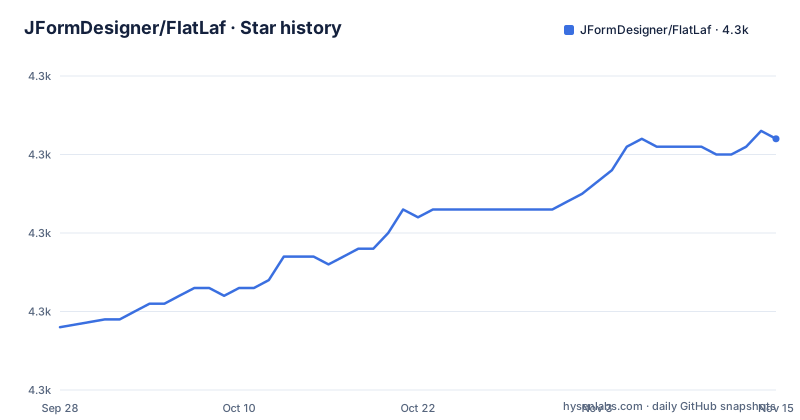
Star history
- JFormDesigner/FlatLaf4,322 ★ · +24
| Repository | 2026-09-28 | 2026-11-15 |
|---|---|---|
| JFormDesigner/FlatLaf | 4.3k | 4.3k |
24 Stars in the last 48 days, measured from the daily GitHub snapshot. Compare with other projects
Editorial analysis
What FlatLaf changes in a Swing application
Swing ships with a default look and feel called Metal, and it still looks like 1998. FlatLaf replaces that rendering layer. It is a cross-platform Look and Feel for Java Swing desktop applications, described in the README as modern, open source, and almost flat: no shadows, no gradients. The palette and icons are heavily inspired by the Darcula and IntelliJ themes from IntelliJ IDEA 2019.2 and later, and the README states FlatLaf uses almost the same colors and icons.
The target audience is narrow and specific. This is for teams that already have a Swing codebase and want it to look current without rewriting the UI. It is not a UI toolkit, not a component library, and not a replacement for Swing. If your application is built on JavaFX, FlatLaf does nothing for you, because it plugs into the Swing Look and Feel mechanism and that mechanism does not exist in JavaFX.
The four built-in themes are Light, Dark, IntelliJ and Darcula. Beyond those, FlatLaf can consume third-party themes originally written for the IntelliJ Platform, which the repository ships as the flatlaf-intellij-themes addon. That is the most interesting part of the design: instead of inventing a theme format and hoping people fill it, FlatLaf reads a format that already has an ecosystem behind it.
How the theme mechanism actually works
A Swing Look and Feel is a set of UI delegates plus defaults. When you call a setup method, you install those delegates and the associated UIManager defaults before any component is created. That ordering constraint is the whole reason the README says to add the call before you create any Swing component. Create a JFrame first and it has already resolved its delegates from the old look and feel.
The theme layer sits on top of that. FlatLaf themes are properties files, and the documentation links a dedicated Properties Files page and a Components UI Properties page that lists the per-component keys. A theme is therefore data, not code: you can override individual keys, and the Theme Editor exists specifically to edit those properties files. The repository also ships flatlaf-extras, which the README describes as covering SVG icons, a tri-state check box, UI inspectors and more.
HiDPI scaling is handled inside the look and feel rather than left to the application, and the README states FlatLaf runs on Java 8 or newer, including LTS and latest releases. That Java 8 floor is a deliberate compatibility choice and it is the reason the library can be dropped into older enterprise applications that have not moved past 8.
Adding the dependency and switching the look and feel
The README points to Maven Central for binaries and gives the coordinates directly. For a Gradle build, the artifact is com.formdev:flatlaf, and the version is the one you want from Maven Central. The README shows the coordinates in the groupId/artifactId/version form.
groupId:     com.formdev
artifactId:  flatlaf
version:     3.7.2
If you are not using a build tool, the README says to download flatlaf-<version>.jar from Maven Central and put it on the classpath. Recent releases listed for the project are 3.7.2, 3.7.1 and 3.7.
Once the JAR is on the classpath, the getting started section gives a single call. It has to run before any Swing component is constructed, which in practice means the first lines of main.
FlatLightLaf.setup();

// create UI here...
That is the entire integration for the default light theme. To see the themes before wiring anything up, the README offers a demo JAR and says to run it with java -jar flatlaf-demo-<version>.jar, or double-click it. It requires Java 8 or newer. Running the demo is the fastest way to see whether the Dark and Darcula palettes match what your application already looks like.
Packaging pitfalls: fat JARs and obfuscators
The README devotes more space to packaging than most projects do, and the reason is that FlatLaf ships multi-release JAR content and service files that naive tooling destroys.
If you repackage FlatLaf into a fat or uber JAR, the README lists three requirements: add Multi-Release: true to META-INF/MANIFEST.MF, keep the META-INF/versions/ and META-INF/services/ directories, and merge the content of equally named files in META-INF/services/ rather than letting one overwrite another. A build that flattens service files will produce a JAR that compiles and then fails at runtime.
Obfuscation and shrinking tools get their own warning. The README names ProGuard and Shadow and says to exclude the package com.formdev.flatlaf and all sub-packages. Shrinking tools work by removing what looks unreferenced, and look-and-feel classes are typically loaded by name through UIManager rather than by direct reference, so they look unreferenced.
There is also a native library dimension. The README links a Native Libraries distribution page for instructions on redistributing FlatLaf native libraries with your application, and the repository contains a flatlaf-natives module. The README does not spell out the redistribution terms in the main text, so if you bundle a runtime, that page is the source to read rather than the README.
Where FlatLaf is the wrong choice
FlatLaf only affects Swing. If your desktop application is on JavaFX, or you have already migrated, none of this applies, and the question people search for, FlatLaf versus JavaFX, is not really a comparison between two libraries. JavaFX is a separate UI toolkit with its own rendering and its own CSS-based styling. FlatLaf is a rendering layer inside Swing. Choosing between them is a toolkit decision you have already made by the time FlatLaf becomes relevant.
Within Swing, the limitation is custom painting. A look and feel controls how the standard components draw, but any component that overrides paintComponent and fills its own background will keep doing exactly that. FlatLaf cannot retroactively flatten a hand-drawn panel, and mixing an opaque custom background with a dark theme is a reliable way to get an unreadable result. The same applies to hard-coded colors scattered through application code: a theme switch changes the defaults, not your literals.
The Java 8 floor cuts the other way too. If you are on a modern JDK and want to use newer Swing APIs, FlatLaf's compatibility target does not prevent that.
Finally, if your application needs a live theme switch, check the FlatLaf documentation for that behaviour.
Alternatives and how their approach differs
The realistic alternative inside Swing is the platform look and feel, meaning the system look and feel or the cross-platform Metal default. The system look and feel delegates to the host OS, so a Windows application looks like Windows and a macOS application looks like macOS, at the cost of two or three different visual results to test and no shared dark mode. FlatLaf takes the opposite position: one consistent cross-platform appearance, with Light and Dark variants that are identical everywhere. That is a deliberate trade of native fidelity for consistency, and it is the right trade for a tool that ships on three platforms with one screenshot in the manual.
The other alternative is a third-party theme for an existing look and feel, or hand-rolled UIManager overrides. That approach gives you full control and no new dependency, but you own every component's defaults forever, including the ones you forgot about. FlatLaf's IntelliJ Platform theme support is the interesting middle ground here: rather than a bespoke theme format, it consumes an existing one, which is why the addon can bundle many popular open-source third-party themes. If your team already maintains an IntelliJ theme, that reuse is the argument for FlatLaf over a custom override file.
On the toolkit question, JavaFX is the alternative only if you are willing to rewrite the UI layer. It is a different rendering model, not a drop-in, and the README gives no migration path from Swing to JavaFX because that is not what the project is for.
Maintenance, licensing and upgrade cost
The repository is not archived, and the last push was on 2026-11-01. Releases are spaced out rather than continuous: 3.7 in December 2025, 3.7.1 in March 2026, 3.7.2 in July 2026. That cadence suggests a project that ships when there is something to ship, which for a look and feel is reasonable, since the underlying Swing API is stable.
Upgrade cost is low in the common case. The integration surface is one setup call plus a classpath entry, so a version bump usually means changing a version number and re-running the demo to check the palette. The real cost is in the packaging steps described above: every time you touch your fat JAR configuration or your obfuscation settings, the Multi-Release manifest flag, the META-INF/services merge and the com.formdev.flatlaf exclusion all have to survive. That is a build-configuration cost, not a library cost, and it recurs.
The project is licensed under Apache-2.0, which is a permissive licence that permits commercial use and redistribution. This is not legal advice and the licence text in the repository is the authority; the practical point is that Apache-2.0 is compatible with the commercial applications the README lists as users, including JProfiler, install4j and DbVisualizer. The native libraries are a separate question and the README directs you to the Native Libraries page for redistribution instructions, so treat that as a second thing to check rather than assuming the main licence covers it.
Editorial conclusion
Adopt FlatLaf if you maintain a Swing desktop application, want IntelliJ-style Light and Dark themes without hand-painting every component, and can accept that the native library is a separate redistribution concern. Do not adopt it if you are starting a new UI on JavaFX or a web stack, because FlatLaf only changes how existing Swing components paint and does not replace the toolkit. Before committing, run the demo JAR, check that your custom painting does not set opaque backgrounds, and read the Native Libraries page if you ship a bundled runtime.
Frequently asked questions
Is FlatLaf free?
Yes. The repository is licensed under Apache-2.0, which permits commercial use and redistribution. The README lists several commercial applications that use it.
What is FlatLaf in Java?
It is a cross-platform Look and Feel for Java Swing desktop applications, described in the README as modern, open source, and almost flat, with Light, Dark, IntelliJ and Darcula themes. It runs on Java 8 or newer.
How to use FlatLaf in a Swing application?
Add the com.formdev:flatlaf dependency, then call a setup method such as FlatLightLaf.setup() in your main method before creating any Swing component. The README's getting started section shows exactly this.
How to install FlatLaf?
FlatLaf binaries are on Maven Central under groupId com.formdev and artifactId flatlaf, so Maven and Gradle users add it as a dependency. Otherwise the README says to download flatlaf-<version>.jar and put it on the classpath.
What is FlatLaf?
FlatLaf is an open-source cross-platform Look and Feel for Java Swing desktop applications, with Light, Dark, IntelliJ and Darcula themes. The README describes the look as almost flat, with no shadows or gradients.
Official sources
Add this badge to your README
If you maintain this project, the badge below links readers to this analysis and shows its maintenance status from the daily GitHub snapshot. Paste the markdown into your README; add ?metric=license or ?metric=stars to the image URL for a different field.

[](https://hysenlabs.com/projects/jformdesigner-flatlaf)Star history chart for your README
[](https://hysenlabs.com/projects/jformdesigner-flatlaf)Was this useful?