AnLinux: a rootless Linux distribution layer for Android
AnLinux allow you to run Linux on Android without root access.
At a glance
- What is it?
- AnLinux is a thin Java front end over Termux and PRoot that downloads a distribution image, unpacks it and runs it without root. That makes it easy to try and unsuited to anything demanding.
- Who is it for?
- AnLinux earns its place when the goal is a working Debian-family shell on a phone with no root and no patience for chroot setup, and it fails the moment the workload needs kernel features PRoot cannot fake, which is why audio support is still listed as unfinished work. The specific first step is installing Termux first, since the app is a wrapper around it and does nothing without it.
- Can I use it commercially?
- Yes. Apache-2.0 is a permissive licence: you can use, modify and sell software built on it, as long as you keep its copyright and licence notices.
- Is it still maintained?
- Yes. The repository last received commits 36 days ago.
- What is it written in?
- Mainly Java, according to GitHub's language statistics.
Answers come from the project's GitHub data, last synced on October 22, 2026, and from our analysis. They are not legal advice.
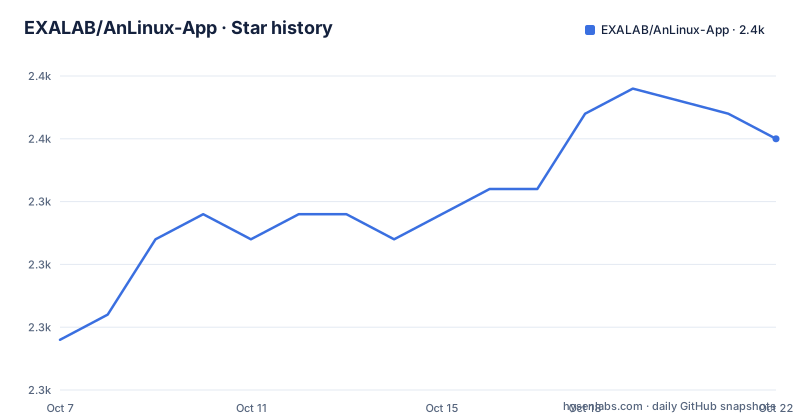
Star history
- EXALAB/AnLinux-App2,350 ★ · +8
| Repository | 2026-10-07 | 2026-10-22 |
|---|---|---|
| EXALAB/AnLinux-App | 2.3k | 2.4k |
8 Stars in the last 15 days, measured from the daily GitHub snapshot. Compare with other projects
Editorial analysis
A front end over Termux and PRoot, not a virtual machine
The README is short, and its shortness is the specification. AnLinux is described as an app that lets you run Linux on Android without root access, and it credits two projects for making that possible: Termux and PRoot. The mechanism takes one sentence. A bash script downloads an image over the internet, decompresses it, and then mounts it using PRoot.
That is a much narrower claim than a virtual machine or a container runtime, and the difference is worth being precise about. PRoot works by intercepting system calls in userspace and redirecting paths, so the distribution believes it is root inside its own tree while the Android kernel underneath knows nothing about it. Nothing is partitioned, nothing is booted, and no kernel module is loaded. The cost is that operations requiring real kernel support either fail or get emulated poorly, which is exactly the shape of the project's remaining limitations.
The repository itself is correspondingly small. The tree holds `AnLinux/`, `icons/`, a `LICENSE`, an English README and a Chinese one, with no scripts or images. Those live in a separate repository, AnLinux-Resources, which the README links at the top. That split is worth knowing if you go looking for the bash script the mechanism description mentions: it is not in this repository.
The project is written in Java, licensed Apache-2.0, and its repository topics list the fourteen distributions plus the desktop environments it targets. The last push was on 2026-09-17, the same day release v6.77 was published, so this is versioned on a date-and-build basis rather than by semver.
Fourteen distributions and a deliberately short support list
The distribution list is long and the supported combinations are much shorter, which is the first thing to get right before installing anything. The README names Ubuntu, Debian, Kali, Kali Nethunter, Parrot Security OS, BackBox, Fedora, CentOS, openSUSE Leap, openSUSE Tumbleweed, Arch Linux, BlackArch, Alpine and Void. Fourteen entries, all of which are images this project knows how to fetch.
The desktop environment story is narrower. Five are listed as supported: Xfce4, Mate, LXQt, LXDE and KDE. The window manager story is narrower still, and here the README is explicit about why: Awesome and IceWM are supported, but only on Ubuntu, Debian, Kali, Parrot Security OS and Fedora. Window manager support in general was removed because of a `/dev/tty0` error that could not be found, which is a good example of a limitation stated plainly rather than buried.
Device requirements are equally concrete. Android Lollipop at minimum, on armv7, arm64, x86 or x86_64. That architecture list matters more than it looks: it means the images are prebuilt per architecture, and a device on an architecture outside that set has no image to download.
Two more support facts: the app requires Termux, installable from the Play Store or from F-Droid, and the distribution and desktop environment combinations are a moving target rather than a guarantee. The README's own list of future work includes retesting blacklisted desktop environments, which is an admission that some combinations were removed for failing.
What the repository deliberately leaves out
The README opens by redirecting anyone looking for images and scripts to AnLinux-Resources. That single line explains the shape of both projects. AnLinux-Resources holds the distribution images and the provisioning scripts. This repository holds the Android application, which is the part that decides what to download, how to unpack it and what to hand to PRoot.
This matters when you evaluate the project. The interesting engineering, the part that decides whether a given distro and desktop environment combination works, is not visible in the tree you can read here. `AnLinux/` is the application source and `icons/` is artwork. If you want to know why a specific combination is unsupported, the answer is in the other repository or in the issue tracker, not in the code.
The licence situation also has a wrinkle the README documents rather than hides. The application is Apache-2.0, but the application icon is credited to Alpár-Etele Méder, and the Ashmem library used in the app is sourced from android-shmem, with both links given. For an open source application that ships third-party artwork and a borrowed native library, naming the sources is the minimum that lets someone else audit what they are getting.
The README also points at three prior projects as references: GNURootDebian, debian-noroot and termux-ubuntu. Reading them alongside this one gives a fair picture of the lineage, since all three solve the same problem with different trade-offs and all three predate the Play Store era that made AnLinux the version most people meet.
A plain answer to a plain question: how does it run without root
Worth answering directly, because it is the question most people arrive with. AnLinux needs no root because it never asks Android for a new user namespace or a mount. Termux provides a Linux userspace environment on the phone using its own packaged tools, and PRoot provides a way to run a program against an alternative filesystem root without kernel support. The distribution image is fetched, decompressed into Termux's storage, and PRoot is invoked with that directory as the apparent root.
Every one of those steps is why the limitations exist. Downloading means network access and storage. Decompressing means the image has to match your architecture. And because PRoot is emulating the environment rather than the kernel providing it, anything a distribution expects to do to kernel space is either unavailable or a rough approximation. That is the mechanism behind the audio support gap, and behind the removal of window manager support when `/dev/tty0` could not be found.
It is also why this is not a rootless container runtime. Containers need user namespaces and cgroups, which Android restricts. PRoot sidesteps the kernel entirely instead, which is more compatible and considerably less capable. That trade is the whole project in one sentence: maximum compatibility, minimum isolation, and none of the guarantees a virtual machine would give you.
Where AnLinux is the wrong tool
The clearest case is anything needing real kernel features. Hardware-accelerated graphics, reliable audio, Bluetooth, and anything that depends on a working `/dev` tree are all outside what PRoot can provide convincingly. The README does not pretend otherwise: audio support sits in the future work list rather than the feature list, and window manager support was withdrawn with an error message as the stated reason.
The second case is performance and longevity. You are downloading and unpacking a distribution image on a phone, inside a userspace emulator, on top of Android's own resource management. Android will also kill background processes under memory pressure, and none of that changes the fact that your session is not a container with a defined lifecycle. For a terminal session while travelling this is fine. For a long-running service it is a bad bet.
The third case is security expectations. Rootless does not mean isolated. A distribution running under PRoot has the Termux user's permissions, and Termux itself draws from Play Store or F-Droid installs. Running an unfamiliar distribution image on that footing is a reasonable thing to do for exploration and not for anything holding credentials worth keeping.
The honest summary is that AnLinux is an excellent teaching and convenience tool with a narrow supported matrix, a small visible codebase and a companion repository holding the substance. If your requirement is a real Linux filesystem with kernel integration, use a rooted device, a virtual machine, or a cheap separate machine, and treat AnLinux as the thing you try first.
Editorial conclusion
AnLinux earns its place when the goal is a working Debian-family shell on a phone with no root and no patience for chroot setup, and it fails the moment the workload needs kernel features PRoot cannot fake, which is why audio support is still listed as unfinished work. The specific first step is installing Termux first, since the app is a wrapper around it and does nothing without it. Pick a distribution from the README's list, and treat the version number, currently v6.77 from 2026-09-17, as the thing to check when something behaves differently than expected.
Frequently asked questions
How can I install Linux on my Android device without using root?
AnLinux does exactly this, by wrapping Termux and PRoot rather than asking Android for anything privileged. A bash script downloads a distribution image, decompresses it, and mounts it through PRoot, so nothing is partitioned and no kernel module is loaded. You need Termux installed first, either from the Play Store or from F-Droid, and Android Lollipop or later on an armv7, arm64, x86 or x86_64 device.
Which Linux distributions can AnLinux install?
The README lists fourteen: Ubuntu, Debian, Kali, Kali Nethunter, Parrot Security OS, BackBox, Fedora, CentOS, openSUSE Leap, openSUSE Tumbleweed, Arch Linux, BlackArch, Alpine and Void. Images are prebuilt per architecture, so the supported set of armv7, arm64, x86 and x86_64 matters as much as the distribution name. The images and provisioning scripts live in the separate AnLinux-Resources repository, not in this one.
Why did AnLinux drop window manager support?
The README states that window manager support was removed because a /dev/tty0 could not be found error made it unusable. Awesome and IceWM are still listed as supported window managers, but only on Ubuntu, Debian, Kali, Parrot Security OS and Fedora. That narrowing is a fair illustration of how much of this project depends on the combination rather than the component.
Is audio or Bluetooth working in AnLinux?
Audio support is listed under future work rather than as a working feature, so treat it as unfinished. PRoot emulates the filesystem and system calls in userspace instead of asking the kernel, which is exactly why device-level features tend to be the weak point. The README also notes it may consider support for BSD distributions later, which is a plan rather than a commitment.
Official sources
Add this badge to your README
If you maintain this project, the badge below links readers to this analysis and shows its maintenance status from the daily GitHub snapshot. Paste the markdown into your README; add ?metric=license or ?metric=stars to the image URL for a different field.

[](https://hysenlabs.com/projects/exalab-anlinux-app)Star history chart for your README
[](https://hysenlabs.com/projects/exalab-anlinux-app)Was this useful?