Sign: A Notation for Data Integrity Checks That Doubles as a Language
Sign integrity generic notation
At a glance
- What is it?
- Sign is a JavaScript-hosted language for expressing data integrity in a generic way. It ships with a playground interpreter, but its documentation is thin and its license is custom, so adoption requires caution.
- Who is it for?
- Adopt Sign if you need a notation that treats integrity checks as first-class expressions and you are willing to work with an early-stage interpreter and a custom license. Do not adopt it for production systems, formal verification, or teams that require stable documentation.
- Can I use it commercially?
- Not without permission. GitHub finds no licence file in the repository, and without a licence all rights are reserved by default: you may read the code but not reuse it. Check the README, or ask the authors, before using it.
- Is it still maintained?
- Yes. The repository received new commits within the last day.
- What is it written in?
- Mainly JavaScript, according to GitHub's language statistics.
Answers come from the project's GitHub data, last synced on October 22, 2026, and from our analysis. They are not legal advice.
Star history
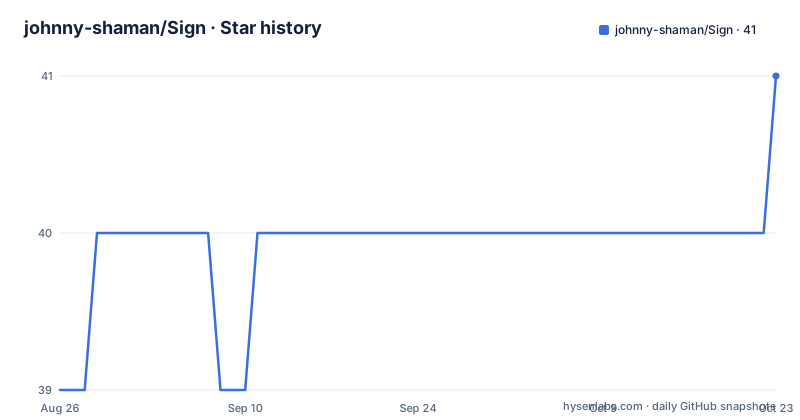
- johnny-shaman/Sign40 ★ · +1
| Repository | 2026-08-26 | 2026-10-22 |
|---|---|---|
| johnny-shaman/Sign | 39 | 40 |
1 Stars in the last 57 days, measured from the daily GitHub snapshot. Compare with other projects
Editorial analysis
What Sign Aims to Solve and Who Should Look at It
Sign is a language for expressing the integrity of data evaluation in a generic way. The README positions it for data validation, integrity checks, and what it calls Functional Effects. The problem it targets is that integrity checks are often scattered across codebases, tied to specific formats, and hard to reason about as a whole. Sign wants to give you a single notation that can describe integrity independent of the data source. The intended audience is engineers who work on validation pipelines, data contracts, or functional programming and who want a formal way to talk about whether a value is acceptable. It is not a library that plugs into your stack. It is a language, with its own syntax, semantics, and interpreter. That distinction matters: adopting Sign means learning a new notation, not just calling a function.
The Core Mechanism: A Graph of Products and Coproducts
The README includes two mermaid diagrams that sketch the language's conceptual structure. The first shows a graph with identity and Void at the top, then Object (which is True) containing Number, Letter, and List. False is defined as Null. Below that are Apply (Default or Fulfilled) and Partial (Partial or Not Apply). The arrows show that Lambda relates to Partial and Apply, and those relate back to False and to the Object types. The second diagram pairs Product concepts (Syntax, List, Stack, Literal, Compilation) with Coproduct concepts (Semantics, Lambda, Stream, Operator, Interpretation). Each product has a bidirectional arrow to its coproduct counterpart: Syntax with Semantics, List with Lambda, Stack with Stream, Literal with Operator, Compilation with Interpretation. This suggests that Sign treats syntax and semantics as two sides of the same coin, and that list processing maps to lambda calculus, stack to stream, literal to operator, and compilation to interpretation. The diagrams are conceptual, not executable, but they reveal a design that is heavily influenced by functional programming and formal language theory. If you are not comfortable with category theory terms like product and coproduct, the notation will feel abstract.
Getting It Running: The Playground and Its Commands
The only concrete implementation is the alpha playground in the alpha/javascript directory. The README gives a clear setup path. For Windows, there is an install script: right-click install_alpha.ps1 and choose Run with PowerShell, or run ./install_alpha.ps1 from the terminal. That script can install Node.js if it is missing, then downloads data and generates the parser, and finally launches the playground. For subsequent runs, you just execute sign_alpha_web.ps1. For manual setup on any platform, the commands are: cd alpha/javascript, then npm install, then npm run build:parser, then npm run playground. There are also shell scripts: ./sign_alpha_web.sh for macOS/Linux/Git Bash and .\sign_alpha_web.ps1 for Windows PowerShell. The playground starts a local server at http://localhost:5183 and opens your browser automatically. One important note: if you edit sign.pegjs, which the README calls the official specification, you must rerun npm run build:parser for the changes to take effect in the playground. That is a concrete detail that will save you confusion.
The Interpreter Pipeline: Lexer, Passes, and Interpretation
The README describes the interpreter as currently under development with a pipeline: lexer, Pass1/1b/2/3, and then interpreter. This is the only detail about how the language executes. The pipeline suggests a multi-stage compilation or analysis process, where the lexer tokenizes input, the passes likely perform syntactic and semantic checks, and the interpreter evaluates the result. The fact that there are multiple passes indicates that Sign is not a trivial syntax sugar. It is a real language with a parser generated from sign.pegjs, a PEG grammar file. The use of PEG.js (or a compatible generator) is inferred from the file extension. The playground is the way to see the pipeline in action, but the README does not explain what each pass does or what errors look like. If you plan to contribute or debug, you will need to read the source code in alpha/javascript, which is not documented in the README. This is a gap for anyone who wants to understand the semantics deeply.
A Genuine Limitation: The Documentation Is a Skeleton
The README is short and points to documents that are not included in the provided material. There is a manifesto, a language reference, a specification, and a license, all in English and Japanese, but their contents are unknown from the repository listing. The only actual content is the README itself and the two diagrams. That is a serious limitation for a language project. You cannot evaluate the syntax, the type system, or the integrity semantics without reading the reference and specification documents. The README says the language is for expressing integrity in a generic way, but it never shows a single line of Sign code. The example files are mentioned, but their content is not given. This means the project is not self-contained. If the documents are not complete, the language is effectively unusable. The project is also not archived and has no recent releases listed, which suggests it is early in its lifecycle. The last push is unknown, so you cannot assess maintenance activity. This is a case where the documentation being thin is a real barrier, not a minor annoyance.
The Wrong Tool for Many Validation Tasks
Sign is not a drop-in replacement for JSON Schema, Joi, or Zod. Those tools are libraries that you import into your existing JavaScript or TypeScript project and use to validate data structures. Sign is a separate language with its own interpreter. That means you cannot use it to validate a request body in an Express route without running a separate process or embedding the interpreter. The README does not mention any integration mechanism, such as a Node.js API or a command-line tool that outputs validation results. The playground is a web server, not a library. So if your goal is to add validation to an existing application, Sign is the wrong tool. It is also not suitable for performance-critical validation, because the interpreter is under development and likely slower than native validation libraries. The README does not provide any benchmarks, and you should not assume any performance characteristics. The language is also not formally specified in the provided material, so you cannot rely on it for correctness-critical systems like financial transactions or medical data.
An Alternative: JSON Schema with a Different Approach
A real alternative to Sign is JSON Schema, which is a declarative language for validating JSON data. Unlike Sign, JSON Schema is widely adopted, has a formal specification, and has many implementations in JavaScript, such as Ajv. The approach is different: JSON Schema describes constraints on the structure and values of JSON documents, using keywords like type, properties, and required. Sign, based on the diagrams, seems to be more abstract, with concepts like Lambda and Stream that go beyond plain data validation. JSON Schema is tied to JSON, while Sign claims to be generic. But JSON Schema's advantage is that it is mature, documented, and integrated into countless tools. If you need to validate data today, JSON Schema is a safer choice. Sign's generic notation might be more expressive, but that expressiveness is not demonstrated in the README. The trade-off is clear: JSON Schema gives you a working solution with a large ecosystem, while Sign offers a potential for abstraction that is not yet realized.
Maintenance and License: Unknowns That Should Stop You
The repository has no license field, but the README links to a custom license file named sign-language-license.en-us.md. That is a red flag for many organizations. A custom license means you cannot assume standard terms like MIT or Apache 2.0. You must read the license document and, if needed, consult a lawyer. The README does not summarize the license's key terms, so you cannot know if commercial use is allowed, if modifications must be shared, or if there are patent clauses. The maintenance situation is equally unclear. There are no recent releases retrieved, and the last push is unknown. The default branch is main, and the project is not archived, so it is presumably still active, but there is no evidence of regular updates. The interpreter is explicitly described as under development, which means the language may change in breaking ways. If you build on Sign, you may need to update your code as the specification evolves. Given the custom license and the development status, the maintenance and upgrade cost is unpredictable. This is a project to watch, not to build on yet.
Editorial conclusion
Adopt Sign if you need a notation that treats integrity checks as first-class expressions and you are willing to work with an early-stage interpreter and a custom license. Do not adopt it for production systems, formal verification, or teams that require stable documentation. Before using it, verify the license terms in documents/License/sign-language-license.en-us.md and test the playground at alpha/javascript to see if the current implementation matches the specification. The project is honest about being under development, but that honesty does not make it ready for critical workloads.
Frequently asked questions
How do I run the Sign playground?
From alpha/javascript run `npm install`, `npm run build:parser` and `npm run playground`. On macOS, Linux or Git Bash use ./sign_alpha_web.sh, and on Windows PowerShell use .\sign_alpha_web.ps1. The server then listens on http://localhost:5183 and opens your browser.
Why do my changes to sign.pegjs not show up in the Sign playground?
The parser is generated from sign.pegjs, which the README calls the formal specification, so you have to run `npm run build:parser` again after editing it or the playground keeps using the previous grammar.
What is under the Sign language license?
A language license document pair lives at documents/License/sign-language-license.en-us.md with a Japanese version beside it. The repository itself declares no license, and it has no GitHub releases.
Where are the Sign notation documents kept?
Under documents/: a manifesto, a .sn example, the Sign reference, and a specification directory, each in an en-us and a ja-jp version.
Official sources
Add this badge to your README
If you maintain this project, the badge below links readers to this analysis and shows its maintenance status from the daily GitHub snapshot. Paste the markdown into your README; add ?metric=license or ?metric=stars to the image URL for a different field.

[](https://hysenlabs.com/projects/johnny-shaman-sign)Star history chart for your README
[](https://hysenlabs.com/projects/johnny-shaman-sign)