ProxyPin: one Flutter capture tool across five platforms, with trust and retention left to you
Open source free capture HTTP(S) traffic software ProxyPin, supporting full platform systems
At a glance
- What is it?
- ProxyPin is an Apache-2.0 Flutter application that intercepts, inspects and rewrites HTTP(S) traffic on Windows, Mac, Linux, Android and iOS. This covers the scan code connection that replaces WiFi proxy setup, the domain-only filter, keyed AES decryption, request mapping and blocking, and the gaps the project leaves in certificate trust, history retention and release signing.
- Who is it for?
- ProxyPin suits a developer who wants one capture tool from the desktop through to the phone, with scripting, mapping and blocking in the same window, and who is willing to read the source and MQTT_CAPTURE.md for the gaps. Do not expect a documented certificate trust procedure, a retention policy for captured traffic, or a Linux or Windows package.
- Can I use it commercially?
- Yes. Apache-2.0 is a permissive licence: you can use, modify and sell software built on it, as long as you keep its copyright and licence notices.
- Is it still maintained?
- Yes. The repository received new commits within the last day.
- What is it written in?
- Mainly Dart, according to GitHub's language statistics.
Answers come from the project's GitHub data, last synced on November 15, 2026, and from our analysis. They are not legal advice.
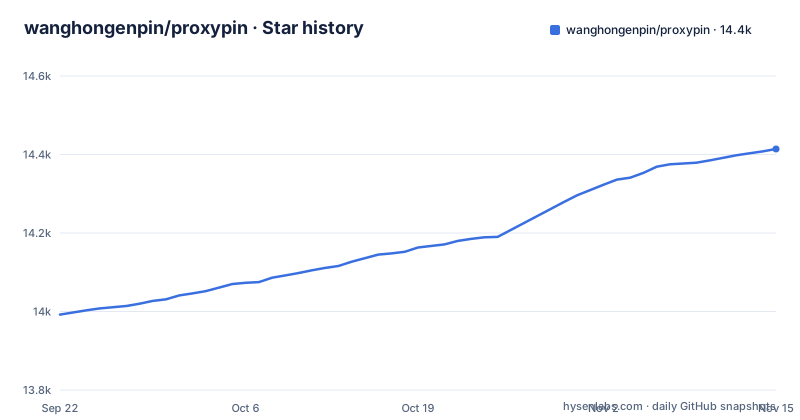
Star history
- wanghongenpin/proxypin14,414 ★ · +422
| Repository | 2026-09-22 | 2026-11-15 |
|---|---|---|
| wanghongenpin/proxypin | 14k | 14.4k |
422 Stars in the last 54 days, measured from the daily GitHub snapshot. Compare with other projects
Editorial analysis
Five platform directories, one Dart codebase behind them
ProxyPin intercepts, inspects and rewrites HTTP(S) traffic, and the reach across platforms comes from Flutter rather than from five separate tools. The repository holds `android/`, `ios/`, `linux/`, `macos/` and `windows/` side by side, with `lib/` carrying the shared Dart and `assets/` the bundled files, so the phone build and the desktop build are the same application rather than a web viewer bolted onto a native core. The networking that makes this usable for phones is the scan code connection: a terminal scans a code and forwards its traffic to a machine running ProxyPin, configuration synchronization included, and two terminals can scan codes to point at each other. The payoff is that a phone needs no manual WiFi proxy setup at all. The cost is that the capture point is another machine, which makes ProxyPin as much a remote inspector as a local one.
Domain names are the only dimension the capture filter has
The filter works in one dimension, the domain name, and the stated purpose is to intercept only the traffic you need so other applications are not disturbed. The instinct is right for a capture tool. The limit is that the unit of selection is a host rather than an application, a process, a port or a path, so the blast radius is set by whoever else shares that hostname. Phone apps lean on content delivery networks and shared API hosts, which means enabling one domain pulls in every request to that host from every app on the device. Separating them afterwards is left to the search view, which matches on keywords and response types, so finding the one request you turned the tool on for is manual work over a list you did not ask for.
Body decryption is keyed AES, and no trust step is documented
Reading inside a response is described in one line: configure an AES decryption key and the HTTP message body is decrypted automatically. That covers the case where you hold the key and the payload uses AES. Nothing in the README names any other algorithm. Nothing in the README describes installing a certificate authority, importing a root certificate, or trusting anything on either the phone or the desktop, even though reading inside HTTPS traffic is what the project exists for. Capturing traffic from a Flutter app is called out as supported and the README does not say what has to be in place first for that case. If your work depends on seeing inside an encrypted body, budget time for the source and the `docs/` directory before you commit to it.
One Gatekeeper instruction, and it applies to every unsigned app
On macOS the first launch is gated, and the workaround the project gives is a machine-wide one. macOS warns about an untrusted developer when the app is first opened, and the instruction is to go to System Preferences, Security and Privacy, and allow any source. That is the only platform specific instruction in the README. Linux and Windows get no equivalent: nothing about preserving the executable bit through a download, nothing about a first run dialog, nothing about what happens when another proxy already holds the capture port. The setting you are asked to change is also broader than the application, since allowing any source relaxes how the whole system treats every unsigned program you download, not ProxyPin alone.
Mapping answers from your own script, blocking pretends the network broke
The rewrite features are where a capture tool starts behaving like a test harness, and each one brings a consequence. Scripting runs JavaScript over requests and responses. Rewriting covers redirection, replacing the request or response message, and modifying by increment. Mapping is the strongest form: the request is never sent to the remote service, and the response comes from local configuration or from your script. Blocking stops a request by URL before it reaches the server. So a mapped endpoint answers whether or not the real service exists, which means a feature that passes under mapping has proved nothing about the server behind it. A blocked request is indistinguishable from a failed connection on the app's side, which sends you looking at the network when the cause is a rule you wrote. Nothing states how these rules are ordered or persisted.
Captured history is saved automatically and leaves as HAR
History is on by default, which is the feature to think hardest about. Captured traffic is saved automatically so you can backtrack and view it later, and the store exports and imports HAR, the interchange format web tooling already speaks, so a session taken on your phone moves into any other HAR reader in one step. What travels with it is exactly what you would not paste into a bug report: request headers, cookies, bearer tokens, form bodies, and for an authenticated application most of a live session. Nothing in the README documents a retention window, an encryption setting for that local store, or a way to scrub a single session. Anyone who reaches the machine or the exported file gets credentials rather than only API shapes.
MQTT capture and the agent files sit outside the write up
Several capabilities are documented somewhere other than the landing page. The top level carries MQTT_CAPTURE.md, AGENTS.md and SKILL.md, along with `docs/` and `tool/` directories, and none of these is linked from the project page. Whether ProxyPin can capture MQTT traffic, and what the skill and agent files expose to an automated caller, is therefore settled by files you have to open yourself. Feature bullets stop short elsewhere too: the toolbox is named as favorites, common encoding tools, QR codes and regular expressions, with no statement of which encodings are implemented or which regex flavor the patterns use. Localization has its own `l10n.yaml` beside `analysis_options.yaml` and `pubspec.yaml`, and the write up itself is bilingual, with English and Chinese pages.
One official channel per platform, and a fast release cadence
Distribution differs by platform with a single official channel each. Desktop builds come from the GitHub releases page, Android is published on Google Play under `com.network.proxy`, and iOS sits on the App Store as `id6450932949`. No apt, dnf, brew, snap or flatpak entry is described, and no checksum or signature instructions are given for the release assets, so installing on Linux or Windows means unpacking a downloaded artifact yourself. The cadence makes pinning worth doing: v1.3.2 shipped 2026-09-23, v1.3.3 on 2026-09-29 and v1.4.0 on 2026-10-23, and the last push to `main` is 2026-11-02, so two patch releases landed six days apart. A repackaged APK or IPA carrying the name does not come from these releases, which is why the store listing is the reference.
Editorial conclusion
ProxyPin suits a developer who wants one capture tool from the desktop through to the phone, with scripting, mapping and blocking in the same window, and who is willing to read the source and MQTT_CAPTURE.md for the gaps. Do not expect a documented certificate trust procedure, a retention policy for captured traffic, or a Linux or Windows package. Install only from the store listings or the releases page, set the AES key only for the flow you actually need to read, and clear captured sessions when the investigation ends.
Frequently asked questions
What does ProxyPin do?
ProxyPin intercepts, inspects and rewrites HTTP(S) traffic on Windows, Mac, Android, iOS and Linux, built with Flutter. It filters by domain name, searches captured requests, runs JavaScript over them, rewrites or blocks by URL, decrypts response bodies with an AES key you supply, and saves history with HAR export and import.
how to use proxypin
Install the build for your platform, start it, then connect a device by scanning the code it shows so the device forwards its traffic to ProxyPin with configuration synchronized, avoiding manual WiFi proxy configuration. On macOS the first open needs System Preferences, Security and Privacy, allow any source. Turn on the domain name filter to limit what is intercepted.
is proxypin safe
The project is open source under Apache-2.0 and publishes store listings for Android and iOS plus release assets for desktop. Two things to weigh yourself: macOS first launch asks you to allow any source, and captured traffic including headers, cookies and bodies is saved automatically with HAR export, with no documented retention setting or security policy file in the repository.
proxypin alternative
The project names no alternative to compare against, and presents itself as free open source HTTP(S) capture software with full platform support. Its own differentiators are the scan code connection for phones, request mapping that answers without contacting the remote service, and JavaScript scripting over requests and responses.
Official sources
Add this badge to your README
If you maintain this project, the badge below links readers to this analysis and shows its maintenance status from the daily GitHub snapshot. Paste the markdown into your README; add ?metric=license or ?metric=stars to the image URL for a different field.

[](https://hysenlabs.com/projects/wanghongenpin-proxypin)Star history chart for your README
[](https://hysenlabs.com/projects/wanghongenpin-proxypin)Was this useful?