Flexibility: A JavaScript polyfill that brings Flexbox to IE8 and IE9
GitHub describes it as A JavaScript polyfill for Flexbox. The repository metadata lists JavaScript as its primary language. The metadata lists the MIT license. This article stays within the project description and details documented in the GitHub repository README.
At a glance
- What is it?
- Flexibility is a JavaScript polyfill that implements the CSS Flexible Box Layout module in browsers that never supported it, notably Internet Explorer 8 and 9. It works by reading styles, computing flex layout in JavaScript, and writing the results back to the DOM.
- Who is it for?
- Adopt Flexibility if you must support Internet Explorer 8 or 9 and want to use Flexbox without maintaining a separate layout system. Do not use it if your audience is limited to modern browsers, where native Flexbox is faster and simpler.
- Can I use it commercially?
- Yes. MIT is a permissive licence: you can use, modify and sell software built on it, as long as you keep its copyright and licence notices.
- Is it still maintained?
- Probably not. The repository last received commits 49 months ago, on September 21, 2022.
- What is it written in?
- Mainly JavaScript, according to GitHub's language statistics.
Answers come from the project's GitHub data, last synced on October 22, 2026, and from our analysis. They are not legal advice.
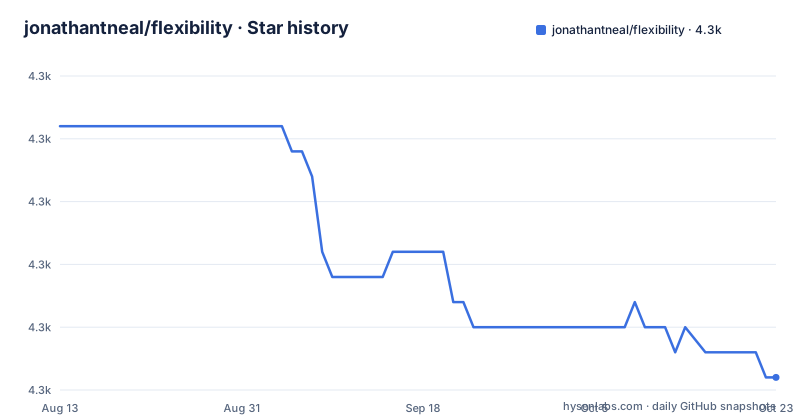
Star history
- jonathantneal/flexibility4,278 ★ · -10
| Repository | 2026-08-13 | 2026-10-22 |
|---|---|---|
| jonathantneal/flexibility | 4.3k | 4.3k |
-10 Stars in the last 70 days, measured from the daily GitHub snapshot. Compare with other projects
Editorial analysis
The problem Flexibility solves
Flexbox is a CSS layout mode that aligns and distributes elements in a container even when their size is unknown or dynamic. Internet Explorer 8 and 9 never implemented it, and IE10 supported only an early draft. Flexibility is a JavaScript polyfill that brings Flexbox to those older browsers. It is aimed at developers who need to support legacy browsers but still want to use modern layout techniques. Without a polyfill, those developers would have to write float-based or table-based fallbacks, which are brittle and time-consuming. Flexibility lets you write one flexbox layout and have it work in IE8 and IE9, at the cost of running JavaScript to emulate the layout engine.
How the polyfill works
Flexibility does not try to patch the browser's CSS engine. Instead, it reads the flexbox-related styles from an element, computes the layout in JavaScript, and writes the computed positions and sizes back to the DOM. The README exposes this as a three-step API: read, readAll, and write, writeAll. The read function takes an Element and returns its flexbox styles. The readAll function takes an Element and returns a list of flexbox details from that element or its descendants. The write function takes a details object and writes the flexbox details back to the element. The writeAll function takes an array of details and writes them all. This read-compute-write cycle is what allows the polyfill to emulate flexbox behavior in browsers that have no native support. The global flexibility method is the entry point: you call flexibility(document.documentElement) to polyfill the whole document.
Getting it running
The README gives a simple setup. Download flexibility.js and include it anywhere on your page with a script tag. Then call the flexibility method on the outermost element you want to polyfill. For Internet Explorer 10 and lower, you must add a -js-display: flex declaration before any display: flex declarations in your CSS, or use PostCSS Flexibility to automate that during your build. The README shows a CSS example: .container { -js-display: flex; display: flex; }. For other browsers, you use a data-style attribute instead: <div data-style="display: flex;"></div>. This attribute tells the polyfill what styles to apply, presumably because those browsers do not support the -js-display prefix. The API also exposes lower-level functions, flexibility.read, readAll, write, and writeAll, which you can use inside your own framework if you need finer control.
Limitations and failure modes
The README does not list specific unsupported flexbox properties, but the polyfill's approach implies several limitations. First, it only works when JavaScript is enabled. If a user has JS disabled, they get no flexbox at all. Second, the read-compute-write cycle is not reactive: if the layout changes after the initial call, you must call flexibility again, or the layout will be stale. The README does not mention automatic reflow on resize or on DOM changes. Third, the data-style attribute approach for non-IE browsers is awkward: it puts CSS in HTML, which mixes concerns and can be easy to forget. Fourth, the polyfill only emulates the subset of flexbox that the author implemented. Complex flex layouts, such as nested flex containers or flex-basis with percentage values, may not work correctly. The README points to a support section for details, but that section is not included in the material, so you must check the repository's SUPPORT.md to know exactly what is covered.
A real alternative: native Flexbox with a build-time fallback
The obvious alternative is to use native Flexbox and accept that IE8 and IE9 will not get it. If you must support those browsers, you could use a different layout method entirely, such as floats or tables, and serve Flexbox only to modern browsers via feature queries or a build tool. PostCSS Flexibility is a companion tool that automates the -js-display prefix, but it still relies on the same JavaScript polyfill at runtime. Another approach is to use a CSS grid polyfill, but that is a different layout model. The key difference is that Flexibility does the layout calculation in JavaScript after the page loads, whereas native Flexbox is computed by the browser's layout engine. Native Flexbox is faster, more complete, and automatically updates on resize and content changes. The trade-off is browser support. If you only need to support IE10 and down, the -js-display prefix approach is lighter than the full data-style mechanism, but it still requires the polyfill script.
Maintenance and upgrade cost
The README does not mention any maintenance history, and the repository has no recent releases listed. The npm and Bower badges suggest it was published to both registries, but the last push date is unknown. This lack of visible activity is a concern. A polyfill that emulates a complex layout module needs to keep pace with spec changes and browser updates. If the project is unmaintained, you may be stuck with bugs that never get fixed. The MIT license is permissive, so you can fork and patch it yourself if needed, but that is a real cost. The API is small and documented, which helps if you need to maintain it internally. However, the read-write cycle means you must integrate the polyfill into your page lifecycle, and you must handle cases where the layout changes dynamically. The documentation points to a contributing file, but it is not included here, so you would need to read the repository for details on how to report issues or submit fixes.
Who should adopt it, and what to verify first
Flexibility is the right choice if you have a hard requirement to support Internet Explorer 8 or 9 and you want to use Flexbox without rewriting your layout in a different model. It is also useful if you are already using a build step and can add PostCSS Flexibility to automate the -js-display prefix. Before adopting it, verify that your flexbox usage is within the supported subset by reading the SUPPORT.md file in the repository. Test the polyfill on your actual pages, especially with dynamic content, because the read-write cycle may not handle changes well. Check whether the project is still maintained by looking at the commit history and issue tracker, since the README gives no release information. If you only support modern browsers, skip this polyfill entirely. If you must support IE8 and IE9, this is one of the few realistic options, but be prepared to test thoroughly and possibly fork the code.
Editorial conclusion
Adopt Flexibility if you must support Internet Explorer 8 or 9 and want to use Flexbox without maintaining a separate layout system. Do not use it if your audience is limited to modern browsers, where native Flexbox is faster and simpler. Before adopting, verify that your flexbox usage stays within the subset the polyfill supports, test the read and write cycle on your actual content, and check that the -js-display or data-style conventions fit your CSS pipeline. The polyfill's approach of reading, calculating, and writing styles in JavaScript gives you a concrete path to legacy support, but it is a maintenance burden that you should weigh against dropping older browsers entirely.
Frequently asked questions
What browsers does the Flexibility polyfill target?
The documented targets are Internet Explorer 8 and 9 or any older browser for the JavaScript path, and Internet Explorer 10 and lower for the -js-display: flex declaration placed before display: flex. Other browsers are notified through the data-style attribute. Browser coverage details are meant to be read in SUPPORT.md.
How do I install Flexibility?
Download flexibility.js and include it anywhere on the page with a script tag. For Internet Explorer 10 and lower you can instead add a -js-display: flex declaration before each display: flex, or let the PostCSS Flexibility plugin write it during the build. The package has no runtime dependencies.
What does the Flexibility API expose?
The global flexibility method carries four child functions: read takes an Element and returns flexbox related styles, readAll takes an Element and returns a list of details from it or its descendants, write takes Details and writes them back to their elements, and writeAll takes an Array.
Does Flexibility have tests?
The test script in package.json runs npm run eslint, so it lints the lib directory and nothing else. An ava dependency and a test directory are both present in the repository, but the behaviour tests are not part of the command that runs on commit.
Official sources
Add this badge to your README
If you maintain this project, the badge below links readers to this analysis and shows its maintenance status from the daily GitHub snapshot. Paste the markdown into your README; add ?metric=license or ?metric=stars to the image URL for a different field.

[](https://hysenlabs.com/projects/jonathantneal-flexibility)Star history chart for your README
[](https://hysenlabs.com/projects/jonathantneal-flexibility)