JourniOne Planning Skills: a travel planning Skill with a journal at the end
JourniOne 旅行规划 Skill:从灵感与逐日路线,到带地图、可分享的 Travel Journal,按需衔接酒店与航班。
At a glance
- What is it?
- JourniOne Planning Skills is an agent Skill that takes a travel idea, builds a daily route, pulls hotel and flight options through two external dependencies, and renders the result as a shareable Travel Journal. It is aimed at travellers who want a shareable guide rather than a table of links, and it is not a trip planner you can run offline.
- Who is it for?
- JourniOne Planning Skills fits a traveller who wants a visual, linkable itinerary with hotel and flight research attached, and who is happy to let the client reach journione.ai, the TourMind hotel Skill and the Kiwi MCP. It does not fit a team that needs offline planning, a privacy guarantee, or a booking flow that does not depend on third party channels, and the public link sharing model in particular deserves a decision before you use it.
- Can I use it commercially?
- Not without permission. GitHub finds no licence file in the repository, and without a licence all rights are reserved by default: you may read the code but not reuse it. Check the README, or ask the authors, before using it.
- Is it still maintained?
- Yes. The repository last received commits 11 days ago.
- What is it written in?
- Mainly JavaScript, according to GitHub's language statistics.
Answers come from the project's GitHub data, last synced on November 7, 2026, and from our analysis. They are not legal advice.
Star history
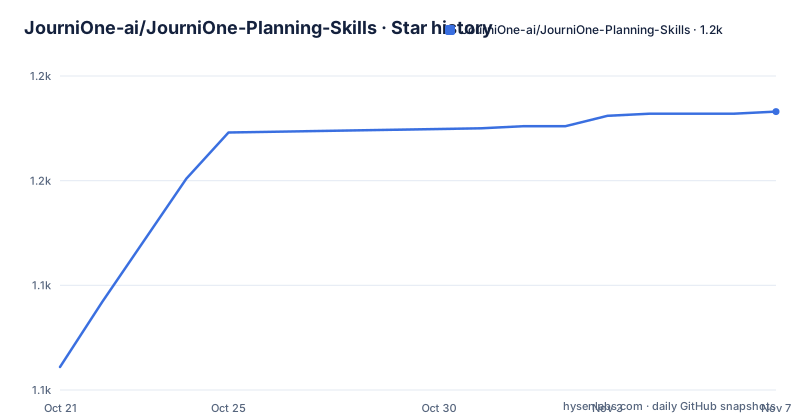
- JourniOne-ai/JourniOne-Planning-Skills1,183 ★ · +122
| Repository | 2026-10-21 | 2026-11-07 |
|---|---|---|
| JourniOne-ai/JourniOne-Planning-Skills | 1.1k | 1.2k |
122 Stars in the last 17 days, measured from the daily GitHub snapshot. Compare with other projects
Editorial analysis
From a one line idea to a daily route you can walk
The entry point is deliberately small. You tell JourniOne where you want to go, what you enjoy, and who is travelling, or you hand it an itinerary, photos and notes you already have. From that it builds daily routes around your interests and your pace, checks key places and transport, and leaves room in each day for sightseeing, meals, travel and rest. The pacing part is the interesting bit, because a route that lists every attraction in a city is not a plan. The documented examples show the intended register: ask for four days in Tokyo with a taste for jazz and neighbourhood walks but no live show every day, and the skill is expected to come back with two approaches rather than a single itinerary, with dates left open. Another example asks for a Kyoto itinerary to be relaxed, for booked activities to be kept, and for hotels with convenient transport and free cancellation. The design assumption is a conversational client, not a form, and the skill is invoked by describing the need in natural language rather than by typing a skill name.
I want four days in Tokyo. I like jazz and neighborhood walks, but not a live show every day. Give me two approaches first; I will decide the dates later.Two views over the same plan: Journal and Map
A plan becomes a guide only after you confirm it, and the confirmation step is where the output shape changes. Once confirmed, the plan turns into a visual Travel Journal that you can explore like a travel handbook, and it carries two distinct views. The Journal view holds images, stories and the daily plans. The Map view holds places and routes, so you can see where a location sits relative to the other places in that day's plan and how you get between them. Opening a single place gives more information about it. The map presentation is backed by daily Google Maps routes, which show the places of a given day in order. The practical effect is that the same itinerary serves two different moments of a trip: browsing ideas before departure, and finding the next stop while you are travelling. The project also makes a point of separating planning from booking in the interface, since a plan can be adjusted any number of times before you say to create the guide from that version.
Hotels and flights arrive through two outside dependencies
JourniOne does not do the searching itself. Hotel work is delegated to the TourMind hotel search and booking Skill, which is described as accessing aggregated rates from more than 100 hotel channels worldwide, naming Ctrip, Fliggy, Meituan, Tongcheng, Qunar, Agoda, Expedia and Booking.com. The comparison is claimed to go past the headline price, covering room type, meals, taxes, cancellation terms and availability, and the recommendations are meant to explain why a hotel suits the route and what to check before booking. Flights come through the Kiwi MCP, and the skill uses them to line up arrival and departure times, airport transfers and stays with the rest of the itinerary. Two boundaries are stated plainly. Hotels and flights are searched only when you ask for them, and shortlisting an option or creating a guide does not place an order. Actual booking continues on the chosen channel, where the supplier fulfils the reservation under the agreed terms, and the booking confirmation is what determines the final status of a reservation.
Installing means importing a Skill and satisfying two dependencies
There is no package to compile and no service to host. The project is a set of files meant to be imported into an agent client, and the documentation names two routes. The first is the client's own Skill manager, where the package displays under the name Travel Journal Creator. The second is a release package, handled through the separate installation guide. Once the Skill is in place, an installation agent checks and prepares the required TourMind hotel Skill and the Kiwi MCP, reusing whatever the client already has, and it interrupts you only when a permission, a manual step or a reload is needed. Initialisation is complete when the client can discover both dependencies, which is a concrete definition of ready. The environment requirements are listed too: the bundled scripts need Node.js 22 or later, and the client itself needs web search, file access, HTTPS requests and remote MCP support. One point is worth noting for anyone with a strict network policy. Creating a JourniOne guide needs no JourniOne token and no local JourniOne MCP service, but it does connect to journione.ai by default, so the service on the other end is a dependency even though nothing is installed locally for it.
A share link is public, and that is the point
Sharing is treated as a core output rather than an export. You can send a guide, an itinerary card or a share link to friends or post them on social media, and the intent is that other people can understand each day's plans and see where everything is, so the itinerary becomes a starting point for planning together. Trip links can be viewed without signing in, while signing in is what lets you save your own journal, keep editing it and share it from the page. The privacy consequence is stated in the same paragraph as the feature, which is unusual and welcome. Before sharing, personal details, photos and document content you want to keep private have to be removed, because anyone with a public link may be able to reach the contents. The separate privacy and sharing document in the repository covers that in more detail. The design decision worth naming is that there is no private by default mode, so the safer path is to review the generated journal as if it were a web page you are about to publish, since that is effectively what it becomes.
Version 1.0.3 and the reporting question it introduces
The package version is 1.0.3, and the changelog entry for that version adds three planning stage experience events. Reporting is enabled by default, it can be disabled persistently, and the project states that it does not capture chat content. That combination is the sort of detail worth reading twice before installing. Three new telemetry style events, on by default, is a small amount of data leaving the client, and the persistent disable switch is the escape hatch. The documentation also contains a warning about dated checks: the release checklist describes package preparation and historical online checks, and it says that a dated check describes the service at that time rather than its current status, and that actual creation, search and booking outcomes depend on the respective service responses. In practice that means a passing check recorded in the release checklist is evidence about a moment in the past, not about the service as it runs today, and the same caveat applies to hotel and flight results, which depend on what the channels actually return.
Where JourniOne is the wrong choice
The dependency surface is what limits the use cases. Planning a trip from an idea requires web search, a network call to journione.ai, and two external integrations, so a client without remote MCP support cannot run it at all, and a traveller on a connection with no data cannot use the planning half at all even if a journal is already cached. Privacy is the second limit. A share link that anyone can open, combined with an import flow that accepts existing photos, notes and documents, means the tool encourages a workflow where personal content flows into a hosted artifact and then outward, and the project asks users to strip that content by hand rather than offering a private setting. There is also a scope limit. The project is about sightseeing, meals and pacing for one trip, and it is not a collaboration tool, a booking system of record, or an offline itinerary archive. A team that wants a durable, version controlled travel document, or that books through a corporate travel tool, will find the value thin.
A repository built like a skill package, not an application
The file layout tells you what kind of thing this is. There is a `SKILL.md` at the root, which is the manifest an agent client reads to learn what the skill does, and then directories named `agents/`, `playbooks/`, `references/` and `scripts/`. The `scripts/` directory holds the bundled code that needs Node.js 22 or later, while `references/` and `playbooks/` hold the material the skill consults, and `agents/` holds agent definitions. Beside that sit the documents a user reads: `INSTALL.md`, `EXAMPLES.md`, `FAQ.md`, `PRIVACY.md`, `DEPENDENCIES.md`, `RELEASE-CHECKLIST.md` and a `CHANGELOG.md`, along with an `assets/` directory for the images used in the readme. The readme itself is published in seven languages, English, Simplified Chinese, Japanese, Spanish, Korean, French and Arabic, each in its own `README.*.md` file. There is no GitHub release history for the repository, and the versioning story is the package version inside the readme plus the changelog, so a user is expected to track 1.0.3 in the text rather than from a release page. The last push was on 2026-10-11, so the package is being worked on even though no versioned artefacts are published alongside it.
Editorial conclusion
JourniOne Planning Skills fits a traveller who wants a visual, linkable itinerary with hotel and flight research attached, and who is happy to let the client reach journione.ai, the TourMind hotel Skill and the Kiwi MCP. It does not fit a team that needs offline planning, a privacy guarantee, or a booking flow that does not depend on third party channels, and the public link sharing model in particular deserves a decision before you use it. Before installing, check three things: that your client supports remote MCP, web search and HTTPS requests, that Node.js 22 or later is available for the bundled scripts, and whether the default reporting of planning stage events is acceptable in your environment, since the project states that reporting is on by default and can be disabled persistently.
Frequently asked questions
What does the JourniOne Planning Skills package need before it can run?
The client needs web search, file access, HTTPS requests and remote MCP support, and the bundled scripts need Node.js 22 or later. The installation agent also prepares the TourMind hotel Skill and the Kiwi MCP, and initialisation is complete only when both can be discovered.
Does JourniOne need a token or a local MCP service to create a guide?
No. Creating a guide requires no JourniOne token and no local JourniOne MCP service, and the skill connects to journione.ai by default instead.
Does JourniOne book hotels and flights for me?
Not on its own. Hotel rates are searched through the TourMind hotel Skill across more than 100 channels, flights through the Kiwi MCP, and booking continues on the selected channel where the supplier fulfils the reservation. Shortlisting or creating a guide never places an order.
Can a JourniOne travel journal be shared without an account?
Yes, trip links can be viewed without signing in. Signing in is needed to save your own journal, keep editing it and share it from the page, and the project asks you to remove personal details, photos or documents before sharing since anyone with a public link may reach the contents.
What is the current package version of JourniOne Planning Skills?
The readme states package version 1.0.3, and that version adds three planning stage experience events with reporting enabled by default, which can be disabled persistently and does not capture chat content. The repository itself has no GitHub releases.
Official sources
Add this badge to your README
If you maintain this project, the badge below links readers to this analysis and shows its maintenance status from the daily GitHub snapshot. Paste the markdown into your README; add ?metric=license or ?metric=stars to the image URL for a different field.

[](https://hysenlabs.com/projects/journione-ai-journione-planning-skills)Star history chart for your README
[](https://hysenlabs.com/projects/journione-ai-journione-planning-skills)Was this useful?