jpanther/congo: Installation and first use for Hugo
A powerful, lightweight theme for Hugo built with Tailwind CSS.
At a glance
- What is it?
- Congo is an MIT-licensed Hugo theme that combines Tailwind CSS with content-focused layouts, client-side search, multilingual support and optional browser features. Its Hugo Module setup is concise, but adoption requires replacing generated site configuration and maintaining a Tailwind-based asset workflow.
- Who is it for?
- Congo fits developers who want a configurable Hugo site with dark mode, responsive layouts, multilingual publishing, search and optional interactive content. It is a poorer choice if you need a zero-configuration theme, a server-backed search service or an independently maintained design system.
- Can I use it commercially?
- Yes. MIT is a permissive licence: you can use, modify and sell software built on it, as long as you keep its copyright and licence notices.
- Is it still maintained?
- Yes. The repository last received commits 98 days ago.
- What is it written in?
- Mainly HTML, according to GitHub's language statistics.
Answers come from the project's GitHub data, last synced on November 7, 2026, and from our analysis. They are not legal advice.
Star history
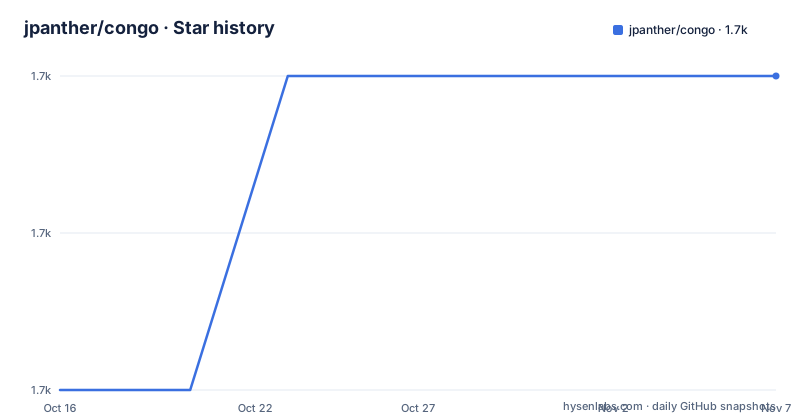
- jpanther/congo1,657 ★ · +2
| Repository | 2026-10-16 | 2026-11-07 |
|---|---|---|
| jpanther/congo | 1.7k | 1.7k |
2 Stars in the last 22 days, measured from the daily GitHub snapshot. Compare with other projects
Editorial analysis
The Hugo publishing problem Congo addresses
Congo targets people who already publish with Hugo and want a theme that handles common site structure without imposing one rigid content model. The README says the theme supports arbitrary content types, taxonomies and menus, as well as multilingual content and right-to-left languages. That makes it relevant to personal blogs, documentation-style sites and projects whose categories or navigation do not match a fixed article-only structure.
The visual layer is built on Tailwind CSS 3.0. Congo provides a responsive layout, multiple colour schemes, customizable Tailwind definitions and dark-mode controls that can be forced on, forced off or switched automatically with a user toggle. The README also lists several homepage layouts, so a new site can choose a presentation before replacing its content and metadata.
This is a theme rather than a content management system. Content remains in Hugo's familiar directories, while Congo supplies templates, assets, translations and default configuration. The package name identifies it as `hugo-congo-theme`, and its Go module path, `github.com/jpanther/congo/v2`, separates version 2 from an older major release line. That structure is useful when deciding whether configuration should follow the v2 documentation or an earlier theme setup.
Congo's template and browser-side feature path
Based on the repository layout, Hugo rendering is the central path. Templates live under `layouts/`, shared data under `data/`, translation strings under `i18n/`, static files under `static/`, and Tailwind inputs and generated assets under `assets/`. Hugo uses these areas to assemble pages before they reach a browser. The repository also contains `archetypes/`, so Congo supports Hugo's content scaffolding conventions rather than replacing them.
Some features do not end at build time. Client-side search is powered by Fuse.js, which means the browser receives search data and performs the lookup rather than relying on a separately documented server search endpoint. The README does not explain the size of that index, its update process, or how it behaves for a very large site. That omission matters when search is central to the publication.
Other optional browser features follow similar paths. The README lists Mermaid diagrams, Chart.js charts and KaTeX mathematical notation, while `package.json` contains corresponding development dependencies. SVG icons come from FontAwesome 6. The repository's development script watches the Tailwind CSS input and writes compiled output with Tailwind's command-line interface in watch mode using `--jit`. This script is for working on the theme itself with Node dependencies installed. Site maintainers using Congo through Hugo do not need to run it for every ordinary Hugo build unless they are modifying the theme's source assets.
Search, diagrams, analytics and content customization
Congo packs several optional integrations into one theme, but enabling them means accepting different runtime dependencies. Fuse.js handles client-side search. Mermaid and Chart.js cover diagrams and charts, while KaTeX renders mathematical notation. These tools are listed both in the README and in `package.json`, which places the browser libraries in theme development rather than treating them as server-rendered features.
The content feature set is broader than basic posts. The README lists tables of contents, heading anchors, code-copy controls, buttons and badges. It also supports HTML and Emoji in articles. Those conveniences are useful for technical publishing, although the README does not provide a site-wide security policy for author-supplied HTML. A site that permits untrusted contributors to submit raw HTML would need to resolve that publishing boundary separately.
Configuration extends beyond presentation. The theme documents support for Fathom Analytics, Plausible Analytics, Umami Analytics and Google Analytics. It also includes RSS feeds, favicons, comments and social-sharing links. Automatic image resizing is assigned to Hugo Pipes, so image handling remains in Hugo's build path rather than depending on a separate image service.
Multiple homepage layouts and flexible menus are useful only after the site's content organization has been decided. Congo can render different content types, but it cannot by itself define which fields editors need or which publication rules apply. The theme documentation links to Getting Started for site configuration, while the README does not reproduce every configuration key.
Installing Congo as a Hugo Module
The README identifies the Hugo Module method as the easiest option and requires Go, Hugo and an existing Hugo project. Start from the project directory and initialize modules with the exact placeholder repository path used in the documentation:
hugo mod init github.com/<username>/<repo-name>Replace the placeholder with the site's actual repository coordinates. Then create `config/_default/module.toml` with Congo's versioned module path:
[[imports]]
path = "github.com/jpanther/congo/v2"
After that configuration exists, start the Hugo server. The README states that the theme will be downloaded automatically during this process:
hugo serverThe next step is important. Congo requires the generated root `hugo.toml` to be deleted, after which the theme's `*.toml` configuration files are copied into `config/_default/`. The `module.toml` file must not be overwritten. The README points to the theme cache and the repository's `stable/config/_default` directory as sources for those files, but does not give a portable copy command, so this operation must be performed using the local workflow appropriate for the machine.
After the files are in place, follow Congo's Getting Started documentation for site-specific settings. The first local preview should expose the selected homepage layout and default theme styling. Exact URLs and menu output depend on the site's content and configuration, so the README does not support a more specific result claim.
Updating the v2 module and tracking theme releases
Congo's documented update command updates Hugo Modules from the project directory:
hugo mod get -uAccording to the README, this updates the theme to the latest release. Because Congo follows the major-version module path `github.com/jpanther/congo/v2`, adopters should check that instructions still refer to the same major version. The repository is not archived, and its last push was on 2026-08-01. Recent listed releases include v2.14.0 on 2026-05-23, v2.13.0 on 2026-01-20 and v2.12.2 on 2025-07-12.
The upgrade cost extends beyond running one command. Congo stores theme defaults under `config/_default`, so a site that copied those files may later need to reconcile them with newer theme defaults. The README points to dedicated installation update instructions but does not describe merge conflicts, a rollback procedure or a compatibility matrix. The repository contains a `CHANGELOG.md`, which is the relevant file to inspect before accepting a new release.
The project uses the MIT License. Its `package.json` also declares `"license": "MIT"`, while theme development depends on Tailwind CSS and several browser libraries whose licenses are not listed in the repository. An organization should review those dependency terms separately rather than treating the theme's MIT declaration as a complete dependency review.
Congo's constraints and the manual alternative
The strongest constraint is configuration replacement. The quick start does not simply add a theme to a generated Hugo site. It removes `hugo.toml` and copies Congo's configuration into `config/_default/`. This is workable for a new project, but it creates a real migration decision for an existing site. The README gives no merge script or compatibility guidance for every Hugo configuration field.
The feature set can also exceed a site's needs. Client-side search, diagrams, charts, mathematics, analytics, comments and social sharing add configuration and browser payload choices. The README describes Congo as optimized for performance and accessibility and claims perfect Lighthouse scores, but it does not explain which page templates and content states produced those scores. Those are project claims, not a guarantee for every deployment.
Hugo Modules are not the only installation path. Congo also supports a Git submodule and a completely manual installation. The practical difference is ownership of the theme source. Hugo Modules import the versioned package through `go.mod` and `config/_default/module.toml`, with `hugo mod get -u` handling updates. A manual installation instead places Congo's files directly into the theme workflow and leaves the maintainer responsible for obtaining and updating them. The README does not compare automatic or manual asset updates, so no stronger claim about that distinction is justified.
Editorial conclusion
Congo fits developers who want a configurable Hugo site with dark mode, responsive layouts, multilingual publishing, search and optional interactive content. It is a poorer choice if you need a zero-configuration theme, a server-backed search service or an independently maintained design system. Before adopting it, compare the `config/_default` files with your current site configuration, confirm that your required content models and analytics services are supported, and inspect the browser dependencies used by features such as Fuse.js, Mermaid and Chart.js.
Frequently asked questions
What are the prerequisites for installing jpanther/congo with Hugo Modules?
The README requires Go, Hugo and a new Hugo project before following the quick start. The project directory must also be initialized with `hugo mod init`.
How do I update the jpanther/congo Hugo theme?
Run `hugo mod get -u` from the Hugo project directory. Congo's documentation states that this updates the theme to the latest release.
Which search and visualization libraries does jpanther/congo support?
The README lists client-side search powered by Fuse.js, diagrams and visualizations through Mermaid, charts through Chart.js, and mathematical notation through KaTeX.
Official sources
Add this badge to your README
If you maintain this project, the badge below links readers to this analysis and shows its maintenance status from the daily GitHub snapshot. Paste the markdown into your README; add ?metric=license or ?metric=stars to the image URL for a different field.

[](https://hysenlabs.com/projects/jpanther-congo)Star history chart for your README
[](https://hysenlabs.com/projects/jpanther-congo)Was this useful?