pytorch-widedeep: Wide and Deep Models for Tabular Data With Attached Text and Images
A flexible package for multimodal-deep-learning to combine tabular data with text and images using Wide and Deep models in Pytorch
At a glance
- What is it?
- The library implements Google's Wide and Deep architecture in PyTorch and extends it to multimodal inputs. It fits teams that already have a tabular pipeline and want text or image columns inside the same model, and it expects you to accept a fairly large configuration surface in return.
- Who is it for?
- Consider pytorch-widedeep for tabular learning or for jointly training tabular, text and image components. For tabular-only tasks, compare it with strong tree-based baselines on your own data rather than ruling it out in advance.
- Can I use it commercially?
- Yes. Apache-2.0 is a permissive licence: you can use, modify and sell software built on it, as long as you keep its copyright and licence notices.
- Is it still maintained?
- Activity is slowing. The repository last received commits 6 months ago.
- What is it written in?
- Mainly Python, according to GitHub's language statistics.
Answers come from the project's GitHub data, last synced on November 10, 2026, and from our analysis. They are not legal advice.
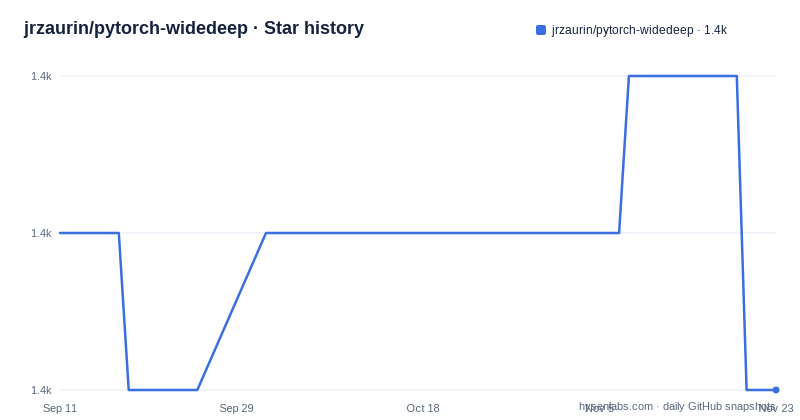
Star history
- jrzaurin/pytorch-widedeep1,417 ★ · +1
| Repository | 2026-09-11 | 2026-11-10 |
|---|---|---|
| jrzaurin/pytorch-widedeep | 1.4k | 1.4k |
1 Stars in the last 60 days, measured from the daily GitHub snapshot. Compare with other projects
Editorial analysis
The gap pytorch-widedeep fills: tabular rows that also carry text and images
Most tabular tooling assumes every column is a number or a category. The moment a row also carries a product description, a support ticket body, or a photo, teams split the pipeline: train a text model or a vision model, emit an embedding, paste it back as a column, then train the tabular model on top. That works, but the text encoder never sees the tabular loss, and the tabular model never influences how the text is represented. pytorch-widedeep is built for the case where you want those branches trained together. The README describes it as a package to use deep learning with tabular data, and specifically to facilitate the combination of text and images with corresponding tabular data using wide and deep models. The intended user is someone comfortable in PyTorch who has a dataframe with mixed column types and wants a single model rather than a two-stage pipeline. Text and image branches are optional: the project also provides tabular-only components and examples.
Component assembly: wide, deeptabular, deeptext, deepimage and the WideDeep wrapper
The architecture is assembled from named components. The README lists four: wide, deeptabular, deeptext and deepimage. Each can be used alone, and the WideDeep class composes whichever subset you pass. The wide side follows the original paper's cross product transformations, which the README quotes directly: for binary features, a cross-product transformation such as AND(gender=female, language=en) is 1 only when the constituent features are all 1. The deep side is where the modality-specific encoders live. The deeptabular slot accepts interchangeable models, and the README names TabMlp, TabResnet, TabNet and TabTransformer as drop-in alternatives, noting that the example code would be almost identical whichever you pick. That interchangeability is the real design decision here: the library is a wiring layer over encoders rather than a single fixed network. The extension point is explicit. Custom models work as long as they expose a property called output_dim giving the size of the last layer of activations, so WideDeep can size its final combination correctly. If your encoder does not expose output_dim, the model cannot be constructed. The README points to an Examples folder for custom component usage.
Installation, dependencies and the version history that matters
The package is published on PyPI as pytorch-widedeep, and the README documents both a standard install and a developer install path, with a Testing section and a contribution guide. The Python support line in the README badge is 3.9, 3.10, 3.11 and 3.12. That 3.12 support arrived recently: release v.1.7.0 is described as adding multi-GPU support and updated dependencies so that the package is compatible with Python 3.12. Before that, v.1.6.5 added mps backend support and more recommendation models, and v.1.6.4 introduced the rec module. The practical consequence is that the dependency floor moved in v1.7.0. If you are pinned to an older PyTorch or an older Python, you are on a release line that predates the 3.12 work, and the release notes are the place to confirm which combination is supported rather than assuming the latest tag works with your existing environment. The README also states that all architecture snippets in it should run locally, which is a useful claim to test against your own environment before building on it.
Running a first model: the toy dataframe the README builds
The README's quick start constructs a 100 row dataframe with a mix of column types: two categorical columns (city, name), two continuous ones (age, height), two free-text columns (sentence, other_sentence), an image_name column, and a binary target. The image column is populated by a helper that writes 32 by 32 random PNG files into a local images directory, so the example is self-contained and needs no download. From there the README builds a standard Wide and Deep architecture and states that building a model from a single component follows the same shape. This is the part of the documentation worth reading closely before you write your own code, because the column-type split is the contract: the library needs to know which columns are categorical, which are continuous, which are text, and which are image paths, and the toy example shows exactly how that mapping is expressed. The README notes that the snippets would be almost identical across the deeptabular choices, so swapping TabMlp for TabResnet is a one-line change rather than a rewrite.
Where the library is thin, and when it is the wrong tool
The README is explicit that it is a package for deep learning with tabular data, and the project maintains a separate benchmark repository comparing tabular deep learning against LightGBM. That comparison exists because the answer is not settled. For a purely tabular problem with a few hundred thousand rows, a gradient boosted tree is usually the cheaper and often the stronger baseline, and pytorch-widedeep does not remove that fact. The library can also be evaluated on tabular-only data; choose based on measured accuracy, cost and maintenance rather than assuming a winner. There is a second cost: the configuration surface. Choosing between TabMlp, TabResnet, TabNet and TabTransformer, deciding whether the wide branch is worth including, and wiring custom encoders all require judgement that the README does not make for you. The wide component in particular is not free. The README quotes a binary-feature example of cross products; that example does not establish that interactions are meaningful only for binary inputs. Check the preprocessor's supported inputs and validate the feature choices on your data. Finally, the custom-encoder path depends on a single convention, the output_dim property. Miss it and the failure is at construction time, not at training time, which is at least a fast failure.
The alternative: LightGBM and a two-stage embedding pipeline
The honest comparison is not another multimodal deep learning library. It is the pipeline most teams already have. Take the text column, run it through a sentence encoder, take the image column, run it through a vision backbone, append both as dense features, and train LightGBM on the resulting table. The difference in approach is where the gradient flows. In the two-stage pipeline the text and image encoders are frozen or fine-tuned against their own objective, and the tabular model sees their output as fixed inputs. In pytorch-widedeep the branches are components of one WideDeep model, so the tabular loss can shape the text and image representations. That is a real architectural difference and it is the reason to pick this library. It is also the reason the two-stage pipeline remains attractive: it is easier to debug, each stage can be evaluated independently, and you can replace the tabular model without retraining the encoders. The project's own benchmark repository against LightGBM is the fairest starting point for deciding which side of that line your problem sits on.
Maintenance, licensing and what to verify before you commit
The repository is not archived and the licence is Apache-2.0, which permits commercial use and modification, but the usual obligations around notices and attribution apply and this is not legal advice. Version activity is steady rather than rapid: v.1.6.4, v.1.6.5 and v.1.7.0 landed between September 2024 and September 2025, and the last push to the repository is dated 2026-04-30. The upgrade cost concentrates in the dependency pins. v1.7.0 changed dependencies to reach Python 3.12 compatibility, so moving from the 1.6.x line to 1.7.0 is the upgrade to plan for, not a patch bump. There is a published DOI and a JOSS paper, which gives you something citable if that matters for your review process, and a Slack channel for questions. Before adopting, pin the release, confirm the Python and PyTorch versions in your environment match that release's notes, and run the README's toy example end to end. A successful toy run checks basic setup, but does not validate the mapping, leakage, generalisation or performance of your own dataset.
Editorial conclusion
Consider pytorch-widedeep for tabular learning or for jointly training tabular, text and image components. For tabular-only tasks, compare it with strong tree-based baselines on your own data rather than ruling it out in advance. Check the Python and dependency requirements of the release you install, verify the expected inputs and output_dim of custom encoders, and test whether a wide branch improves your metric.
Frequently asked questions
How does pytorch-widedeep size its wide component?
The README example uses Wide(input_dim=np.unique(X_wide).shape[0]) after fitting WidePreprocessor. It counts distinct encoded values in that example; it is not the number of columns. Follow the version-specific preprocessor documentation and verify how unseen and crossed values are encoded for your data.
Can I use my own model with pytorch-widedeep?
The README says a custom component must expose output_dim with the size of its final activations. It must also be compatible with the expected PyTorch model interface, inputs and output shape; test the custom component with the version you use.
What version of numpy does pytorch-widedeep allow?
numpy>=1.21.6 with an upper bound below 2.0.0, which excludes the whole 2.x line. It is the only dependency in the file with a ceiling, and three others, gensim, spacy and tqdm, carry no version constraint at all.
Which pytorch-widedeep backbones can I swap?
TabMlp, TabResnet, TabNet and TabTransformer for tabular data, and BasicRNN, StackedAttentiveRNN and HFModel for text. The README notes that the Hugging Face models require their corresponding parameters and preprocessor.
What licence does pytorch-widedeep use?
Two licence files sit at the root, LICENSE_APACHE_v2_0 and LICENSE_MIT, while the repository's licence field records only Apache-2.0. The README reserves a License section and separate BibTex and APA citation headings.
Official sources
Add this badge to your README
If you maintain this project, the badge below links readers to this analysis and shows its maintenance status from the daily GitHub snapshot. Paste the markdown into your README; add ?metric=license or ?metric=stars to the image URL for a different field.

[](https://hysenlabs.com/projects/jrzaurin-pytorch-widedeep)Star history chart for your README
[](https://hysenlabs.com/projects/jrzaurin-pytorch-widedeep)Was this useful?