Version numbers encode a timestamp and a commit hash
A fast, powerful type checker designed for Ruby. internals.md There is also a talk online that describes Sorbet's high-level architecture and the reasons why it's fast: Fast type checking for Ruby Building Sorbet There are multiple ways to build sorbet.
At a glance
- What is it?
- Sorbet is a type checker for Ruby written in C++ and built with Bazel. Its README is a contributor guide rather than a user guide, and its release tags embed a build timestamp and a commit hash, while published gem versions can be pinned to make builds reproducible.
- Who is it for?
- Sorbet suits a team with a large Ruby codebase that wants types without a rewrite and without changing the language its editors already understand. Four things to know before you commit.
- Can I use it commercially?
- Yes. Apache-2.0 is a permissive licence: you can use, modify and sell software built on it, as long as you keep its copyright and licence notices.
- Is it still maintained?
- Yes. The repository received new commits within the last day.
- What is it written in?
- Mainly C++, according to GitHub's language statistics.
Answers come from the project's GitHub data, last synced on November 15, 2026, and from our analysis. They are not legal advice.
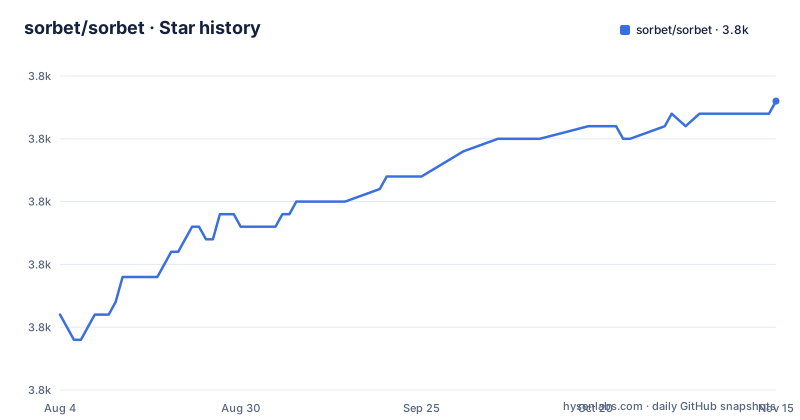
Star history
- sorbet/sorbet3,808 ★ · +17
| Repository | 2026-08-04 | 2026-11-15 |
|---|---|---|
| sorbet/sorbet | 3.8k | 3.8k |
17 Stars in the last 103 days, measured from the daily GitHub snapshot. Compare with other projects
Editorial analysis
The README is written for contributors and says so in its third paragraph
Most projects present a README as the front door. This one explicitly declines to. After two sentences describing what Sorbet is, it states that the README contains documentation specifically for contributing to Sorbet, and then redirects: read the public documentation on the project site, or edit those docs; watch the recorded talks; or try the online playground. The rest of the file matches that framing. It opens with the project's user-facing design principles, then moves straight into a build quickstart, build configurations, common compilation errors, how to run the tests, the several distinct test harnesses, debugging, writing documentation, and editor and environment setup. There is nothing in it about writing your first signature or about interpreting an error message. That is not a criticism, since the material for users lives elsewhere and the split is clearly signposted, but it does mean the repository's front page is the wrong entry point for evaluating the tool.
Release identifiers and gem version pinning
GitHub release tags include a numeric version, a build timestamp and a short commit identifier. These details help identify the corresponding build, but the tag alone does not explain compatibility or the changes in a release.
RubyGems publishes versioned `sorbet-static` packages, so a project can pin a specific gem version and commit its lockfile for reproducible installs. When upgrading, review the project’s release information and test the new checker against your own code rather than assuming compatibility from the identifier alone.
Six build configurations, and the flag that selects them is repeatable
The build offers a menu of named configurations, each with a distinct purpose. The default for development is a debug configuration with good stack traces that also runs all the project's internal enforcement checks. A sanitizing configuration links in extra sanitizers, specifically undefined-behaviour and address sanitizers, catching most memory and undefined-behaviour errors at the cost of a substantially larger and slower binary. A debug-symbols configuration is described as being included by the debug configuration and doing nothing else. A forced-debug configuration uses more memory in exchange for reporting more sanity checks. A static-libraries configuration forces static linking. And two release configurations exist that are described as the exact configuration shipped to users. What makes this worth reading carefully is that these are not mutually exclusive, despite the singular-looking flag:
--config=dbg --config=sanitizeThat pairing is given as the common combination when debugging, and it means the flag accumulates rather than selecting. Passing a second configuration does not replace the first. Anyone scripting builds will get this wrong at least once. Separately from the configurations, a compiler optimisation flag can be turned on for any build independently, so the two axes multiply.
Your local build links differently from the one users get
The static-linking configuration exists for one reason, spelled out in the file: Sorbet defaults to dynamic linking because it is faster to build, and release builds already use static linking regardless. So the binary a developer produces locally with the standard debug configuration is not the same kind of artefact as the one distributed to users. This is a deliberate trade, since dynamic linking buys iteration speed and you want that while working, but it has consequences that are easy to forget. A bug that reproduces only in a release build is now a distinct category rather than a curiosity, and a plugin or extension that links against a locally built binary may pick up a different transitive set than it would against a release. The two release configurations are split by operating system rather than unified, which tells you the shipping artefacts are produced per platform rather than from one portable target. Anyone reproducing a user-reported problem should build with the release configuration for that platform first, and only then suspect the code.
ENFORCE checks and forcedebug are the same idea at two different levels
Two of the build descriptions point at the same engineering idea at different granularities. The debug configuration runs all of the project's enforcement assertions, which are the internal checks compiled into the code that abort when an invariant is violated. The forced-debug configuration uses more memory but reports even more sanity checks. So the mechanism is a tiered set of assertions, where the cheap ones are always on in development and the expensive ones are opt-in. The design implication is worth naming because it explains a lot about how the codebase is written: for this to work, every internal invariant has to be expressed as an assertion at the point where it holds rather than validated later, and the memory cost of the extra tier is the price paid for finding the violation at the point it was introduced. The same pattern shows up in the testing section, where a separate corpus of tests exists alongside expectation tests, command-line tests and language-server tests, with the language-server interaction tests recorded and replayed rather than driven live. Assertions in the binary and recordings in the test suite are two answers to the same problem: how do you verify a compiler reliably.
The documented build failure is an Xcode upgrade
There is a dedicated section on common compilation errors, and it contains exactly one entry, which is worth reading as a signal about what actually goes wrong. The error is that the Xcode version must be specified to use an Apple cross-tool, and the file notes that it typically occurs after an Xcode upgrade. The remedy is installing the command line tools and making sure the system's command line tools directory points at an installed Xcode, so that the licence has been accepted and a real Xcode is present. Everything else about the build is treated as configuration; the single documented failure is a host toolchain changing underneath you. That is the kind of entry you only get when a project has been through several of them, and it is also a caution about the Bazel-based Apple cross-toolchain configuration, which couples the build to the version of a commercial tool that Apple ships for free but updates on its own schedule. If you hit it, the answer is in the file, and if you hit something adjacent, there is no guidance.
A type checker repository that also contains the playground, the website and the editor extension
The root directory reads like a type-checker pipeline and then keeps going. There are directories for the abstract syntax tree, the parser, the namer, the resolver, the rewriter, the definition validator, hashing, the common layer and the core, which between them are the stages a checker moves through. Then there are directories for signature handling in two formats, the checker's own signature format and the community standard, plus an inference directory for generating signatures from runtime data. And then there are directories for a WebAssembly toolchain, the editor extension, the website, gems, a packager, a payload builder and third-party code. The WebAssembly piece is what makes the online playground possible, and the extension and website directories are why the editor plugin and the documentation site can be built from the same tree as the checker. The three lldb-related entries at the root, a configuration file, a directory and a Python script, are the debugging setup checked in for everyone. The practical note is that a build from this repository does far more than produce a checker, and a change that only wants to touch the resolver still inherits the whole arrangement.
Editorial conclusion
Sorbet suits a team with a large Ruby codebase that wants types without a rewrite and without changing the language its editors already understand. Four things to know before you commit. Read the documentation site rather than the repository README, because the README is explicitly a contributor guide. Do not try to pin a Sorbet version by tag, since the release identifiers embed a build timestamp and commit hash and are not ordered in any way you can depend on. Build with the release configuration for your platform when reproducing a user-reported problem, since local development builds link dynamically while shipped builds do not. And know that the documented build failure is an Xcode upgrade, so expect to hit that on a fresh machine and follow the fix in the file rather than debugging it from scratch.
Frequently asked questions
What is Sorbet?
It is a type checker for Ruby, described as fast, aimed at being easy to add to existing codebases using gradual types and fast to respond with errors and suggestions. It is written in C++ and built with Bazel, and its stated goal is to improve an existing Ruby codebase gradually rather than to impose a type system from the start.
How do I build Sorbet from source?
Install the build dependencies with the system package manager, which the quickstart lists as Bazel, autoconf, coreutils and parallel, then clone the repository and invoke the Bazel build for the main binary with the debug configuration. The resulting executable appears under the build output directory. You also need developer tools installed and an accepted licence on macOS.
What are Sorbet's stated user-facing design principles?
Six. Be explicit and treat annotations as beneficial rather than a cost. Feel useful rather than burdensome, compensating verbosity with safety. Stay as simple as possible while keeping enough expressive power for real Ruby code. Stay compatible with Ruby. Scale on all axes, including execution speed, collaborators, lines of code and codebase age. And support adoption at different paces so no team has to adopt everything at once.
Why does Sorbet avoid introducing new Ruby syntax?
Because existing Ruby syntax lets the project reuse the tooling people already have, particularly editors, and because the point of the tool is to improve a Ruby codebase gradually. Adding new syntax would make it harder to stay compatible with existing tools and would raise the cost of partial adoption, which the design principles call out as a requirement rather than a preference.
Official sources
Add this badge to your README
If you maintain this project, the badge below links readers to this analysis and shows its maintenance status from the daily GitHub snapshot. Paste the markdown into your README; add ?metric=license or ?metric=stars to the image URL for a different field.

[](https://hysenlabs.com/projects/sorbet-sorbet)Star history chart for your README
[](https://hysenlabs.com/projects/sorbet-sorbet)Was this useful?