Commander puts commands into the parts of Obsidian that have none
Commander - Obsidian Plugin | Add Commands to every part of Obsidian's user interface
At a glance
- What is it?
- Commander is an Obsidian plugin that adds commands to corners of the interface that Obsidian itself leaves bare, and it goes further than that: you can reorder commands, edit them, hide the ones that Obsidian or another plugin added, and choose which devices show which commands. The build is a small esbuild and Tailwind pipeline, and the project is now maintained under a second GitHub account.
- Who is it for?
- Commander suits an Obsidian user who has run out of places to put a command, who wants the same action reachable from the ribbon, the tab header or a menu they built themselves, and who wants to prune the interface of commands they never use.
- Can I use it commercially?
- Yes. MIT is a permissive licence: you can use, modify and sell software built on it, as long as you keep its copyright and licence notices.
- Is it still maintained?
- Yes. The repository last received commits 23 days ago.
- What is it written in?
- Mainly CSS, according to GitHub's language statistics.
Answers come from the project's GitHub data, last synced on November 7, 2026, and from our analysis. They are not legal advice.
Star history
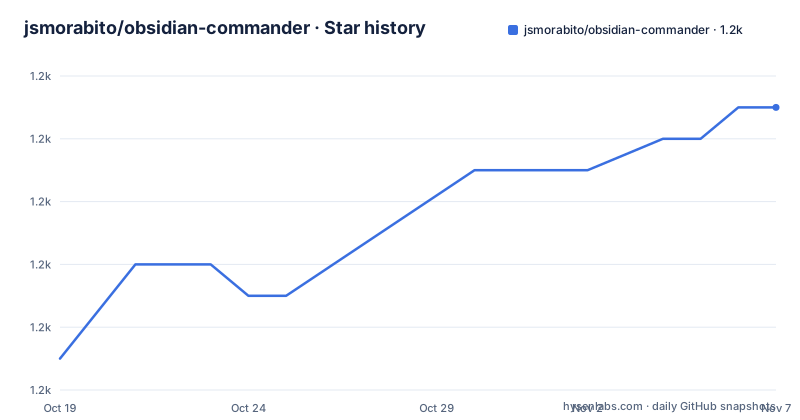
- jsmorabito/obsidian-commander1,243 ★ · +8
| Repository | 2026-10-19 | 2026-11-07 |
|---|---|---|
| jsmorabito/obsidian-commander | 1.2k | 1.2k |
8 Stars in the last 19 days, measured from the daily GitHub snapshot. Compare with other projects
Editorial analysis
A plugin whose job is to place buttons, and then to get out of the way
Commander is an Obsidian plugin for adding commands to different parts of the user interface, which is a small description for something with a wide reach. Obsidian's interface is made of several surfaces, the ribbon on the left, the tab header, the menus, the file explorer, and each of them has its own idea of what a command is and where it can live. Commander's premise is that a command you use often should not be three clicks away in the command palette, and that some surfaces have no place to put one at all. The plugin is published under the package name `cmdr` at version 0.6.0, its entry point is `main.js`, and the licence is MIT with the text in a `LICENSE.md` file. The description in the package manifest puts the intent bluntly, customize your workspace by adding commands everywhere.
Half the feature list is about removing commands
The documented features are add commands, remove commands, re-order commands through the plugin settings menu, edit commands, hide commands added by Obsidian or other plugins, and choose which devices commands appear on. The middle three are the interesting ones, because they are not about adding a button but about taking control of the ones already there. Obsidian's own command palette is long, other plugins add their own, and a user with a dozen plugins can end up with a ribbon full of entries they never touch. Commander's hide and remove options address that, and the edit option goes further, since editing an existing command changes what it does rather than only where it sits. The re-ordering happens in the plugin settings rather than by dragging in the interface, which is a deliberate choice, and it is what makes the order stable across restarts.
Per device visibility exists because Obsidian syncs your settings
The last feature, choosing which devices commands appear on, is the one that tells you something about how the plugin is used. Obsidian users often keep several vaults, or the same vault open on a laptop, a desktop and a phone, and the plugin settings travel with the vault. A command that makes sense on a desktop with a wide screen may be noise on a phone, and a button you only need while writing on a tablet should not clutter a machine you only read on. Making the visibility per device means the configuration is stored per installation rather than per vault, or at least that the plugin treats it that way, and it is the reason the option is called out separately in the feature list rather than being folded into a general settings screen. It is also a warning: if you sync settings between machines, a change to what is visible can follow you to the device you did not mean to change.
The build is esbuild and Tailwind, and one script writes the version
The package manifest shows a small and modern toolchain. The TypeScript side is bundled with esbuild through a config script, and the production build type checks first, so the three commands that matter are these:
tsc -noEmit -skipLibCheck
node scripts/esbuild.config.mjs production
npx tailwindcss -i ./main.css -o ./styles.css --minify
The styles are Tailwind, compiled from a `main.css` entry point into a `styles.css` with the class names pruned, and the repository carries a `tailwind.config.js` alongside an `app.css`. The development mode runs the two watchers in parallel through npm-run-all, and the linting is eslint with the `eslint-plugin-obsidianmd` package, which is the plugin specific rule set for Obsidian's own APIs. Tests are vitest with jsdom available for DOM behaviour. Two scripts are worth noticing because they are the kind of thing Obsidian plugins need and usually forget. The `version` script runs a node script that bumps `manifest.json` and `versions.json` and stages them, which is how the plugin version and the minimum Obsidian version stay in step, and there is an `icons` script that regenerates the icon list.
The plugin borrows other people's menu code, with permission
The credits section is unusually specific, and it tells you the project is built on the work of two other Obsidian plugin authors rather than from scratch. Kometenstaub and kzhovn gave permission to use code from their plugins Customizable Page Header and Titlebar and Customizable Menu respectively, which is the layer that lets Commander place items in the titlebar and in the menus rather than only in the ribbon. The design work was done in Penpot, and the visual identity, including the cover and the footer graphic, comes from there. The project itself is designed by Johnny, the account this repository slug refers to, and developed by phibr0, and that split is visible in the repository too, since the badges in the README and the feedback links point at the phibr0 account, while the slug here belongs to the other. If you are looking for the source of truth, that is a detail to check rather than assume.
Translations are a folder and a JSON file
The project supports a `locale/` directory with one file per language, and the instructions for adding a translation are direct. You copy the English `en.json` file to a file named for your language and start changing the sentences on the right hand side. The sentences on the right are the ones you change, and the keys on the left are what identify each string, which is the usual arrangement for a plugin string table. This is a plugin that adds user facing labels to parts of the interface, so the translation surface is larger than a typical plugin's, since every button Commander injects into the ribbon or a menu needs a string. The locale directory sits in the repository root next to `manifest.json` and `versions.json`, and the two files that Obsidian itself reads are the two that the version script maintains.
Where the project stands and who it is for
The release list shows a 0.6.0 published on 2026-10-13, preceded by a beta build on 2026-10-03 and another on 2026-10-02, and the last push to the repository was on 2026-10-16, so this is a project in active development with a recent line of work on the current minor version. The repository also carries an `AGENTS.md` file and a `scripts/` directory with the build and version helpers, and the `src/` directory holds the plugin source, with the CSS entry point and the tailwind configuration at the root. So who is it for? Anyone who has decided that the ribbon, the tab header and the menus are all surfaces worth treating as a single command palette. What it is not is a plugin that changes what Obsidian's commands do at the source, since it works at the level of the interface, arranging and filtering what is already registered by Obsidian and by other plugins.
Editorial conclusion
Commander suits an Obsidian user who has run out of places to put a command, who wants the same action reachable from the ribbon, the tab header or a menu they built themselves, and who wants to prune the interface of commands they never use. It is a poor fit if you rely on Obsidian's own commands being visible, since hiding them is a supported feature, and it is a poor fit if you sync settings across devices without reading the per device option, because a command configured on one machine can be hidden or shown on another. Before you install it, check three things: the version you are taking, since 0.6.0 was published on 2026-10-13 after two beta builds, that the plugin matches your Obsidian version, since the development dependencies target the obsidian package at 1.13.1, and the repository you clone from, because the README badges and links point at the phibr0 account rather than the one the slug refers to.
Frequently asked questions
What does the Commander plugin do for Obsidian?
It adds commands to different parts of the Obsidian interface. It can also remove and re-order commands through the plugin settings menu, edit existing commands, hide commands that Obsidian or other plugins added, and choose which devices the commands appear on.
How do I build the Commander plugin from source?
The production build type checks and bundles with esbuild, and the styles are compiled with Tailwind. The three commands are `tsc -noEmit -skipLibCheck`, `node scripts/esbuild.config.mjs production` and `npx tailwindcss -i ./main.css -o ./styles.css --minify`. Tests run with vitest and linting uses eslint with the Obsidian plugin rules.
Can I hide commands that Obsidian or another plugin added?
Yes, hiding commands added by Obsidian or by other plugins is one of the documented features, alongside removing them, re-ordering them in the plugin settings menu and editing what an existing command does.
How do I add a translation to Commander?
The locale directory holds one JSON file per language. Copy the English en.json file to a file named for your language and change the sentences on the right.
Which repository is the current home of Commander?
The badges and the feedback links in the README point at the phibr0 account on GitHub, while the project was designed by Johnny. The release list shows 0.6.0 published on 2026-10-13 after two 0.6.0 beta builds, and the last push to the repository was on 2026-10-16.
Official sources
Add this badge to your README
If you maintain this project, the badge below links readers to this analysis and shows its maintenance status from the daily GitHub snapshot. Paste the markdown into your README; add ?metric=license or ?metric=stars to the image URL for a different field.

[](https://hysenlabs.com/projects/jsmorabito-obsidian-commander)Star history chart for your README
[](https://hysenlabs.com/projects/jsmorabito-obsidian-commander)Was this useful?