jsynowiec/node-typescript-boilerplate: a strict, framework-free Node.js TypeScript starter
Production-ready Node.js TypeScript boilerplate: ESM, Vitest, ESLint, Prettier, GitHub Actions, Mise, and AGENTS.md included.
At a glance
- What is it?
- A small template that ships TypeScript 6, native ESM, Vitest, ESLint, Prettier, GitHub Actions and Mise, and deliberately leaves out Express, NestJS, Docker and databases. The trade-off is that you wire the runtime layer yourself.
- Who is it for?
- Adopt this template if you want a Node.js 24 and TypeScript 6 project where linting, type checking, tests and CI already agree with each other, and you are willing to add your own HTTP layer. Do not adopt it if you need a working Express or NestJS API in the first hour, or if your codebase is CommonJS, because the README explicitly says not to open issues about CommonJS or ESM here.
- Can I use it commercially?
- Yes. Apache-2.0 is a permissive licence: you can use, modify and sell software built on it, as long as you keep its copyright and licence notices.
- Is it still maintained?
- Yes. The repository last received commits 16 days ago.
- What is it written in?
- Mainly TypeScript, according to GitHub's language statistics.
Answers come from the project's GitHub data, last synced on November 15, 2026, and from our analysis. They are not legal advice.
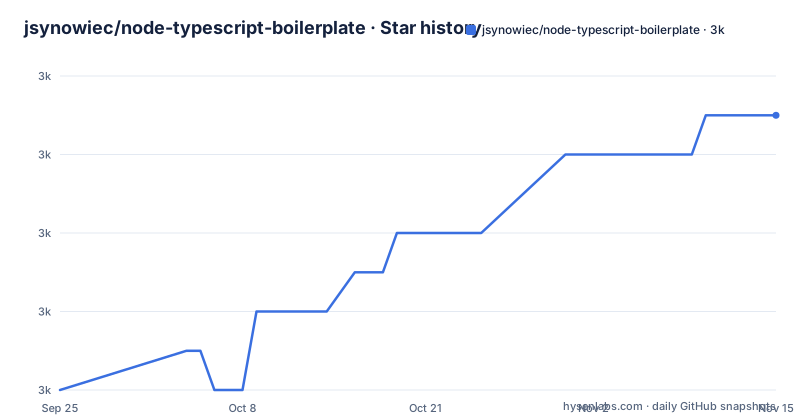
Star history
- jsynowiec/node-typescript-boilerplate2,963 ★ · +7
| Repository | 2026-09-25 | 2026-11-15 |
|---|---|---|
| jsynowiec/node-typescript-boilerplate | 3k | 3k |
7 Stars in the last 51 days, measured from the daily GitHub snapshot. Compare with other projects
Editorial analysis
The setup work this template removes, and the setup work it keeps
Every new Node.js service starts with the same afternoon of chores: pick a TypeScript config, decide between CommonJS and ESM, wire a test runner, add a linter, add a formatter, and make CI run all of it. This project packages that afternoon. It targets Node.js 24 and TypeScript 6, uses native ES modules, and ships ESLint with typescript-eslint, Prettier with EditorConfig, Vitest, and a GitHub Actions workflow. The package.json declares one runtime dependency, tslib, and everything else sits in devDependencies.
The audience is narrow on purpose. The README lists backend services, CLIs, workers, APIs, job processors and libraries as good fits, and adds that the template is "intentionally small, strict, and boring". What it does not include is just as explicit: no Express, NestJS or Fastify, no serverless deployment, no database, no ORM, no authentication, no Docker, no cloud configuration. If your project needs any of those, you add them, and you choose them.
That is a coherent position rather than a gap. A starter that bundles an HTTP framework also bundles that framework's upgrade schedule, its middleware conventions and its opinions about error handling. This one leaves those decisions open and pays for it by giving you a repository that does not run a server out of the box.
How the toolchain fits together: one source tree, four tsconfig files
The repository layout tells most of the story. Source lives in src/, unit tests in __tests__/, and the root holds four TypeScript configurations: tsconfig.json for the normal build, tsconfig.release.json for release output, tsconfig.vitest.json for tests, and tsconfig.eslint.json for linting. Splitting them matters because the release build has different requirements from the developer build, and the README describes build:release as clean and transpile for release with no source maps and comments removed.
The scripts chain in a deliberate order. prebuild runs lint and check-types, and build depends on prebuild, so a build cannot succeed with a lint error or a type error in the tree. check-types runs tsc --noEmit, which means type checking never writes files. The test script runs vitest run unit with an explicit config path, and test:coverage adds --coverage.enabled --coverage.all. The prettier script formats files matching {src,__{tests}__}/**/*.{ts,mts}, so the formatter's scope is the same as the linter's.
The one detail worth pausing on is tslib. TypeScript inlines helpers for async/await, spread and destructuring into every output file that needs them. The README explains that importHelpers: true plus tslib makes files share a single imported copy instead, deduplicating repeated runtime code across the build. That is why a supposedly dependency-free template has exactly one production dependency.
Installing node-typescript-boilerplate and running the first test
The README offers three routes: the GitHub Use template button, a shallow clone, or a zip download of the main branch. The clone route is the one that gives you a clean history, and it is reproduced here as the README writes it.
git clone --depth 1 https://github.com/jsynowiec/node-typescript-boilerplate my-project
cd my-project
rm -rf .git && git init && git add -A && git commit -m "Initial commit"
npm install
After npm install finishes, the repository is a normal Node.js project with no upstream remote and a single initial commit. Node.js 24 is the target: package.json declares "node": ">= 24.11 < 25" under engines, and the README says the project is intended to be used with the latest Active LTS release of Node.js.
Mise is the recommended way to keep that version pinned. The README points at the Mise getting started guide and explains the reasoning: Mise tracks your environment so the tools you use respect the settings of the project you are working on, which means switching between projects does not require changing your installed software. The repository carries a mise.toml and a .node-version file for this.
The first real use is the test suite that ships with the template. Run it and you should see Vitest report the unit tests under __tests__/.
npm testTo see coverage rather than a pass or fail count, use the coverage script, which enables coverage for all files rather than only the ones a test touched.
npm run test:coverageWhen you are ready to produce output, build:release cleans first, then transpiles with the release configuration.
npm run build:releaseThe start script runs node build/src/main.js, so it expects the build directory to exist before you call it.
Vitest instead of Jest, and what that changes day to day
The README gives its own reasoning for choosing Vitest: it is generally faster than Jest, especially for large test suites, it has native support for ES modules, it is easier to configure, and it simplifies working with mocks, spies and types. The same paragraph concedes that the choice of tooling depends on the project's specific requirements.
That concession is the honest part. The real difference for a new project is the ESM story. Jest's ESM support has historically required transformation configuration that Vitest does not need, and this template is ESM-only by design, so pairing Jest with it would mean fighting the module system in the test runner as well as in the build. If your team already has Jest infrastructure, shared reporters, or a large suite you are migrating, this template is a worse fit than one that ships Jest.
One practical consequence of the Vitest choice is visible in the scripts. The test command passes --config __tests__/vitest.config.ts, so the test configuration lives inside the tests directory rather than at the root. That keeps the root clean, but it also means a reader looking for test configuration will not find it next to package.json.
AGENTS.md and the assumption that an agent writes some of your code
The template ships AGENTS.md, described in the README as project guidance for AI coding agents such as GitHub Copilot, Claude Code, Codex-style agents and other agentic development tools. The stated contents are instructions about TypeScript style, testing expectations, Node.js conventions, dependency policy and verification steps. A CLAUDE.md file also sits at the repository root.
The README's justification is that AGENTS.md has become a community-driven standard, stewarded by the Agentic AI Foundation under the Linux Foundation, and is the closest thing to a universal config file for AI coding tools. Whether or not that framing convinces you, the file itself is a starting point rather than a specification. The README says plainly that the included guidelines are just an example and that you should write your own, project-specific context and instructions.
Treating the shipped AGENTS.md as final would be a mistake, because it encodes the template author's preferences, not your service's. The useful part is the structure: it gives an agent a place to learn that lint and type checks gate the build, that tests live in __tests__/, and that the dependency policy is deliberately thin.
Where this template is the wrong choice
The clearest limitation is stated by the project itself: no HTTP framework. If you are building an API and want routing, middleware and request parsing on day one, you will spend your first hours choosing and wiring a framework. The README's topics list mentions Express, but the README body explicitly excludes it, so the topic tag is not a promise of a bundled server.
The second is the module system. The template is ESM-only, and the README tells readers to study the Node.js and TypeScript ESM documentation first, and that a project requiring CommonJS will have to convert to ESM. It then closes the door firmly: please do not open issues for questions regarding CommonJS or ESM on this repo. If you maintain a CommonJS codebase and want to add a service alongside it, the friction is real and the maintainer will not help you cross it.
The third is the Node.js version constraint. package.json allows Node.js 24.11 up to but not including 25, and the README targets the latest Active LTS. On an older runtime, or on an odd-numbered release, expect the engines field to complain. That is a deliberate choice for a template that wants modern TypeScript and ESM behaviour, but it does rule out environments pinned to Node.js 22 or earlier.
Finally, there is no Docker, no database and no deployment configuration. For a serverless function or a containerised service, you are starting from a bare Node.js project.
Alternatives that make the opposite trade
The obvious comparison is an Express-focused TypeScript boilerplate, the kind that appears in searches for Express TypeScript boilerplate and mongoose boilerplates. Those projects typically arrive with a server entry point, route and controller folders, middleware, environment loading, and often a database layer with an ORM already wired. The difference is not quality, it is where the decisions were made. A framework boilerplate makes them for you and asks you to delete what you do not want. This template makes none of them and asks you to add what you do want.
There is a practical consequence on the upgrade path. A boilerplate with Express and an ORM pins those versions and carries their breaking changes. This template's devDependencies are all tooling, and the only runtime dependency is tslib, so the surface that can break under you is smaller. In exchange, the day you add a framework, you own that decision and its maintenance.
A second comparison is against a full application framework such as NestJS. NestJS gives you dependency injection, modules, decorators and a testing story out of the box, at the cost of adopting its architecture. Choosing this template and then rebuilding those patterns by hand would be the worst of both. Pick NestJS if you want the architecture; pick this if you want to design it.
Maintenance cost, licence and what to check before adopting
The last push to the default branch was on 2026-06-30, and the repository is not archived. The repository has no published GitHub releases, which fits a template: version 0.0.0 in package.json and no changelog to follow. Upgrades therefore mean watching the toolchain rather than a project release, and the devDependencies are pinned with tilde ranges, so patch and minor updates arrive within the declared range while majors require a deliberate bump.
The project is licensed under Apache-2.0, and the README points to the LICENSE file. Apache-2.0 is a permissive licence that includes an explicit patent grant, which matters more for a template you copy into a commercial repository than the copyright line does. This is a description of the licence text, not legal advice; if your organisation has rules about which licences may enter a repository, run the template past whoever enforces them, because you are copying the source into your own tree rather than depending on it as a package.
One maintenance note from the README is worth repeating: the project previously used Volta for toolchain management and switched to Mise because Volta is no longer maintained, citing volta-cli/volta issue 2080 and noting that the Volta maintainers recommend Mise. That is a template tracking its own tooling, which is the behaviour you want from something you build on. Before adopting, verify that npm run lint, npm run check-types and npm test all pass on your machine with Node.js 24.11, and check whether the AGENTS.md example matches your team's TypeScript conventions or needs replacing.
Editorial conclusion
Adopt this template if you want a Node.js 24 and TypeScript 6 project where linting, type checking, tests and CI already agree with each other, and you are willing to add your own HTTP layer. Do not adopt it if you need a working Express or NestJS API in the first hour, or if your codebase is CommonJS, because the README explicitly says not to open issues about CommonJS or ESM here. Before you commit, run npm run build:release and npm run test:coverage on your machine with Node.js 24.11 to confirm the toolchain resolves, and read AGENTS.md to see whether its example instructions match how your team writes TypeScript.
Frequently asked questions
Does node-typescript-boilerplate include Express or another web framework?
No. The README lists Express, NestJS, Fastify, serverless deployment, databases, ORMs, authentication, Docker and cloud configuration under what this template is not, and describes it as a clean foundation you can build on.
Which Node.js version does node-typescript-boilerplate require?
package.json declares "node": ">= 24.11 < 25" under engines, and the README says the project is intended to be used with the latest Active LTS release of Node.js.
Can I use node-typescript-boilerplate with CommonJS?
The template uses native ESM, and the README says a project requiring CommonJS will have to convert to ESM. It also asks readers not to open issues about CommonJS or ESM on the repository.
How do I run the tests in node-typescript-boilerplate?
The test script runs vitest run unit with the config at __tests__/vitest.config.ts, and test:coverage adds the coverage flags. The README recommends Vitest over Jest for its ESM support and simpler mock and spy handling.
Official sources
Add this badge to your README
If you maintain this project, the badge below links readers to this analysis and shows its maintenance status from the daily GitHub snapshot. Paste the markdown into your README; add ?metric=license or ?metric=stars to the image URL for a different field.

[](https://hysenlabs.com/projects/jsynowiec-node-typescript-boilerplate)Star history chart for your README
[](https://hysenlabs.com/projects/jsynowiec-node-typescript-boilerplate)Was this useful?