Jython: Python 2.7 on the JVM, and what the project says about its own future
Python for the Java Platform
At a glance
- What is it?
- Jython is an implementation of Python in Java that currently supports only Python 2.7, and its own documentation is blunt about what that means for adoption. It suits a team with existing Java infrastructure and a Python 2 codebase, and the project's own guidance is that running on Jython should not be considered an alternative to porting to Python 3.
- Who is it for?
- Jython fits an organisation that has committed to the JVM and has a Python 2.7 codebase it cannot port yet, because it gives you the JVM's deployment story, the Java standard library and the Java ecosystem in exchange for CPython compatibility, and because the Gradle build produces a normal Maven artifact.
- Can I use it commercially?
- Check first. The repository uses a licence we do not classify automatically, so read its LICENSE file before any commercial use.
- Is it still maintained?
- Yes. The repository last received commits 1 day ago.
- What is it written in?
- Mainly Python, according to GitHub's language statistics.
Answers come from the project's GitHub data, last synced on November 7, 2026, and from our analysis. They are not legal advice.
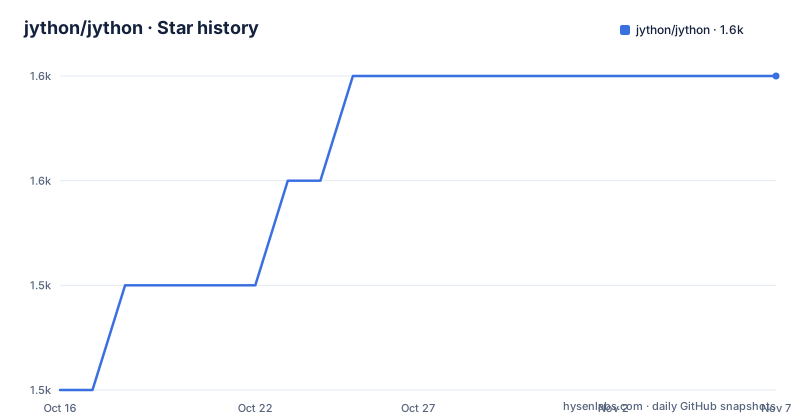
Star history
- jython/jython1,551 ★ · +3
| Repository | 2026-10-16 | 2026-11-07 |
|---|---|---|
| jython/jython | 1.5k | 1.6k |
3 Stars in the last 22 days, measured from the daily GitHub snapshot. Compare with other projects
Editorial analysis
The project's own statement about whether to use it
Jython is the development repository of Jython, the implementation of Python in Java. Only version 2.7 of Python can be supported at present, with a note to watch this space for a 3.x version.
The support section is the most unusual part of the documentation, because it tells you not to use the thing. Python 2.7, the language, is no longer supported by the PSF. Running on Jython should not be considered an alternative to porting your application to Python 3, due to the limitations cited here and the small amount of effort available to support 2.7.x. Jython 2.7 is offered for continuity because a 3.x is not yet available.
That is a project stating its own limits plainly, which is rarer than it should be and more useful than a marketing page. The scope narrows immediately. This is not a Python 3 runtime, though the documentation says to watch for a 3.x version.
So the audience is defined by the constraint. A team with a Python 2.7 codebase, on the JVM, who cannot port yet, gets a working runtime. A team with a Python 3 codebase gets nothing here. A team starting a new project on the JVM has a bad reason to reach for a language whose current implementation is two major versions behind.
What Jython does offer is compatibility with Python 2.7 the language, with good compatibility, and a high proportion of the standard library included, taken from late versions of CPython around 2.7.13. The caveat that follows is the important one: some standard library modules have a Jython-specific implementation that has not kept pace with its CPython counterpart.
That last sentence is the practical risk. A module that has drifted is a module whose behaviour differs from what the CPython documentation says, and the difference is not necessarily a crash, it can be a subtly different return value.
The licence field in the repository is marked as a custom licence that GitHub cannot classify, and the project points at an ACKNOWLEDGMENTS file for details about Jython's copyright, licence, contributors and mailing lists.
What you get: the JVM and the Java ecosystem
The compatibility story is about Python, and the other half of the value is about Java.
Jython 2.7 support for the Python ecosystem includes built-in support of pip and setuptools, and the documentation notes that you can use `bin/pip` if the targets do not include C extensions. That last clause is the whole C extension story in one sentence, and it is worth understanding. Most of what makes CPython's standard library fast is written in C, and a Python implementation that is itself written in Java cannot load a C extension module compiled for CPython. So the pure Python packages work and the accelerated ones do not.
That constraint is not a bug in Jython, it is the consequence of the implementation choice, and it propagates. A dependency tree that includes a package with a C extension is a dependency tree that does not work on Jython.
There is a native launcher for Windows, `bin/jython.exe`, that works essentially like the `python` command. That is a small detail with a real effect on Windows, where the alternative is a shell script wrapper and a classpath.
The Java side of the equation is the reason to choose Jython at all. A Python program running on Jython can call Java classes directly, and can be called from Java, without a foreign function interface, a bridge process, or a serialization boundary. For a shop that has standardised on the JVM, that is the argument: one deployment story, one build tool, one artifact type, one operations pipeline.
The repository shows the two worlds sitting side by side. There is a `Demo/` directory with subdirectories named applet, awt, bean, embed, javaclasses, jreload, modjy_webapp and swing, and those names are themselves a lesson in what the integration looks like. An applet demo is the old Java deployment model, awt and swing are the Java UI toolkits, embed and bean are about hosting Jython inside a Java host, javaclasses is about compiling Java from the interpreter, and jreload and modjy_webapp are about reloading and serving Python inside a Java web container.
The `Doc/`, `Lib/`, `src/`, `ast/`, `grammar/` and `lib-python/` directories are the implementation, and the presence of a `grammar/` directory tells you the parser is generated from a grammar rather than hand written, which is how a language implementation stays consistent with a language specification.
Two build systems, and why there are two
Jython has an Ant build and a Gradle build, and the documentation is clear about which is which.
For development, Jython is normally built using ant, and it is necessary to have Ant and at least a Java 8 SDK on the path. The command is simply:
antThat leaves an executable in `dist/bin` which you may run from the check-out root with `dist/bin/jython`. Other ant targets exist, notably `clean`, `javatest` and `jar`.
Testing the build means running the regression tests, which is the standard CPython suite adapted:
dist/bin/jython -m test.regrtest -e -m regrtest_memo.txtor by invoking the Ant target `regrtest`. Running the actual CPython regression suite is a significant thing for a reimplementation, because that suite is the executable definition of Python's behaviour, and running it under your implementation is a much stronger statement than a set of your own tests.
For an installer, `ant installer` produces a snapshot installer JAR in `dist`:
java -jar jython-installer.jarfor the graphical installer, or:
java -jar jython-installer.jar --consolefor the console version.
The Gradle build exists for a different purpose, and the documentation explains the distinction in a way that is worth quoting because it is a real packaging decision. It results in a family of JARs and a POM, intended to provide the Jython core in a form that Gradle and Maven users can consume as a dependency, invoked with `gradlew publish`, delivering a JAR and a POM into the `.build2\repo` directory. Whereas the JARs delivered by the installer are somewhat fat, embedding certain dependencies in shaded, renamed form, the JAR from the Gradle build is spare and cites its dependencies externally through a POM.
So there are two artifacts for two consumers. The installer JAR is self-contained and easy to hand to someone, and the Gradle JAR is a proper library that resolves its own dependencies through Maven and does not fight with the versions already in your dependency graph. For a team with Gradle, the second is the one you want, and the shading difference is exactly why a build like that exists.
The repository has both build files at the top level, `build.xml` and `build.gradle`, with `gradlew` and `gradlew.bat` wrappers.
The Mercurial to Git migration, and what it cost
There is a line in the build documentation that is really a piece of project history, and it is worth reading for the reason it is there.
The project uses Git for version control, and the master repository is at the GitHub repository, and you should clone it to create a buildable copy of the latest state. The previously authoritative repository at hg.python.org is not now in use, remaining frozen at v2.7.2.
So a project that lived on Mercurial for a long time moved to Git, and the old repository is still reachable but frozen at 2.7.2. That is a meaningful detail for anyone trying to find history, because a search for Jython history will land on the Mercurial repository first, and the two have different timelines.
The version numbers in the release list show how close together the releases came. v2.7.4 is dated 2026-09-28 and v2.7.5b1 is dated 2026-09-26, so the two releases came within two days of each other, and both are recent. The last push was on 2026-09-01 and the repository is not archived, so the project is being worked on.
There is also a NEWS file that the documentation points to for detailed release notes, including bugs fixed, backward breaking changes and new features, and that is worth checking before upgrading because a project with a 2.x compatibility promise still has to make changes under it.
The security and legal files are in place as well. There is a SECURITY.md at the top level for reporting vulnerabilities, a NOTICE.txt, a LICENSE.txt and the ACKNOWLEDGMENTS file, and a CPythonLib.includes and CoreExposed.includes file, which are the two lists that decide what the standard library looks like from inside the implementation.
Where Jython is the right answer and where it is not
The honest use cases are narrow, and the documentation's own warning is the best guide to them.
Jython is right when the constraint is organisational rather than technical. A regulated environment that has standardised on a Java runtime for everything, and a legacy Python 2.7 service that must keep running, is the case where Jython converts a rewrite project into a port. Same deployment, same monitoring, same artifact type, and the Python code keeps working.
It is also right for a specific kind of integration task, where a Python component has to be embedded in a Java host and the alternatives are all worse. A process boundary with serialization on each call is slow and fragile, a JNI bridge is unpleasant to maintain, and Jython gives you a direct object model on both sides.
It is wrong for new work. The project says it plainly: running on Jython should not be considered an alternative to porting your application to Python 3, because of the limitations and because the effort available to support 2.7.x is small. A small maintenance effort means the platform will keep falling behind, and a platform that keeps falling behind is a liability in a dependency.
It is also wrong where C extensions matter. A package that only works on CPython, or a package whose C extension is the fast path, does not work here, and that removes more of the ecosystem than the version number alone suggests.
So the difference in approach is the direction of travel. Jython preserves Python 2.7 on the JVM, while the Jython documentation itself is telling you to make the change to Python 3.
The project also has a long tail of supporting material. There is a `ProcessDocs/` directory with the project processes, a `Doc/` directory, a `tests/` directory and a `bugtests/` directory, a `maven/` directory, an `installer/` directory, a `registry` file, and a `Demo/` directory with the Java integration examples. The `registry` file at the top level is a detail that older hands will recognise and newer ones will not.
Editorial conclusion
Jython fits an organisation that has committed to the JVM and has a Python 2.7 codebase it cannot port yet, because it gives you the JVM's deployment story, the Java standard library and the Java ecosystem in exchange for CPython compatibility, and because the Gradle build produces a normal Maven artifact. Skip it for anything new, because the project itself says running on Jython should not be considered an alternative to porting to Python 3, and because Python 2.7 as a language is no longer supported by the PSF. Before you adopt it, read the ACKNOWLEDGMENTS file for the licence terms, which the repository's licence field marks as a custom licence that GitHub cannot classify, and check the standard library gaps, since some modules have a Jython-specific implementation that has not kept pace with its CPython counterpart. The last push was on 2026-09-01.
Frequently asked questions
Which version of Python does Jython support?
Only version 2.7 at present. The project states that a high proportion of the standard library is included from late CPython versions around 2.7.13, but that some standard library modules have a Jython-specific implementation that has not kept pace with its CPython counterpart.
Is Jython still maintained?
The repository is not archived and the last push was on 2026-09-01, with releases v2.7.4 and v2.7.5b1 in September 2026. The project states that Jython 2.7 is offered for continuity because a 3.x version is not yet available.
How do I build Jython from source?
Clone the GitHub repository, have Ant and at least a Java 8 SDK on the path, and run `ant`. That leaves an executable in `dist/bin` you can run as `dist/bin/jython`. You can run the regression tests with `dist/bin/jython -m test.regrtest -e -m regrtest_memo.txt` or the `regrtest` Ant target.
What is the difference between the Jython installer JAR and the Gradle JAR?
The installer JARs are somewhat fat, embedding certain dependencies in shaded, renamed form, while the JAR from the Gradle build is spare and cites its dependencies externally through a POM, which is the form for Gradle and Maven consumers.
Can I use pip and setuptools on Jython?
Yes, Jython 2.7 support for the Python ecosystem includes built-in support of pip and setuptools, and you can use `bin/pip` if the targets do not include C extensions.
Official sources
Add this badge to your README
If you maintain this project, the badge below links readers to this analysis and shows its maintenance status from the daily GitHub snapshot. Paste the markdown into your README; add ?metric=license or ?metric=stars to the image URL for a different field.

[](https://hysenlabs.com/projects/jython-jython)Star history chart for your README
[](https://hysenlabs.com/projects/jython-jython)Was this useful?