BewlyCat rewrites the Bilibili homepage from inside the browser
BewlyCat, a Bilibili browser extension developed from BewlyBewly.
At a glance
- What is it?
- BewlyCat is a browser extension that restyles the official Bilibili site and adds playback and homepage behaviour that the site does not ship. It is a single maintainer's fork of BewlyBewly, published through browser stores, and it refuses to be wrapped in a desktop client.
- Who is it for?
- Adopt BewlyCat if you watch Bilibili in a desktop browser every day and would rather have the page rebuilt than patched, since collection auto shutdown, speed memory and background tab opening are settings that Bilibili itself does not expose. Skip it if you need a packaged desktop application or a Safari build the maintainer maintains for you, both of which the project explicitly declines.
- Can I use it commercially?
- Check first. The repository uses a licence we do not classify automatically, so read its LICENSE file before any commercial use.
- Is it still maintained?
- Yes. The repository received new commits within the last day.
- What is it written in?
- Mainly Vue, according to GitHub's language statistics.
Answers come from the project's GitHub data, last synced on November 25, 2026, and from our analysis. They are not legal advice.
Star history
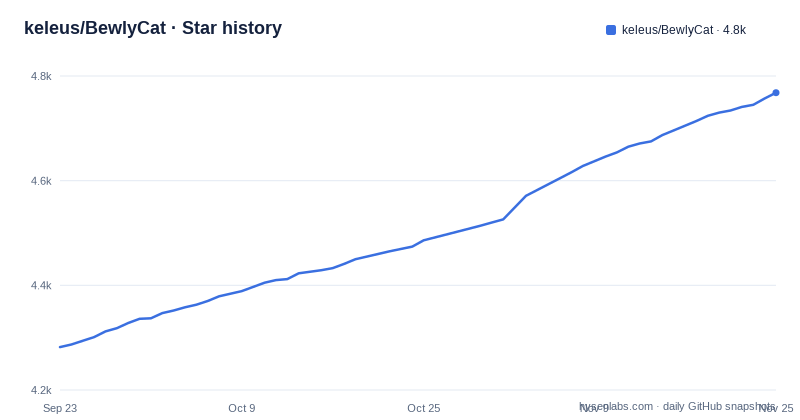
- keleus/BewlyCat4,768 ★ · +486
| Repository | 2026-09-23 | 2026-11-25 |
|---|---|---|
| keleus/BewlyCat | 4.3k | 4.8k |
486 Stars in the last 63 days, measured from the daily GitHub snapshot. Compare with other projects
Editorial analysis
A homepage rebuild aimed at one person's habits, not a general user base
The starting point is small. The package description in `package.json` says it all: "Just make a few small changes to your Bilibili homepage." The actual README is blunter about who the work is for. It states that the project is modified around the author's personal usage habits, and that suggestions and bug reports are still welcome.
Everything else follows from that framing. BewlyCat is not trying to be a Bilibili client, a downloader or a media player. The README carries an explicit prohibition on wrapping the extension or its fork code in any form of client application, with the reason given plainly: the goal is to improve the use of Bilibili's own website. That single rule decides the install story, the platform list and the update path.
The audience is therefore narrow but obvious. If you open bilibili.com in Chrome, Edge or Firefox every day and find the default page noisy, the extension has something for you. If your Bilibili use happens inside the official mobile app or inside a third party desktop wrapper, this project is aimed at the wrong client entirely.
Three separate build targets wrapped by one pack step
The repository layout shows how a browser extension of this size gets assembled. The scripts in `package.json` split into four build units: `build:web`, `build:js`, `build:inject` and `build:bg`. The content script, the injection bundle and the background bundle are compiled separately, then zipped.
Per-browser differences are handled with environment variables rather than separate source trees. The `build` script runs with `NODE_ENV=production`, `build-firefox` adds `FIREFOX=true`, and `build-safari` adds `SAFARI=true`. The dev loop mirrors this, with `dev:web` starting vite, `dev:bg` running `tsup --watch ./src` and `dev:prepare` running `esno scripts/prepare.ts`, all started in parallel by `pnpm dev`.
The Safari branch is the clearest statement of intent. `build-safari` exists in the scripts, and there is a `convert-safari` step that shells out to `xcrun safari-web-extension-converter`. The README nonetheless says the project will not package Safari and will not carry out heavy Safari-only adaptation, inviting anyone who needs it to build it themselves. The tooling is there; the maintenance is deliberately declined.
The added features cluster around collection playback and speed memory
The fork's additions are not cosmetic. The list runs to fourteen items, and the ones with real engineering behind them cluster in a single place: making long collections of video behave like a playlist you can walk away from.
There is automatic shutdown at the end of a collection, so a collection can be left running as background music. There is a random play mode for collection videos. There is a mode that keeps the default playback mode instead of letting it drift, and a setting that remembers the last playback speed instead of resetting it. Auto shutdown and speed memory are switched on in settings, so they are opt-in rather than defaults.
Two more additions reach beyond the player. Video cards and top bar links can be set to open in the background rather than replacing the current tab. Homepage recommendations can move forward and back. And in the web mode, recommendations can be filtered by the ratio of likes to play counts, which is the kind of change that matters to someone who finds the default feed uninformative. The README credits `UserScripts/bilibiliHome` and `bilibili-app-recommend` as the reference for obtaining the access key.
Dropping bundled fonts took the package from 14.4M to 600K
One deletion is more interesting than most of the additions. The removed-features list records that built-in fonts were stripped to reduce bundle size, and gives both numbers: 14.4M down to 600K. That is a twenty-four fold reduction and it changes what the extension is. A 14.4M download puts real friction in front of every user who unpacks a zip rather than installing from a store, and store review is a separate delay entirely.
The same list shows other deliberate cuts. The legacy top bar was deleted and the original top bar component refactored, with the README claiming no difference in function. Some animations that interfered with normal use were removed, including drawer open and close animations. The line removing Cantonese translation is struck through: that translation is maintained by BewlyBewly's original author, and English is shown when a translation is missing.
One addition, item 13 in the feature list, gets a longer description. Local loudness equalisation lives under Settings, Bilibili, Player, Volume Equalisation, and balances loudness differences between videos while disabling the native equaliser through the player component. It exposes a target loudness value, a strength control and a status display, with the algorithm described in `docs/local-loudness.md`.
Install an unpacked extension locally
Three install routes exist, and only the last one involves a command. The Chrome Web Store, the Edge add-ons store and the Firefox add-ons site all host the extension, and the README warns that store review takes different times in each case.
For a local install there are two sources. The Actions CI page builds the latest code, while the project's download page holds stable versions, and both produce `extension.zip`. For a local developer installation, extract the zip and open the browser's extensions page.
edge://extensionsTurn on developer mode, choose Load unpacked, and select the extracted directory that contains manifest.json. That route suits anyone who wants to try a CI build instead of a downloaded one.
Building from source is a pnpm workflow, and the repository pins `[email protected]` as its package manager. The `build-pack` script chains the production build, the Firefox build and the zip packing steps, so a Firefox-only build runs `pnpm build-firefox` and local iteration runs `pnpm dev`, which clears the output directory before running the vite, tsup and esno steps. A pnpm version that does not match the pin is the first thing to check if a build step fails.
Store review puts up to 30 days between a commit and your browser
This is where the extension's promise meets a wall it does not control. The README asks readers not to chase maintainers about review in issues, and states that store misbehaviour is caused by the store. It then gives the ranges: Chrome usually lags by 30 minutes to 15 days, Edge by 3 to 30 days, and Firefox by 1 to 30 minutes.
A concrete example is given elsewhere in the same file. Bilibili adjusted its homepage recommendation API in January 2026, and users on versions below 1.5.6 do not get the correct feed, leaderboard or category sections. The fix is in the repository; the delivery depends on a queue.
Code moves faster than stores clear it. That gap, not the commit rate, decides when a fix reaches you, and Edge at 3 to 30 days is the worst case in the list.
Where BewlyCat parts company with Bilibili-Evolved
Both projects change bilibili.com, but they take different approaches. Bilibili-Evolved is a broad script collection that patches the site with many separate user scripts, and the README credits it as a source for some of the implementations BewlyCat absorbed. BewlyCat instead rebuilds page components. The legacy top bar was deleted and the component refactored, animations that broke interactions were cut, and the player gained first class controls such as a speed memory setting and collection auto shutdown.
Upstream BewlyBewly is the other fork relationship, and it is explicitly loosened. The project left the BewlyBewly fork network so it could be found by search on GitHub, while keeping the original authorship, the historical contributors and the information about the original project.
One point matters for anyone redistributing this. BewlyCat was developed on the original under an MIT licence, and the author says he contacted the original author and obtained authorisation, including the right to publish on the Chrome Web Store.
Editorial conclusion
Adopt BewlyCat if you watch Bilibili in a desktop browser every day and would rather have the page rebuilt than patched, since collection auto shutdown, speed memory and background tab opening are settings that Bilibili itself does not expose. Skip it if you need a packaged desktop application or a Safari build the maintainer maintains for you, both of which the project explicitly declines. Check your version number first, because anything below 1.5.6 predates Bilibili's January 2026 homepage API change and renders the wrong recommendation, leaderboard and category sections. Then open the extensions page and watch the store review lag decide when your fix actually lands.
Frequently asked questions
How do I install BewlyCat on Chrome or Edge?
Download `extension.zip` from the GitHub Releases page, open `chrome://extensions` in Chrome or `edge://extensions` in Edge, and drag the zip onto the page. An alternative path is to unpack the zip and load the unpacked folder with developer mode enabled.
Does BewlyCat work on Safari?
The project states that it will not package Safari and will not do extensive Safari-only adaptation. A `build-safari` script and a `convert-safari` step using `xcrun safari-web-extension-converter` exist in `package.json`, so anyone who needs it is expected to build it themselves.
Why does my Bilibili homepage feed look wrong in BewlyCat?
Bilibili adjusted its homepage recommendation API in January 2026. The README instructs users to update to version 1.5.6 or later so the new recommendations, leaderboard and category sections render as expected.
How long does a BewlyCat update take to reach the browser stores?
Review timing is set by each store rather than by the maintainer. The README gives Chrome as usually 30 minutes to 15 days late, Edge as 3 to 30 days and Firefox as 1 to 30 minutes.
What did BewlyCat remove compared to BewlyBewly?
Built-in fonts were removed, cutting the bundle from 14.4M to 600K, and the legacy top bar was deleted.
Official sources
Add this badge to your README
If you maintain this project, the badge below links readers to this analysis and shows its maintenance status from the daily GitHub snapshot. Paste the markdown into your README; add ?metric=license or ?metric=stars to the image URL for a different field.

[](https://hysenlabs.com/projects/keleus-bewlycat)Star history chart for your README
[](https://hysenlabs.com/projects/keleus-bewlycat)Was this useful?