WoWee: A Native C++ WoW Client That Skips MPQs Entirely
World of Warcraft Engine Experiment - a custom opensource client.
At a glance
- What is it?
- WoWee is an open-source C++ World of Warcraft client with a custom Vulkan renderer. It supports Vanilla 1.12, TBC 2.4.3, and WotLK 3.3.5a, but its real claim is that it never reads MPQ archives at runtime.
- Who is it for?
- Adopt WoWee if you are a developer or researcher working with private servers and need a client that runs on Linux, macOS, Windows, or Android arm64 without reading MPQs at runtime. Do not use it as a drop-in replacement for the official client; the README says it is not.
- Can I use it commercially?
- Check first. The repository uses a licence we do not classify automatically, so read its LICENSE file before any commercial use.
- Is it still maintained?
- Yes. The repository last received commits 1 day ago.
- What is it written in?
- Mainly C++, according to GitHub's language statistics.
Answers come from the project's GitHub data, last synced on October 22, 2026, and from our analysis. They are not legal advice.
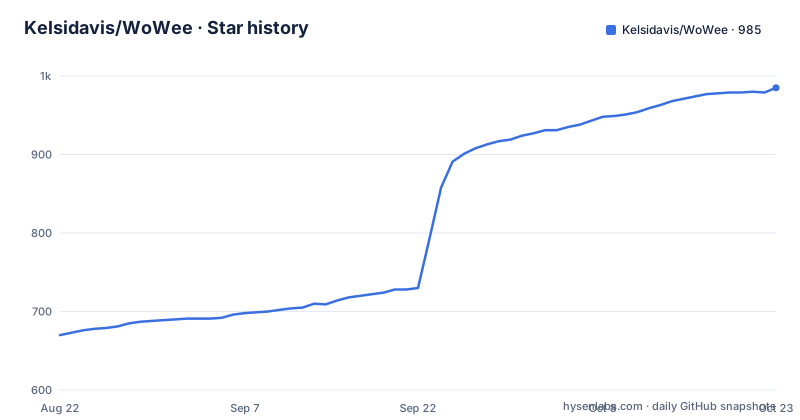
Star history
- Kelsidavis/WoWee979 ★ · +309
| Repository | 2026-08-22 | 2026-10-22 |
|---|---|---|
| Kelsidavis/WoWee | 670 | 979 |
309 Stars in the last 61 days, measured from the daily GitHub snapshot. Compare with other projects
Editorial analysis
What WoWee Actually Solves
WoWee solves the problem of running a World of Warcraft client on modern platforms without relying on the original binary or its MPQ archives. The README is explicit: "WoWee does not read MPQs at runtime." Instead, it extracts game data into a loose-file tree with a generated manifest.json, then renders everything through a custom Vulkan renderer. This is aimed at developers and researchers who work with private servers like AzerothCore, TrinityCore, MaNGOS, or Turtle WoW, and who need a client that can run on Linux, macOS, Windows, and even Android arm64. It is not for a casual player who wants to log into a retail server; it is an educational and research project, as the README stresses.
The Architecture: From MPQ to Manifest
The core design decision is to bypass MPQ archives entirely. The client expects a Data/ directory with subdirectories for each expansion: classic, turtle, tbc, and wotlk. Each contains a manifest.json that maps game assets to loose files. The extraction step is done once, on a desktop, using either extract_assets.sh or extract_assets.ps1, with a target like wotlk. The manifest is generated by the extractor, and the client reads that manifest at startup. This means the client never touches proprietary archive formats at runtime, which simplifies the code and avoids legal complications with Blizzard assets, since the user supplies their own legally obtained data. The trade-off is a large disk footprint: the README mentions a full extraction is around 18 GB, and you need to keep each expansion separate if you want multiple ones.
Getting It Running: Commands and Config Keys
The quick start is straightforward. On Ubuntu, you install dependencies like libsdl2-dev, libvulkan-dev, and glslc, then clone with submodules: git clone --recurse-submodules. The build is a standard CMake flow: cmake -S . -B build -DCMAKE_BUILD_TYPE=Release, then cmake --build build --parallel. After building, you extract data with ./extract_assets.sh /path/to/WoW/Data wotlk, which produces the Data/expansions/wotlk/manifest.json. Then you run ./build/bin/wowee. There are environment variables for specific cases: WOW_DATA_PATH points to a custom Data directory, WOWEE_REALM_HOST_OVERRIDE overrides only the host of a MaNGOS realm while preserving the port, and WOWEE_TURTLE_AUTH_BUILD changes the auth build for older Turtle WoW servers. These are concrete, testable config keys.
The Renderer and Platform Support
The renderer is custom Vulkan, and the README lists what works: terrain, WMO, M2, water/lava, particles, lighting, shadows, weather, and asynchronous world streaming. It also handles SRP6 authentication and RC4 header encryption, which are the protocol details needed to talk to private servers. The platform support is broad: Linux, macOS, Windows on x86-64 and ARM64, plus Android on arm64 with on-screen controls. macOS uses MoltenVK, and the release DMGs are Developer ID signed and notarized. Android is a notable addition, but it has a hard requirement: Android 13 or newer on arm64, because Android's libvulkan.so only exports the Vulkan 1.2/1.3 entry points from API 33. The APK is signed with a debug key, so users must allow unknown sources.
Experimental Features and Their Caveats
Two features are explicitly marked experimental: the world editor and AMD FSR3 frame generation. The README warns that their interfaces, formats, and runtime requirements may change. FSR2 upscaling is available, but the graphics acceleration features are under active development and should not be treated as release-critical. This is a genuine limitation: if you depend on FSR3 for performance, you are on unstable ground. The Warden module execution is also optional, running through Unicorn Engine x86 emulation. That is a security-sensitive feature, and the README does not describe how it is configured or whether it works on all platforms. For a research project, that is acceptable, but for production use, it is a red flag.
Limitations and Wrong Use Cases
The most obvious limitation is that WoWee is not a drop-in replacement for the official client. The README says so directly: "This is an active work in progress, not a drop-in replacement." It requires a pre-extracted data set, which means you cannot just point it at a retail installation. The extraction script is the only path, and it depends on StormLib, which is not always packaged (Fedora users must build it from source). Another failure mode is the Android data push: the README warns that the trailing `/.` in adb push matters, and nesting the data one level deeper leaves the client unable to find manifest.json. That is a fragile setup. Also, the license is marked NOASSERTION in the repository, which is a legal risk; you cannot assume it is open source under a standard license without checking the actual files.
Alternatives and How WoWee Differs
The main alternative is to use the official WoW client binaries with a private server, which is what most players do. That approach reads MPQs directly and requires Windows or macOS (or Wine on Linux). WoWee's difference is architectural: it never reads MPQs, which means it can run on platforms the official client does not support, like Android, and it gives developers full control over the rendering pipeline via Vulkan. Another alternative is a full server-side emulator like TrinityCore, but that is a server, not a client. There is also the option of using a different open-source client like CMaNGOS's client, but that is typically a patched official client, not a from-scratch renderer. WoWee is unique in that it is a native C++ client with its own renderer, so it is a true experiment, not a wrapper.
Maintenance and Upgrade Cost
The release cadence is active: v3.1.13, v3.1.12, and v3.1.11 were pushed within three days, which suggests rapid iteration. That is good for bug fixes, but it also means you should expect frequent updates and potential breaking changes, especially in experimental components. The README points to a docs/status.md for project status, which is the place to check before upgrading. The build process is standard CMake, so upgrading should be a matter of pulling new commits and rebuilding, but the extraction step may need to be re-run if the manifest format changes. The dependency list is moderate: SDL2, GLM, OpenSSL, Vulkan, and FFmpeg, plus optional Unicorn and StormLib. On macOS, MoltenVK is required, which adds a layer. The cost is not trivial: you need to maintain a build environment and re-extract data when the format changes, but the project provides scripts to help.
Editorial conclusion
Adopt WoWee if you are a developer or researcher working with private servers and need a client that runs on Linux, macOS, Windows, or Android arm64 without reading MPQs at runtime. Do not use it as a drop-in replacement for the official client; the README says it is not. Before adopting, verify that your server's expansion (classic, turtle, tbc, or wotlk) matches a supported extraction target, and confirm your OS meets the Vulkan and Android API 33 requirements. Also check the license, which is marked NOASSERTION, meaning you must clarify terms before redistribution.
Frequently asked questions
What is WoWee and which WoW versions does it support?
A native C++ World of Warcraft client with a custom Vulkan renderer, described as an educational and research project containing no Blizzard assets or code. It supports Vanilla 1.12, TBC 2.4.3 and WotLK 3.3.5a through expansion-specific profiles and packet parsers, and has been tested with AzerothCore, TrinityCore, MaNGOS and Turtle WoW 1.18.
How does WoWee get the game data?
You supply it. The client does not read MPQs at runtime and instead needs a loose-file tree with a generated manifest.json, which the asset builder extracts from a legally obtained installation. When the client finds nothing extracted it opens the builder instead of the login screen, and the same tool is available as the standalone wowee_assets window.
Do I need StormLib to build WoWee?
No, the client still builds without it, but asset_extract, the wowee_assets window and the in-client asset builder are left out. Ubuntu and Debian ship libstorm-dev, Arch offers stormlib-git through the AUR, and on Fedora or Nobara the project gives instructions for building it from source under /usr and then re-running CMake so it is picked up.
How do I enable AMD FSR3 frame generation in WoWee?
Turn on WOWEE_ENABLE_AMD_FSR3_FRAMEGEN with AMD's SDK available under extern/; the build helpers clone the FidelityFX SDKs there. Both that flag and WOWEE_ENABLE_AMD_FSR2 are off by default, and the client's built-in FSR 1 and FSR 3 upscaling need neither SDK.
Does the WoWee client load WoW addons?
Yes. It loads Blizzard's own FrameXML interface from your extracted game data and draws it with the client, and addons placed in the game's Interface\AddOns folder load too. Controller support maps button names for Xbox, PlayStation, Nintendo and Steam Deck layouts.
Official sources
Where developers are discussing it
Posts on Hacker News, dev.to and Lobsters that link to this repository, found by our scan of those communities. 1 in the last 30 days; newest first.
- Open Source World of Warcraft Client in C++ and Vulkan RendererHacker News · Sep 23, 2026 · 1 points · 0 comments
Add this badge to your README
If you maintain this project, the badge below links readers to this analysis and shows its maintenance status from the daily GitHub snapshot. Paste the markdown into your README; add ?metric=license or ?metric=stars to the image URL for a different field.

[](https://hysenlabs.com/projects/kelsidavis-wowee)Star history chart for your README
[](https://hysenlabs.com/projects/kelsidavis-wowee)