ejbca-ce: an open source certificate authority, and where its limits are
EJBCA® – Open-source public key infrastructure (PKI) and certificate authority (CA) software.
At a glance
- What is it?
- EJBCA Community is the LGPL-licensed subset of a long-running Java certificate authority, and the first thing its readme does is tell you not to run it in production. That is not a hedge, it is the design of the edition split, and the rest of the document is an unusually clear map of what you get, what you do not, and what surrounds it.
- Who is it for?
- EJBCA Community suits somebody who needs a real certificate authority to learn on, to test an issuance pipeline against, or to prototype an enrolment workflow, because it is a complete implementation rather than a toy. It is a poor fit for anything issuing certificates that clients will trust, because the readme is explicit that production deployments need certifications and assurances the community edition does not provide.
- Can I use it commercially?
- Yes, with conditions. LGPL-2.1 is a weak copyleft licence: you can use it inside commercial and closed-source software, but if you distribute changes to its own files, you must publish those changes under the same licence.
- Is it still maintained?
- Yes. The repository last received commits 53 days ago.
- What is it written in?
- Mainly Java, according to GitHub's language statistics.
Answers come from the project's GitHub data, last synced on November 6, 2026, and from our analysis. They are not legal advice.
Star history
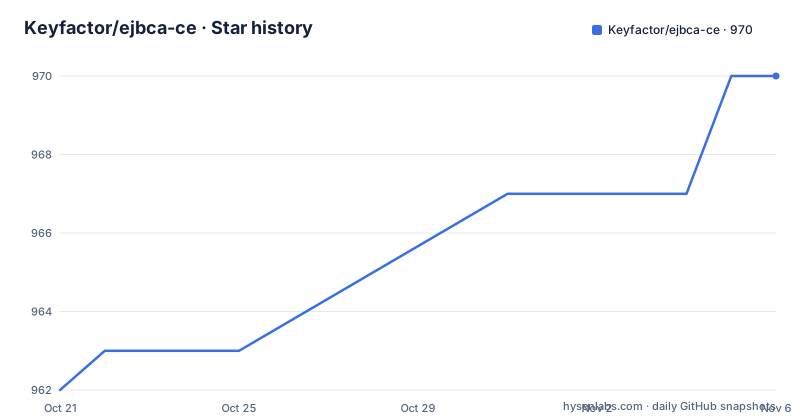
- Keyfactor/ejbca-ce970 ★ · +8
| Repository | 2026-10-21 | 2026-11-06 |
|---|---|---|
| Keyfactor/ejbca-ce | 962 | 970 |
8 Stars in the last 16 days, measured from the daily GitHub snapshot. Compare with other projects
Editorial analysis
A full certificate authority, not a library
The description is short: EJBCA is a public key infrastructure and certificate authority solution and one of the longest-running certificate authority software projects.
The age matters, because in this category longevity is a signal. A certificate authority is one of the few pieces of software where a long-lived codebase with years of security patches is more valuable than a fresh rewrite, because the protocols, the algorithms and the ways people attack them have all had time to be tried. The readme says the project is platform independent and covers the full certificate lifecycle, from enrollment and management to validation.
The implementation is in Java and runs on a virtual machine such as OpenJDK, so it is available on most platforms, and Linux and Windows are named specifically. The primary language in the repository metadata is Java, and the build is a Gradle project with a wrapper.
So this is a server application. It issues certificates, it stores them, it validates them, and it has the protocol plumbing and the key management that implies. That is different from the many small libraries that generate a certificate for you, and the difference is exactly what makes the edition split in this project make sense.
The readme leads with what you must not do with it
The note at the top of the readme has two parts, and both are worth reading in full.
The first is about security reporting. The project says it takes the security of the software and the trust of its users seriously, and asks that a suspected vulnerability be reported responsibly by contacting a security address at the company's domain. The address sits on a different domain from the project's homepage.
The second is the one that decides your deployment. The community edition is not intended for production use, and for production deployments you are pointed at the enterprise edition.
Then the welcome section repeats the same idea in a different way, by describing the community edition as an open source subset of the enterprise edition, certified by the Open Source Initiative, and designed for learning, testing and prototyping certificate and PKI workflows. The readme then gives the reason in a sentence that is unusually blunt for a vendor: production deployments typically require security certifications, high assurance features, service level agreements, support and operational assurances, all of which are available in the enterprise edition.
That is a fair description of the gap. A certificate authority is one of the few systems where the software being correct is necessary but not sufficient, because there is also a question of the assurance around the keys, the audit trail and the process around issuance, and none of that is in the code.
Two editions, and what the commercial one adds
The two editions are described separately, and the descriptions are written to be compared.
The enterprise edition is designed for production PKI deployments and offers advanced features, security certifications, high assurance features, enterprise grade operations and commercial support with service level agreements.
The community edition is the open source subset, under the LGPL licence, and it is what this repository contains.
The gap is not a matter of scale. It is a matter of what a certificate authority is asserting about itself. An enterprise edition with certifications and a support contract is making a statement that a set of auditors have examined the process. A community edition with a best effort support community is making a different statement, and the readme is honest about which is which.
There is also a route into the commercial product without a sales conversation for everybody. A 30 day free trial is offered as a ready to use environment with no installation or setup required, through what the project calls test drives, and there is a separate request a demo path.
So the practical sequence for an evaluator is clear. Install the community edition to learn the product and to test an integration, and if the deployment is real, use the trial of the enterprise edition to see whether the assurances are what you need.
Three ways to deploy it
The getting started section for the community edition lists three routes, and they are the three you would expect from a Java server that also ships to Kubernetes users.
Deploying from source means cloning the repository and installing it, with the documentation pointing at the installation guide. Running as a container means pulling the published image from a public registry. And using Helm for automation means a chart published to a chart registry.
The third route is worth a sentence of its own. A Helm chart for a certificate authority is not a convenience, it is a way of running more than one instance with persistent volumes, which a certificate authority with a database of issued certificates needs if it is to be a real system rather than a demonstration.
The commercial edition is also offered as a 30 day free trial in a ready to use environment, with no installation or setup required, which is a separate path from the community download.
The ecosystem, which is the real argument for using it
The related projects and integrations sections are the most convincing part of the readme, because they show what a working PKI needs and how this fits into it.
There are sibling projects for the surrounding tools. A tools repository, a community umbrella repository, a certificate card format project, a certificate manager issuer, and a separate signing server, also in a community edition.
Then the integrations, and these are the ones that matter in production. A Vault PKI engine, a certificate manager issuer for Kubernetes, and a Kubernetes CSR signer. That last one is the interesting case, because in a Kubernetes cluster the certificate authority is often not the thing issuing certificates, but a service that signs a request once the cluster's own admission control has approved it, and a signed request from a proper authority is a better answer than a self-signed certificate with a patched installer.
The automation section lists Ansible playbooks and the Helm chart, and the clients section lists a Java easy REST client plus Go, Python, Java and C sharp client SDKs. A REST client and four language SDKs is a good sign about the API's shape, since it means the interface is the product for anybody who is not running the server.
Taken together, this is the part of the project that tells you how a vendor thinks about long term support: the CA is one piece, and the surrounding tooling is what makes it usable in a real environment.
Support channels, and the honest gap between them
The support section is a list of destinations, and it reads like a routing table.
For a problem or a feature request, the issues tab. For contributing, a contributing guidelines document. For actual fixes or proposed enhancements, the pull requests tab. For guidance, the community discussions. Then the documentation, the how-to guides, the release information, the open source project website and a page comparing the community and enterprise editions.
The difference in the two support descriptions is the sentence to notice. Community support is open source and community supported, there is no support service level agreement, and a helpful best effort community is available. Enterprise support is licensed software backed by professional support services.
That is the same distinction as the deployment note, stated from the support side rather than the licensing side, and a reader should take it as a single message: this is a complete, real, capable product whose operational guarantees are not part of the open source distribution.
For a project that has been running for a long time and has an ecosystem of integrations and SDKs around it, that is a reasonable and fairly stated arrangement. It is also the one thing to check first when you are evaluating whether the community edition is appropriate for what you are planning.
The repository and the release cadence
The tree is a large Java project with both modern and older build systems in it, which is what a long-lived code base looks like.
There is a Gradle build with the wrapper scripts and settings files, and there is also an Ant build file and a set of project files for the Eclipse development environment, along with a classpath file. The source is organised into a modules directory, a lib directory, a source directory, a configuration directory, a charts directory, a documentation directory, and a bin directory. There is a security policy, a contributing guide, a licence file, and several XML files whose names suggest a history of features being added and removed over the years.
The licence is LGPL 2.1, which is a good fit for a server application that people extend and deploy, since it lets you use it commercially without the copyleft reaching into your own code.
The release history shows a long-running product with a steady release line: version 9.1 in March 2025, 9.3 in December 2025 and 9.6 in September 2026, with the last push on the same day as the newest release and the repository not archived. So the code is being worked on, and the release notes for each point version are published in the documentation rather than only in the repository.
The one badge worth noting is the one for the OpenSSF best practices project, which is a security posture scorecard for open source projects. For a certificate authority, having that badge is not decoration, and its presence tells you the project is submitted to that kind of external review.
Editorial conclusion
EJBCA Community suits somebody who needs a real certificate authority to learn on, to test an issuance pipeline against, or to prototype an enrolment workflow, because it is a complete implementation rather than a toy. It is a poor fit for anything issuing certificates that clients will trust, because the readme is explicit that production deployments need certifications and assurances the community edition does not provide. Before you plan around it, read the differences page and the security policy, and if you are deploying for a real audience, look at the enterprise edition rather than working out which certification you are missing.
Frequently asked questions
Is EJBCA Community Edition suitable for production?
No, and the readme says so at the top. The community edition is an open source subset of the enterprise edition, designed for learning, testing and prototyping certificate and PKI workflows, and the readme notes that production deployments typically require security certifications, high assurance features, service level agreements, support and operational assurances that are available in the enterprise edition.
What does EJBCA do and what is it written in?
It is a public key infrastructure and certificate authority solution, one of the longest-running certificate authority software projects, covering the full certificate lifecycle from enrollment and management to validation. It is written in Java and runs on a virtual machine such as OpenJDK, so it runs on Linux, Windows and other platforms.
How do I run EJBCA Community Edition?
Three routes are documented: deploy from source by cloning the repository and following the installation guide, run it as a container from the published image, or use the Helm chart published to a chart registry for automated deployment. The enterprise edition can be evaluated separately with a 30 day free trial in a ready to use environment.
How do I report a security vulnerability in EJBCA?
Responsibly and privately, by contacting the security address given in the readme, which is under the company's domain. The project states explicitly that it takes the security of the software and the trust of its users seriously.
Official sources
Add this badge to your README
If you maintain this project, the badge below links readers to this analysis and shows its maintenance status from the daily GitHub snapshot. Paste the markdown into your README; add ?metric=license or ?metric=stars to the image URL for a different field.

[](https://hysenlabs.com/projects/keyfactor-ejbca-ce)Star history chart for your README
[](https://hysenlabs.com/projects/keyfactor-ejbca-ce)Was this useful?