best-of-robot-simulators: How the Rankings Work
A Best-of-list of Robot Simulators, re-generated weekly on Wednesdays
At a glance
- What is it?
- best-of-robot-simulators is a generated catalog for comparing robotics simulators across 11 categories. Its automated score is useful for narrowing research, but the project itself warns that list updates have stopped and individual simulator details require separate verification.
- Who is it for?
- Researchers can adopt this catalog as a starting point when comparing simulators by domain, activity signals and automated quality scores. Engineering teams that need dependable live rankings should first review issue 275, confirm the displayed project links and inspect each simulator's current documentation and license.
- Can I use it commercially?
- Yes, with credit. CC-BY-SA-4.0 allows commercial use as long as you credit the authors and indicate what you changed. It is written for creative content, so check how it applies to any code.
- Is it still maintained?
- Yes. The repository last received commits 3 days ago.
- What is it written in?
- GitHub does not report a main language for this repository.
Answers come from the project's GitHub data, last synced on November 7, 2026, and from our analysis. They are not legal advice.
Star history
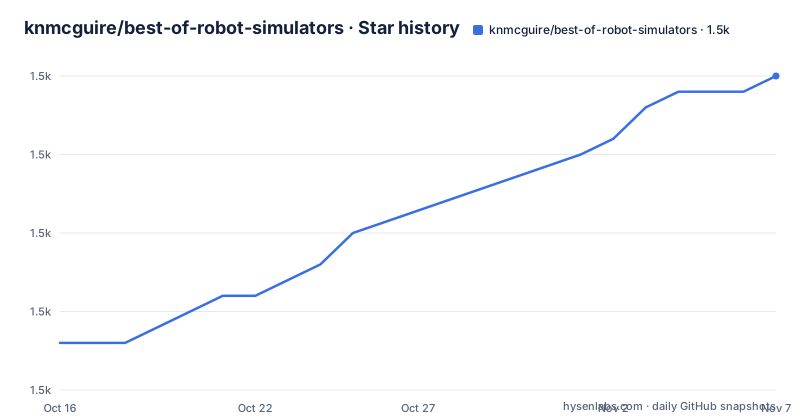
- knmcguire/best-of-robot-simulators1,505 ★ · +17
| Repository | 2026-10-16 | 2026-11-07 |
|---|---|---|
| knmcguire/best-of-robot-simulators | 1.5k | 1.5k |
17 Stars in the last 22 days, measured from the daily GitHub snapshot. Compare with other projects
Editorial analysis
What best-of-robot-simulators Actually Provides
best-of-robot-simulators solves the discovery problem rather than the simulation problem. It does not implement a robot model, physics engine, sensor simulator or training environment. Instead, it collects existing simulator projects and arranges them so that an engineer can compare candidates according to robotics use case and an automated project-quality score.
The README describes 180 projects divided into 11 categories: generic robotics simulators, 2D simulators, aerial, maritime, automotive, space, AI training, other domain-specific projects, game engines, physics engines, rendering engines and a miscellaneous category. This classification is useful because a simulator selected for manipulation research may be a poor fit for maritime robotics or visual perception. It also exposes an important distinction in the list: engine projects are included alongside application-specific simulators, so the entries do not all solve the same technical problem.
The intended users are engineers, researchers and developers looking for a shortlist. Someone evaluating a simulator for continuous integration, synthetic data generation or algorithm development can use the catalog to identify candidates. A person already committed to a particular robotics stack may gain less from it because the README does not document detailed migration paths, API compatibility tests or direct head-to-head comparisons of simulator behavior.
The catalog is not neutral evidence that one simulator is suitable for production. Its ranking combines automatically collected metrics from GitHub and package managers. That makes it a screening tool. It does not replace checking supported operating systems, sensor fidelity, documentation, hardware requirements or the simulator's own license.
Projects YAML, Metrics and the Ranking Pipeline
The visible repository layout points to a configuration-driven generation process. `projects.yaml` is the principal editable source for project entries, while `config/`, `history/`, `latest-changes.md` and generated releases support the surrounding update workflow. The README asks contributors to open an issue, submit a pull request or edit `projects.yaml` directly.
The project-quality score is calculated from various metrics collected automatically from GitHub and package managers. Displayed fields include GitHub star count, contributors, forks and issues, package-manager update timestamps, downloads and dependent-project counts. The generated list also marks new projects, inactive projects, dead projects, trending entries and recently added entries. These signals help distinguish a busy project from a dormant repository, but they are not a technical evaluation of simulation accuracy.
GitHub measurements describe activity and visibility. Package-manager measurements can describe distribution and release freshness. Neither directly establishes whether a collision model is accurate, whether a lidar model includes representative noise, or whether a generated dataset resembles real sensor data. The ranking is therefore most defensible as a way to organize candidates before deeper technical review.
The README also defines a robotics simulator through a virtual environment, robot interaction and perception, physics or rendering engines, sensor models, and purposes such as design, evaluation or data generation. That definition explains the collection's scope, but it does not disclose the exact scoring formula, metric normalization or tie-breaking policy in the README. Engineers who need reproducible scoring should inspect the generator configuration before treating score differences as decisive.
Reading Simulator Entries Without Misreading the Badges
Each expandable entry combines a project name, a quality score, GitHub information, a short description and a license link when one is available. The README provides direct clone commands for some listed simulators. For example, MuJoCo's entry includes a command that clones the Google DeepMind repository. That command retrieves source code; it does not build MuJoCo or install its Python bindings.
The status symbols require care. The README defines a new project as one less than six months old, an inactive project as one with 12 months without activity and a dead project through its listed extreme inactivity threshold. These labels are repository-level classifications. They do not establish that a package is unusable, that support has formally ended, or that a dormant upstream project cannot still meet a specialized requirement.
The license shown beside an entry applies to that simulator entry. The catalog itself uses CC-BY-SA-4.0. A reader considering redistribution must keep those two license contexts separate. The catalog's open-content license does not automatically settle the terms of MuJoCo, Webots, Gazebo, O3DE or any other listed project, because the README associates those projects with their own separate identifiers.
The ranking is also not a category recommendation. A general physics engine with a high score may lack a complete robot stack, while a domain-specific simulator may offer the scene model that an engineering team actually needs. The correct first pass is to filter by domain, then inspect the simulator's upstream documentation and current repository state.
A First Survey of Generic and Specialized Simulators
There is no installation procedure for best-of-robot-simulators in the README. It is a curated Markdown list backed by repository files, not an application distributed through a documented package manager. The project says to use its GitHub repository, open `README.md` and follow the category links. A first real use of a listed simulator starts with the clone command printed in that simulator's entry.
For a broad engineering survey, begin with Generic Robotics Simulators. The excerpt places MuJoCo first in that category and describes it as a general-purpose physics simulator for multi-joint dynamics and contact. Webots appears as a robot simulator, while Gazebo is described as an open-source robotics simulator. O3DE for Robotics appears as a multi-platform 3D engine, and Newton is described as a GPU-accelerated physics engine built on NVIDIA Warp and aimed at roboticists.
The MuJoCo entry provides this source-retrieval command:
git clone https://github.com/google-deepmind/mujocoRunning it creates the upstream MuJoCo source directory. The README does not provide build, dependency or Python-binding commands for this first use, so those steps must come from MuJoCo's upstream documentation. This distinction matters because cloning a listed repository is not the same as installing or validating a simulator.
Those entries are different kinds of abstraction. MuJoCo is presented as a dynamics simulator, Webots as a robotics simulator, O3DE as a 3D engine and Newton as a physics engine. Comparing them under one heading does not imply that they expose identical robot APIs, scene formats or workflows. The next selection step should follow the required capability, such as contact dynamics, full robot scenarios, rendering or GPU-oriented physics.
For a narrower project, move directly to Aerial, Maritime, Automotive, Space or AI Training Simulators. Those sections contain 32, 20, 5, 6 and 35 projects respectively in the README. The smaller Automotive section may be easier to survey, while the AI training section offers many choices. In either case, the catalog supplies candidates and links, not evidence that every entry supports the same sensors, maps, control interfaces or dataset formats.
Stopped Generation and Its Effect on Catalog Freshness
The most important operational fact is the README warning: updates to the list have been stopped while the maintainer watches issue 275 for an upstream fix. This warning conflicts with the broader claim that the list is regenerated weekly, and it should carry more weight when assessing current data freshness. The repository is not archived, and the last push was on 2026-10-15, but a recent repository commit does not prove that automated list generation is functioning.
Recent releases include `2026.10.14`, `2026.09.30` and `2026.10.07`. Their existence indicates that versions were published at those points, but release presence alone cannot resolve the README's explicit stop notice. Users should inspect issue 275 and the newest release before assuming that the displayed score or activity labels reflect the current state of every upstream project.
Maintenance of the catalog and maintenance of an individual simulator are separate costs. The catalog can regenerate, but its ranking still depends on APIs, rate limits and metadata exposed by GitHub and package managers. A simulator can also release a major version or change its license without the catalog immediately reflecting that change while generation is stopped.
Upgrade cost for this project is mainly editorial and interpretive rather than application migration. Contributors may need to edit `projects.yaml`, follow `CONTRIBUTING.md` and reconcile generated changes. Consumers face no simulator API upgrade when the list changes, but they must manually verify stale metadata before using it for technical selection.
Why a Direct Simulator Evaluation Can Be Better
The main alternative to this catalog is not another ranking list. It is a direct evaluation of a small set of upstream simulators against a defined scenario. For example, an engineering team could inspect the documentation and repositories for a general-purpose physics engine such as MuJoCo, a robot-oriented environment such as Webots and a domain-specific simulator, then compare them on the same robot model, sensor inputs and expected outputs.
This approach produces evidence specific to the intended use. It can expose API differences, platform requirements and missing features that aggregate scores cannot represent. It costs more time because each candidate must be examined and, where permitted by the project's instructions, installed and exercised. The catalog is faster for discovery and much weaker for qualification.
Engine-focused alternatives also have a different scope. The list separately categorizes physics and rendering engines. A team needing only contact dynamics may compare physics engines directly, while a team needing an integrated robot, sensor and scene workflow may focus on generic robotics simulators. Using best-of-robot-simulators across these groups is acceptable for initial research, but it should not substitute for a requirement-driven comparison matrix.
The catalog is also the wrong tool for runtime experimentation. It does not document common installation commands, scene creation steps or APIs for the listed simulators. The clone commands shown inside individual entries are repository references, not a complete installation tutorial. Teams needing executable examples must follow each simulator's upstream documentation.
License, Contributions and Adoption Boundaries
best-of-robot-simulators is licensed under CC-BY-SA-4.0. That matters when adapting or redistributing the catalog's curated content, while any use of the simulator source code remains subject to that simulator's own license. Readers should check the license identifier displayed for each entry instead of assuming that all 180 projects share the catalog's terms.
The repository provides contribution routes through issues, pull requests and direct edits to `projects.yaml`. This is a practical advantage for correcting a missing project or changing an entry, although direct editing may involve generation or formatting rules not visible in the truncated README. `CONTRIBUTING.md` is the appropriate place to check those rules before submitting a change.
The catalog is best suited to students, researchers and engineers who need a categorized survey before selecting simulators. It is less suitable for automation that requires guaranteed fresh metadata, for procurement decisions based only on its score, or for teams seeking a production-ready simulation environment. The adoption boundary is clear: use the list to assemble candidates, then verify each candidate's current upstream documentation, license, activity state and technical requirements before committing engineering work.
Editorial conclusion
Researchers can adopt this catalog as a starting point when comparing simulators by domain, activity signals and automated quality scores. Engineering teams that need dependable live rankings should first review issue 275, confirm the displayed project links and inspect each simulator's current documentation and license. For a one-time technology survey, the catalog remains useful; for an actively maintained procurement database, its stopped-update warning is decisive.
Frequently asked questions
What is best-of-robot-simulators used for?
It is a ranked directory of robotics simulator projects grouped into 11 categories. It helps users discover candidates before checking their upstream documentation and technical requirements.
Does best-of-robot-simulators include a simulator I can install directly?
No. The repository is a curated list backed by files such as `projects.yaml`, not a simulator application. Installation instructions must come from the upstream project selected from an entry.
How is the project-quality score calculated?
The README says the score uses metrics collected automatically from GitHub and package managers. It does not disclose the exact formula, normalization or tie-breaking rules in the README.
Is best-of-robot-simulators still updated?
The README contains a warning that updates have been stopped while an upstream fix is monitored through issue 275. The last push was on 2026-10-15, and recent releases exist, but those facts do not remove the warning.
Can I use the ranking to choose a production robotics simulator?
Not by itself. The score combines repository and package metadata rather than documenting simulation accuracy, hardware needs, sensor support or production readiness.
What license applies to the catalog and its listed simulators?
The catalog uses CC-BY-SA-4.0. Each simulator has its own displayed license identifier, which must be checked separately.
Official sources
Add this badge to your README
If you maintain this project, the badge below links readers to this analysis and shows its maintenance status from the daily GitHub snapshot. Paste the markdown into your README; add ?metric=license or ?metric=stars to the image URL for a different field.

[](https://hysenlabs.com/projects/knmcguire-best-of-robot-simulators)Star history chart for your README
[](https://hysenlabs.com/projects/knmcguire-best-of-robot-simulators)Was this useful?