BaleVPN: a P2P VPN tunnel that hides IP traffic inside Bale voice calls
P2P VPN Tunnel Over Bale Messaging System
At a glance
- What is it?
- BaleVPN relays internet access from one Bale account to another over the messenger's LiveKit voice-call infrastructure. The README is unusually honest about what that costs you in privacy.
- Who is it for?
- BaleVPN fits one narrow situation: two people who already have Bale accounts and each other in their contact lists, where one has working internet and the other does not, and neither can rent a server. It is not an anonymity tool, and the README says so in its own privacy section.
- Can I use it commercially?
- Yes. MIT is a permissive licence: you can use, modify and sell software built on it, as long as you keep its copyright and licence notices.
- Is it still maintained?
- Yes. The repository last received commits 167 days ago.
- What is it written in?
- Mainly Rust, according to GitHub's language statistics.
Answers come from the project's GitHub data, last synced on November 25, 2026, and from our analysis. They are not legal advice.
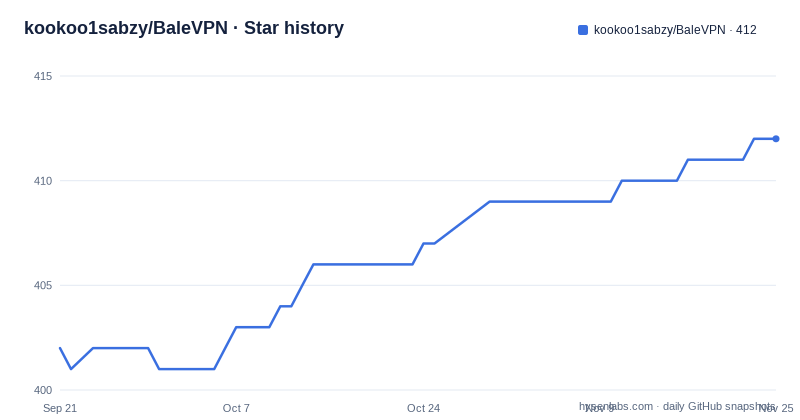
Star history
- kookoo1sabzy/BaleVPN412 ★ · +10
| Repository | 2026-09-21 | 2026-11-25 |
|---|---|---|
| kookoo1sabzy/BaleVPN | 402 | 412 |
10 Stars in the last 65 days, measured from the daily GitHub snapshot. Compare with other projects
Editorial analysis
The problem BaleVPN picks: no server, no signup, no payment
Most censorship-circumvention tools assume you can reach a machine outside the filtered network. That machine costs money, needs an IP that is not blocked, and has to be configured by someone who knows what they are doing. BaleVPN removes that machine from the picture. The relay is another person.
The arrangement is peer-to-peer in the literal sense. One device runs as the server and provides internet. The other runs as the client and consumes it. According to the README, the link is carried over the voice-call infrastructure of Bale, described there as the national Iranian messaging app, so to Bale's servers the session looks like a long voice call between two contacts.
The intended user is not a network engineer. The README opens with what it calls the simplest start: two Android phones, the APK installed on both, each signed in with a Bale account, one flipped to Server and the other to Client. There is no third-party server, no signup and no command line in that path. A laptop on the server side is also supported, which is the option for someone who has a working connection and wants to share it.
The project states plainly that it has no commercial relationship with Bale. That matters, because the whole design leans on Bale's call infrastructure continuing to behave the way it does today.
How the tunnel is assembled, from the repository layout down
The repository is split into crates and an Android app rather than one binary. The top-level entries include bale-signaling-rust, lk-signaling-rust, lktunnel-rust, bale-vpn-rust and bale-vpn-android, alongside a reverse_engineering directory and a docs folder. That layout tells you where the work sits: one crate handles Bale's own signaling, another handles LiveKit signaling, and lktunnel-rust carries the tunnel itself over the LiveKit data channel. The Android app is a separate build that links the Rust code through a JNI shim.
The data path is what the README describes. IP traffic from the client is pushed through the LiveKit data channel of a voice call between the two Bale accounts. Bale's LiveKit server acts as the SFU and TURN node, which means it forwards the media and data rather than the two peers connecting directly. The data channel is encrypted with DTLS, so passive observers on the path and ISP middleboxes see opaque bytes.
There is a second mode. Instead of routing all IP traffic, BaleVPN can expose a SOCKS5 proxy, and in that mode the client-to-server traffic rides inside a QUIC channel that adds TLS 1.3 on top of the LiveKit data channel. The topics list on the repository names quic-over-rtp, userspace-tcp and sock5, which matches that split between a full tunnel and a proxy.
The consequence of the SFU design is unavoidable: the relay is in the path, and the README does not pretend otherwise.
What Bale's SFU can see, in the project's own words
This is the part most projects bury. BaleVPN puts it near the top. Because Bale's LiveKit server is the SFU and TURN node, the README states that it has access to the plaintext of the data flowing through the call. Three specific exposures are listed.
First, Bale can see who relays for whom. Every tunnel session is a Bale voice call between two accounts, so call records reveal which account uses which relay, when, and for how long. The README calls this the social graph. Second, Bale can see which destinations you connect to: IP and port, plus the hostname carried in the TLS SNI field of any HTTPS request. Third, Bale can read the contents of any traffic that is not itself end-to-end encrypted. Browsing HTTPS sites leaves the payload opaque; plaintext HTTP, DNS or FTP through the tunnel does not.
The SOCKS5 mode deserves its own warning, and the README gives one. The QUIC layer is end-to-end encrypted between the two BaleVPN peers in principle, which would shield contents from the SFU. But there is no certificate authority. Both ends generate self-signed certificates at startup and accept whatever the peer presents. Anyone who can inject into the QUIC handshake path, including whoever operates the SFU you are routing through, can perform a transparent man-in-the-middle by handing each side its own certificate. The QUIC layer stops passive eavesdropping by other tenants on the SFU. It does not stop an active adversary at the relay.
The README's own summary is that you should treat the tunnel like a corporate VPN whose operator you do not fully trust. Fine for IP-level reachability, not adequate as an anonymity or end-to-end privacy layer. That is a fair description of what the architecture permits.
Installing BaleVPN and making a first connection
The primary path is Android. The README points to a setup guide at docs/android-en.md and a Persian equivalent at docs/android-fa.md, and describes installing the APK on both devices, signing in with your Bale account inside the app, then setting one device to Server and the other to Client. Before any of that, the two Bale accounts must have each other in their contact list.
Building from source uses the top-level Makefile. The Makefile documents two flavours of work, a local build and an Android build that cross-compiles the JNI shim via cargo-ndk:
make build
make android
The Makefile also carries a sync target for pushing the tree to a remote host. Its own comment describes it as rsyncing the repo while excluding generated artefacts the remote will regenerate on its own build:
make sync REMOTE=user@host:/pathThe flags exclude .git/, target/, node_modules/ and the Android build directories, and --delete removes files on the remote that are not local. Note the Makefile comment that macOS ships rsync 2.6.9, which does not know the --info=progress2 flag, so the target sticks to -v. The Makefile also accepts an optional SSH_KEY variable, which it threads into rsync's ssh command.
If you cannot receive SMS on an Iranian number, the README documents a workaround. Register a virtual number that can receive SMS, register Telegram on that number first and set a username, then register Bale on the same number. Bale detects a non-Iranian number, does not send SMS, and delivers the verification code as a Telegram message. The README warns that free throwaway SMS sites are blocked by both Telegram and Bale, and that losing the virtual number means losing the Bale account.
Where BaleVPN is the wrong tool
The obvious failure mode is the one the README states outright: this is not an anonymity layer. If your threat model includes an adversary who can compel or subvert Bale, the relay sees your destination IPs and ports and the SNI of your HTTPS requests. It also sees the plaintext of anything you send that is not already encrypted at the application layer. If you need to hide who you are talking to, this design cannot do it, because the session is a call between two identifiable accounts.
The second limitation is structural. The tunnel depends on Bale's voice-call infrastructure and on Bale's LiveKit deployment. The README does not document a fallback transport, and the repository has no alternative signaling path in its top-level layout beyond the Bale and LiveKit crates. If Bale changes how calls are established, or starts treating long-lived calls between two accounts as suspicious, the project has to be updated before it works again. The last push was on 2026-06-12, so the code is recent, but the dependency on someone else's service is not something the project controls.
Third, the two accounts must already be contacts. That is a real constraint for someone whose Bale account is new or whose contact list is empty. The README presents it as a precondition, not something the tool arranges for you.
Finally, the SOCKS5 mode is easy to misread as the private option. It is not, for the certificate reason above. Choosing it for privacy rather than for routing flexibility would be a mistake.
How BaleVPN differs from WireGuard and Tor
The closest comparison is a conventional VPN such as WireGuard. WireGuard gives you a cryptographic tunnel between two endpoints you control, with a fixed public key per peer and no third party in the data path. BaleVPN gives you a tunnel whose middle is a third party's media server. WireGuard needs a reachable endpoint and therefore a server; BaleVPN needs two Bale accounts and a working call. The trade is availability against trust. If you can rent a small VPS outside the filtered network, WireGuard is the stronger choice on every privacy axis. BaleVPN exists for the case where you cannot.
Tor differs in a more fundamental way. Tor routes through a volunteer network and is designed so that no single node knows both who you are and where you are going. BaleVPN's relay knows both, by design, and the operator of the SFU is the same party that runs the messaging service you are using. Tor is also slow and blocked by many networks; BaleVPN's whole premise is that the traffic looks like a voice call, which is a different kind of blending.
Against other censorship-circumvention tools that tunnel over a single service, the distinguishing feature here is the peer-to-peer relay model. There is no shared bridge pool to enumerate and block. The cost is that the relay is a person you know, and their connection is the bottleneck.
Licence, maintenance and what upgrading costs you
BaleVPN is MIT licensed. That is permissive: you can use, modify and redistribute it, including in closed products, provided the copyright notice and permission notice are preserved. It does not grant any rights to Bale's service, and the README is explicit that there is no commercial relationship with Bale. Nothing in the licence changes the fact that using the tool means agreeing to whatever terms Bale applies to its accounts.
The repository is not archived. The last push was on 2026-06-12, and the most recent release is v2.1.2 on the same date, following v2.1.1 on 2026-05-29 and v2.1.0 on 2026-05-27. Three releases in roughly two weeks suggests a period of active work, but the repository facts alone do not tell you what happens after June.
Upgrade cost is concentrated in the Android app and the Rust crates. The Makefile's sync target preserves mtimes with rsync -t specifically so cargo's fingerprinting can skip rebuilds when source has not changed, which tells you the maintainers expect repeated remote builds. In practice, upgrading means rebuilding the APK on both devices, since the client and server sides are the same codebase with a role switch. There is no documented in-app update mechanism in the README, and no migration notes for the v2.1.x line. If you are running a version from before those releases, the README does not document rollback.
Editorial conclusion
BaleVPN fits one narrow situation: two people who already have Bale accounts and each other in their contact lists, where one has working internet and the other does not, and neither can rent a server. It is not an anonymity tool, and the README says so in its own privacy section. Before trusting it, read the SOCKS5 certificate warning, confirm the Android APK is the build you expect, and check whether the virtual number behind your Bale account is one you can keep paying for.
Frequently asked questions
Is the BaleVPN tunnel safe?
The README states that the LiveKit data channel is DTLS encrypted, so passive observers and ISP middleboxes see opaque traffic, but Bale's LiveKit server acts as the SFU and TURN node and has access to the plaintext of the data. It also warns that the SOCKS5 QUIC mode has no certificate authority, so an active adversary at the relay can perform a man-in-the-middle. The project's own guidance is to treat it like a corporate VPN whose operator you do not fully trust.
What is a P2P VPN and how does BaleVPN work?
In BaleVPN, one device runs as the server and provides internet while the other runs as the client and consumes it, with no third-party server involved. The traffic is carried over Bale's voice-call infrastructure so that, to Bale's servers, the session looks like a long voice call between two contacts.
What do I need before BaleVPN will connect?
The README requires a Bale account on each device and states that the two accounts must have each other in their contact list. On Android, you install the APK on both phones, sign in inside the app, and set one device to Server and the other to Client.
Can I use BaleVPN without an Iranian phone number?
The README says Bale accepts non-Iranian numbers and delivers the verification code through Telegram instead of SMS for them. The documented steps are to get a virtual number that can receive SMS, register Telegram on it first and set a username, then register Bale on the same number so the code arrives as a Telegram message.
Does BaleVPN hide which sites I visit?
No. The README states that Bale can see which destinations you connect to, including IP and port plus the hostname in the TLS SNI of HTTPS requests, and can read the contents of any traffic that is not itself end-to-end encrypted. It recommends relying on application-level TLS rather than the tunnel for confidentiality.
Official sources
Add this badge to your README
If you maintain this project, the badge below links readers to this analysis and shows its maintenance status from the daily GitHub snapshot. Paste the markdown into your README; add ?metric=license or ?metric=stars to the image URL for a different field.

[](https://hysenlabs.com/projects/kookoo1sabzy-balevpn)Star history chart for your README
[](https://hysenlabs.com/projects/kookoo1sabzy-balevpn)Was this useful?